
Nudge Marketing Playbook (Checklist, Tools and Examples)
Many e-commerce stores fight for customers’ attention, but turning browsers into purchases is still a constant problem.
Store owners know this problem all too well: carts are filled with interest but often abandoned before purchase.
The desire? To convert casual browsing into confirmed sales.
Enter nudge marketing, the art of converting interest into action.
This isn’t just persuasion—it’s about crafting a shopping experience that gently guides customers toward making a purchase.
Nudge marketing uses subliminal signals, such as time-limited promotions and social proof, to nudge customers into taking action while improving their sense of self-assurance and knowledge.
This guide will break down nudge marketing, providing you with actionable tactics that deliver results.
We’ll explore the psychology of shopping, the nuances of customer engagement, and the tangible steps to increase your conversion rates.
Get ready to leverage nudges to improve conversions on your e-commerce site.
Build trust & FOMO
Highlight real-time activities like reviews, sales & sign-ups.


The Concept of Nudge Marketing
Nudge marketing is about gently pushing customers toward making a purchase, using subtle cues and psychological insights.
It turns the digital browsing experience into a pathway towards action.
Like candy at checkout, these digital nudges (think limited-time deals or showcasing popular items) tap into our innate decision-making processes.
This tactic uses the psychological foundations of human behavior to persuade customers to make a purchase.
It’s about understanding how and why we decide and creating an online environment that guides these decisions toward buying.
Setting the Stage for Nudge Marketing:
The first step in effective nudge marketing is getting to know your audience inside and out.
What motivates their purchases?
Are they impulse buyers or careful planners?
This knowledge forms the basis of your strategy.
Next, define clear objectives.
Your goals should guide your nudge marketing tactics, whether increasing sales, growing an email list, or improving customer loyalty.
For instance, streamline the checkout for efficiency-lovers or offer flash sales for bargain hunters.
By preparing carefully, you lay the groundwork for nudges that resonate deeply with your target audience.
This not only makes your strategy more effective but ensures that your efforts lead to tangible outcomes.
Types of Nudges in E-commerce
Here’s a comprehensive list of particularly effective nudges for an e-commerce store looking to optimize conversion rates through nudge marketing.
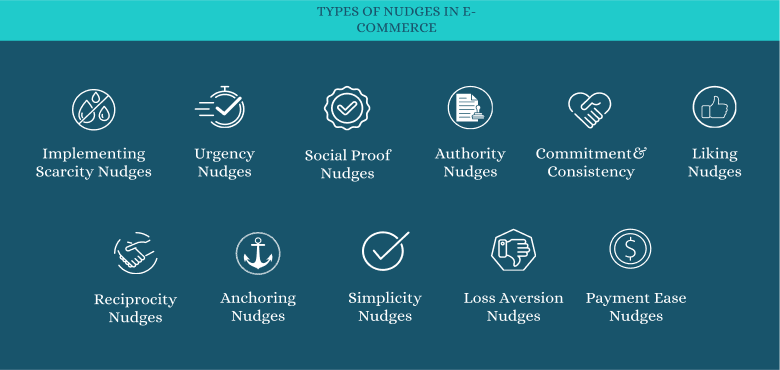
Each type includes a brief description and suggestion on how it can be used:
1. Implementing Scarcity Nudges:
Scarcity nudges can effectively increase product desirability by creating a sense of urgency due to limited availability.
Steps to Implement:
- Identify High-Demand Products: Select products that frequently sell out or are in high demand.
- Display Stock Levels: Clearly show stock counts on the product pages to signal limited availability.
- Update in Real-Time: Ensure that stock levels are updated in real-time to maintain accuracy.
Examples:
- “Hurry! Only 5 left in stock!”
- “Limited availability: Only 3 pieces remaining!”
2. Urgency Nudges:
Urgency nudges prompt shoppers to make immediate decisions through time-sensitive incentives.
Steps to Implement:
- Set Time-Limited Offers: Create offers that expire within a few hours or days.
- Use Countdown Timers: Add timers to product pages and cart checkout pages.
- Highlight Expiry Dates: Clearly communicate when offers will end.
Tools and Plugins:
- Use plugins like Wisernotify or HurryTimer to easily implement countdown timers.
3. Social Proof Nudges:
Social proof nudges leverage customer actions to influence others.
Steps to Implement:
- Showcase Reviews and Ratings: Display them prominently on product pages.
- Highlight Usage Statistics: Share how many people purchased or reviewed an item.
- Customer Testimonials: Use quotes or video testimonials for higher impact.
Best Practices:
- Ensure testimonials and reviews are genuine and verified.
4. Authority Nudges:
Authority nudges build trust and credibility through expert endorsements and certifications.
Steps to Implement:
- Partner with Influencers: Have products reviewed or featured by recognized experts.
- Display Certifications: Show any relevant industry certifications on product pages.
Action Points:
- Use badges like “As Recommended by [Expert]” or “Officially Certified.”
5. Commitment and Consistency Nudges:
Encourage repeat interactions and purchases by rewarding customer loyalty.
Steps to Implement:
- Create a Loyalty Program: Offer points or rewards for repeat purchases.
- Send Targeted Follow-Up Emails: Encourage return visits with personalized offers based on previous purchases.
Templates:
- “Thanks for your purchase! Earn double points on your next visit.”
6. Liking Nudges:
Personalize the shopping experience to create a connection with customers.
Steps to Implement:
- Personalized Recommendations: Use algorithms to suggest items based on past browsing and buying behavior.
- Engage on Social Media: Use customer data to create engaging, relevant content.
7. Reciprocity Nudges:
Encourage customers to engage in mutually beneficial behaviors.
Steps to Implement:
- Offer Free Gifts: Provide a small gift with the first purchase or upon signing up for a newsletter.
- Discounts for Reviews: Offer a future purchase discount in exchange for a product review.
Examples:
- “Leave a review and get 10% off your next order!”
8. Anchoring Nudges:
Establish reference points for pricing to make current offers more appealing.
Steps to Implement:
- Display Original and Sale Prices: Clearly show the discount from the original price to the sale price.
- Use Comparative Pricing: Position premium products next to standard ones to highlight value.
A/B Testing:
- Test different price presentations to see which leads to higher conversion rates.
9. Simplicity Nudges:
Simplify the buying process to reduce barriers and encourage conversion.
Steps to implement:
- Use form fields that auto-populate based on user data, such as automatically filling in the city and state after the user enters their zip code.
- Implement a one-page checkout where users can enter shipping, billing, and payment information all on one screen instead of navigating through multiple pages.
- Replace technical jargon with simple language. For instance, use “Use your email to sign up” instead of “Initiate user registration.”
10. Loss Aversion Nudges:
Minimize the pain of potential loss to encourage completion of purchases.
Steps to implement:
- Send an email an hour after a customer abandons their cart, offering a 5% discount if they complete their purchase within the next 24 hours.
- Display ads on social media platforms featuring the specific products the customer viewed but did not purchase, perhaps with a message like “Still thinking it over? Come back for a special 10% off!”
11. Payment Ease Nudges:
Reduce friction at checkout by offering multiple payment options.
Steps to implement:
- Offer not only Visa and MasterCard but also American Express, Discover, PayPal, Apple Pay, and Afterpay to cover a broad spectrum of customer preferences.
- Enable a “quick pay” feature that allows returning customers to use a saved payment method and shipping address with a single click.
- Localized Payment Options: Offer payment methods that are preferred in the customer’s region.
Crafting Your Nudge Marketing Plan:
To use the power of nudge marketing in e-commerce, it’s essential to create a strategic plan that carefully considers customer behavior and leverages psychological cues to drive sales.
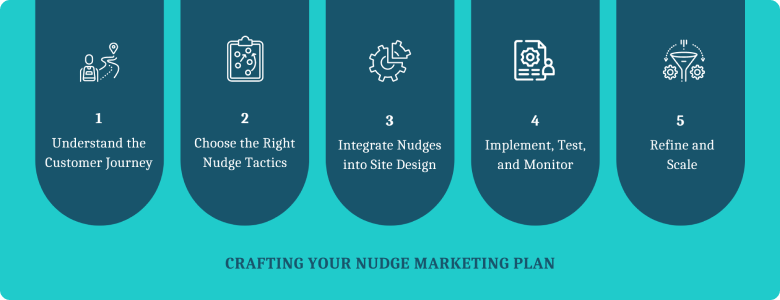
Here’s a focused guide with a checklist and brief examples to ensure each nudge is strategically placed and effective.
Step 1: Understand the Customer Journey
Map out the entire customer journey to pinpoint where nudges will be most effective.
This step is crucial for identifying the psychological triggers that occur at different stages of the shopping process.
Checklist:
Awareness Stage: Identify the first touchpoint.
- Example: Highlighting popular items on the homepage to draw in new visitors.
Consideration Stage: Recognize points where customers evaluate products.
- Example: Displaying star ratings on product lists to simplify decision-making.
Decision Stage: Determine where decisions are made.
- Example: Offering a limited-time discount at the cart page to nudge purchase completion.
Post-Purchase Stage: Consider follow-up engagement.
- Example: Sending a thank you email that includes a coupon for next purchase.
Step 2: Choose the Right Nudge Tactics
Select tactics based on their proven effectiveness in influencing behavior in your specific context.
Different nudges work better at different stages of the customer journey.
Checklist:
Scarcity: Use on product pages.
- Example: Show “Only 3 left in stock!” to create urgency.
Social Proof: Best for consideration and decision stages.
- Example: Include a widget with recent customer reviews and photos.
Authority: Important at the awareness stage.
- Example: Display badges like “As seen on” media logos.
Reciprocity: Effective post-purchase.
- Example: Offer a reward for a review submission.
Step 3: Integrate Nudges into Site Design
Ensure that nudges are integrated in a way that feels natural and enhances the shopping experience rather than disrupting it.
Checklist:
Placement: Ensure nudges are placed where they naturally fit into the user interface.
- Example: Embed scarcity indicators next to the add-to-cart button.
Timing: Time nudges appear when they are most likely to influence behavior.
- Example: Trigger a pop-up discount offer when a user spends more than 60 seconds on a high-ticket item.
Relevance: Tailor nudges to match user interests and behavior.
- Example: Show dynamic content based on the user’s browsing history.
Step 4: Implement, Test, and Monitor
Deploy your nudges and use analytics to track their effectiveness. Adjust based on data to optimize conversions.
Checklist:
Testing: A/B tests different nudge types and formats.
- Example: Test two different scarcity messages to see which drives more conversions.
Analytics: Monitor key performance indicators like click-through rates, conversion rates, and bounce rates.
- Example: Track conversion rate changes after implementing social proof nudges.
Feedback: Collect and analyze customer feedback.
- Example: Use surveys to ask if nudges felt helpful or intrusive.
Step 5: Refine and Scale
Use the insights gathered to refine your approach. Expand successful tactics across different segments and products.
Checklist:
Optimization: Refine nudge wording and timing based on A/B testing results.
- Example: If “Only 2 left!” works well, try “Last item!” for products with only one stock remaining.
Expansion: Apply successful nudges to other products or customer segments.
- Example: Extend a successful post-purchase discount nudge to all first-time buyers.
Innovation: Continuously seek new nudge opportunities.
- Example: Experiment with different forms of reciprocity, such as early access to new products for returning customers.
Build trust & FOMO
Highlight real-time activities like reviews, sales & sign-ups.

Nudge Marketing Tools: Uplift Your E-commerce Game
In this section, you could introduce different types of tools that facilitate nudge marketing tactics.
These could include:
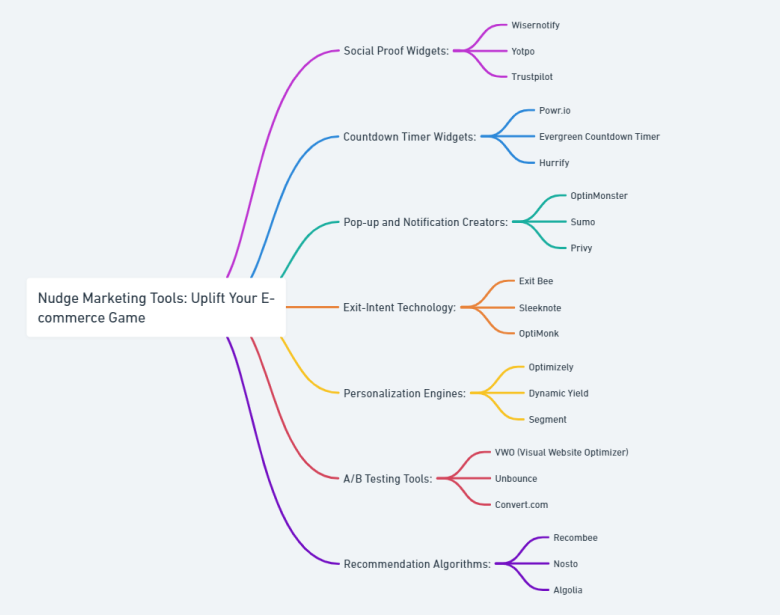
Social Proof Widgets:
- WiserNotify: Shows real-time customer activity notifications to boost confidence.
- Yotpo: Displays reviews, ratings, and user-generated content to build trust.
- Trustpilot: Integrates customer reviews and ratings on your site.
Countdown Timer Widgets:
- Powr.io: Easy-to-install countdown timers for promotions and special events.
- Evergreen Countdown Timer: Provides timers that can reset for each visitor to create a personal sense of urgency.
- Hurrify: An effective countdown timer specifically designed for Shopify stores.
Pop-up and Notification Creators:
- OptinMonster: Known for its powerful lead capture forms and exit-intent pop-ups.
- Sumo: Provides a suite of tools for list building, including pop-ups and welcome mats.
- Privy: Offers highly customizable pop-ups and banners with targeted displays.
Exit-Intent Technology:
- Exit Bee: Targets visitors with personalized messages as they’re about to leave.
- Sleeknote: Customizable exit-intent pop-ups to capture leads or reduce cart abandonment.
- OptiMonk: Offers a variety of exit-intent pop-ups and side messages to keep users engaged.
Personalization Engines:
- Optimizely: Delivers individualized content and experiments with personalization.
- Dynamic Yield: Provides AI-driven personalization across web, mobile, and email.
- Segment: Collects and routes user data to various analytics and marketing tools for personalized experiences.
A/B Testing Tools:
- VWO (Visual Website Optimizer): Offers A/B testing along with other CRO tools.
- Unbounce: Specializes in testing and improving landing page performance.
- Convert.com: Focuses on A/B testing, multivariate testing, and personalization.
Recommendation Algorithms:
- Recombee: Provides real-time product recommendations tailored to user preferences.
- Nosto: Delivers personalized shopping experiences with product recommendations.
- Algolia: Offers powerful search and discovery features with personalized content and product suggestions.

Boost Conversion Instantly
Add Social Proof & Urgency to your website
Conclusion
In the end, the most effective nudge marketing plan is one that aligns with your brand’s values and resonates with your audience.
It’s about creating meaningful interactions and presenting value in a way that feels natural and genuine.
By thoughtfully implementing these nudges into your e-commerce strategy, you’ll boost sales while building relationships.
Nudge marketing isn’t just a tactic; it’s an ongoing conversation with your customers.
As e-commerce continues to evolve, those who listen closely and adapt swiftly will transform browsers into loyal buyers.
So, take these insights, apply the tools, and watch as your e-commerce store flourishes, one gentle nudge at a time.
Also Read: Mastering FOMO Marketing: A Step-by-Step Guide in 2024

Krunal Vaghasiya is a marketing tech expert who boosts e-commerce conversion rates with automated social proof and FOMO strategies. He loves to keep posting insightful posts on online marketing software, marketing automations, and improving conversion rates.




 Capterra