
Add Review Widgets to Instapage in Just a Few Clicks

Instapage is great for building high-converting landing pages, but it doesn’t offer native tools for adding reviews. Without trust signals like testimonials, even beautifully designed pages can suffer from low conversion rates.
WiserReviews helps solve that gap. It allows marketers to automate, collect, and embed highly engaging reviews written, video, or star-based using clean, customizable widgets that seamlessly match Instapage’s design flexibility.
This guide shows how to add WiserReviews to Instapage, where to position reviews for maximum trust impact, and avoid mistakes that can reduce review effectiveness.
Why Add Reviews on Instapage?
Increase Trust on Conversion Pages: Visitors landing on Instapage campaigns need fast reassurance. Showing testimonials early in the scroll builds confidence and improves conversions.
Support A/B Testing with Review Variants: Use WiserReviews widgets as test variables in Instapage. Measure which types or placements of reviews deliver better engagement and conversion outcomes.
Enhance Mobile Landing Experiences: WiserReviews widgets are mobile-optimized, allowing you to create high-trust designs that work on all devices without affecting Instapage speed.

All your reviews in one place
Collect reviews, manage every response, and display them where they matter most.
What Makes WiserReviews’ Reviews Special?
WiserReviews was built to serve fast-loading, conversion-focused platforms like Instapage. It lets you create filtered, branded, embeddable testimonial widgets like floating badges, sliders, or inline carousels.
It supports automatic collection post-purchase or via campaign flows, plus allows filtering and tagging by product, persona, or conversion step. You can preview widgets live to ensure they fit the funnel layout perfectly.
How to Add Reviews on Instapage


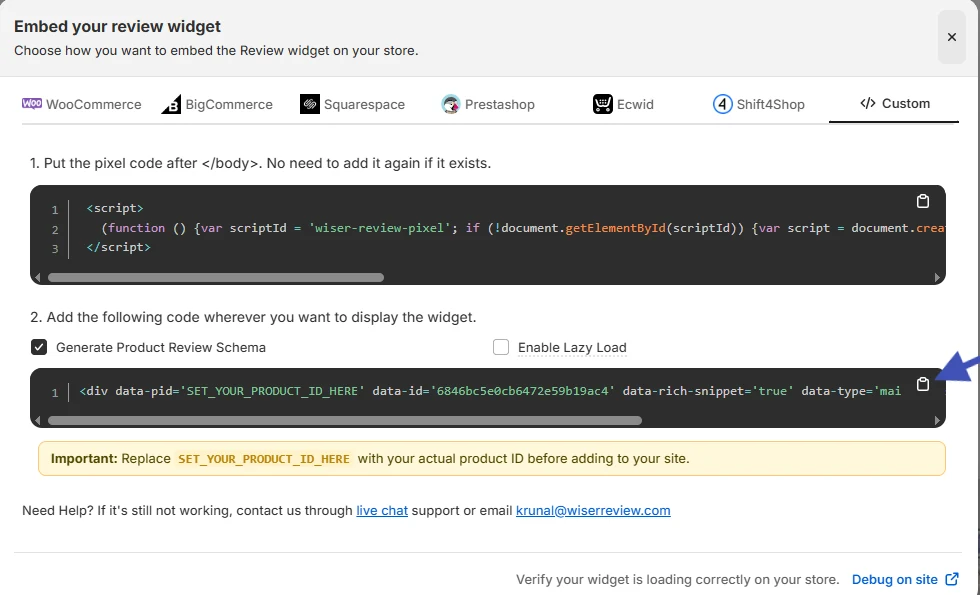


How to Embed Reviews on Instapage
1. In your Instapage editor, select the page section where reviews should appear.
2. Add an “HTML/JavaScript” element to the design.
3. Paste the embed code and resize the frame as needed.
4. Save and preview to ensure optimal display.
Related Post: How to Add Reviews to Your Website in Minutes
Best Practices for Showcasing Reviews on Instapage
Here are a few smart ways to show customer reviews that actually build trust and help boost sales.
Make sure they’re easy to see and feel real to your visitors.
1. Place Reviews Near the Conversion Button or Form
To maximize their influence, embed reviews near your CTA or form submission area.
This placement reassures users at the critical decision moment, acting as a nudge toward completing the conversion goal.
2. Test Multiple Formats Based on Funnel Type
Instapage supports various landing page goals. Use sliders on long-form sales pages, static badges on lead gen forms, and short testimonials for minimalist funnels.
Matching the review style to page layout improves engagement and reduces bounce rates.
3. Filter Reviews by Audience Intent
Tailor reviews by tagging them in WiserReviews.
Use specific tags for different campaigns like “eBook downloads” or “demo requests” and only show reviews relevant to the user’s intent.
This keeps your social proof tightly aligned with the offer.
Different Types of Review Examples


All your reviews in one place
Collect reviews, manage every response, and display them where they matter most.
Common Mistakes to Avoid When Adding Reviews to Instapage
Here are some common mistakes people make when adding reviews to Instapage.
Fixing these can help you build more trust and keep visitors interested.
1. Hiding Reviews at the Bottom of the Page
Placing reviews too far down the page can cause them to be overlooked. Ensure at least one testimonial is visible within the first scroll or near the CTA to immediately build trust with new visitors.
2. Not Syncing Widget Style with Page Design
Widgets that look out of place can hurt credibility. Always align font size, color, and spacing with your Instapage design using WiserReviews’ customization tools to ensure a consistent, on-brand presentation.
3. Using the Same Testimonials Across Every Campaign
Different campaigns speak to different audiences. Reusing generic reviews across all pages can feel impersonal. Instead, segment your testimonials and display only those that match each funnel’s messaging or target audience.
Types of Reviews You Can Add on Instapage
How to Add Google Reviews to Instapage
How to Add Testimonials to Instapage
How to Add Facebook Reviews to Instapage
How to Add Capterra Reviews to Instapage
How to Add Amazon Reviews to Instapage
Wrap-Up
WiserReviews allows you to bring powerful trust signals into any Instapage campaign.
From design flexibility to automation and performance, it’s built to make your review strategy conversion-ready.
Want more clicks and form submissions? Use WiserReviews with Instapage and let social proof move your visitors to act.
Frequently Asked Questions
Can I add customer reviews directly to an Instapage landing page?
Yes, you can manually add reviews using text boxes or embed codes. You can also use tools Wiserreview or review widgets to display them dynamically.
What’s the best section to place reviews on an Instapage layout?
Place reviews near CTAs, pricing tables, or sign-up forms. These spots help increase trust and boost conversions.
Can I show live reviews or updates automatically on Instapage?
Yes, if you’re using a review tool like Wiserreview or Trustpilot, you can embed dynamic review feeds that auto-update based on new feedback.
Does adding reviews slow down my Instapage page?
If you use lightweight embed codes or optimized widgets, it won’t noticeably affect your page speed. Avoid heavy scripts or too many widgets.
How do I customize the design of reviews to match my Instapage brand style?
You can use custom HTML blocks or styling options within the embed settings to change fonts, colors, and layout to match your brand look.

Krunal Vaghasiya is a marketing tech expert who boosts e-commerce conversion rates with automated social proof and FOMO strategies. He loves to keep posting insightful posts on online marketing software, marketing automations, and improving conversion rates.




 Capterra