
How to Add Reviews to a Wix Website (2026)

Wix doesn’t come with product reviews or star ratings built in. The quickest way to add them is the WiserReview app from the Wix App Market.
It has a free plan, and it puts a review section and star ratings on your Wix Stores product pages.
If your Wix site isn’t a store, a coaching site or a service business for instance, the same reviews go on any page through an Embed HTML element.
Here’s the setup for both, where to place the reviews, and what to check when they don’t show.
Wix Stores or a Regular Wix Site?

The route depends on where the reviews need to appear.
- Wix Stores: install the app, and the review section and star ratings appear on product pages on their own. The free plan covers up to 50 orders a month with photo reviews, and paid plans start at $7 a month.
- Any other Wix page: a homepage, a service page, a landing page. Style a widget in WiserReview, copy its code, and paste it into an Embed HTML element. This works on every Wix plan.
Most stores end up using both: the section on product pages, and a carousel on the homepage. Plan prices were checked on the Wix App Market on 13 October 2026.
How to Add Reviews to Wix
Steps 1 to 4 install the app and set up the review section. Steps 5 to 8 place a widget on any other page.
Step 1: Add the App From the App Market
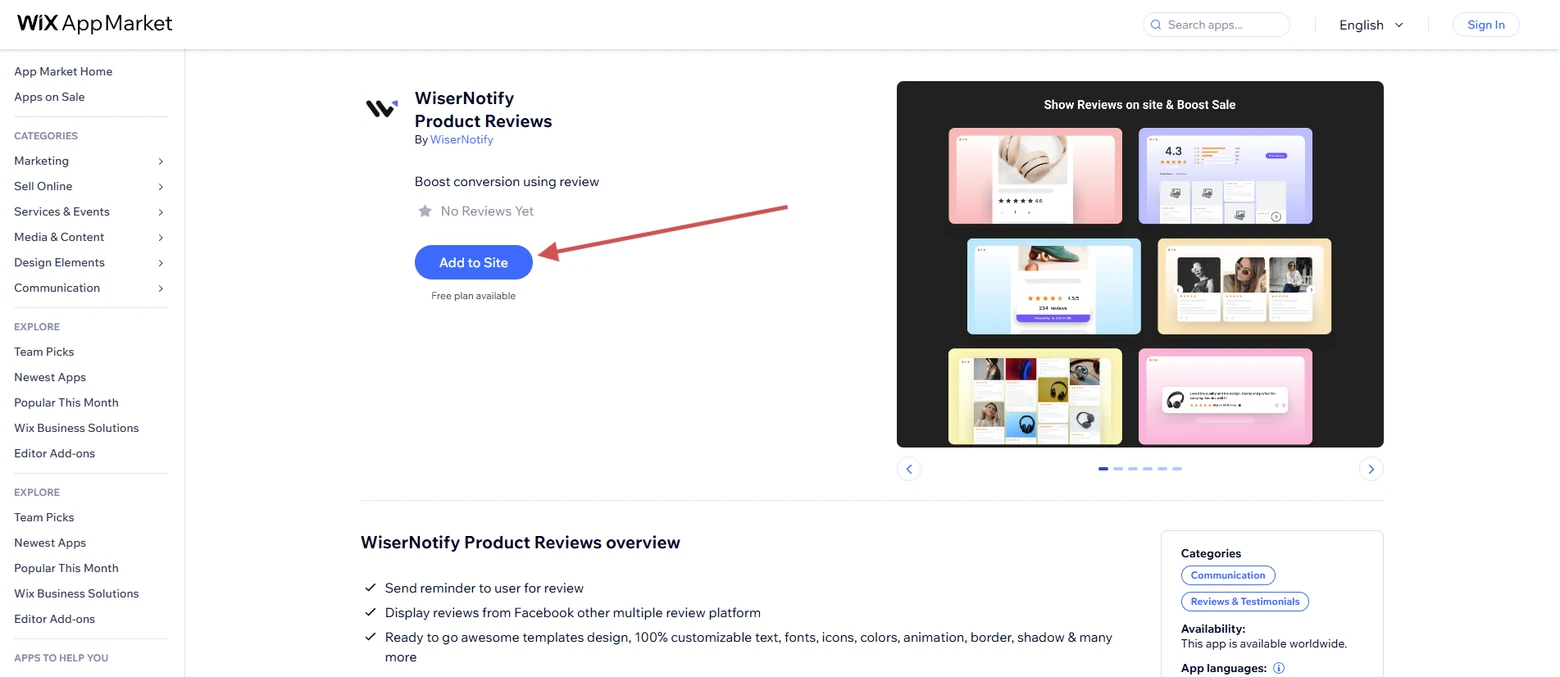
- Open the Wix App Market from your Wix dashboard.
- Search for WiserReview.
- Click Add to Site on the listing.
Step 2: Agree to the Permissions
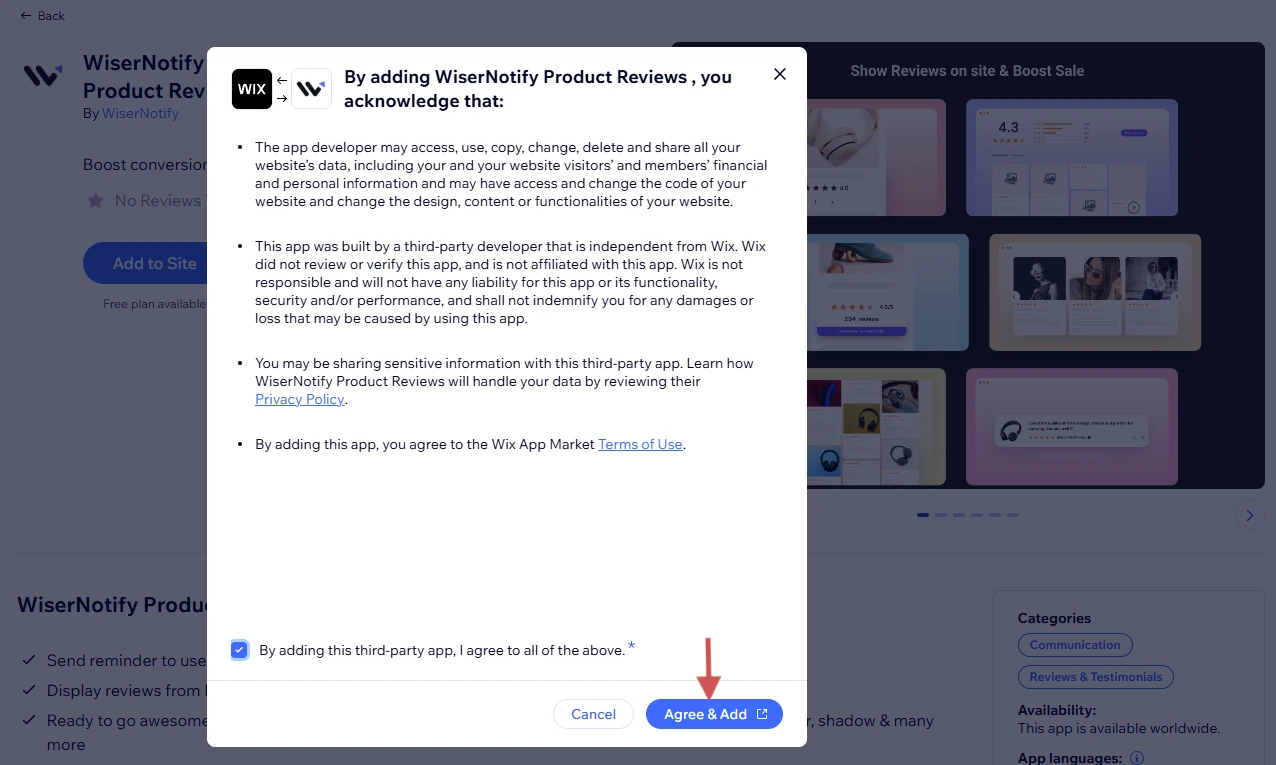
- Check the permissions the app asks for.
- Tick the agreement box.
- Click Agree & Add. Wix installs the app and opens WiserReview.
Step 3: Add Your First Reviews
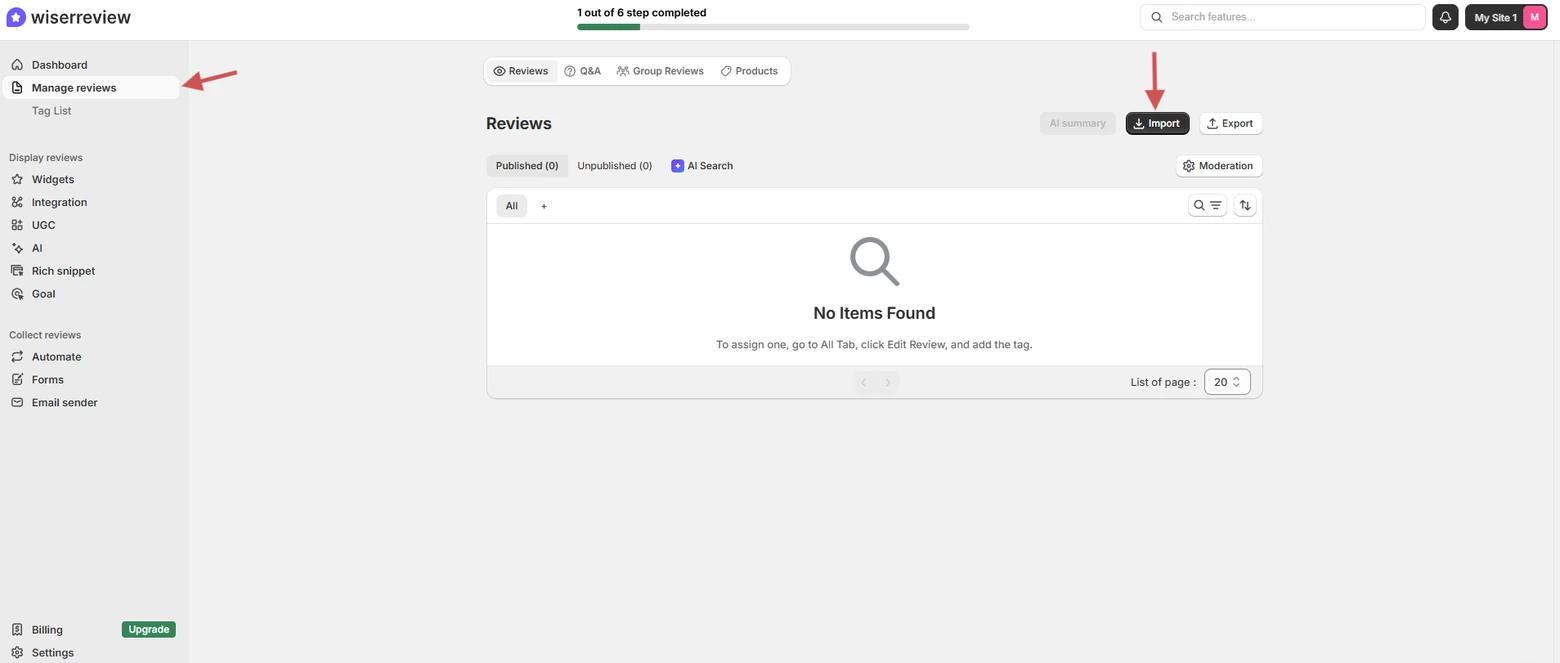
- In WiserReview, open Manage Reviews.
- Click Import if you have reviews in a CSV or on another platform, and follow the prompts.
- Skip this step if you’re starting from zero. The campaign in the next section brings reviews in.
Step 4: Style the Product Review Section
- Go to Widgets and open Product Review Section.
- Set the colors, star icon, and layout to match your theme.
- Save. On Wix Stores, the section and the star rating now show on product pages.
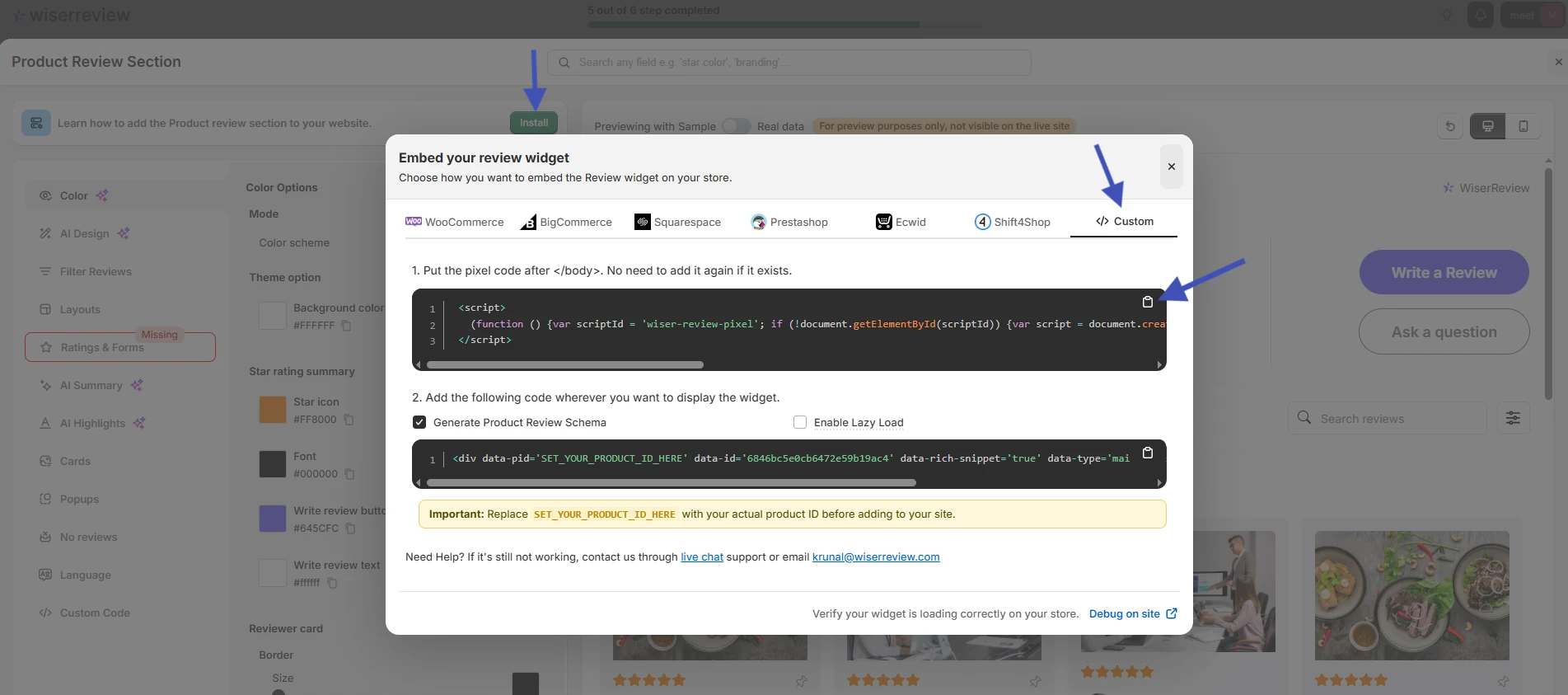
- To put this or any other widget on a non-store page, click Install and continue with step 5.
Step 5: Copy the Widget Code
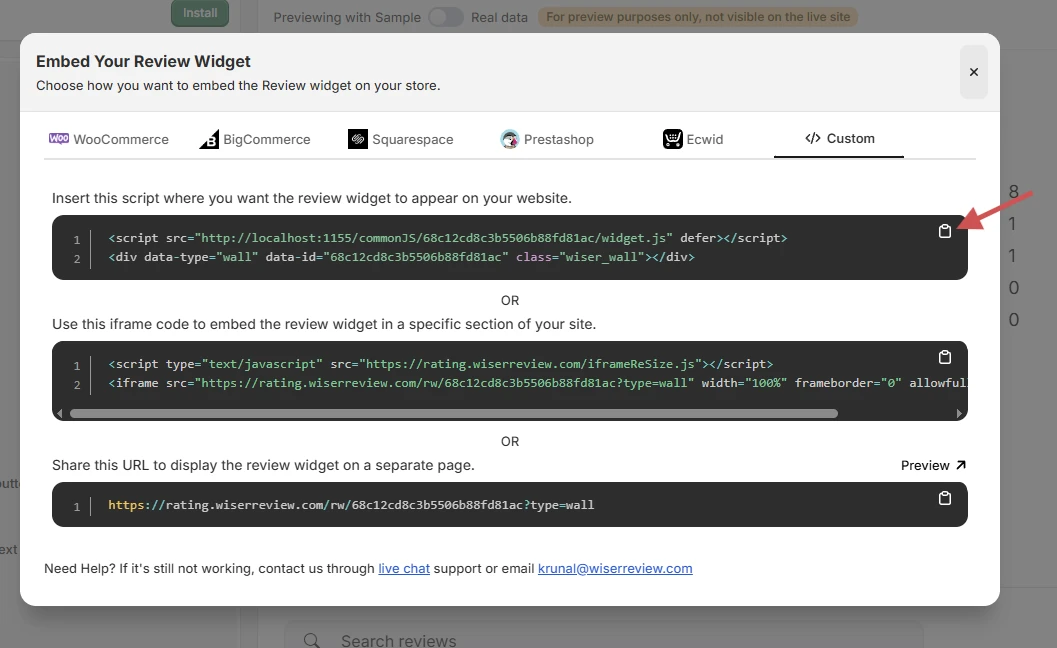
- In the embed window, switch to the Custom tab.
- Click the copy icon beside the code box.
Step 6: Open Your Site in the Wix Editor
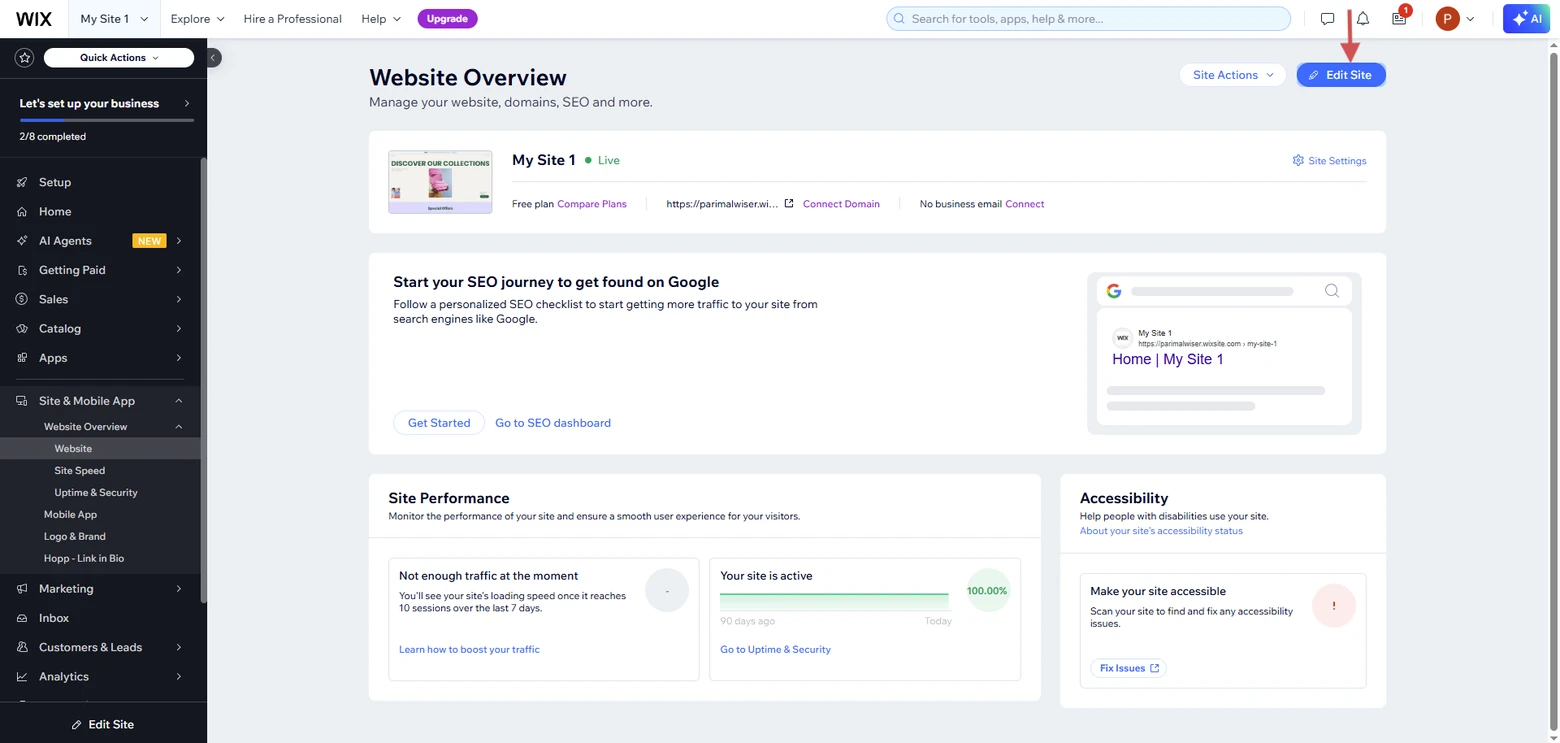
- Go to Website Overview in your Wix dashboard.
- Click Edit Site.
- Open the page that should show the reviews.
Step 7: Add an Embed HTML Element
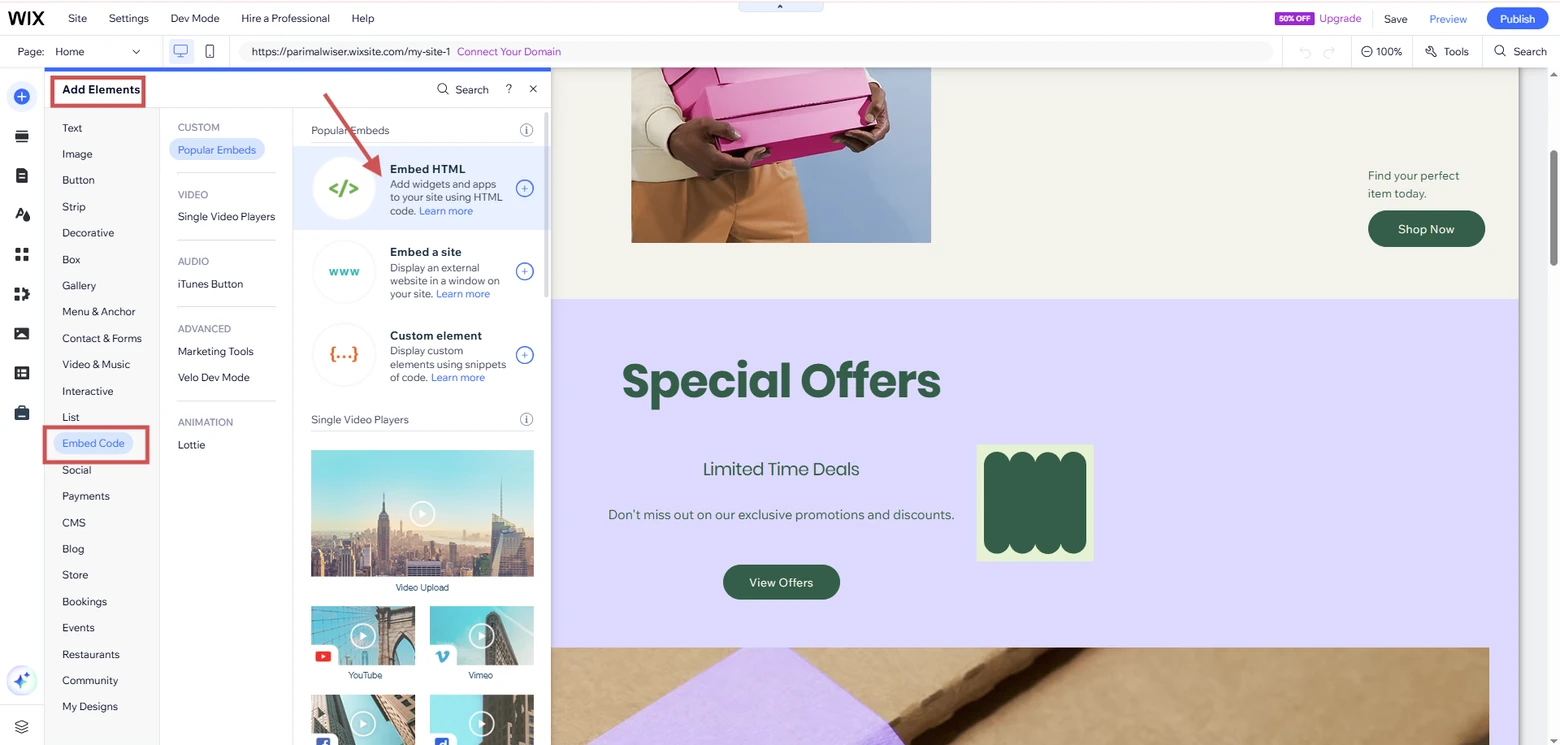
- Click Add Elements in the left bar.
- Pick Embed Code, then select Embed HTML.
- Drop the element where the reviews should sit.
Step 8: Paste the Code and Publish
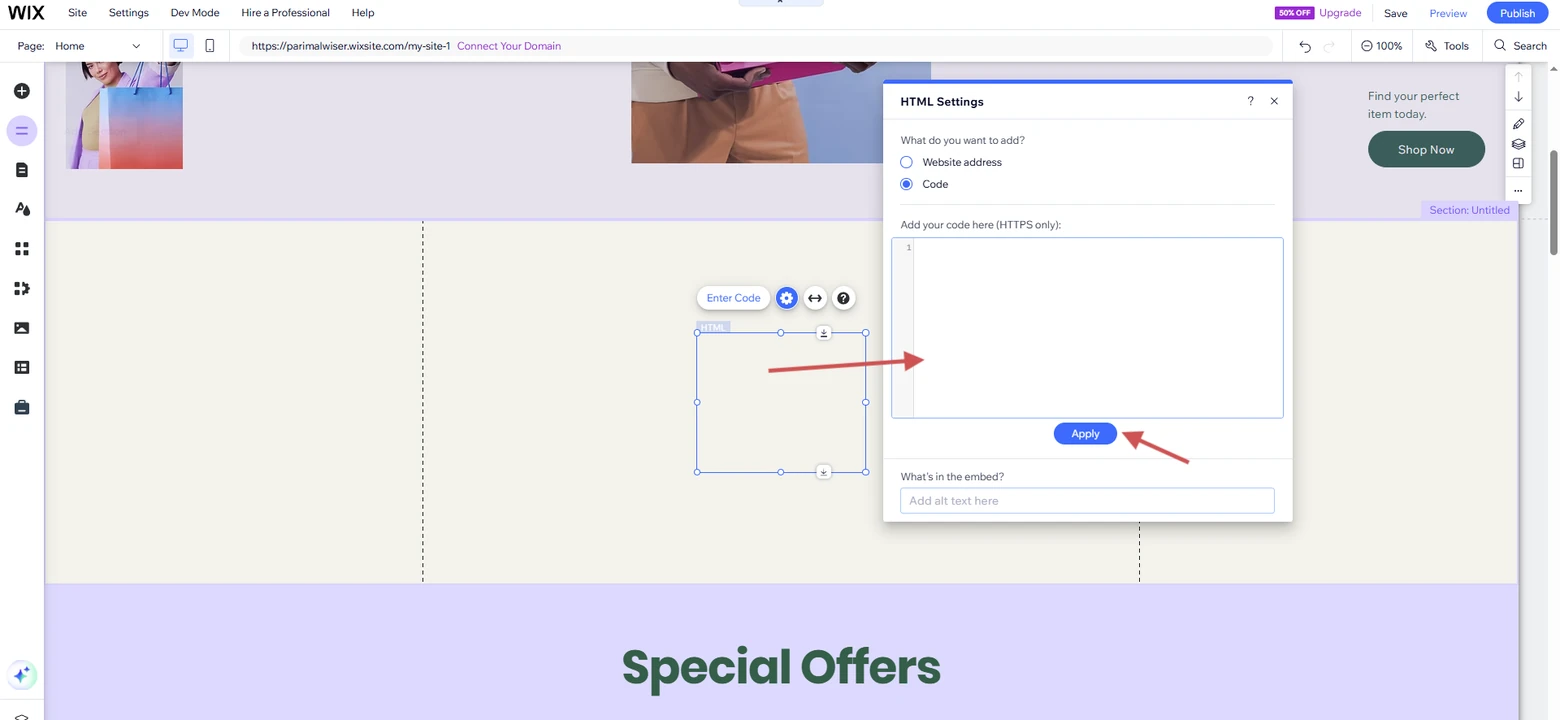
- In HTML Settings, leave Code selected.
- Paste the widget code into the box and click Apply.
- Drag the corners of the element until the whole widget is visible.
- Click Publish and open the live page to check.

Reviews on your Wix product pages
Install the app from the Wix App Market and show a review section and star ratings on every product.
Add Star Ratings Under Product Titles
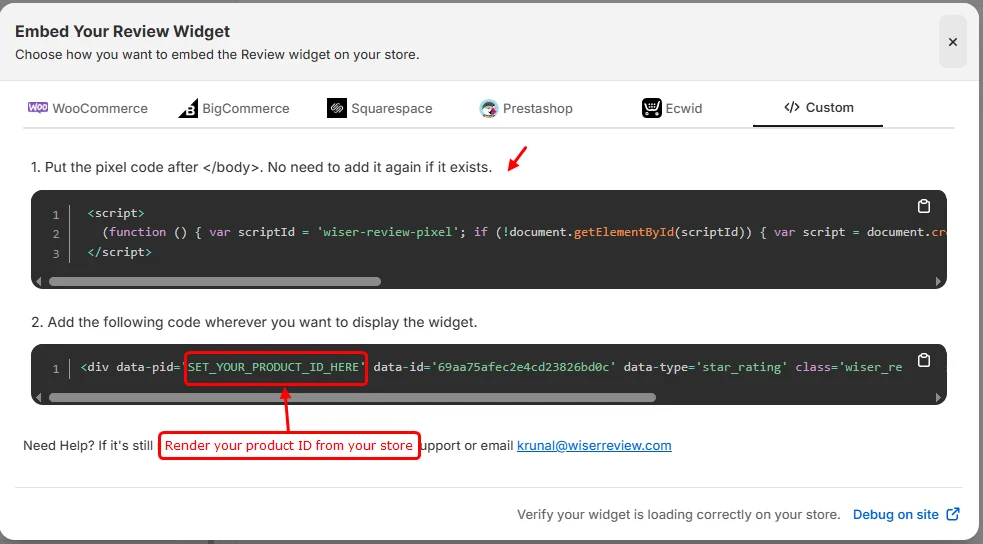
On Wix Stores the star rating comes with the app. On a page you build yourself, a product page in a custom layout for instance, the Star rating widget goes in the same way as any other.
- In Widgets, open Star rating and click Install.
- On the Custom tab, copy the widget code.
- Replace the product ID placeholder with the product’s ID so the right rating loads.
- Paste it into an Embed HTML element right under the product title, then publish.
A rating under the title answers “is this any good?” before the shopper reaches the price, which is where most drop-offs happen.
Collect New Reviews Automatically

Imported reviews get a page started. New ones keep it current, and a campaign asks for them without anyone remembering to.
- In WiserReview, go to Collect reviews, then Automate.
- Click Create automation.
- Set the first request a few days after the order is fulfilled, and a reminder a week later.
- Turn the automation on.
Each Wix order then triggers the request, and the reviews land in Manage Reviews for you to publish.
Turn Wix orders into reviews
Send review requests after every order and show the results on your store.
Where to Show Reviews on Wix

- Product pages: the full section below the details, with the star rating under the title.
- Homepage: a carousel of short quotes under the first screen, before visitors scroll to your products or services.
- Service pages: two or three reviews about that service, close to the booking button.
- Landing pages: one strong quote under the headline, where it supports the offer.
- Mobile view: switch the editor to mobile and check that review cards stack without overlapping.
For more layouts on other page types, see how to show reviews on your website.
Reviews Not Showing on Wix?
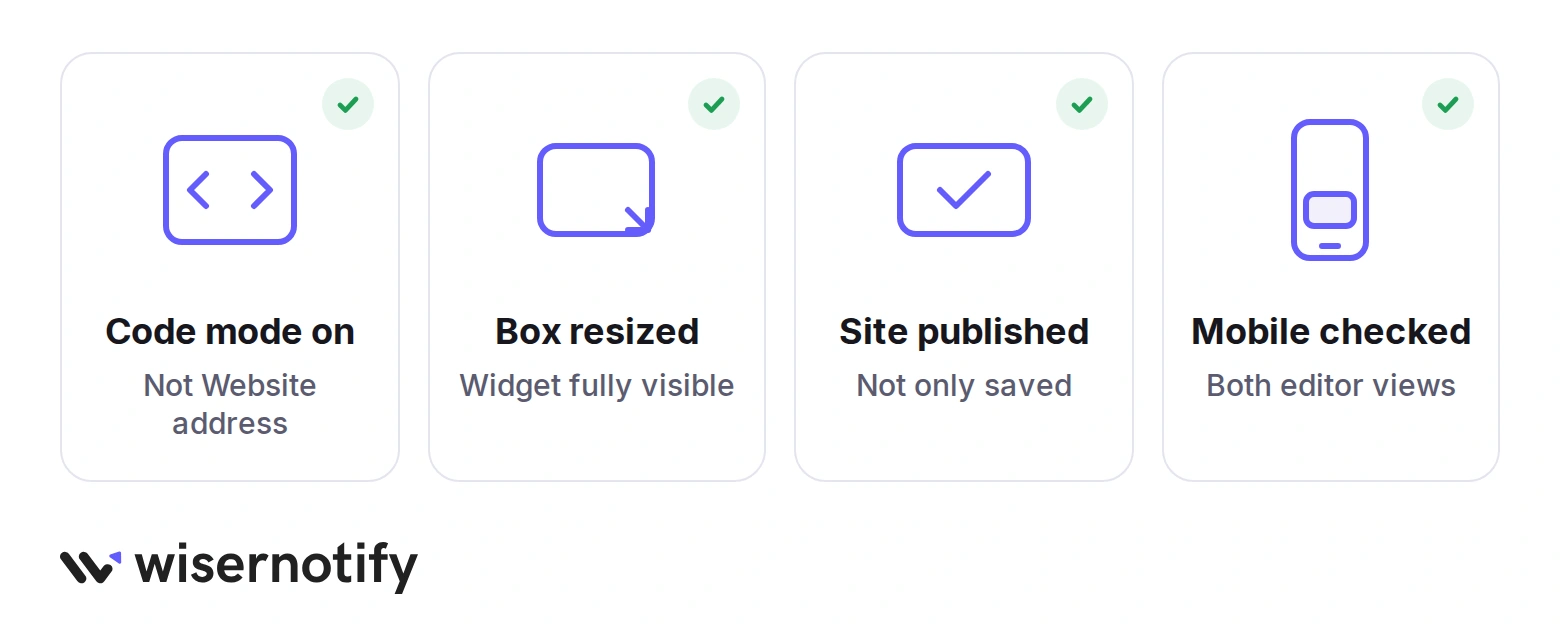
Four things cause most missing widgets on Wix.
- Code mode: in HTML Settings, the Website address option can’t run the widget. Switch to Code and paste again.
- Box size: an Embed HTML element only shows what fits inside it. Drag it larger until the whole widget appears.
- Not published: saving the editor doesn’t update the live site. Click Publish, then check in a private window.
- Mobile view: Wix sizes elements separately for mobile. Open the mobile editor and resize the box there too.
If the product review section is missing on a Wix Stores page, open the app from your dashboard and check that the widget is switched on.
Common Mistakes With Reviews on Wix
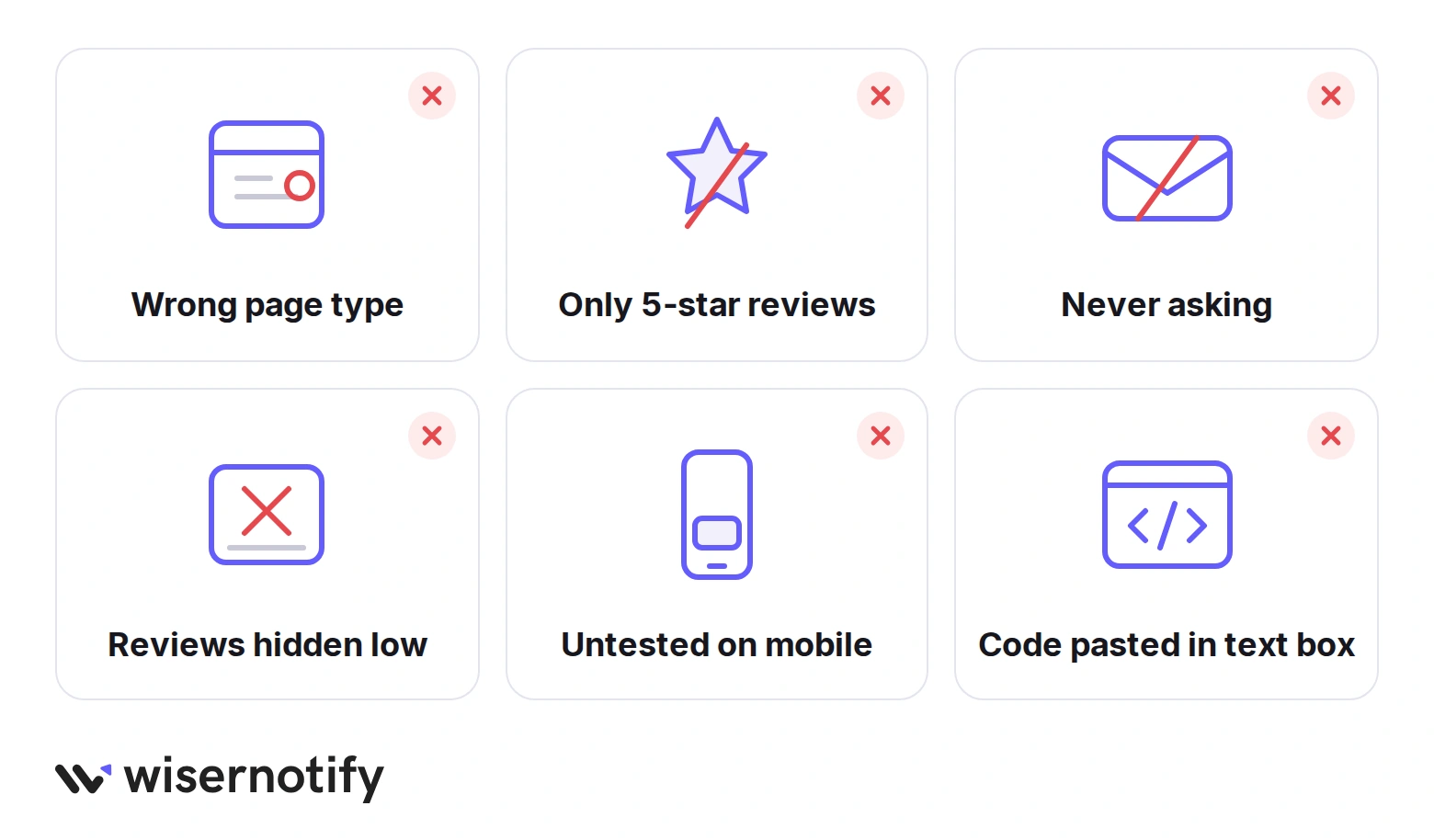
- Using the wrong route: pasting an embed on a Wix Stores product page when the app already shows the section there gives you two review blocks.
- Showing only 5-star reviews: a page of perfect scores reads as filtered. A few fair 4-star reviews make the rest believable.
- Never asking: a store without a campaign collects a review now and then. The automation above turns that into a steady flow.
- Burying the widget: reviews placed at the bottom of a long page are seen by few. Put at least one near the decision point.
- Skipping the mobile check: a carousel that looks right on desktop can overflow on a phone. Check both editor views.
- Pasting into a text box: the widget code only runs inside an Embed HTML element, not a text element.
All your reviews in one place
Collect reviews, manage every response, and display them where they matter most.
Wrap Up
Reviews on Wix come down to one app install for product pages and one Embed HTML element for everything else.
Set up the product review section first, turn on the review campaign, and add a homepage carousel once a few reviews have come in.
Related Post:
Frequently Asked Questions
Can I add reviews to Wix for free?
Yes. The WiserReview app on the Wix App Market has a free plan that covers up to 50 orders a month with a review section, star ratings, and review requests.
Does the review app need Wix Stores?
The app requires Wix Stores to place reviews on product pages. On any other Wix site, paste the widget code into an Embed HTML element instead.
Can I show reviews on a Wix page that isn't a product page?
Yes. Style a widget in WiserReview, copy its code from the Custom tab, and paste it into an Embed HTML element on the page.
Will reviews on Wix show as stars in Google?
Reviews collected through WiserReview can carry review schema, so Google may show stars for product pages once it has indexed them.
How do I collect reviews on Wix automatically?
Set up an automation under Collect reviews that sends a request a few days after each order, with one reminder a week later.

Krunal Vaghasiya is a marketing tech expert who boosts e-commerce conversion rates with automated social proof and FOMO strategies. He loves to keep posting insightful posts on online marketing software, marketing automations, and improving conversion rates.




 Capterra