Table of Contents

Get Summary On :

Reviews on Prestashop

How to Add Google Reviews to PrestaShop in 5 Minutes

PrestaShop stores need customer reviews to build trust and increase sales. Shoppers trust real feedback before they place an order.

PrestaShop does not offer robust built-in tools for collecting and displaying reviews. WiserReviews helps store owners easily collect, manage, and display customer reviews.

This guide shows how to add reviews on PrestaShop and place them where they drive action.

How to Add Reviews on PrestaShop

Adding WiserReview widgets to your website or online store is quick and easy, and no coding is needed!

First, sign up for a WiserReview account.

Then follow the steps below to show beautiful, high-converting reviews.

Step 1: Choose and Customize a Widget

Before adding a review widget to your website, make sure:

You’ve collected at least 2-3 reviews inside your WiserReview account (or manually added one).

Now go to the Widgets tab in your WiserReview dashboard and click Manage on the widget you want to use.

  • Choose the layout (Carousel, Popup, Review Wall, etc.)
  • Filter reviews by tags, ratings, or products
  • Customize colors, fonts, and display options

Step 2: Copy the Embed Code

Once you’re happy with how the widget looks, click the Install or Embed option.

You’ll get a short HTML code snippet (or JavaScript code)

Copy the whole code provided

Step 3: Paste the Code into Your Website

Head to your specific platform’s editor and choose where to place the reviews.

Use an HTML block, a custom code section, or an embed element.

Paste the code you copied from WiserReview.

Save and publish your page.

That’s It! Your Reviews Are Now Live

Once you publish your page, your WiserReview widget will appear automatically and stay updated as new reviews come in.

Widgets are fully responsive and load fast on any device.

Once you’ve added the widget, you can do a lot more inside WiserReview to grow and manage your reviews:

Collect More Reviews (Automatically)

  • Send review requests via email or WhatsApp.
  • Trigger review flows using Shopify, Webhooks, or manual upload.
  • Customize timing and branding to match your tone.

Manage & Organize Reviews

  • Approve, reject, or edit reviews before they go live.
  • Tag reviews by product, category, or topic.
  • Filter by rating, keywords, or date

How to Embed Reviews on PrestaShop

1. In your PrestaShop admin panel, go to the module or template you wish to edit.

2. Use a Custom HTML block or edit the theme template file where you want the reviews displayed.

3. Paste the WiserReviews code and save.

4. Refresh your site to preview the embedded review widget.

Related Post: How to Add Reviews to Your Website in Minutes

Different Types of Review Examples

WiserReview gives you several ways to show reviews on your website.

Each style is designed for a different part of your site, whether it’s your homepage, product page, or landing page.

Here’s a look at all the different display types you can use:

Avatar & Floating Popup

These two options help you show quick and eye-catching reviews that build trust as visitors browse.

What you can do:

  • Show happy customer faces and ratings with the avatar strip
  • Automatically display a popup with top reviews while someone is scrolling
  • Looks good on both desktop and mobile

Good places to use:

  • Avatars in your homepage or about section
  • Floating popups on product pages, checkout, or landing pages

Carousel & Auto Slider

These are moving sliders that show several reviews one after another, perfect for saving space and keeping your page lively.

What you can do:

  • Show 2–3 reviews at a time in a sliding layout
  • Let it slide on its own (auto) or let users click to move
  • Add review text, images, and star ratings

Good places to use:

  • Testimonial sections on home or services pages
  • Landing pages or blog posts to show customer feedback

Nudges & Trust Badge

These help build confidence when visitors are close to making a decision, like adding to cart or booking.

What you can do:

  • Show quick review quotes right where people are deciding (nudges)
  • Add a small badge that shows your overall rating and total reviews.

Good places to use:

  • Near buy buttons or pricing tables
  • Beside product names or in the page header.

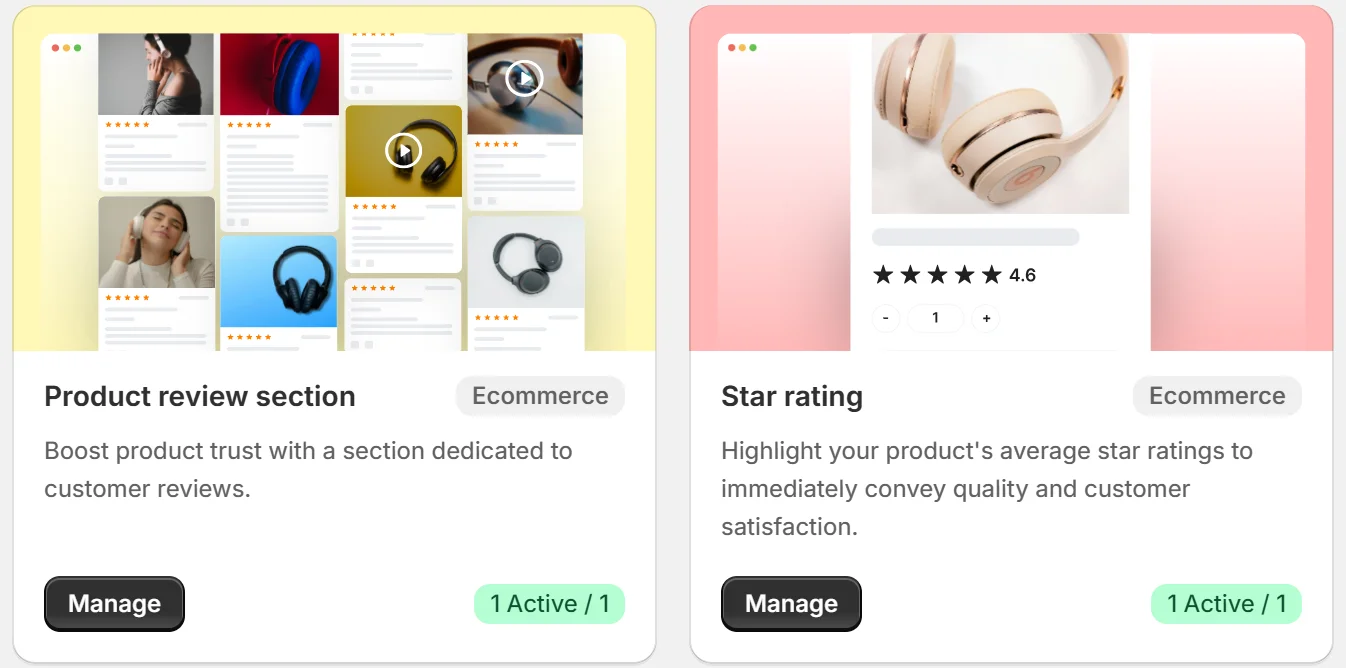
Product Review Section & Star Rating

These are great for online stores. They show detailed feedback and give shoppers a quick look at how others rated a product.

What you can do:

  • Show full customer reviews below product descriptions
  • Show just the star rating near product titles or listings
  • Works with images, videos, and verified buyers

Good places to use:

  • Under each product page
  • On category pages or product lists

Sidebar Snippet & Floating Badge

These stay visible as people scroll your site, so your reviews are always just a click away.

What you can do:

  • Add a “Reviews” tab on the side of your site that opens a panel
  • Show a floating badge with your star rating and review count

Good places to use:

  • On long pages like blogs or service details
  • On mobile or desktop to keep trust visible at all times

Wall of Love & Review Wall

What you can do:

  • Show reviews for your brand, shop, or products in a big grid layout
  • Add star ratings, images, and even filter reviews by tag
  • Make it look clean and easy to browse

Good places to use:

  • A full testimonial page
  • Below your homepage or near “why choose us” sections
Icon

All your reviews in one place

Collect reviews, manage every response, and display them where they matter most.

Types of Reviews You Can Add to PrestaShop

Wrap-Up

Customer reviews turn visitor trust into action. Strong testimonials reduce hesitation before checkout.

WiserReviews keeps reviews visible across key store pages. The setup stays simple and requires little effort.

Add WiserReviews to your PrestaShop store and let real customers drive sales.

FAQ's

No. You paste the widget code into a Custom HTML block or theme file.

No. The widget loads fast and does not affect page speed.

Yes. You can approve, hide, or filter reviews before display.

Yes. You can place reviews on product pages, category pages, and landing pages.

Yes. The widget works with any PrestaShop theme that supports HTML blocks.

Picture of Krunal Vaghasiya
Krunal Vaghasiya
Krunal Vaghasiya is a marketing tech expert who boosts e-commerce conversion rates with automated social proof and FOMO strategies. He loves to keep posting insightful posts on online marketing software, marketing automations, and improving conversion rates.
Wisernotify
Struggling with low conversions?
Use Social Proof & FOMO
Social Media icon