
How to show widget after x second
Updated Jul 22, 20261 min read
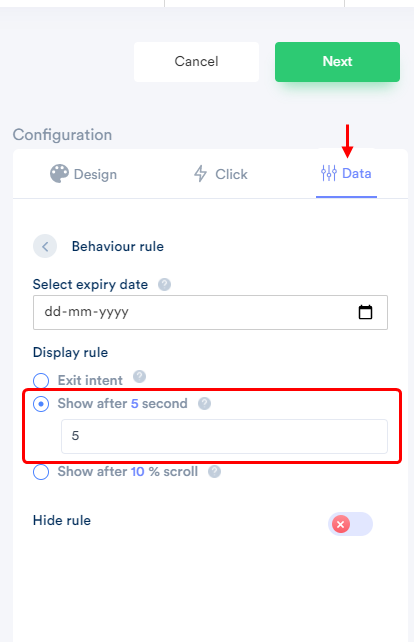
Go to notification list > edit notification > Data_tab >click on Behavioral rule.
By customizing this option, your viewers will be shown the notification of the page after x seconds. The default value is of 5 seconds. You can customize it according to your need.
Note here,
- Some notifications are meant for the site visitors. For those notifications, the timing is suggested to be kept low.
- Some notifications are meant for users who are showing interest in your platform. For them, extending this time will be a better option.
- In the display rule section, select Show after 5-second button
- Enter value(in second).
- The widget will display after x second.
* This functionality is available only for the widget category.
Related guides
Your account API Key & Quota history.Create an Account using Email id, Shopify store, Gmail id, Facebook login.Adding a payment method.
 Still stuck? We'll set it up with youLive chat or a free screen-share call, every day of the year.Chat with support



 Capterra