
9 Popupsmart Alternatives Compared by Price (2026)

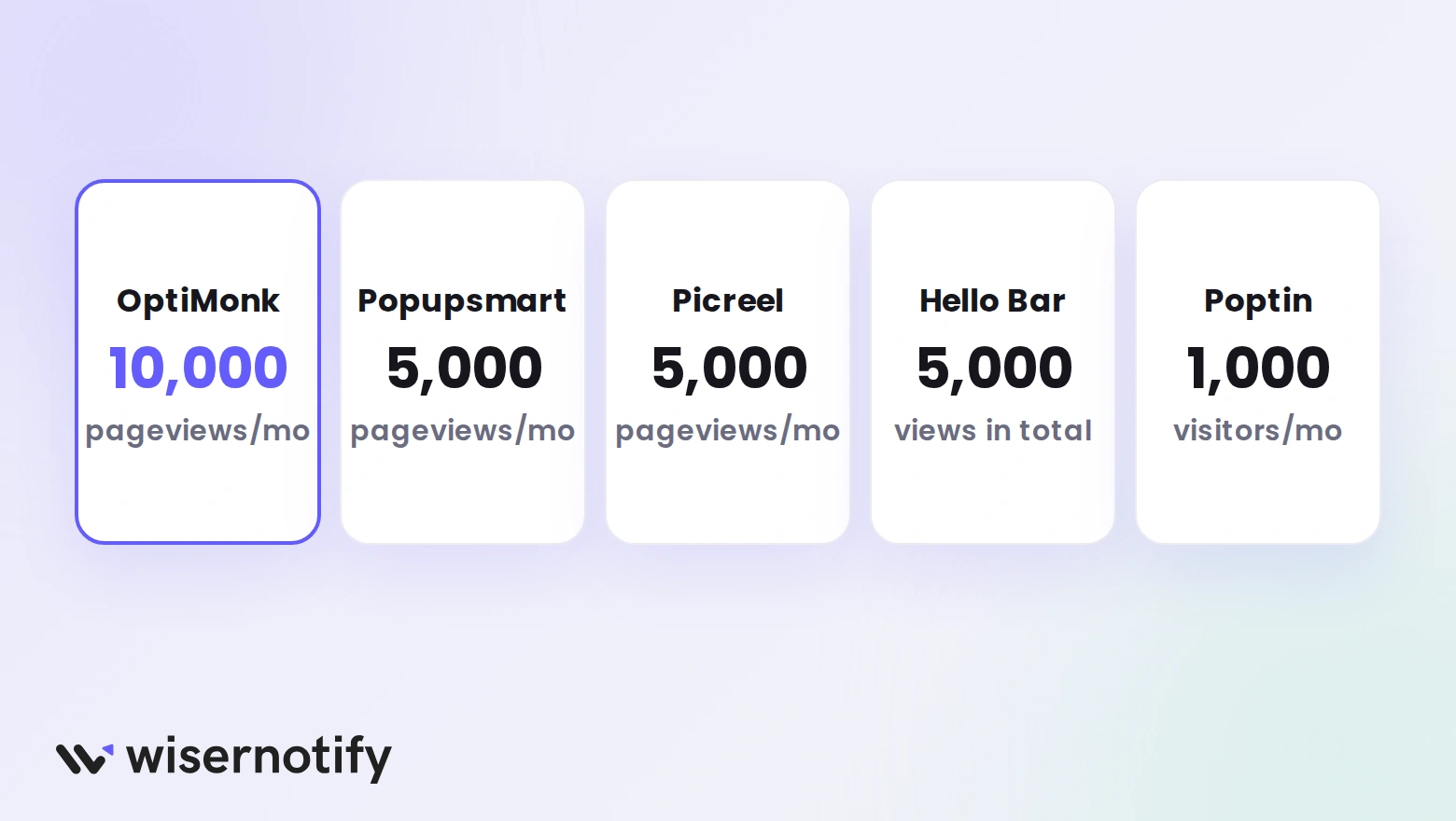
OptiMonk is the best free Popupsmart alternative, with every feature free up to 10,000 pageviews a month.
Hello Bar includes A/B testing on every paid plan from $29 a month, and Poptin has a free plan with unlimited popups. Popupsmart starts A/B testing on Advanced.
This guide lists what Popupsmart costs, why teams leave it, and nine alternatives compared on price and free plans.
Quick Comparison: Popupsmart vs 9 Alternatives
| Tool | Starting price | Free plan or trial | Best for |
|---|---|---|---|
| Wisepops | Not published, quote after a demo | Free 7-day behavioral audit, no public plan | Ecommerce stores that want several message types |
| WiserNotify | Basic $59/yr (5,000 visitors a month), Pro from $16/mo | 7-day free trial, no free plan | Social proof notifications beside a popup tool |
| OptinMonster | $108 the first year, renews at $210/yr (2,500 impressions a month) | No free plan, 14-day money-back guarantee | WordPress sites |
| OptiMonk | Free, or from $19/mo billed yearly | Free up to 10,000 pageviews a month | A free plan with every feature |
| Poptin | Free, or Growth from $19/mo | Free plan (1,000 visitors a month, branded) | Small sites that want popups and email |
| Hello Bar | Free, or from $29/mo (50,000 views a month) | Free for 5,000 views in total | Simple bars and popups |
| Justuno | $59/mo (up to 10,000 visitors a month) | 14-day free trial, no free plan listed | Popups with visitor identification |
| Privy | From $24/mo for popups, $30/mo with email | 15-day free trial, no card | Shopify stores that want popups and email |
| Picreel | Free, or Business from $499/mo | Free up to 5,000 pageviews a month, 15-day trial | Free A/B tested popups on a small site |
Popupsmart Pricing in 2026
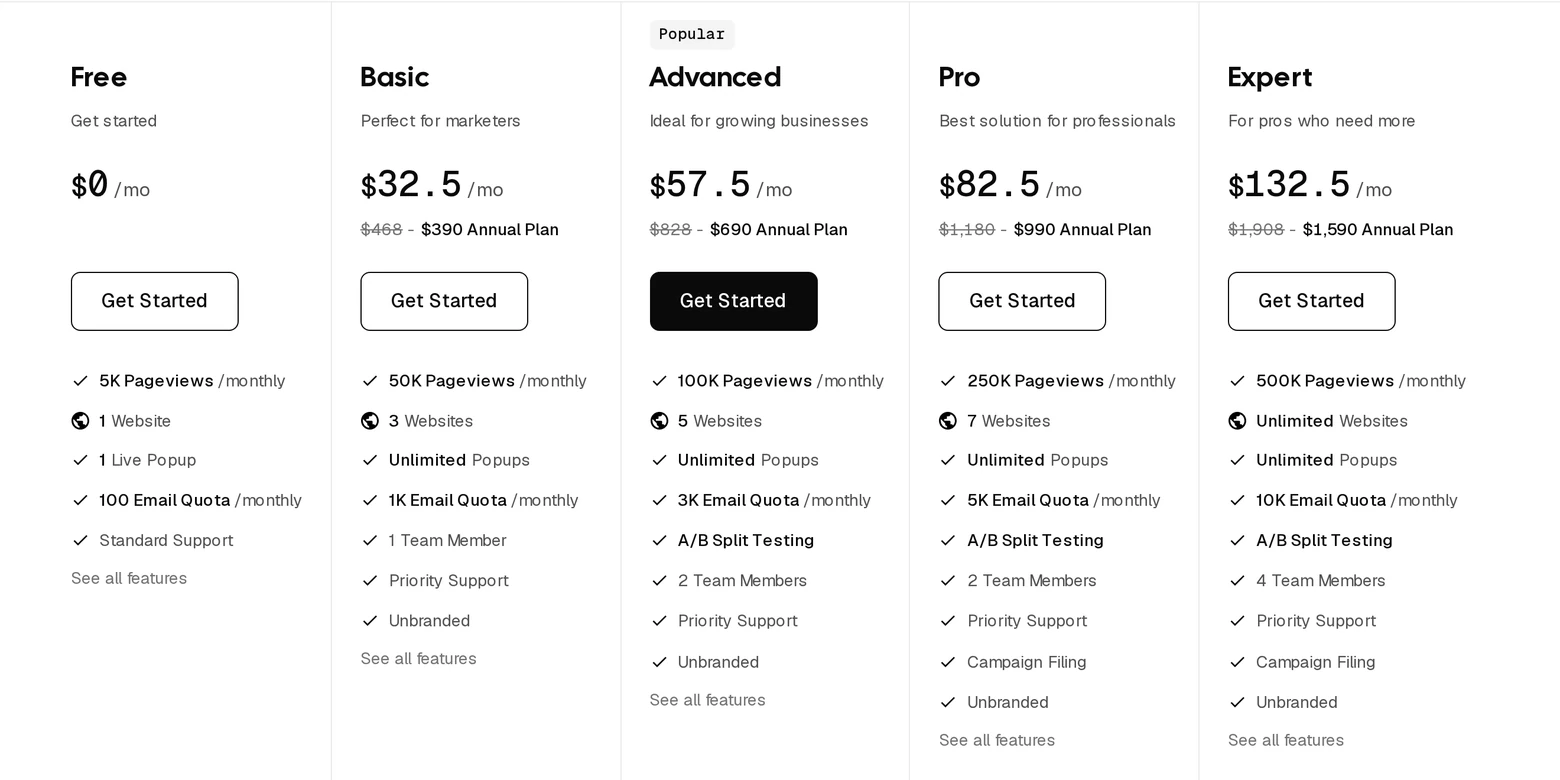
Popupsmart prices by monthly pageviews across five plans. Paid plans allow unlimited popups and are unbranded, and a yearly plan takes 20% off the monthly price.
| Plan | Monthly billing | Billed yearly | Pageviews a month | Key limits |
|---|---|---|---|---|
| Free | $0 | $0 | 5,000 | 1 live popup, 1 website, 100 emails a month |
| Basic | $39/mo | $32.50/mo | 50,000 | Unlimited popups, 3 websites, 1,000 emails, no A/B testing |
| Advanced | $69/mo | $57.50/mo | 100,000 | A/B testing, 5 websites, 3,000 emails |
| Pro | $99/mo | $82.50/mo | 250,000 | A/B testing, 7 websites, 5,000 emails |
| Expert | $159/mo | $132.50/mo | 500,000 | A/B testing, unlimited websites, 10,000 emails |
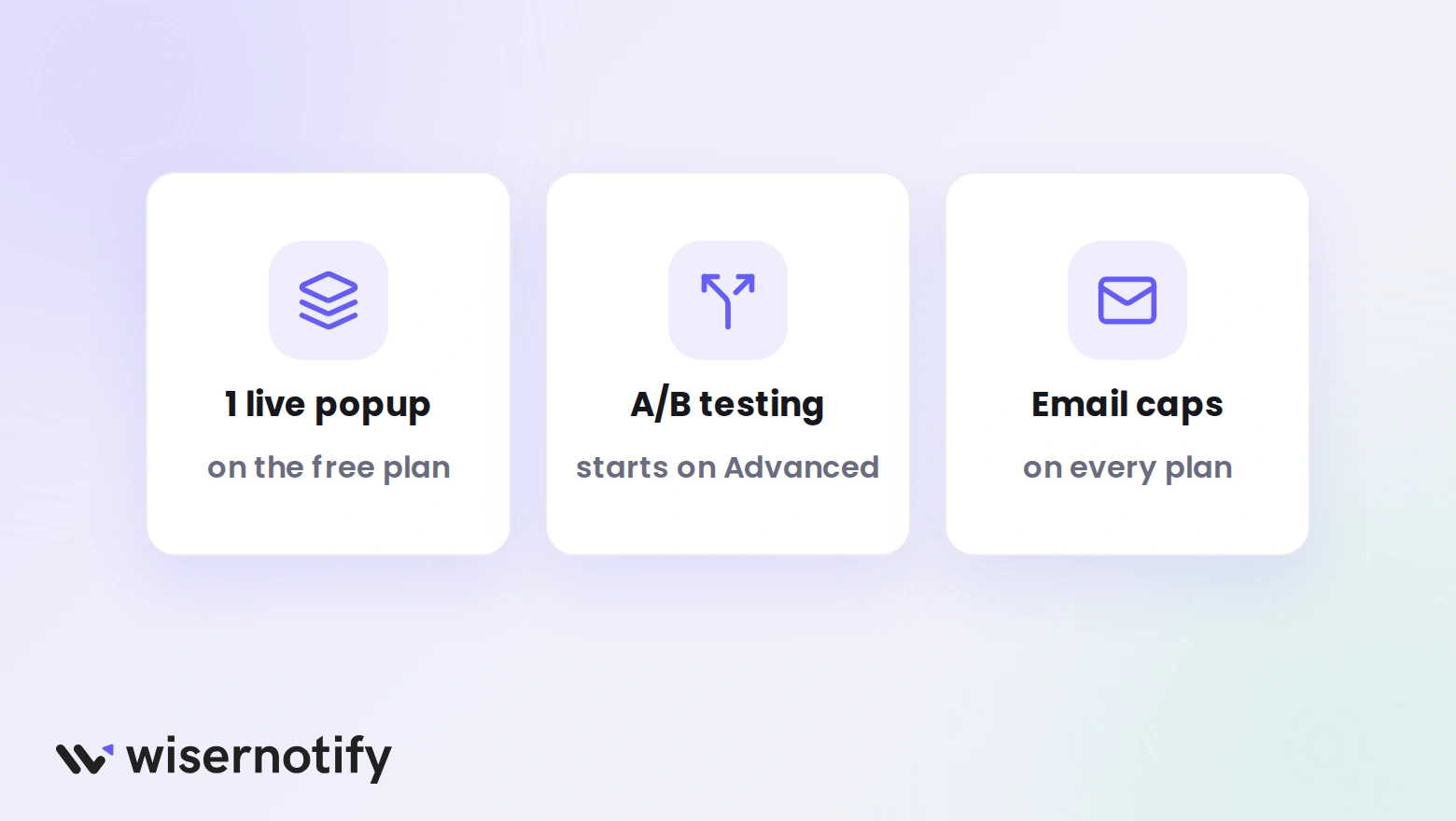
The free plan is a fair way to test, but one live popup and Popupsmart branding limit real campaigns. A/B testing waits until Advanced, which is $57.50 a month billed yearly.
Build urgency
Add floating offers with countdown timer & coupon code.

Why Teams Leave Popupsmart
Popupsmart is quick to set up, with 500+ free templates and an AI builder that drafts a popup from a short description. These are the limits that send teams looking elsewhere.
- Free plan limits: one live popup, one website, branding, and 100 emails a month.
- A/B testing costs more: it starts on the Advanced plan, so Basic stores cannot test.
- Pageview pricing: Basic covers 50,000 pageviews on three websites, and traffic growth moves you up a tier.
- Email quotas: each plan caps emails a month, from 1,000 on Basic to 10,000 on Expert.
- One team seat on Basic: a second team member needs Advanced.
9 Best Popupsmart Alternatives
1. Wisepops

Wisepops runs popups, sticky bars, quizzes, embeds, an onsite feed, and web push from one platform. It suits stores that want several kinds of onsite messages in one tool.
Its pricing is not public. You book a demo, and the team reviews your traffic in a free 7-day behavioral audit before quoting a plan.
- Popups, sticky bars, quizzes, and embeds
- An onsite feed for promotions
- Web push beside onsite campaigns
- A traffic audit before you pay
Starting price: not published, quoted after a demo
Best for: Stores with steady traffic that want several message types in one tool
2. WiserNotify
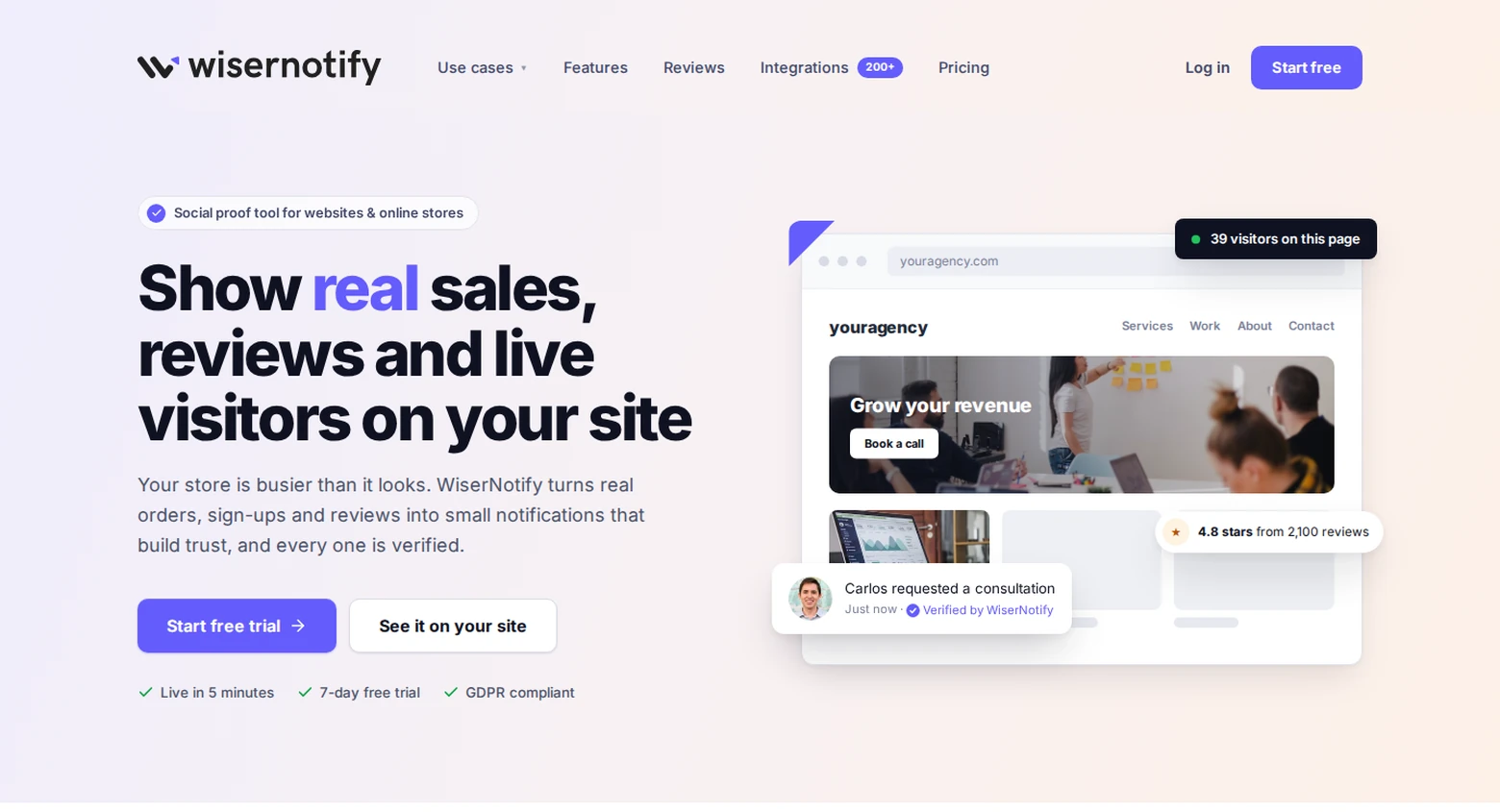
WiserNotify is not a popup builder. It shows social proof notifications, such as recent orders, live visitor counts, and review alerts, while shoppers browse.
Run it beside Popupsmart or any popup tool. The popup asks for an email, and the notification gives the visitor a reason to trust the store.
- Recent sales, live visitor, and review notifications
- Announcement bars and countdown timers
- 250+ integrations with stores, payment tools, and CRMs
- A/B variants to test notification messages
Starting price: Basic is $59 a year for 5,000 visitors a month, and Pro starts at $16 a month. Every plan has a 7-day free trial, and there is no free plan.
Best for: Stores that want social proof beside a popup tool
It has no email capture forms, exit-intent overlays, or spin-to-win wheels, so it works beside a popup tool, not instead of one. See how reviews shape purchase decisions.
3. OptinMonster

OptinMonster is a WordPress-first popup tool with a large template library, exit-intent, and content lockers.
Pricing runs on campaign impressions. Basic covers 2,500 a month on one site, and A/B testing starts on Plus.
- Lightbox, bar, slide-in, fullscreen, inline, and countdown campaigns
- Exit-intent technology from the Pro plan
- Content lockers that gate a download behind an opt-in
- Plans for 1, 2, 3, or 5 sites
Starting price: Basic is $108 for the first year, then renews at $210 a year, with 2,500 campaign impressions a month. There is no free plan, and it has a 14-day money-back guarantee.
Best for: WordPress sites that want deep targeting and templates
4. OptiMonk

OptiMonk has the most generous free plan here. It covers 10,000 pageviews a month with every feature, unlimited campaigns, and no branding on popups.
An AI agent designs and publishes popups from a text description. Paid plans differ only in traffic, AI credits, and domains.
- Targeting, A/B testing, analytics, and integrations on every plan
- An AI agent that writes and publishes popups
- One domain on Free, and more on paid plans
- Live chat support on every plan
Starting price: free up to 10,000 pageviews a month, then from $19 a month billed yearly ($29 billed monthly) for 20,000 to 50,000 pageviews
Best for: Stores under 10,000 pageviews that want every feature free
Also check: Top OptiMonk Alternatives
5. Poptin

Poptin pairs a popup builder with email contacts and campaigns. The free plan allows unlimited popups, 1,000 visitors a month, and 250 contacts.
Free popups carry Poptin branding. The Growth plan removes it and raises the limit to 5,000 visitors a month.
- 60+ popup templates
- Gamified popups, coupons, and forms
- Exit-intent and cart triggers
- A built-in email builder and automations
Starting price: free, or Growth from $19 a month, set by your contacts and visitors
Best for: Small sites that want popups and email in one place
Also check: Top Poptin Alternatives
6. Hello Bar

Hello Bar makes simple popups, header bars, and takeovers. The free plan includes unlimited popups, but only 5,000 views in total.
Paid plans add A/B testing and monthly limits from 50,000 to 500,000 views.
- Popups, header and footer bars, and full-screen takeovers
- Targeting by location, ad campaign, and schedule
- A/B tests on every paid plan
- Gamification and video popups
Starting price: free for 5,000 views in total, then $29 a month for 50,000 views a month
Best for: Bloggers and small stores that want a simple bar or popup
Build trust & FOMO
Highlight real-time activities like reviews, sales & sign-ups.

7. Justuno

Justuno combines popups with product recommendations and visitor identification. Its pricing page uses a slider by monthly visitors, with no free plan listed.
The first tier is $59 a month for up to 10,000 visitors, with a 14-day free trial. A higher tier at $299 a month covers up to 20,000 visitors.
- Website popups with targeting
- AI product recommendations
- Visitor profiles and custom properties
- A free trial on every tier
Starting price: $59 a month for up to 10,000 visitors, with a 14-day free trial
Best for: Ecommerce teams that want popups plus visitor identification
Also check: Top Justuno Alternatives
8. Privy

Privy bundles popups with email and SMS for ecommerce. Its Email plan starts at $30 a month and is priced by mailable contacts.
A popups-and-displays-only plan starts at $24 a month and is priced by monthly page views. Both begin with a 15-day free trial and no card.
- Popup design and targeting
- Email and SMS campaigns and automations
- Contacts that sync to Shopify, BigCommerce, or Wix
- Unlimited email sends
Starting price: from $24 a month for popups only, or $30 a month with email, with a 15-day free trial
Best for: Shopify stores that want popups and email in one tool
9. Picreel

Picreel, now part of ProProfs, builds exit-intent and other popups. The free plan covers 5,000 pageviews a month with unlimited popups and A/B testing.
The next step up is the Business plan at $499 a month, so growth in traffic means a large price jump. A 15-day free trial is available.
- Popup templates and an AI popup builder
- A/B testing on the free plan
- Custom HTML popups for developers
- Shopify popup support
Starting price: free up to 5,000 pageviews a month, then Business from $499 a month
Best for: Small sites that want free A/B tested popups
How to Add WiserNotify Next to Your Popups
Setup takes about ten minutes. Start the 7-day free trial, then follow the video or the six steps below.
Step 1: Copy Your WiserNotify Pixel
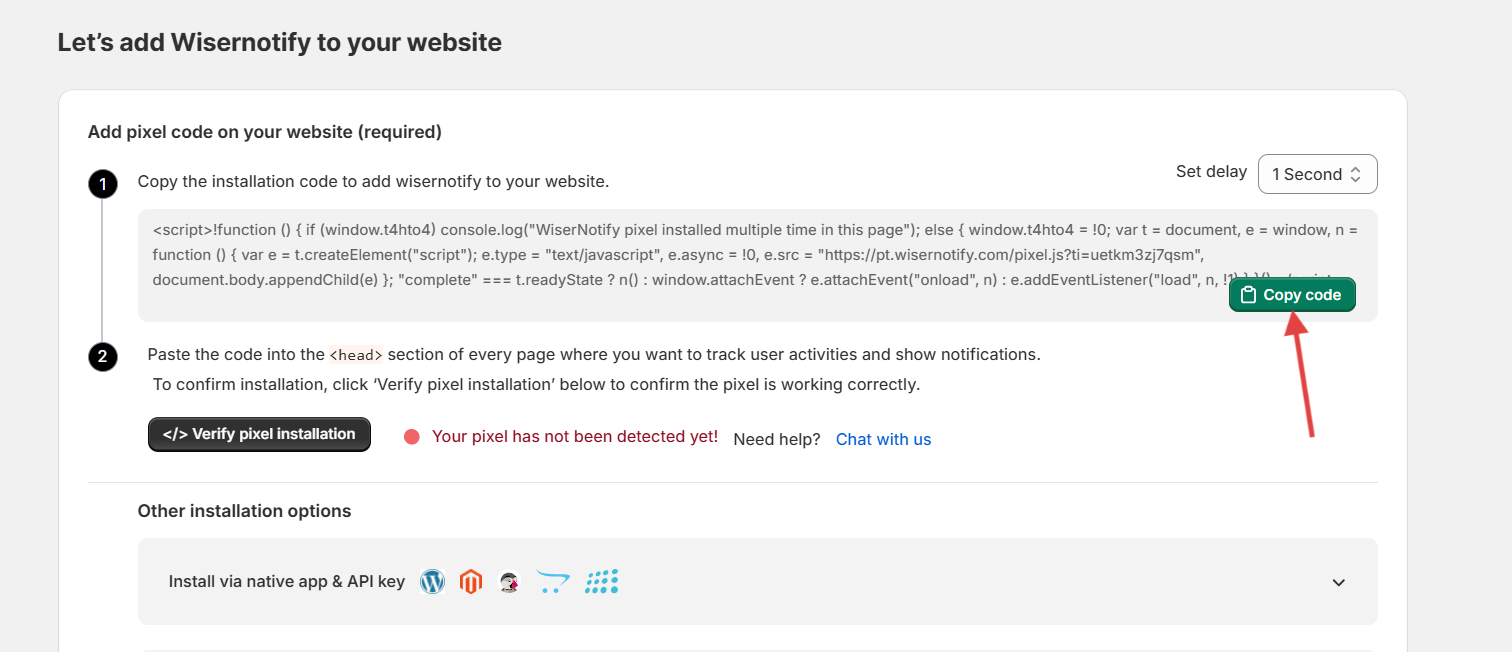
- Log in to WiserNotify and add your website.
- Open the pixel page.
- Click Copy code.
Step 2: Install and Verify the Pixel

- Paste the code into your site’s head section, or follow the guide for your platform in the dashboard.
- Go back to the WiserNotify pixel page.
- Click Verify pixel installation.
- Look for the green line that says the pixel code was detected.
Step 3: Choose Recent Sales and Name It
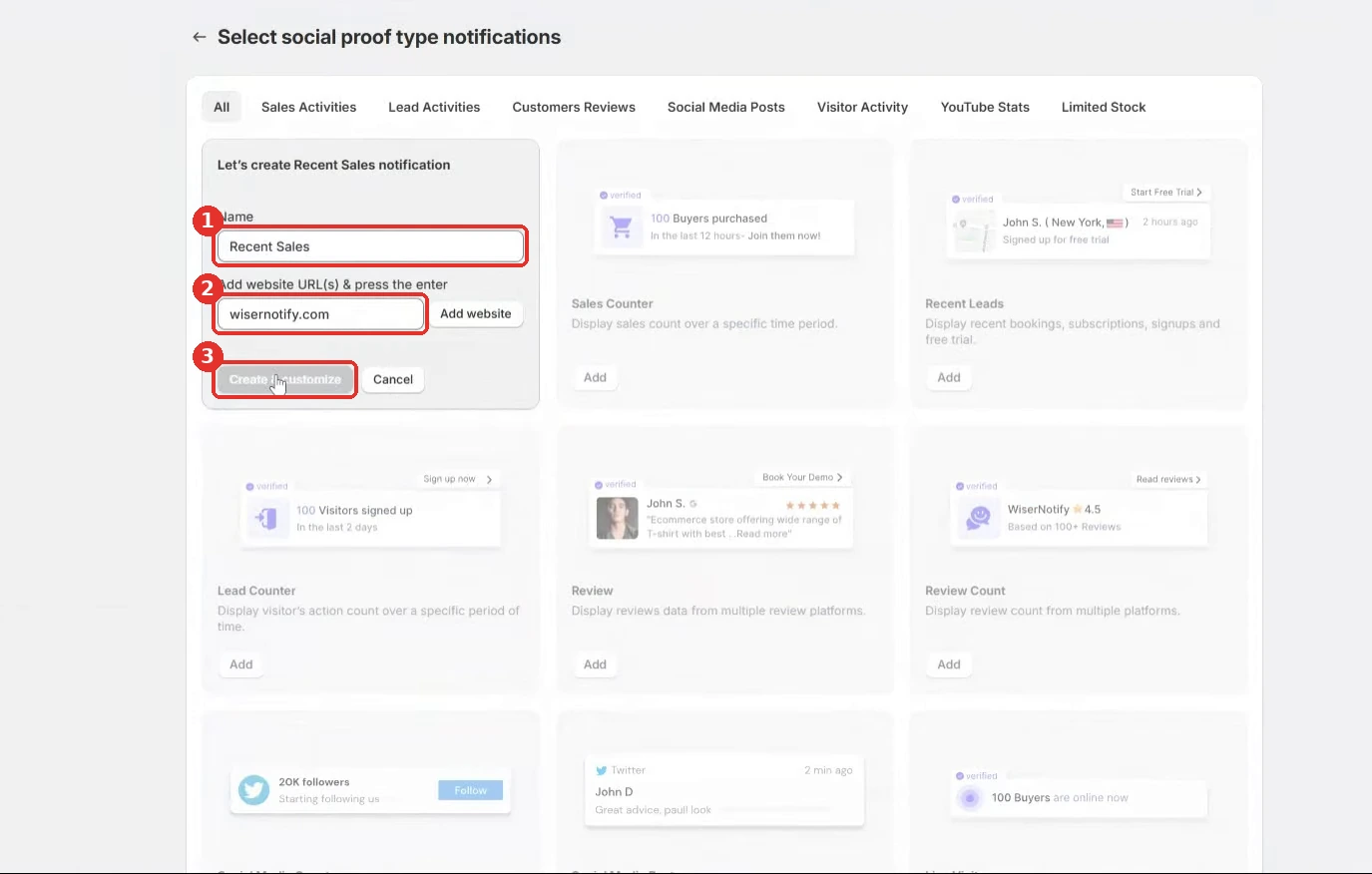
- Open Notifications > Social proof.
- Click Add on the Recent Sales card.
- Name the notification, for example “Store recent sales.”
- Enter your domain and press Enter.
- Click Create & customize.
Step 4: Style the Notification
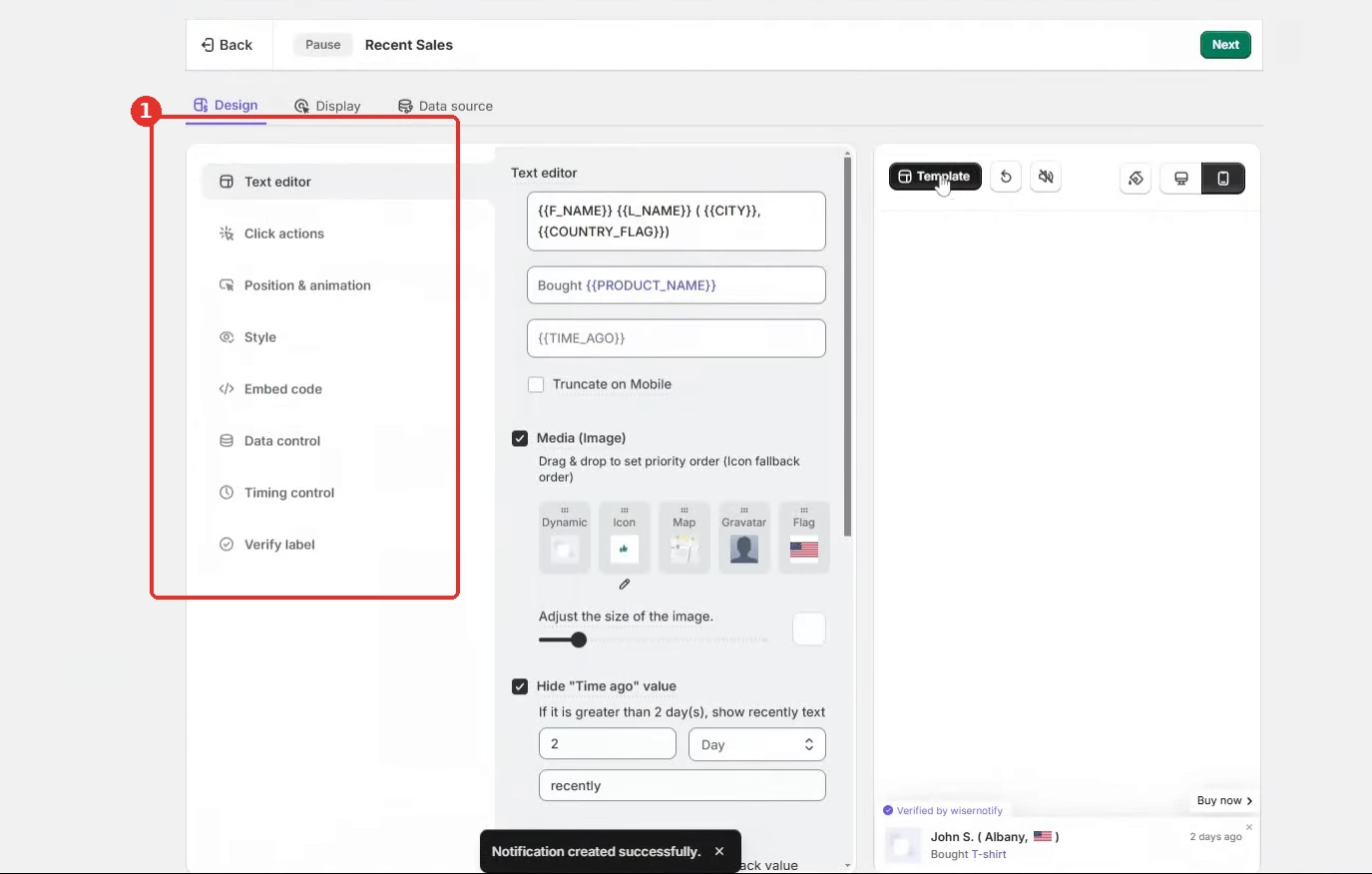
- Leave the name, city, and product placeholders in Text editor.
- Add a “Buy now” button in Click actions.
- Pick a spot in Position & animation that stays clear of your popups.
- Copy your brand colors and font into Style.
- Keep the default delays in Timing control.
- Click Save.
Step 5: Pick the Pages
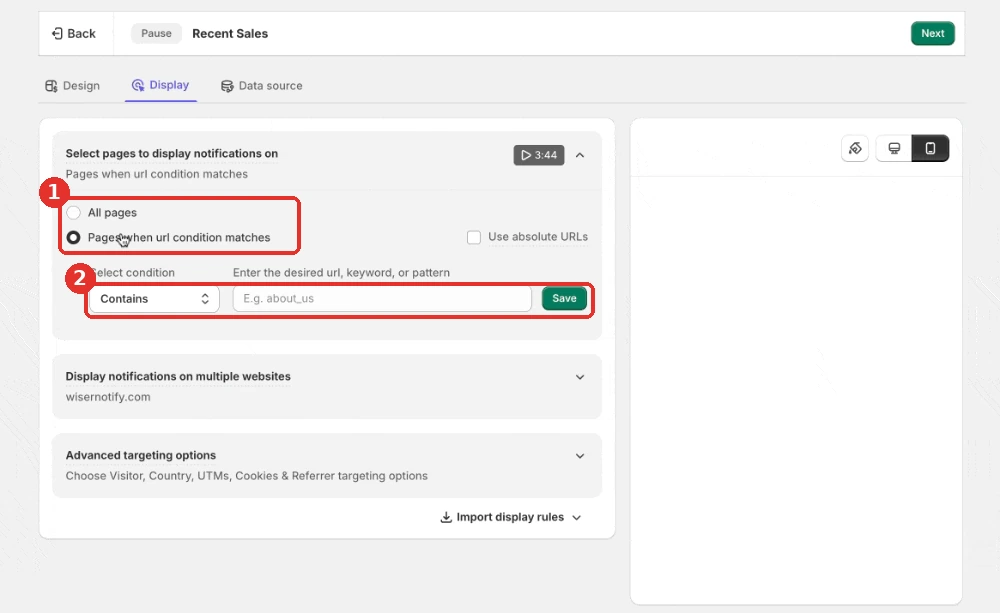
- Go to the Display tab.
- Leave All pages on, or choose Pages when url condition matches to keep the notification off pages where a popup runs.
- Add country, UTM, new or returning visitor, or referrer rules under Advanced targeting options if you need them.
Step 6: Connect Your Orders and Publish
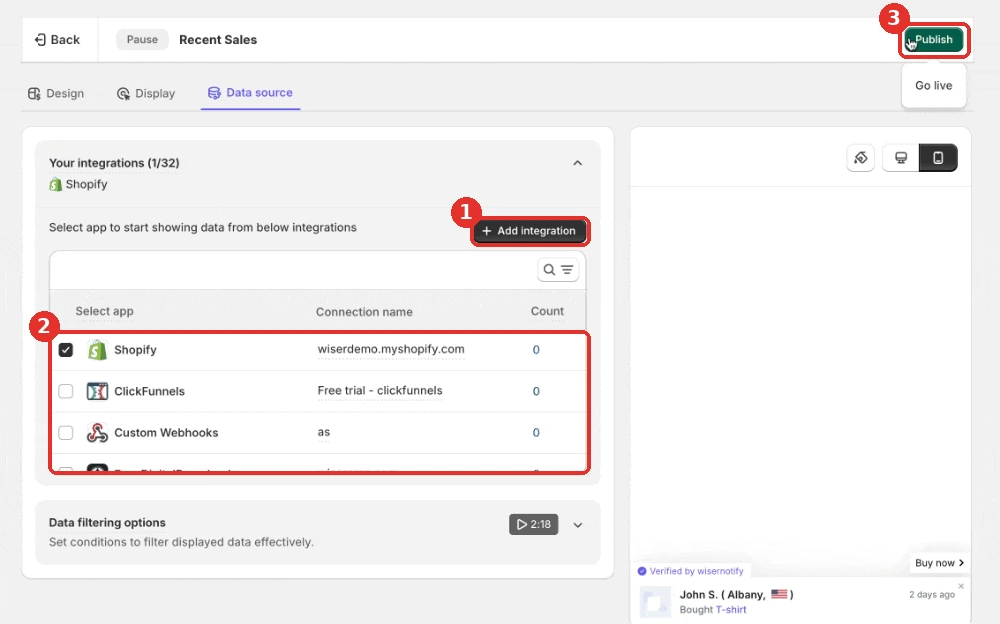
- Go to the Data source tab.
- Click + Add integration and pick your store platform.
- Tick the new connection under Your integrations.
- Click Publish and turn the notification on.
- Open your store in a private window to see it.
Build trust & FOMO
Highlight real-time activities like reviews, sales & sign-ups.

Mistakes to Avoid When Switching
- Losing your AI targeting: Popupsmart’s Smart Mode picks the audience for you. A new tool may need manual rules, so test them on a small audience first.
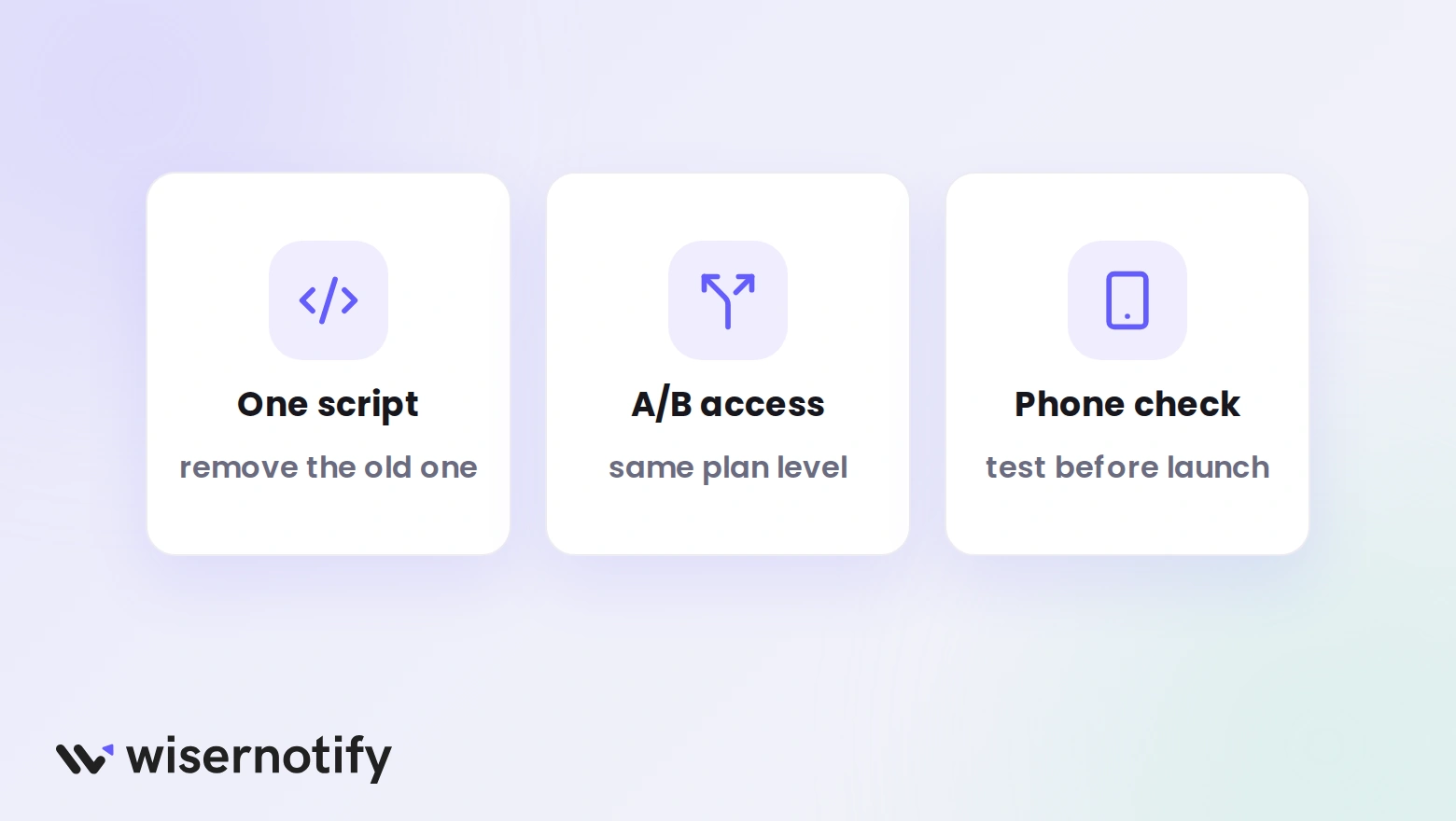
- Running two popup scripts: two tools on one page fight for display and slow it down. Remove the Popupsmart script before you switch on the new one.
- Comparing prices without A/B testing: Popupsmart Basic has no A/B testing, while OptiMonk includes it free. Compare equal feature sets.
- Expecting the same simplicity: a tool with more targeting needs more setup time, so plan for it.
- Skipping a mobile check: test the new popups on a phone so they do not cover the whole screen.
How to Pick the Right Alternative
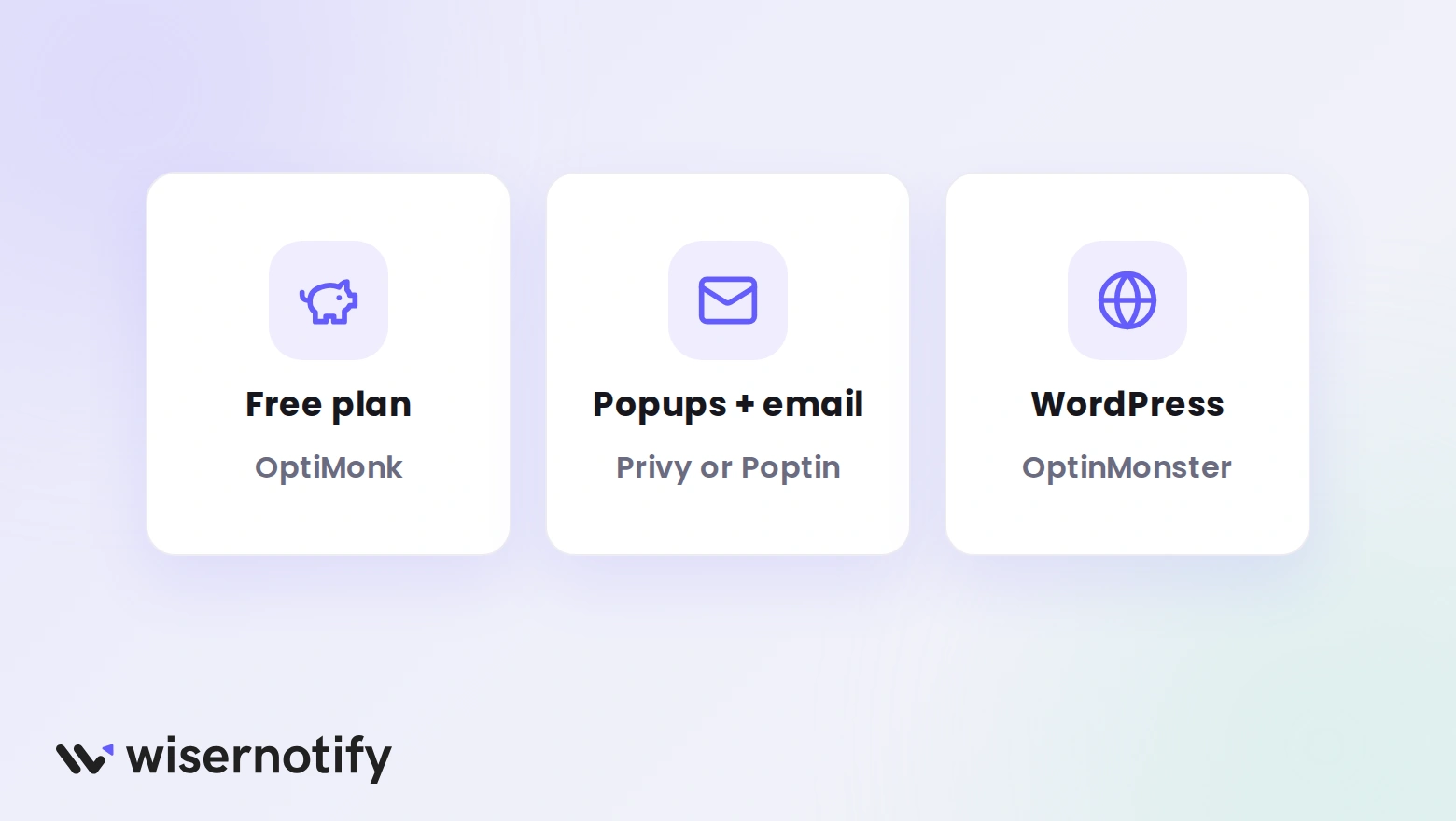
- You want everything free: OptiMonk gives every feature up to 10,000 pageviews a month.
- You want A/B testing on every paid plan: Hello Bar starts at $29 a month.
- You need popups and email together: Privy or Poptin bundle both.
- You run WordPress: OptinMonster has the deepest WordPress targeting.
- You want free A/B testing on a small site: Picreel includes it on the free plan.
- You want visitor identification: Justuno adds it to popups.
- You want social proof beside your popups: add WiserNotify to whichever popup tool you pick.
Test your top three popup campaigns on a free plan for a month. If Popupsmart converts the same, keep it.
Wrap Up
Popupsmart is quick to set up and its templates are free. The limits are the single popup and branding on the free plan, and A/B testing that starts on Advanced.
If those matter, OptiMonk, Hello Bar, and Poptin cover the gap at lower prices, and WiserNotify adds social proof beside any of them.
Frequently Asked Questions
How much does Popupsmart cost?
Paid plans start at $39 a month, or less when billed yearly. A/B testing starts on the Advanced plan.
Does Popupsmart offer free templates?
Yes. Its popup templates are free to use, and you can build your first popup on the free plan without a card.
Does the Popupsmart free plan have branding?
Yes. The free plan allows one live popup and carries branding, and the paid plans are unbranded.
What is the best free Popupsmart alternative?
OptiMonk is free up to 10,000 pageviews a month, with every feature and no branding.
Can WiserNotify replace Popupsmart?
No. WiserNotify shows social proof notifications, not popups, so it works best beside a popup tool.

Krunal Vaghasiya is a marketing tech expert who boosts e-commerce conversion rates with automated social proof and FOMO strategies. He loves to keep posting insightful posts on online marketing software, marketing automations, and improving conversion rates.




 Capterra