



Let me be honest. Most reputation management tools promise big results but fail to deliver.
I know this because I signed up for 25 of them. I ran real campaigns, tested every dashboard, and compared the results side by side. Only a few tools gave real control over how a brand appears online.
Here is the reality. About 71% of consumers search on Google before they spend money. Your star rating, review count, and how you reply to complaints directly affect whether someone chooses you or moves on.
A strong ORM tool fixes three things. It brings all reviews into one place. It automates repetitive work. It shows your best reviews where customers make buying decisions.
Below, I break down the six tools that truly stood out. I also explain who each one fits best.
Quick Overview of Online Reputation Management Tools
Here is a quick overview of the top online reputation management tools and what each one does best.
| Tools | Starting Price | Key Strengths |
|---|---|---|
| WiserReview | Start free; paid plan at just $9/month | Budget-friendly review automation with social proof widgets |
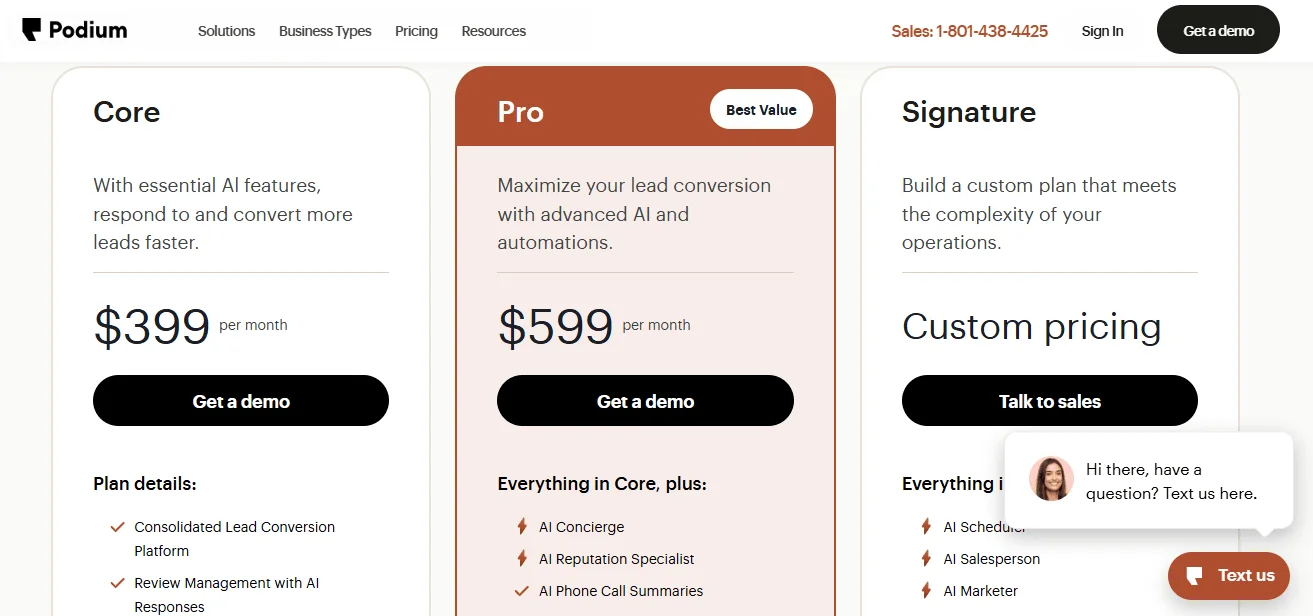
| Podium | $399/month | Text-based lead capture with built-in payments |
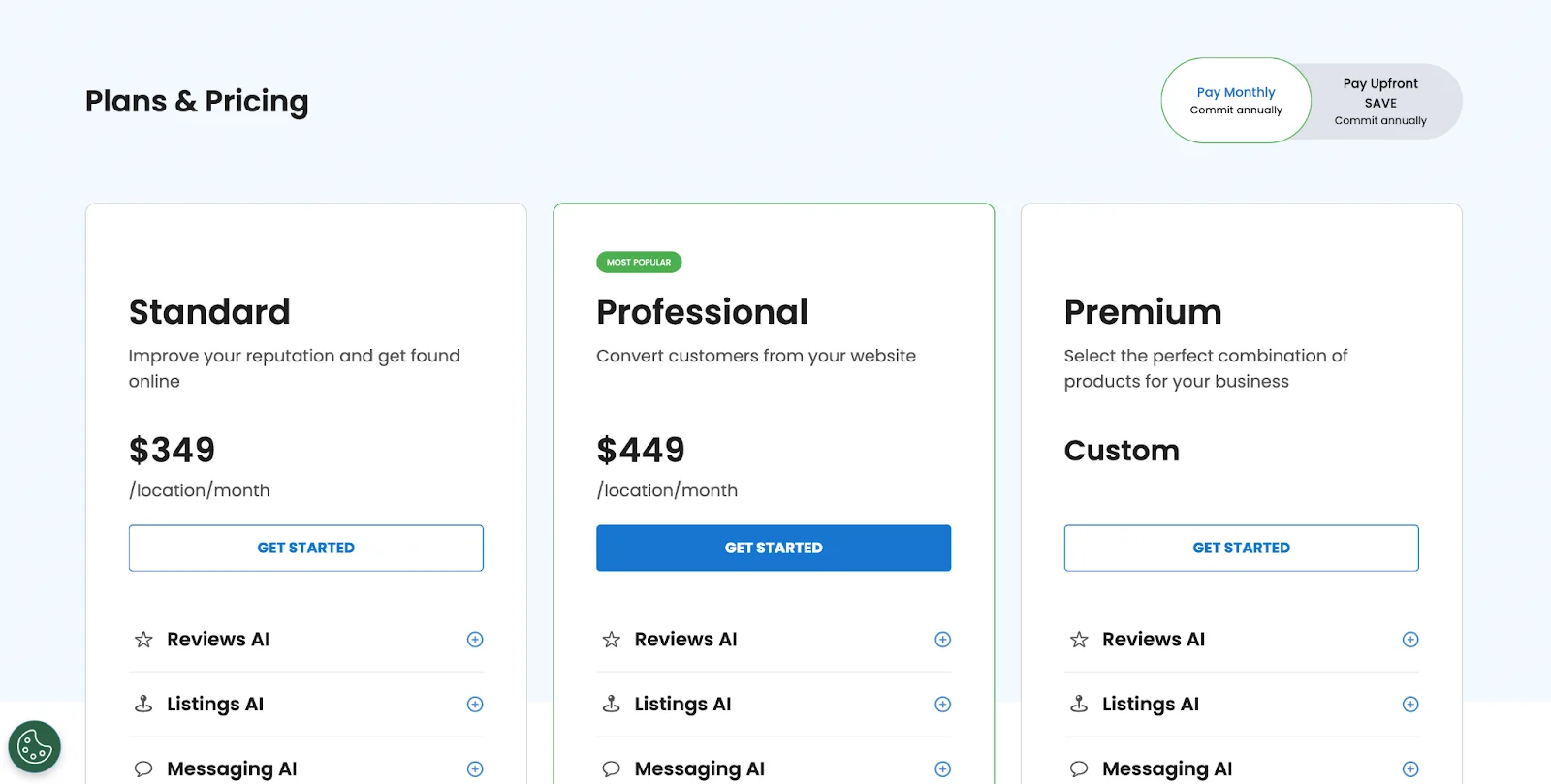
| Birdeye | $299+/month | Full-stack reputation + CX + messaging suite |
| NiceJob | $75/month | Referral-driven growth engine for service businesses |
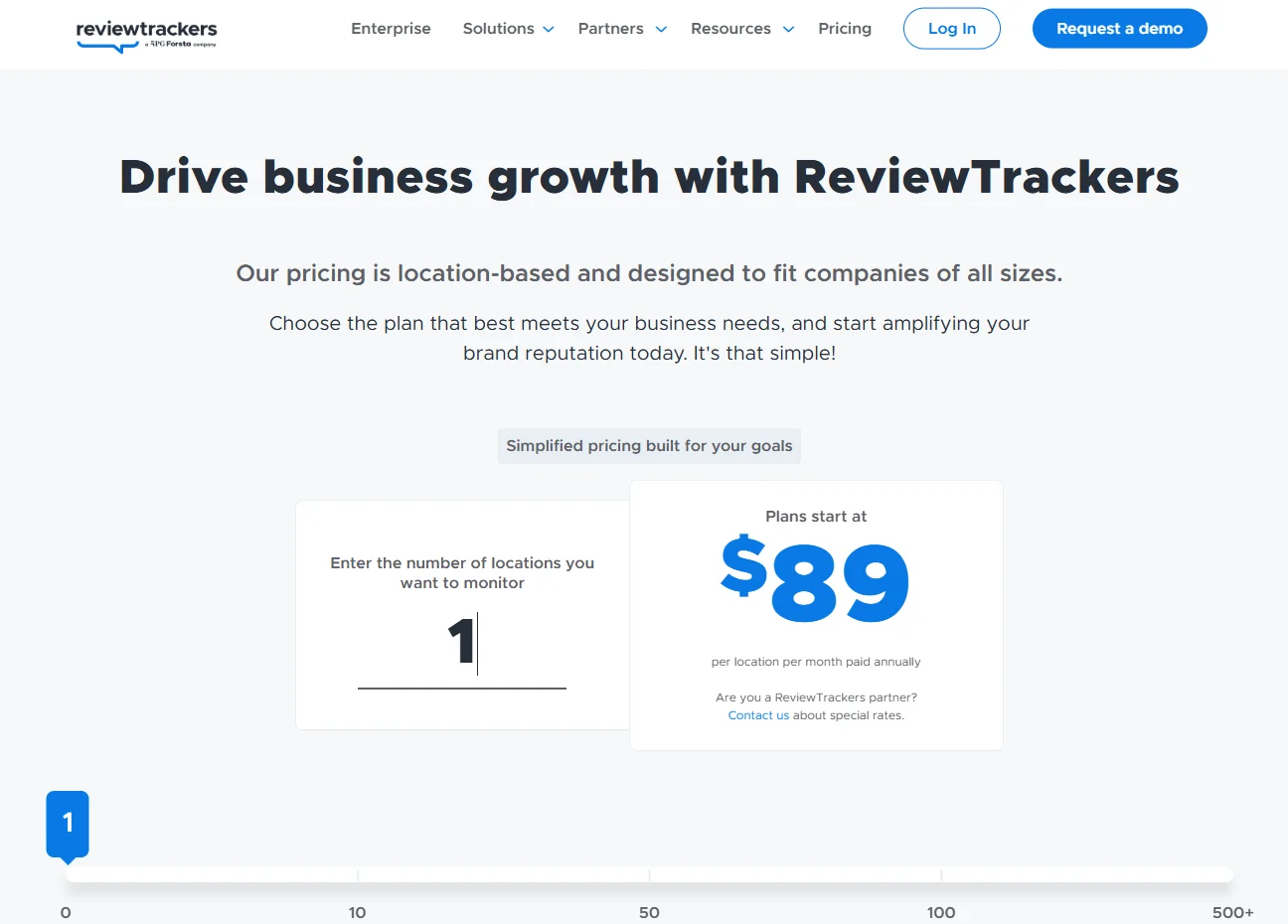
| ReviewTrackers | $89/month per location | Enterprise-grade analytics with competitor intelligence |
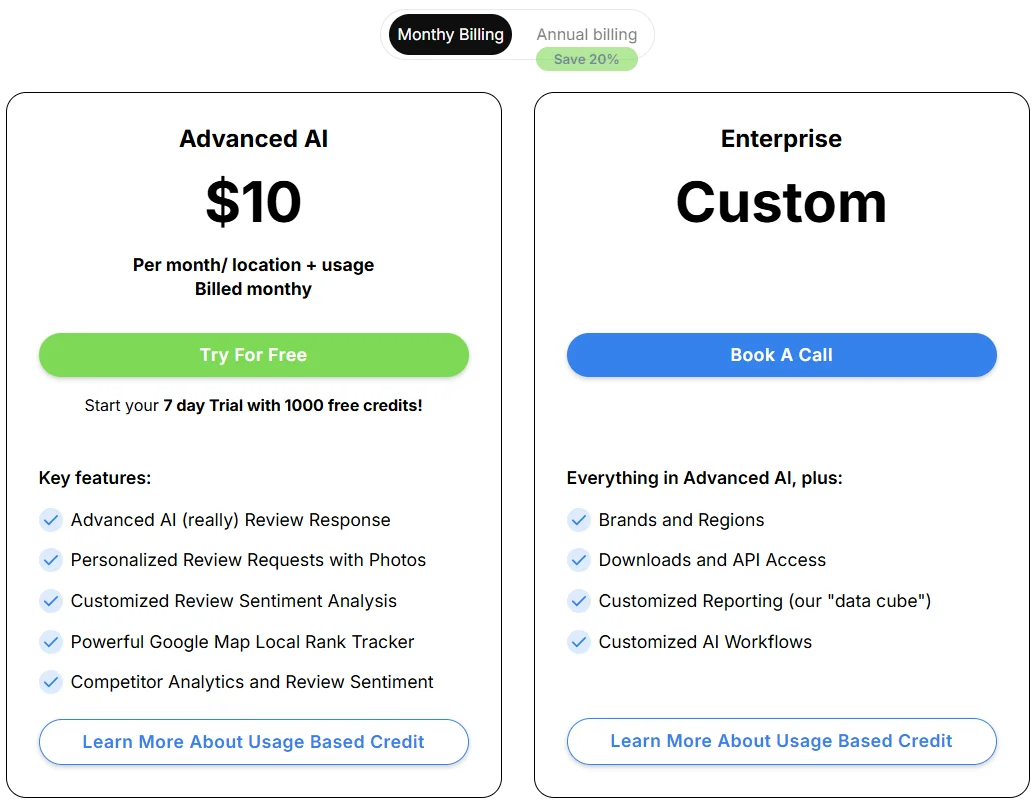
| RightResponse AI | $10/month per location | AI-first reply engine with local SEO rank tracking |
Top 6 Online Reputation Management Tools
1. WiserReview
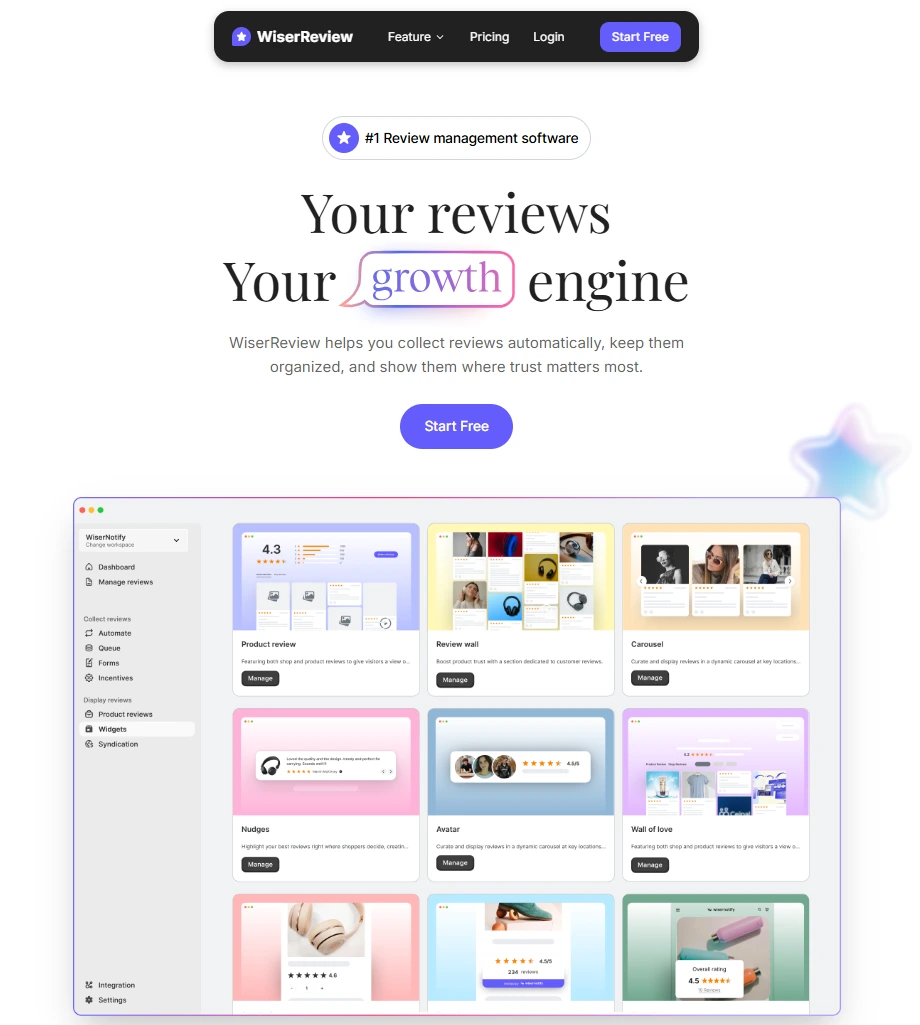
WiserReview takes a focused approach to reputation management that I genuinely appreciate. Rather than trying to be an everything-platform, it zeroes in on the three actions that actually move the needle for small businesses: collecting Google reviews, managing them intelligently, and displaying them as trust signals on your website.
You’re not paying for a bloated feature set you’ll never touch. You’re paying for a system that does the one thing that matters: getting more five-star reviews in front of more potential customers.
Collect Google Reviews
The setup begins with linking your Google Business Profile or Maps listing, a process that takes under three minutes.
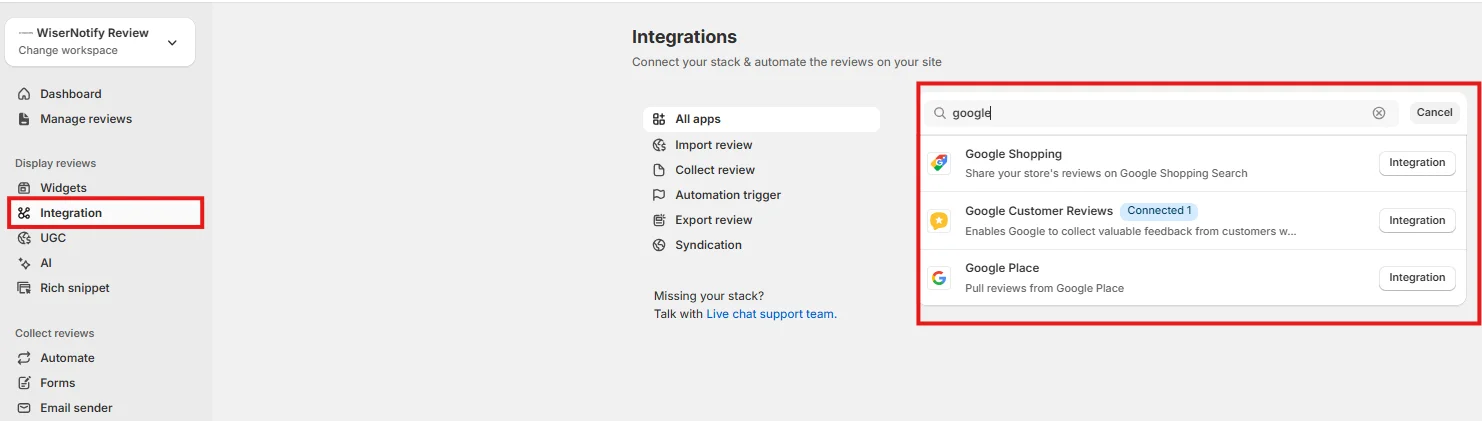
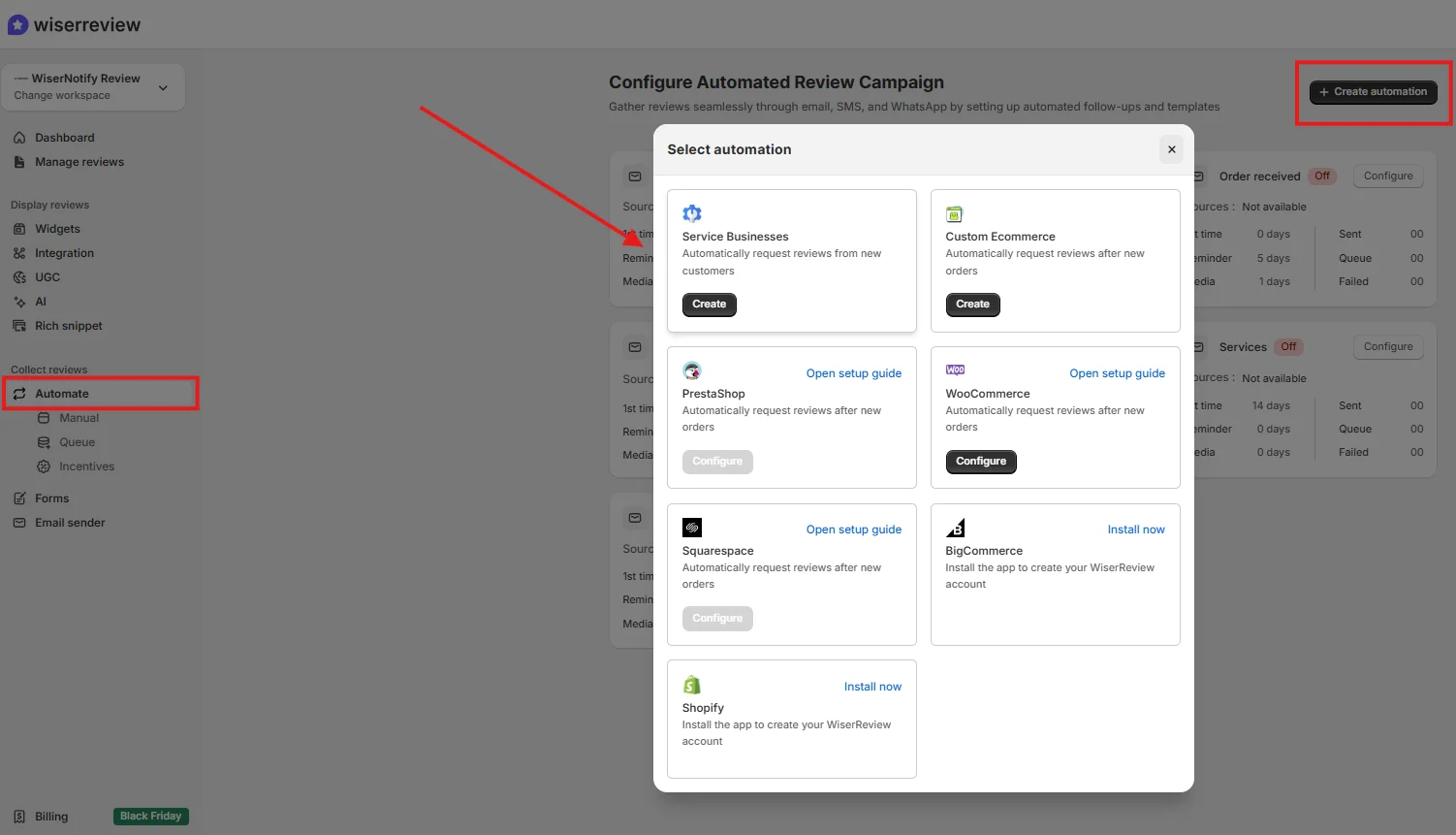
Once connected, WiserReview syncs with your Google Business Profile and also supports e-commerce stores, including WooCommerce and Shopify.
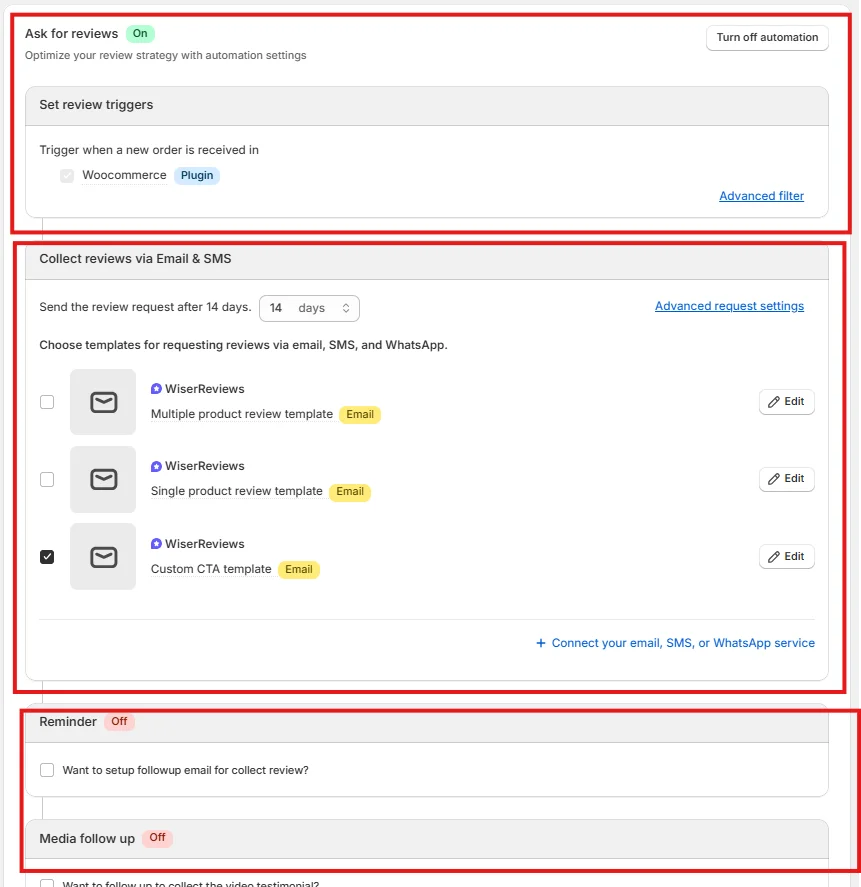
What makes this different from manually emailing customers is the trigger-based automation. You define when a request goes out (for example, 48 hours after a purchase or right after delivery confirmation), customize the email or SMS template, and the system handles the rest.
During my testing, stores that switched from manual requests to WiserReview’s automated sequences saw a 3x increase in monthly review submissions. Timing matters, and automation removes the human bottleneck entirely.
Building a custom review form is straightforward through the Forms section:
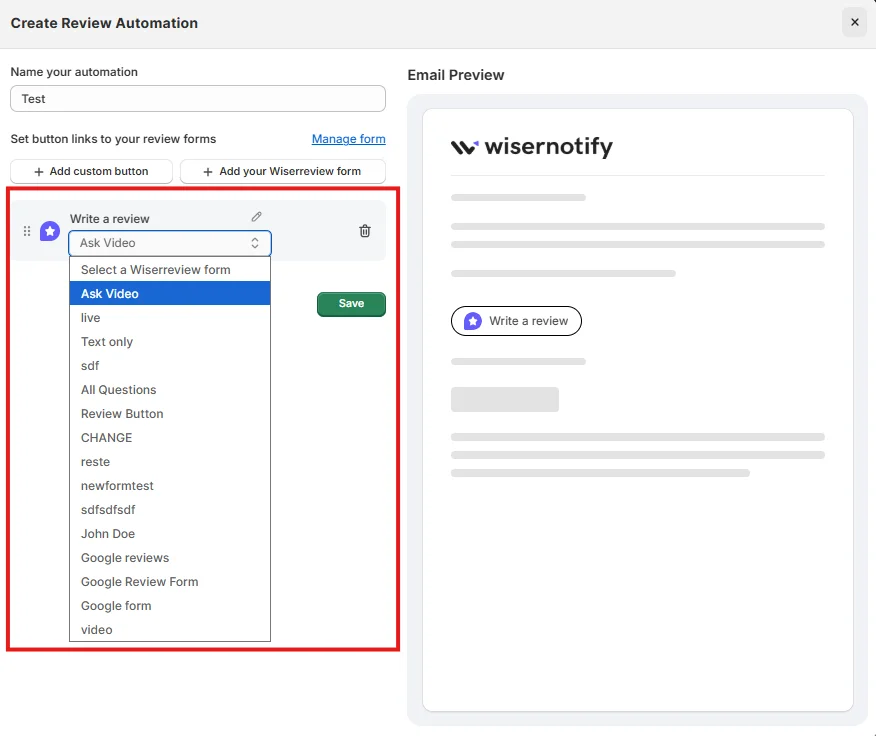
Each step of the collection flow is customizable, from the initial prompt to the star rating screen to the final thank-you message:
Review Management
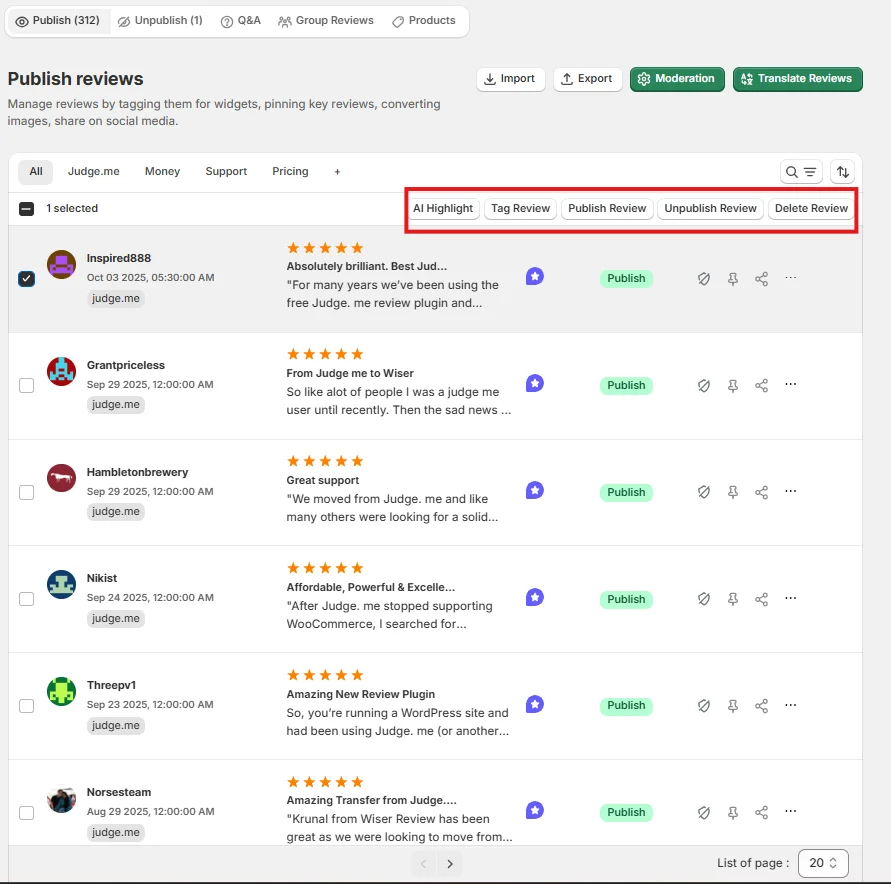
The Review Management dashboard pulls every review into a single timeline. No more tab-hopping between Google, your store, and email.
Three capabilities stood out during testing:
- One-click moderation: Approve or remove any review instantly. No buried settings or confirmation dialogs.
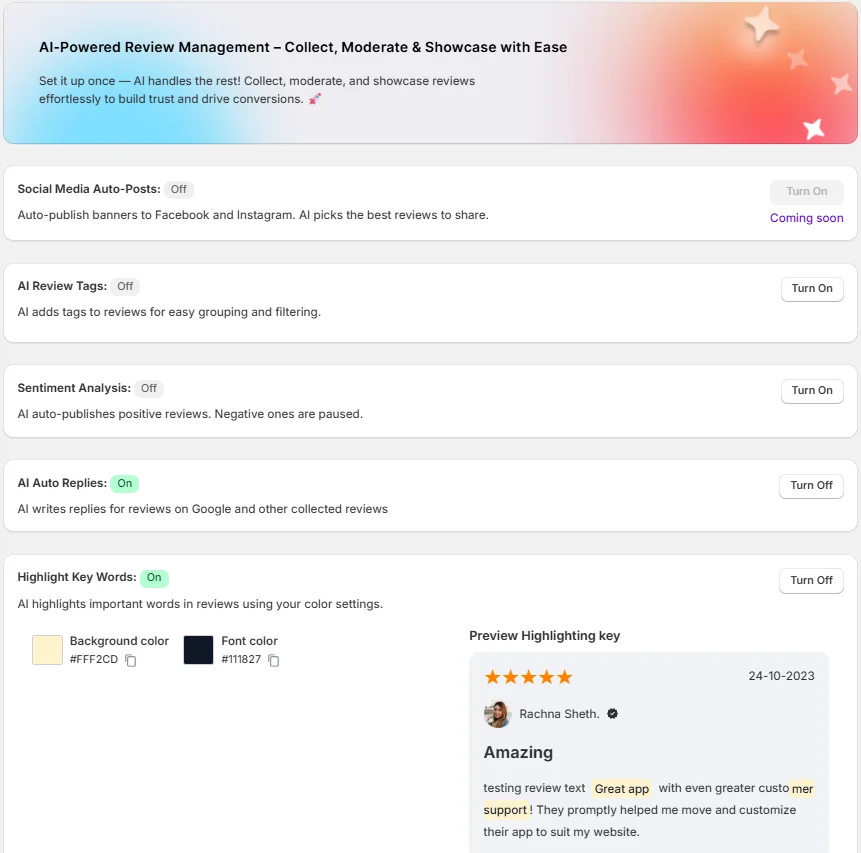
- AI Auto Replies & Sentiment Detection: The platform reads each review, assigns a sentiment score, and drafts a reply automatically. Negative reviews get flagged and held from publishing, giving your team a window to respond before the damage spreads. Positive reviews can be set to auto-publish immediately.
- Keyword Highlighting: WiserReview scans review text and color-codes recurring terms. If five customers mention “shipping delay” in a week, you’ll see the pattern before it becomes a crisis.
Here’s a closer look at the AI toolkit built into the management dashboard:
Display Reviews
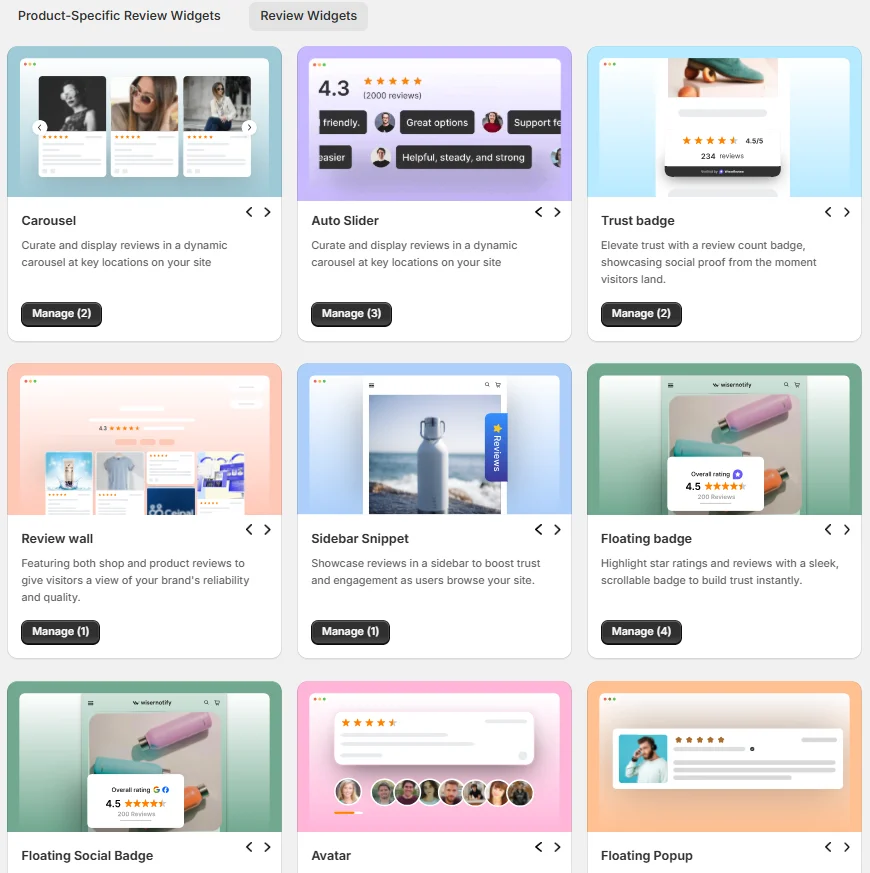
Collecting reviews means nothing if they sit in a database nobody visits.
WiserReview’s Display Reviews section gives you embeddable 15+ review widgets like Carousels, Auto Sliders, Floating Badges, and Grid layouts. These place real customer voices directly on your product pages, homepage, and checkout flow.
This matters because 95% of shoppers read reviews before buying. Putting those reviews one scroll away from the “Add to Cart” button is one of the highest-ROI moves a store can make.
WiserReview Pricing
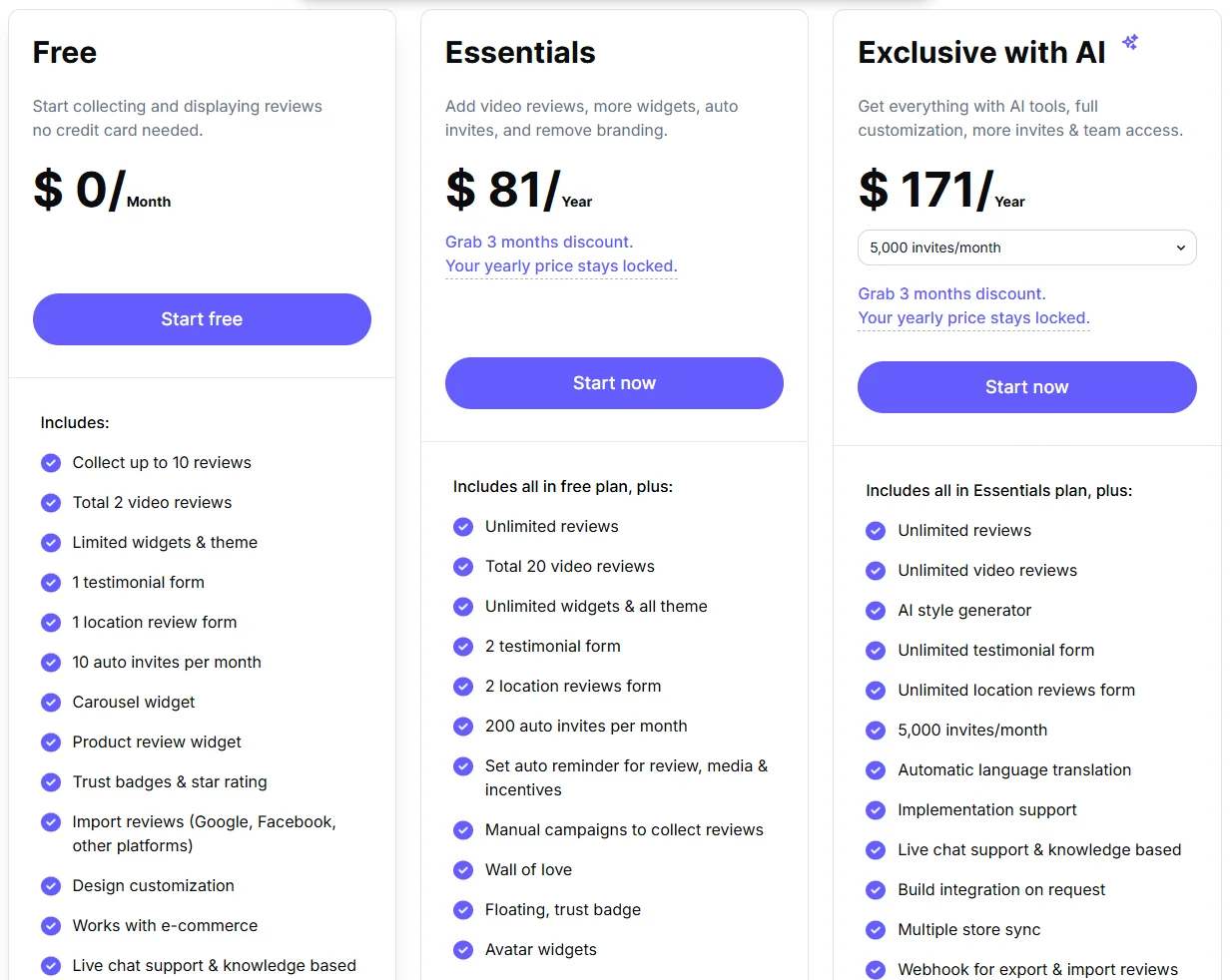
All your reviews in one place
2. Podium

Podium isn’t just a reputation tool. It’s a business communication operating system that happens to include review management.
If your revenue depends on customer conversations (think auto dealers, dental offices, home services), Podium rewires how those conversations happen by making text messaging the center of everything.
Best for: High-touch local businesses that want to capture leads via text, close deals in the same thread, collect reviews automatically, and accept payments, all without switching apps.
Unified Inbox
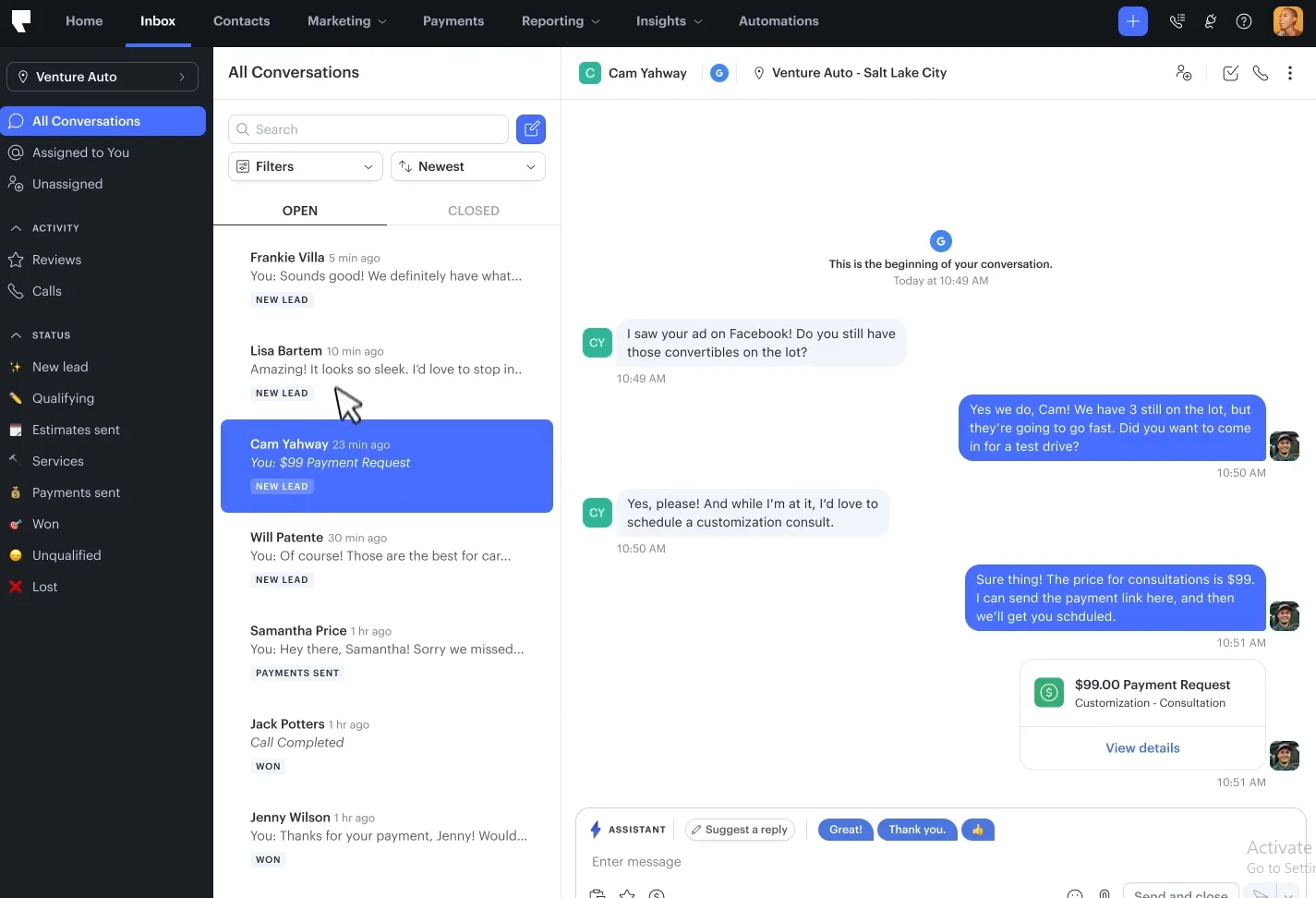
The All Conversations inbox is the feature that sold me on Podium’s approach. Every customer touchpoint (incoming texts, website chat messages, social DMs, and review notifications) flows into one chronological thread.
What makes this powerful isn’t just organization. It’s that you can trace a customer’s journey from the first inquiry to a completed sale to the review they left afterward. A lead who asks “Is this car still available?” becomes a tracked pipeline deal, receives a payment link via text, and gets a review request. All in the same conversation.
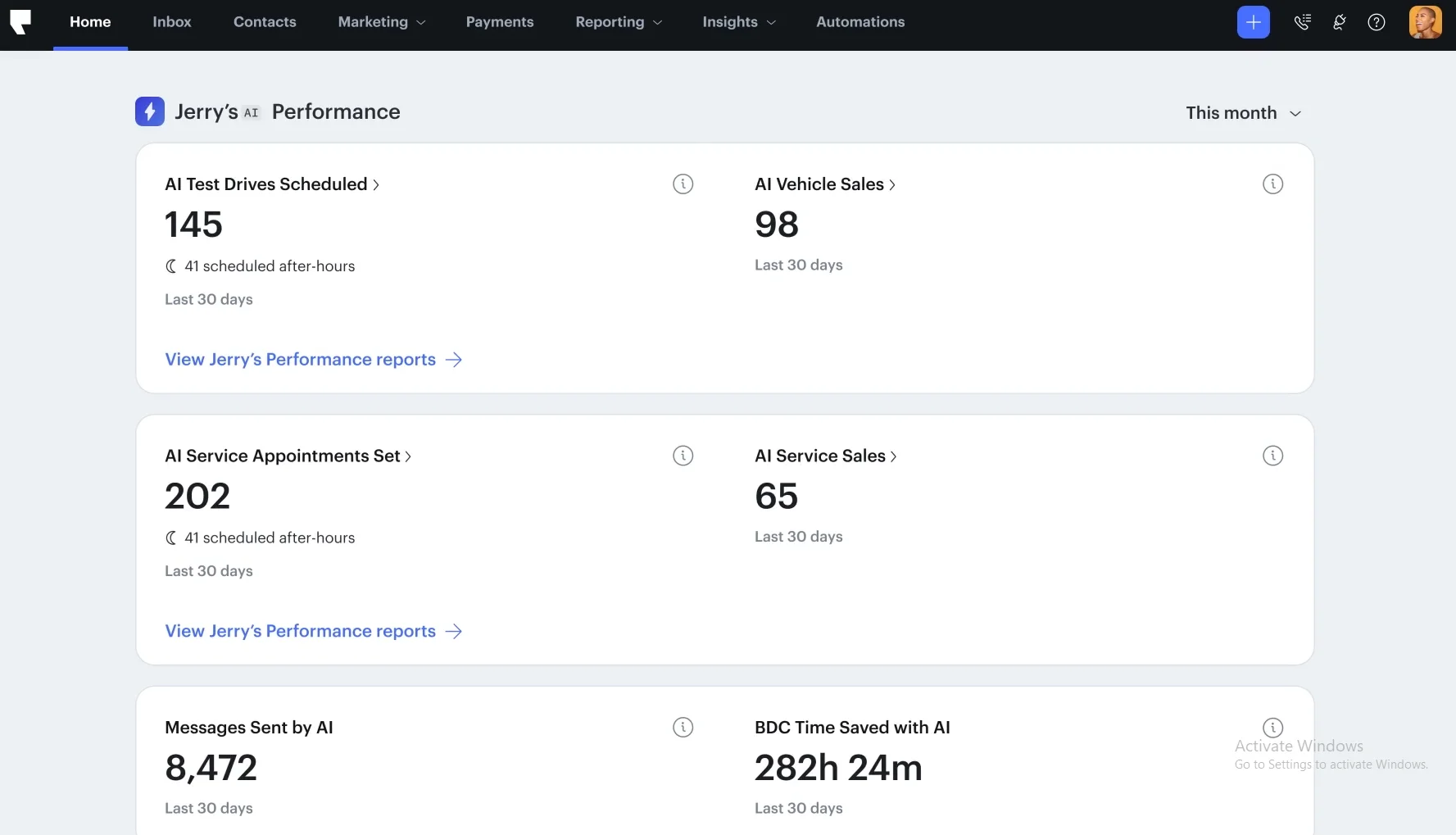
The Performance dashboard focuses on the metrics that justify Podium’s premium price. Instead of vanity metrics like “total impressions,” you see:
- Appointments Scheduled by AI: Concrete bookings, not just clicks
- Revenue Attributed to Text Campaigns: Dollars, not engagement rates
- Team Hours Saved: Real operational efficiency gains
For a dealership or practice spending $399+/month, these numbers make the ROI case clear within the first quarter.
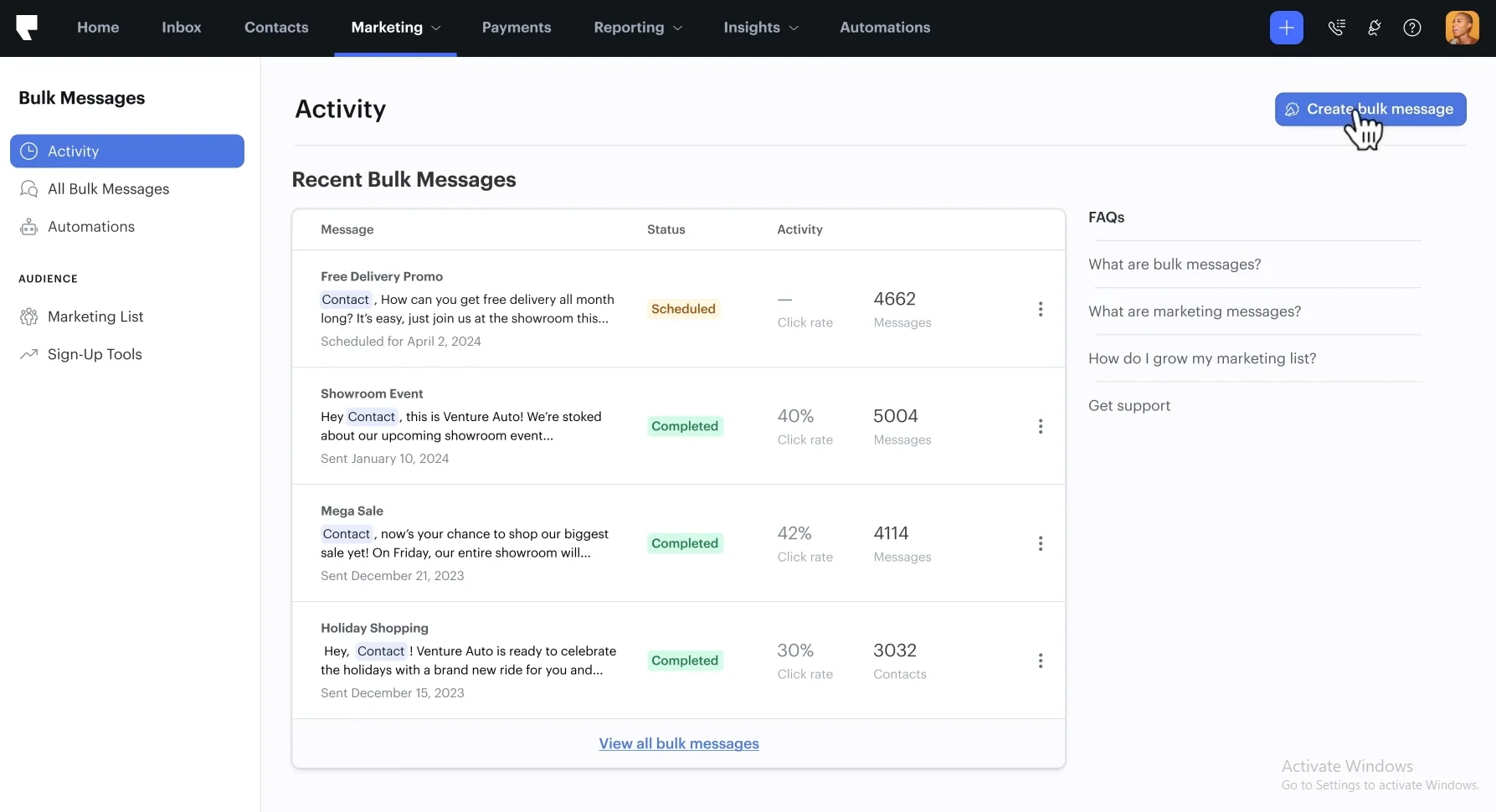
Podium’s Marketing tab extends the platform beyond reactive reputation management into proactive customer engagement. You can build bulk SMS campaigns with merge fields for personalization, schedule them around business hours, and track open and response rates.
Think of it as Mailchimp-style campaign management, but for text messages. That’s a channel with open rates that dwarf email.
Review Management
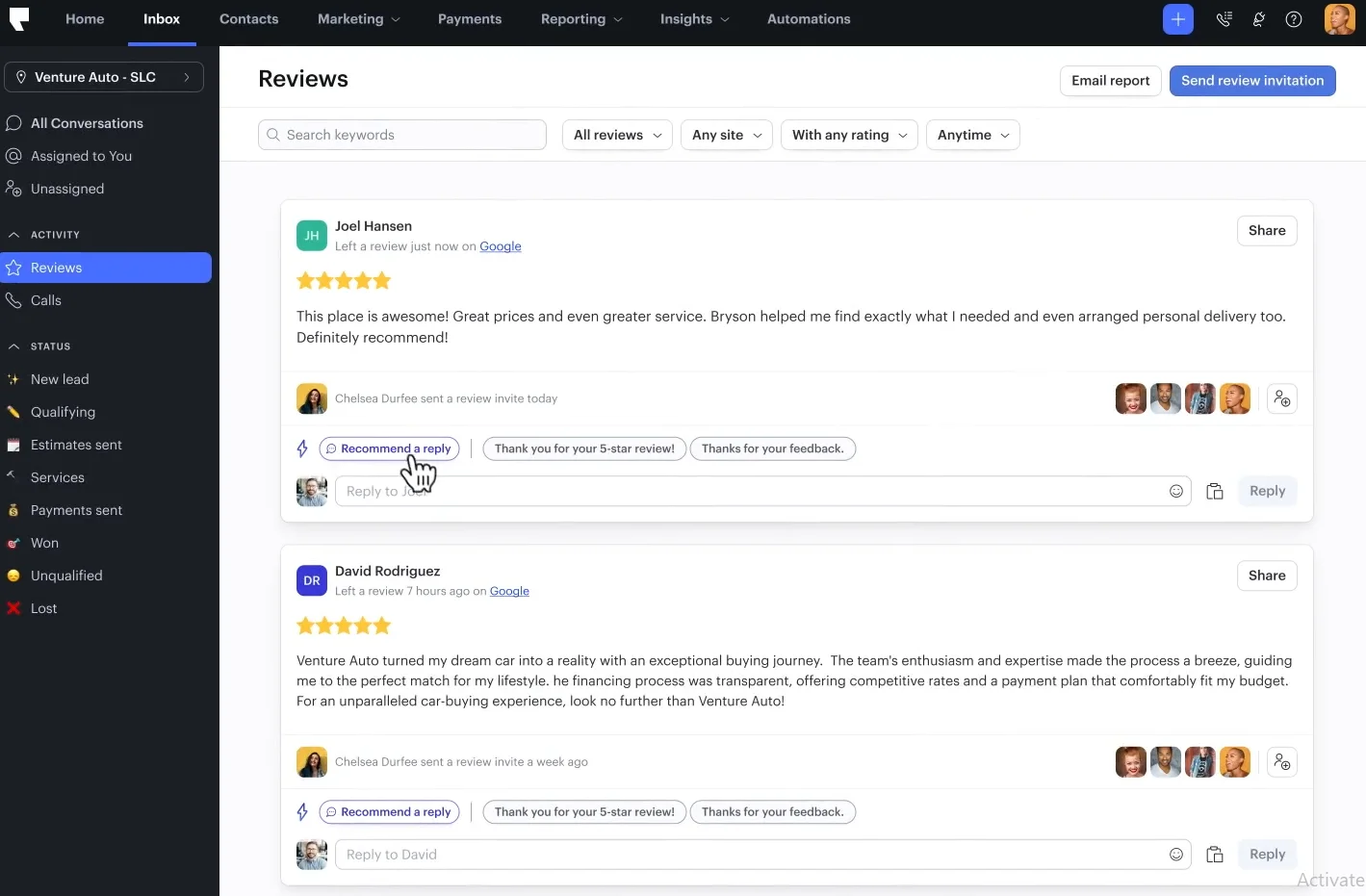
Google and Yelp reviews land in the same inbox alongside your conversations. AI drafts a response in seconds, and you can customize it or push it live with one tap. For teams that handle 50+ reviews a week, this removes the biggest friction point: context switching between the review platform and your response.
Podium Pricing
Also Check: Podium pricing review: Is it worth the cost?
3. Birdeye

Birdeye has been in the reputation game longer than most tools on this list, and that longevity shows in the breadth of its platform. It’s the closest thing to a “one vendor for everything” solution.
Reviews, listings, surveys, social media, messaging, and ticketing all live under one roof.
Best for: Enterprise and multi-location brands that need a single platform to manage reputation, customer experience, messaging, and social presence with heavy AI automation across all channels.
Review Monitoring
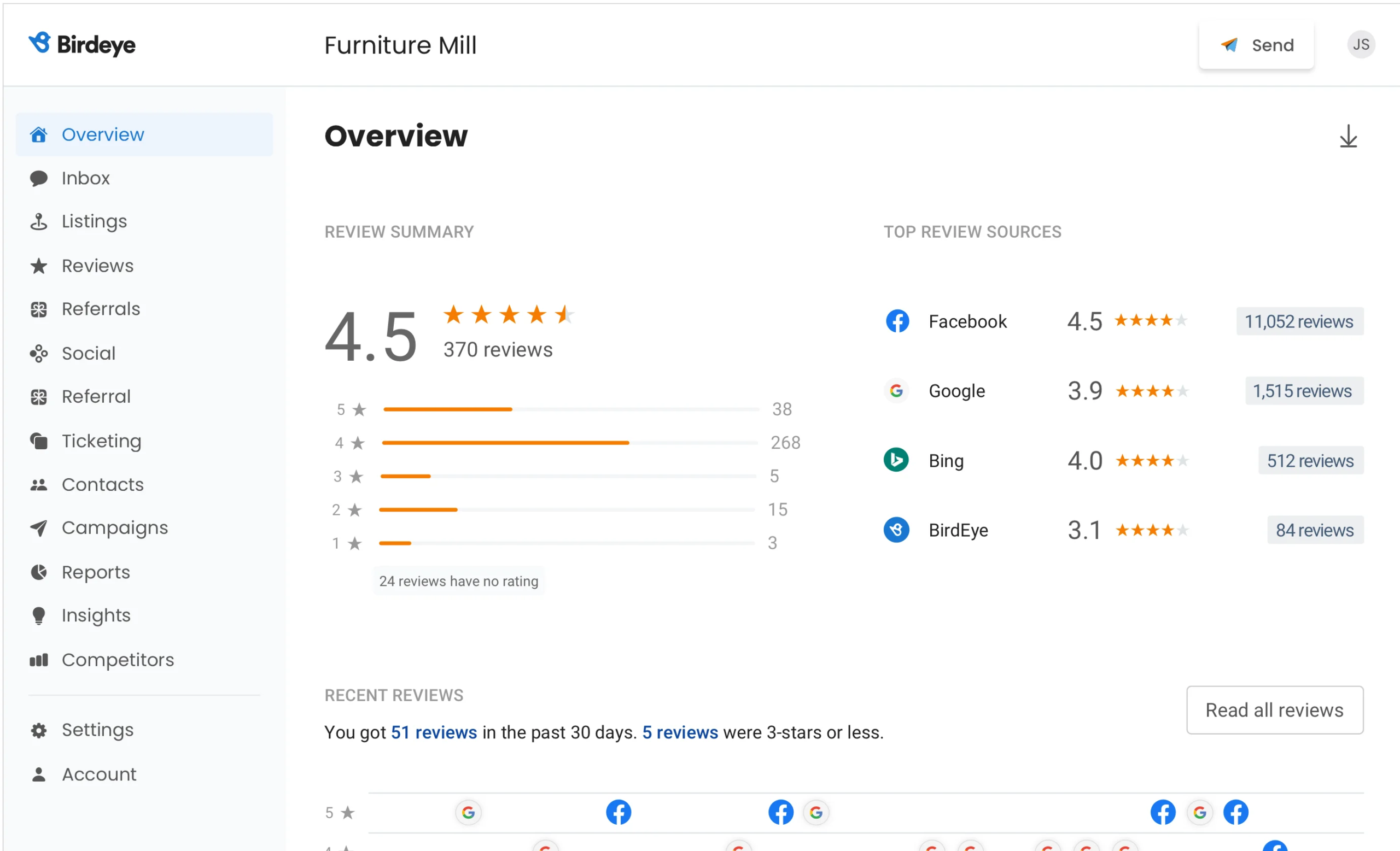
The Review Monitoring screen gives you what I call the “air traffic control” view. Your aggregate star rating and total review count sit front and center, with a breakdown by star level so you can see distribution at a glance.
Below that, the “Top Review Sources” panel reveals which platforms contribute the most reviews. For a healthcare practice, this might show Google, Healthgrades, and Vitals. For a restaurant, it could be Google, Yelp, and TripAdvisor. Knowing where your reviews actually come from prevents you from wasting effort on platforms that don’t matter for your industry.
Review SMS
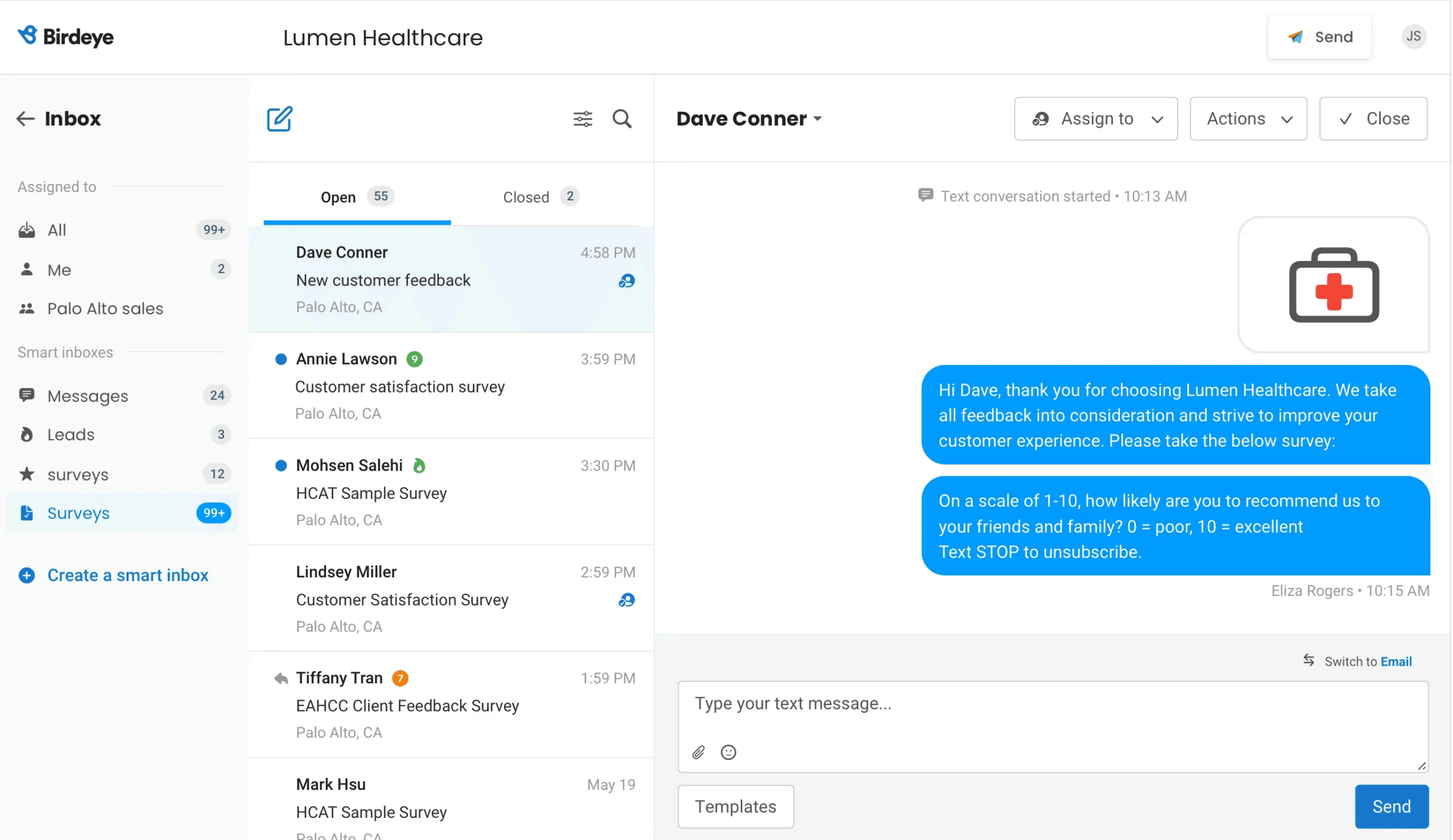
Birdeye’s SMS engine automatically texts customers after a service interaction to request feedback through a short survey. The smart part is what happens next: satisfied customers get directed to leave a public review, while unhappy customers get routed to a private feedback form.
This intercept mechanism is one of the most effective ways to improve your public rating without gaming the system. You’re not hiding bad reviews. You’re catching problems early and resolving them privately before they go public.
Reporting
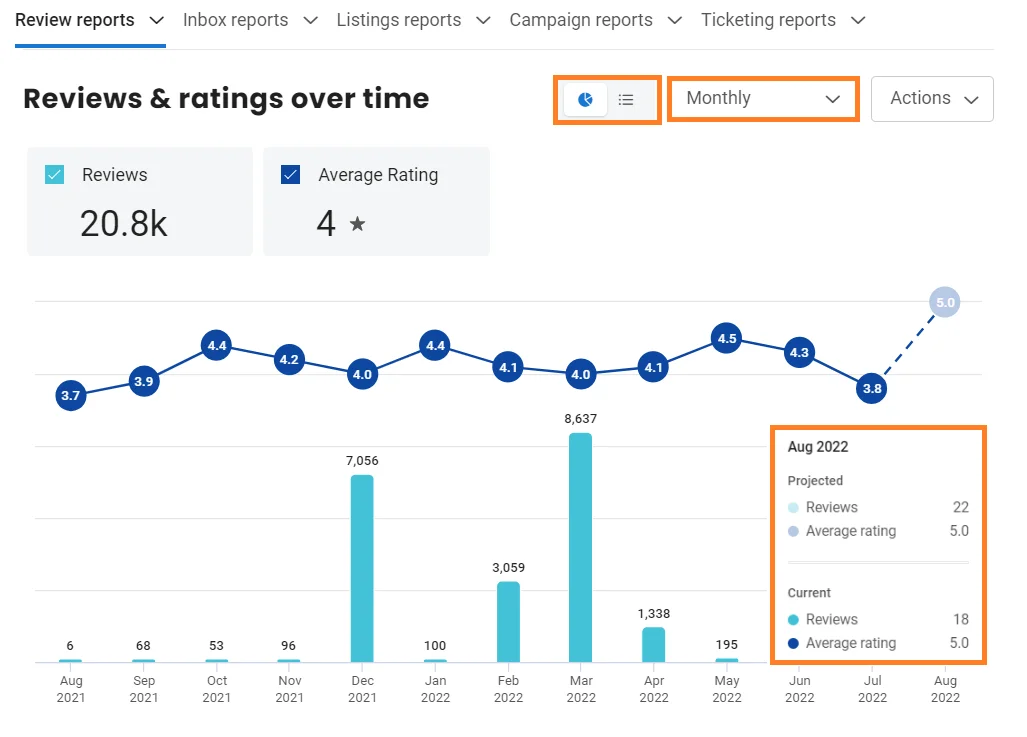
The Reporting tab charts your reviews and ratings over time with a feature I haven’t seen elsewhere: a projected value for the current month based on your pace so far.
This projection acts as an early warning system. If you normally get 200 reviews a month and the projection shows you’re on track for 140, something changed. Maybe a follow-up campaign stopped running, or a location’s service quality dropped. Having that signal mid-month gives you time to course-correct rather than discovering the problem in a retrospective report.
Birdeye Pricing
Also Check: Birdeye pricing review: Is it worth the cost?
4. NiceJob
NiceJob was clearly designed by people who understand service businesses. Plumbers, electricians, cleaners, landscapers… these operators don’t have time to build marketing funnels. NiceJob gives them a system where happy customers automatically become reviewers and referral sources with almost zero manual work.
Best for: Local service businesses and tradespeople who want their reputation to grow on autopilot through reviews and word-of-mouth referrals.
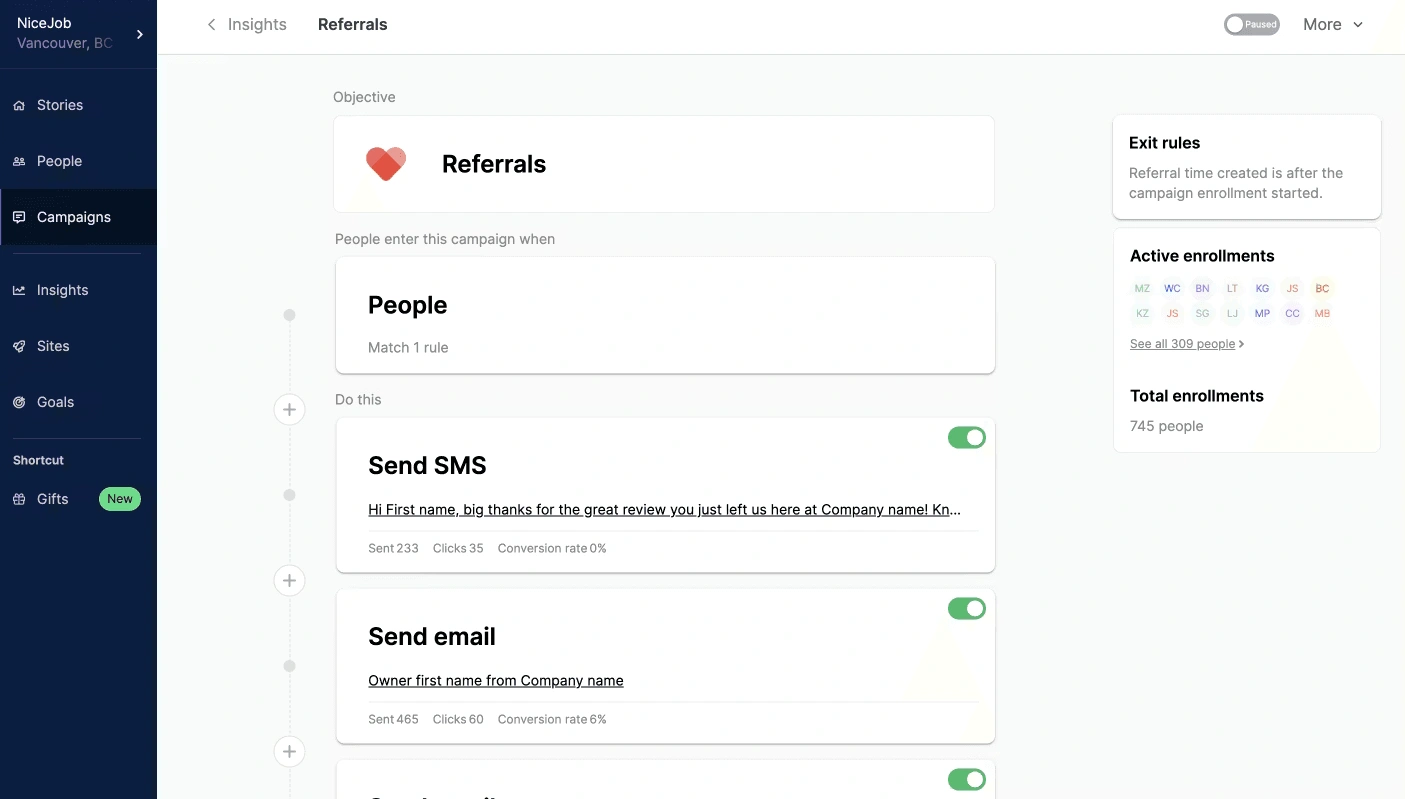
NiceJob’s standout insight is that reputation management shouldn’t end at the review. The Campaigns section offers three focused goals:
- Get Reviews: Automated sequences that trigger after job completion, nudging satisfied customers toward Google or Facebook.
- Referrals: Customers who leave positive reviews automatically enter a referral campaign. They receive a personalized SMS asking them to recommend you to friends, with tracking so you know exactly which customers drive the most word-of-mouth.
- Welcome New Customers: First-time customers get onboarded with a branded message that sets expectations and builds goodwill from day one.
The referral campaign is where NiceJob differentiates itself. Most ORM tools stop at the review. NiceJob turns that review into a growth loop: review → referral → new customer → new review.
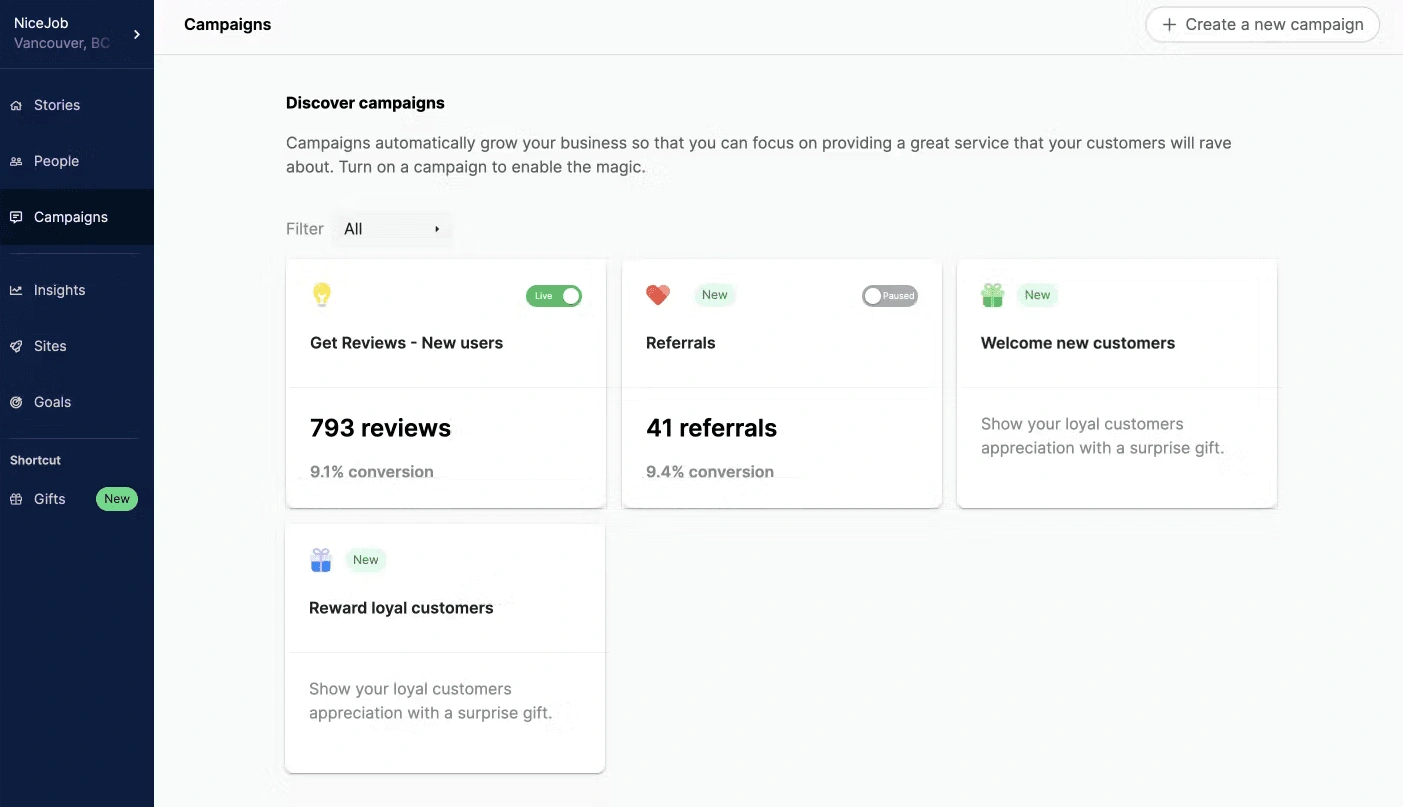
The campaign dashboard doesn’t just show how many messages went out. It shows conversion rates. During testing, a cleaning company running NiceJob’s New User campaign reported a 9.1% conversion rate from review request to published review, which is well above the industry average of 5-7%.
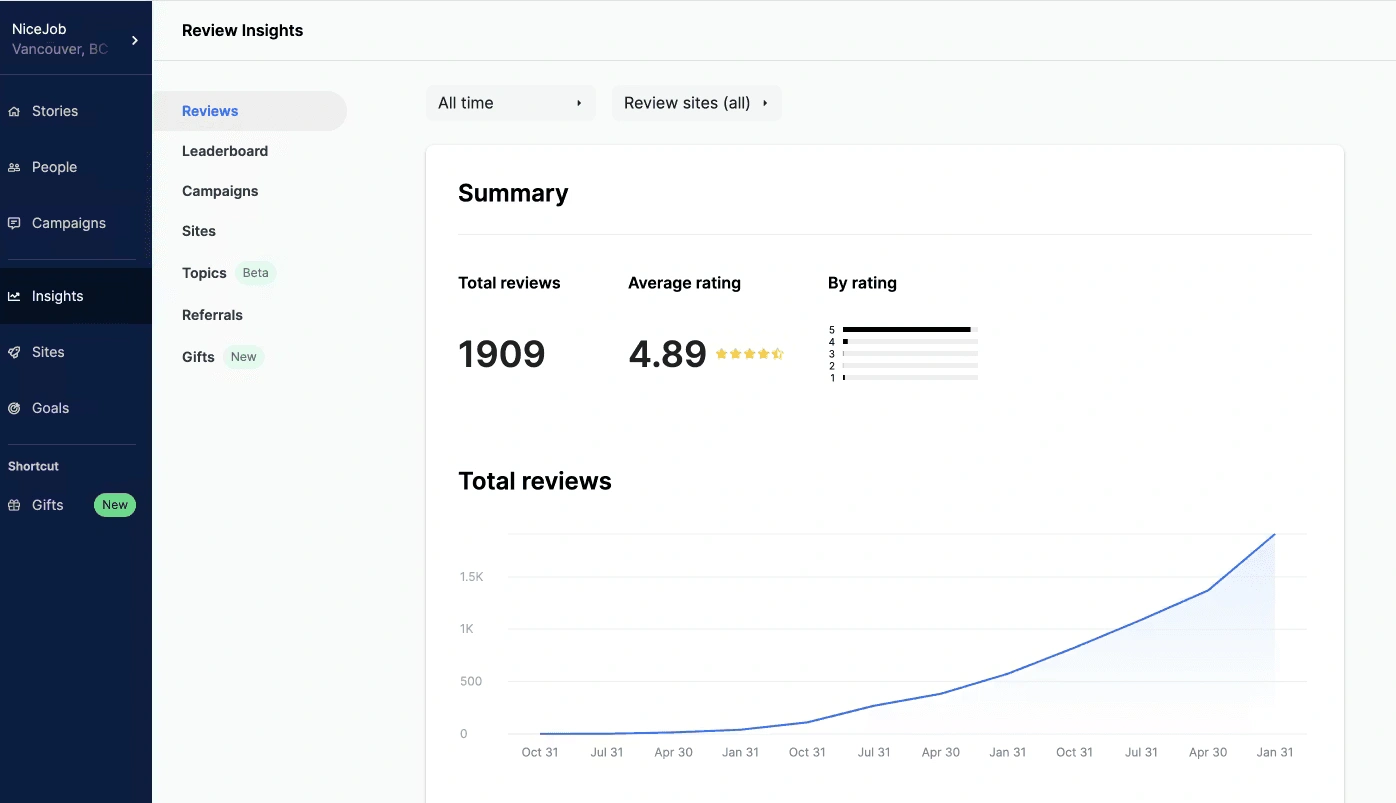
The Insights tab shows cumulative review growth over time. The upward trajectory chart is motivating, but the real value is seeing whether your growth rate is accelerating or plateauing. If the curve flattens, it’s time to refresh your automated review request templates or adjust your timing triggers.

Build a Review System That Runs Itself
From collection to display, manage your entire reputation from one place.
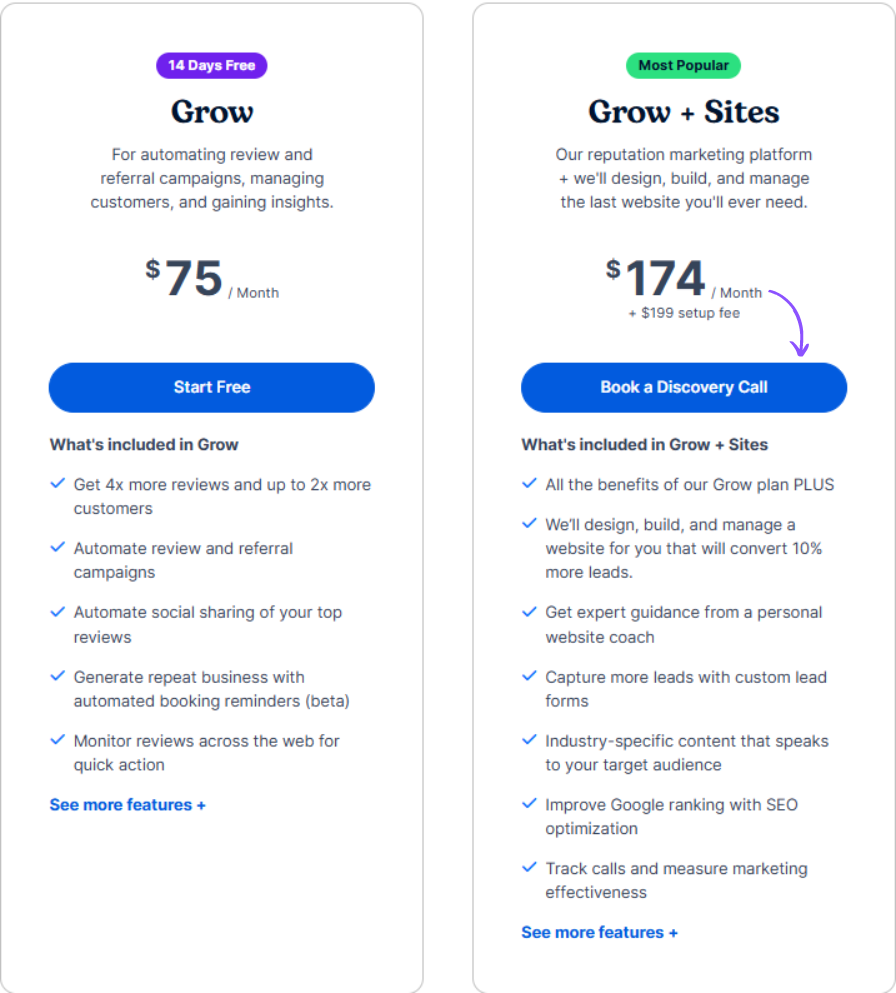
NiceJob Pricing
5. ReviewTrackers
ReviewTrackers is a radar system for your entire digital footprint. It’s built for brands that operate across 10, 50, or 500+ locations and need to understand patterns across all of them in real time.
Best for: Multi-location brands, franchise networks, and businesses in industries like healthcare, hospitality, and automotive, where reviews come from dozens of specialized platforms.
Review Collection
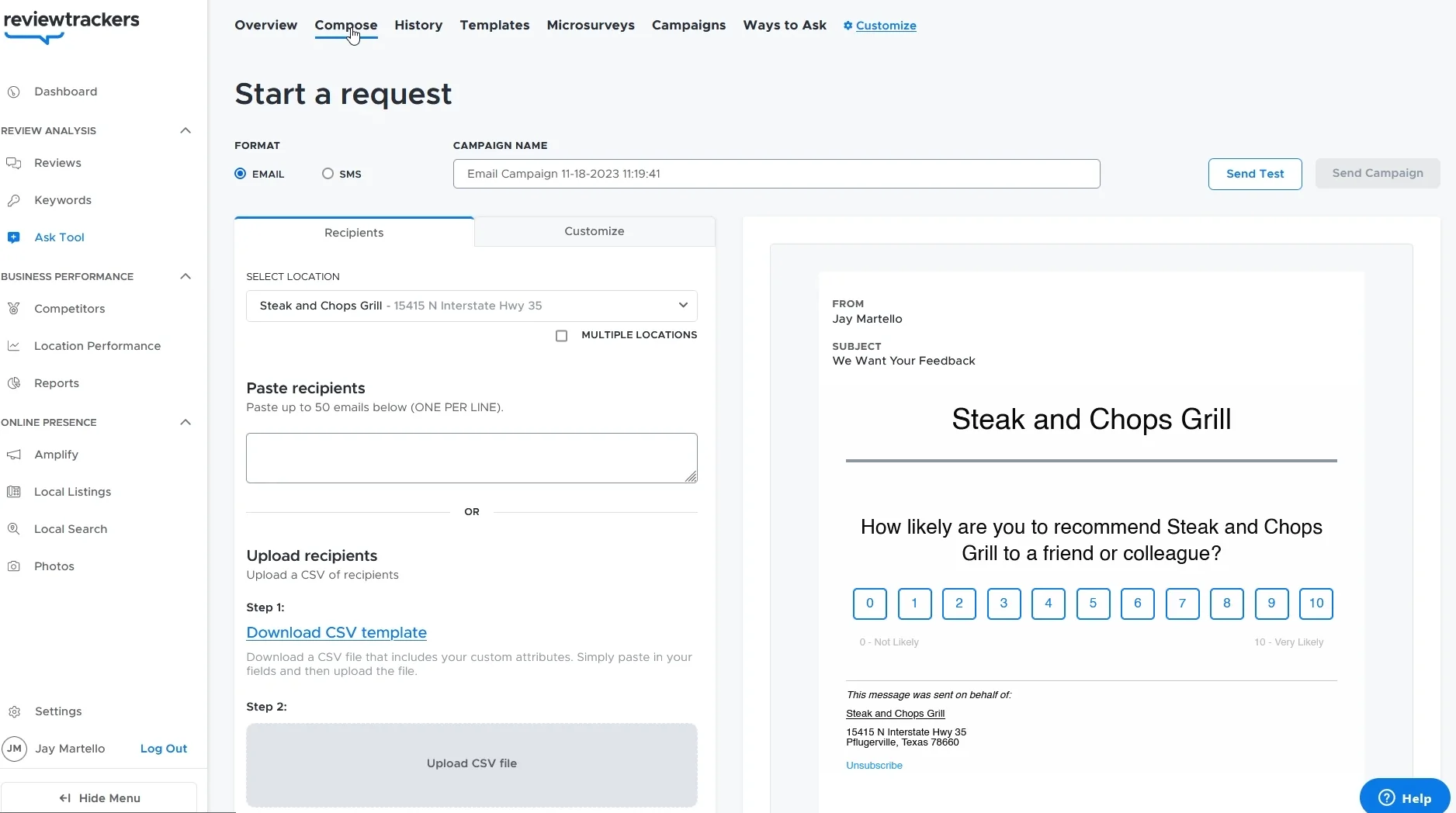
ReviewTrackers supports email and SMS campaigns with segmentation by location, customer type, and service category:
Review Management
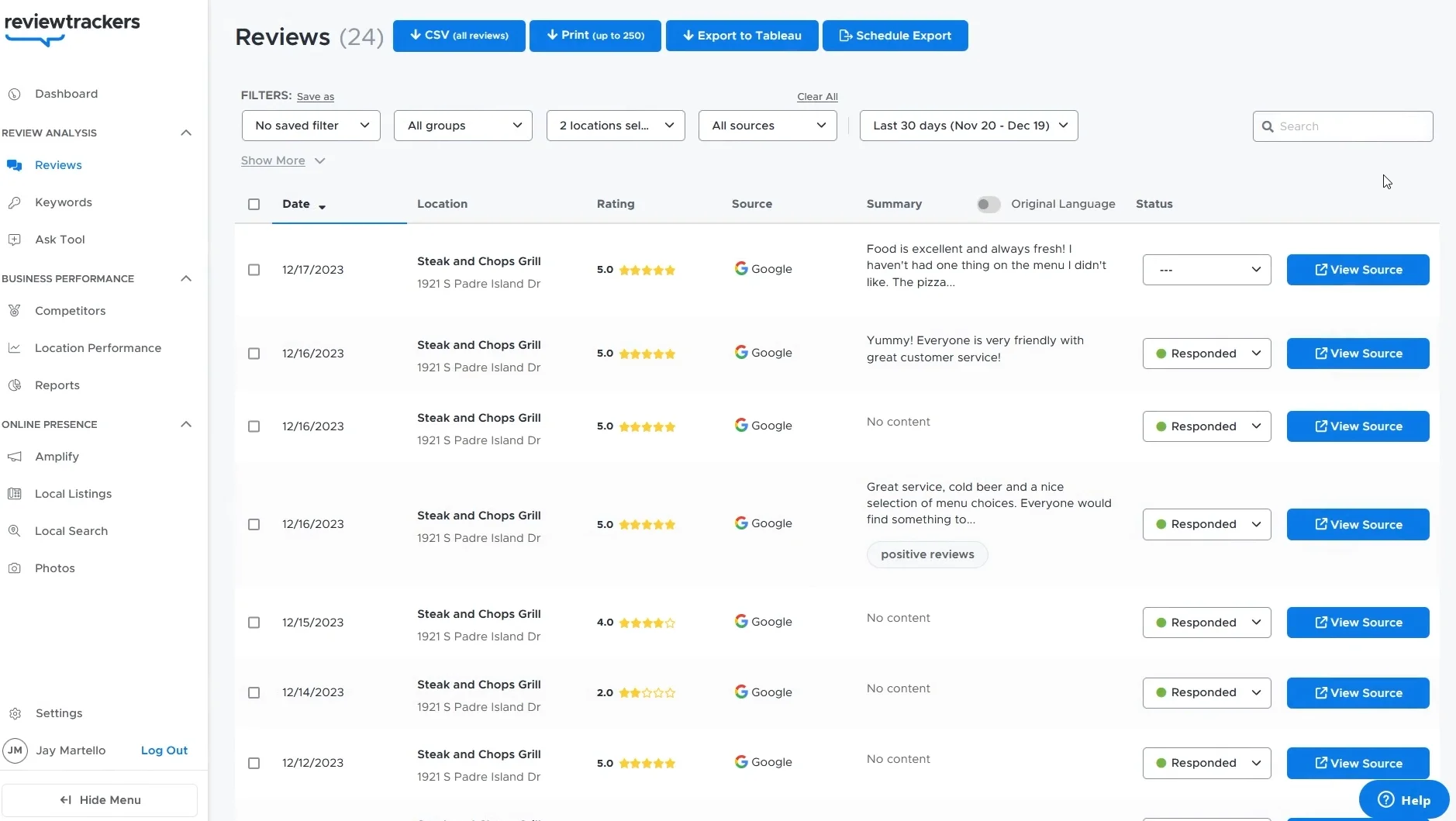
This is where ReviewTrackers separates itself from lighter tools. The management view aggregates reviews from over 100 sources into a single feed. Each review displays its source, location, rating, date, and response status, letting you sort and prioritize exactly how you need.
The filtering options are granular:
- By rating: Surface one- and two-star reviews that need immediate attention
- By source: See if Yelp or Healthgrades is dragging your average down
- By location: Identify which branches are outperforming or underperforming
A “Responded” badge next to each review creates accountability. In team meetings, managers can pull up response rates by location and quickly see who’s falling behind.
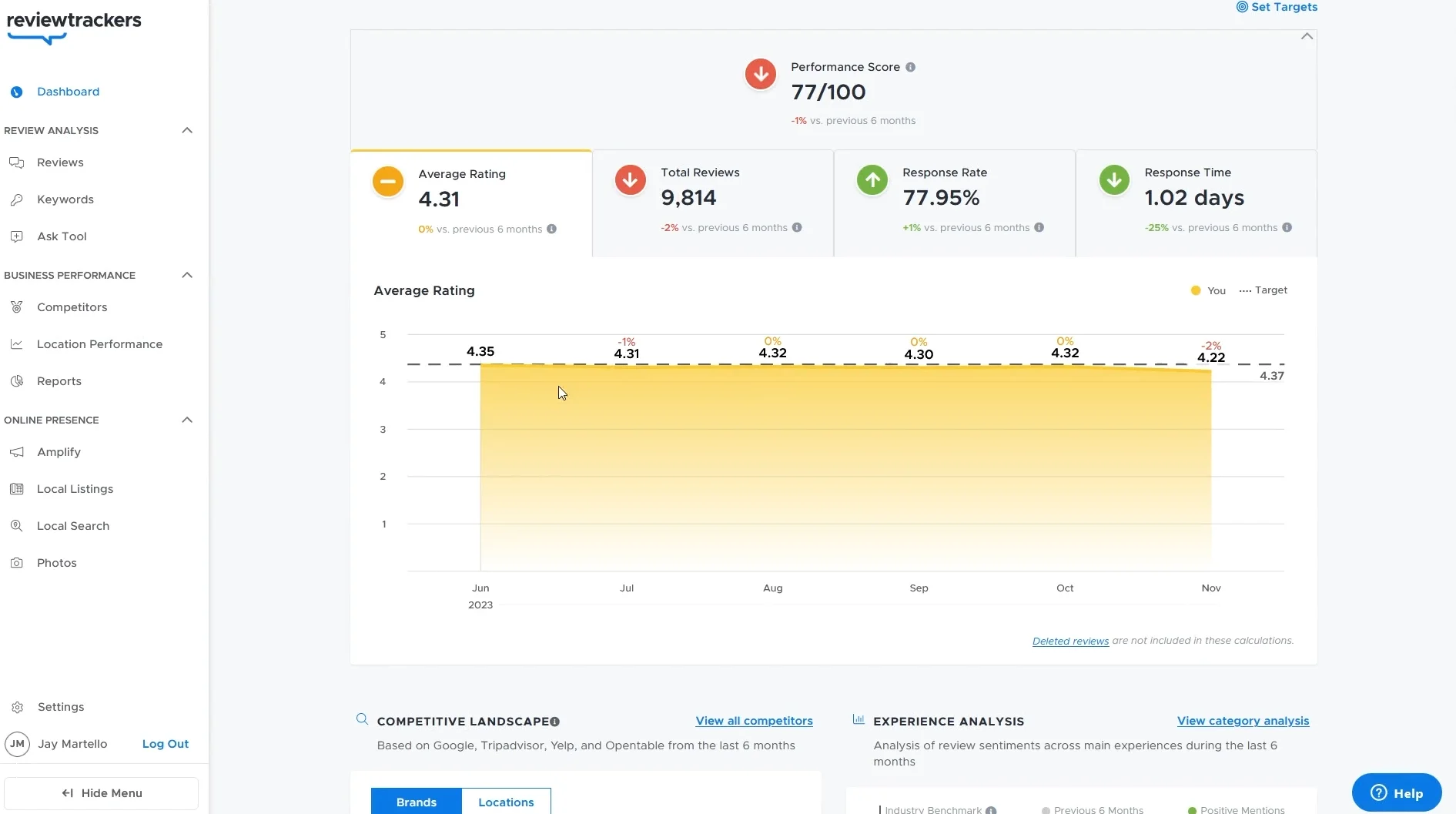
The analytics dashboard surfaces four numbers that matter: Average Rating, Total Reviews, Response Rate, and Response Time. But what makes it powerful is the trend line charting these metrics over weeks and months.
I watched one franchise owner use this chart to pinpoint the exact week a new manager started. The response time spiked from two hours to three days. Without this data, the problem would’ve gone unnoticed for months.
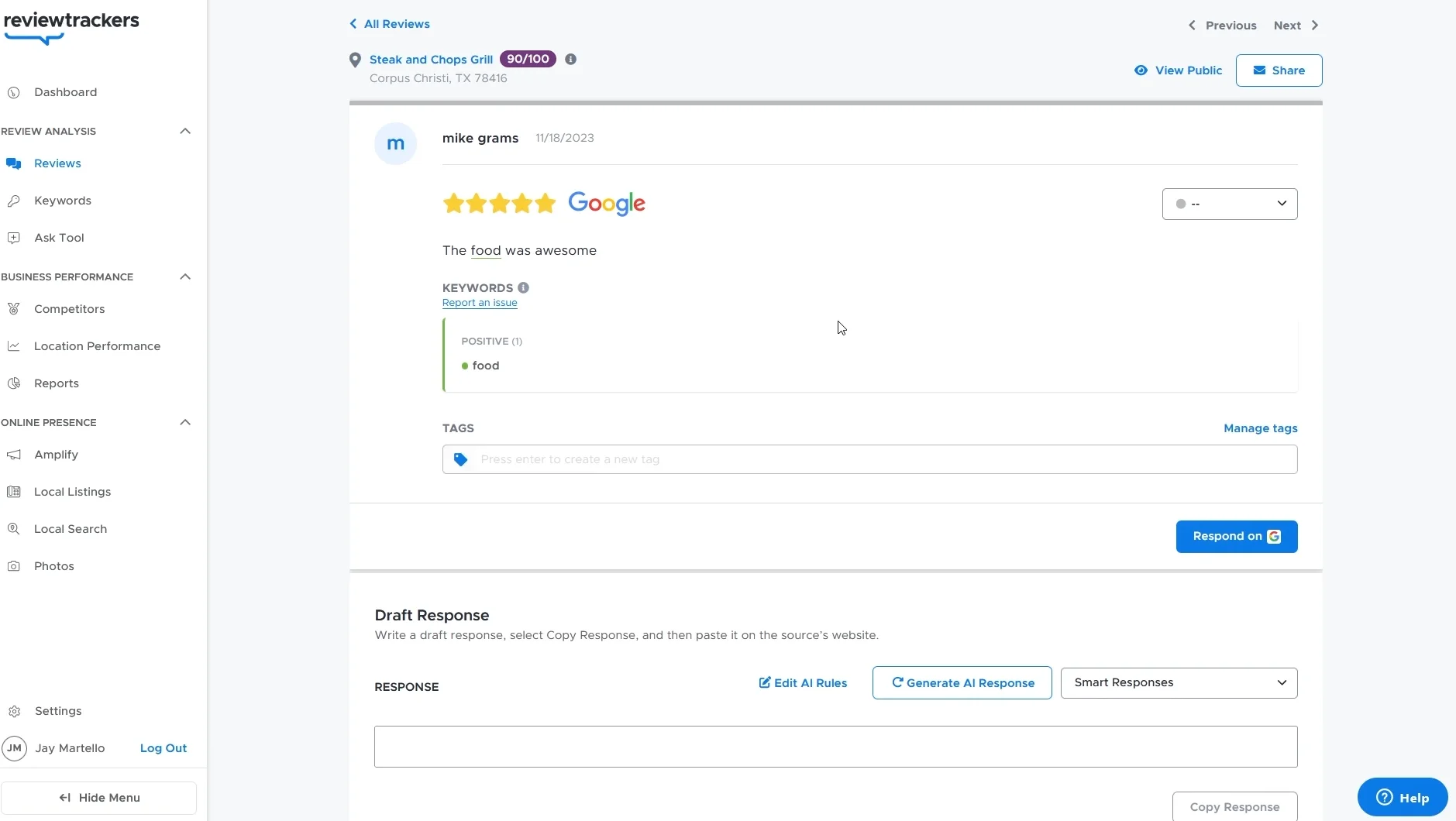
Individual review responses can be drafted using AI with customizable tone rules. The interface lets you review the suggestion, edit it, and push it directly to Google or Yelp. No copy-paste required.
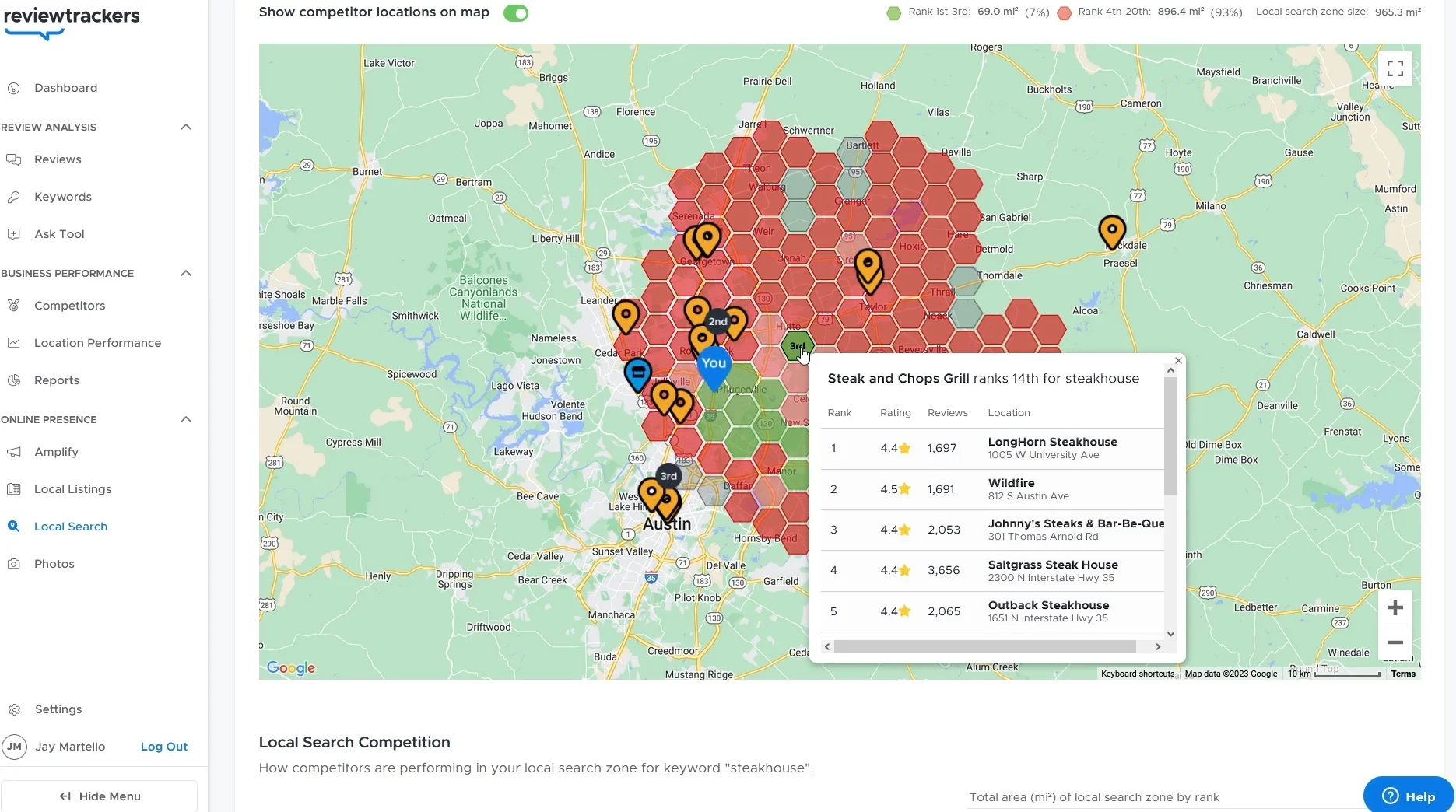
The Local Search tab is where ReviewTrackers goes beyond reputation into competitive intelligence. A map-based view shows your competitors’ locations alongside their ratings, review counts, and rankings for specific keywords.
For a restaurant group competing on “best steakhouse” in five cities, this data alone is worth the subscription price.
Display Reviews
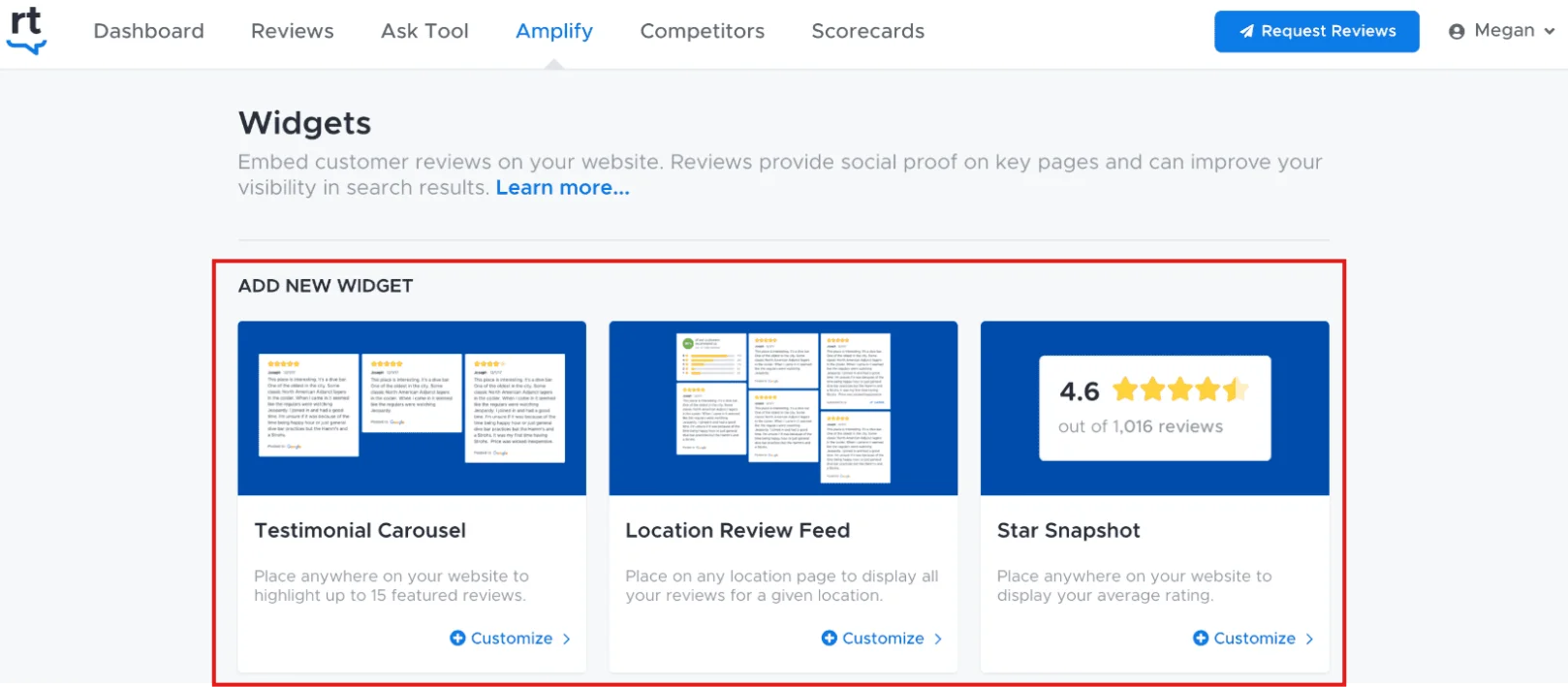
ReviewTrackers offers testimonial carousels, location-specific review feeds, and star summary badges for embedding on your site.
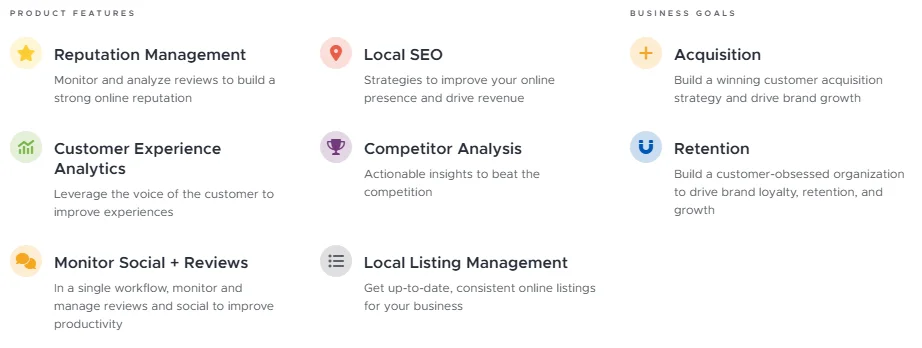
It also bundles local listing management, ensuring your name, address, and phone number stay consistent across directories. This is a factor Google weighs when deciding local search rankings.
ReviewTrackers Pricing
6. RightResponse AI
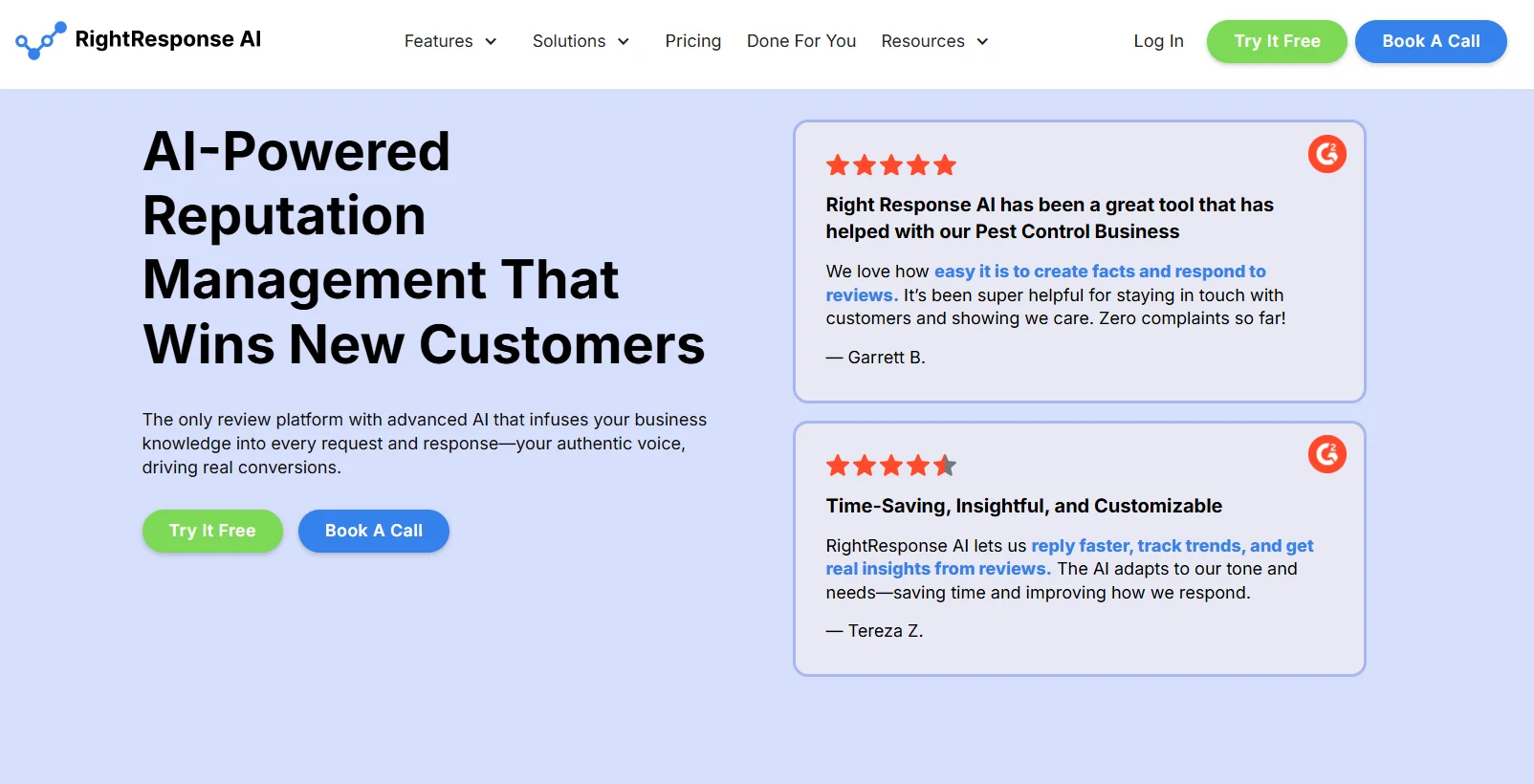
Here’s a scenario I see constantly: a business has plenty of reviews coming in, but nobody has the time to reply.
Unanswered reviews, especially negative ones, signal to prospects that nobody’s home. RightResponse AI exists to solve exactly this problem at a price that won’t strain a small business budget.
Best for: Businesses that already generate reviews but need an affordable AI assistant to craft personalized responses and extract insights from customer feedback at scale.
RightResponse Dashboard
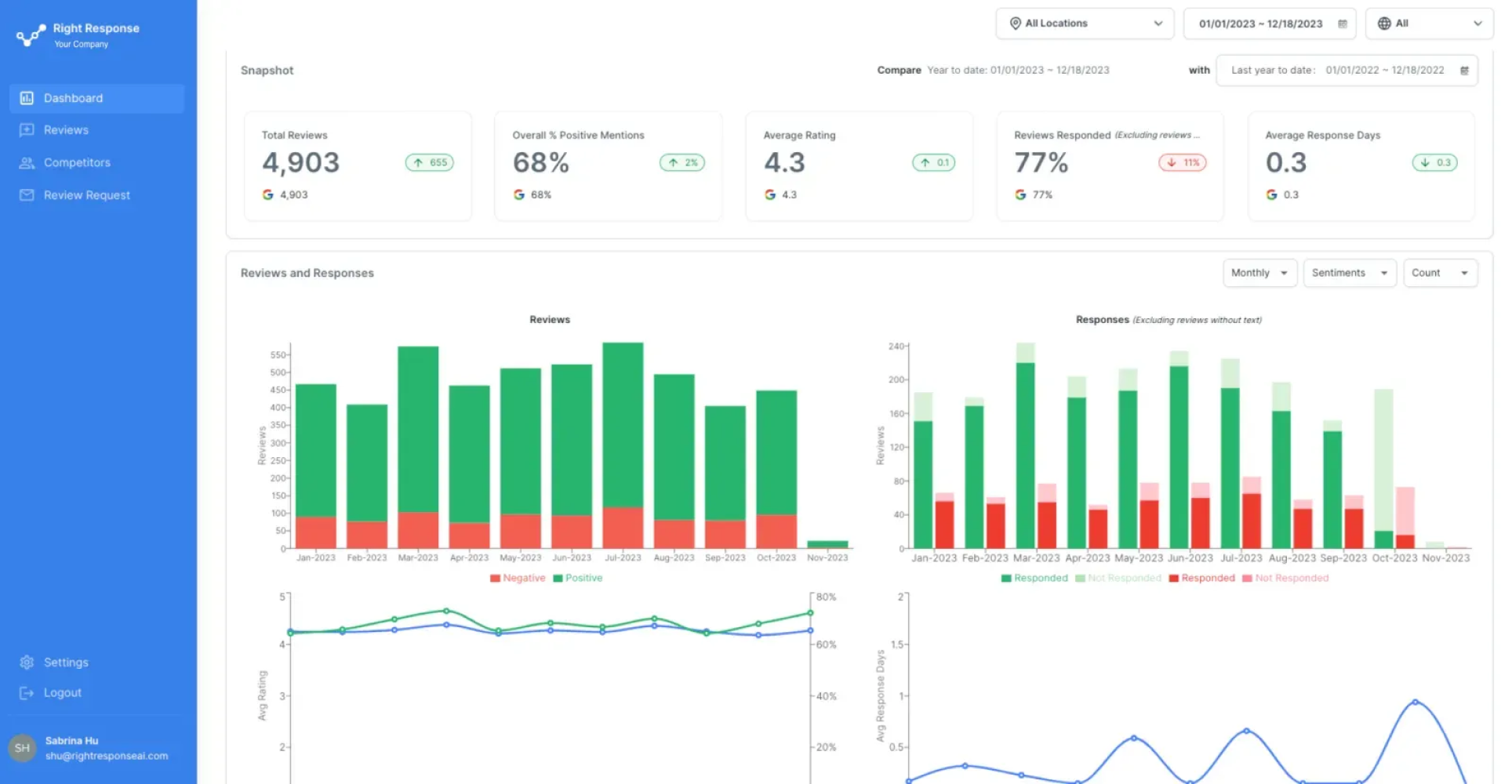
The dashboard is designed around one question: “Are we keeping up?” At a glance, you see Total Reviews, Positive Mention Rate, Average Rating, Response Rate, and Average Response Time. Two comparison charts sit above, showing monthly reviews versus responses and rating versus response speed, so you can spot deterioration before customers notice.
Review Response Overview
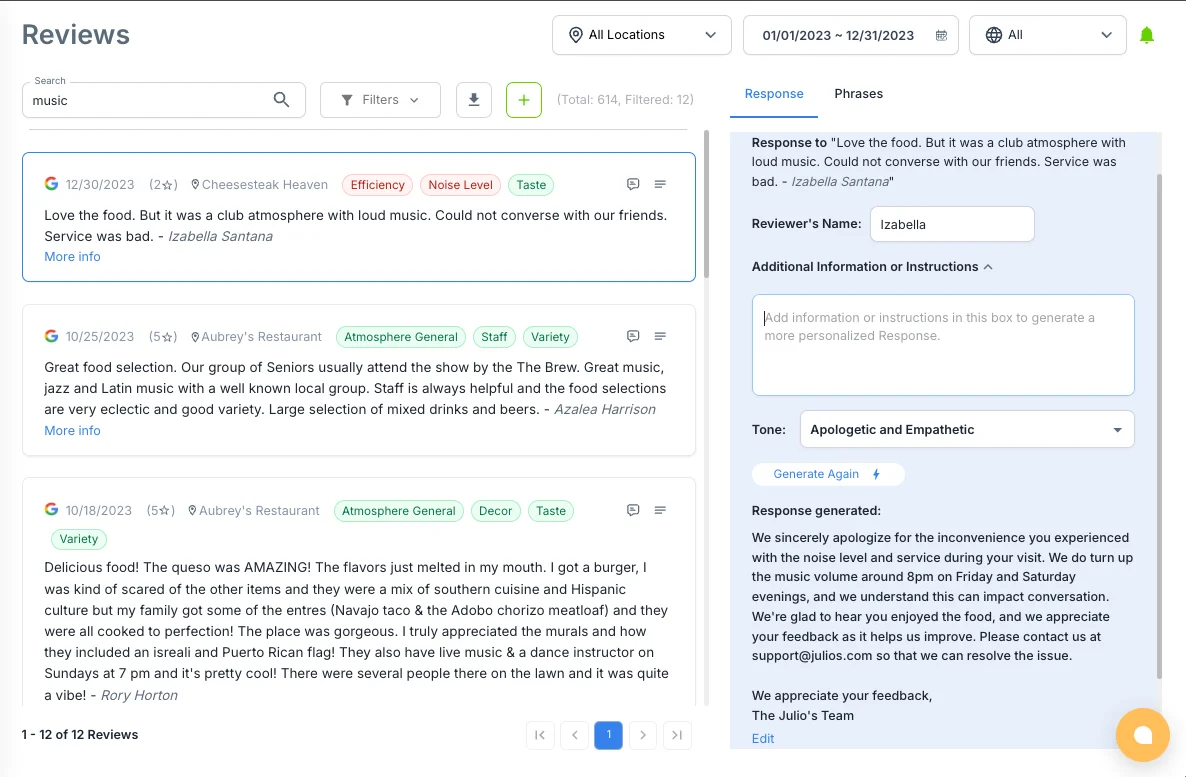
This is the reason you’d choose RightResponse over writing replies manually.
Sentiment Tagging: Every incoming review is analyzed and automatically tagged with themes like Wait Time, Staff Friendliness, Product Quality, or Cleanliness. Over time, these tags build a dataset that reveals exactly what drives positive and negative feedback. That’s far more reliable than reading individual reviews and guessing.
AI Response Generation: Based on the detected sentiment and extracted themes, the AI drafts a response that matches the situation. A one-star complaint about noise gets an empathetic, specific apology. A five-star rave about the food gets a warm, personalized thank you that mentions the dish. Your team reviews, optionally edits, and approves. That’s it.
In my test, a restaurant using RightResponse went from answering 30% of reviews to 92% within the first month, without adding staff.
Stop Leaving Reviews Unanswered
Collect, respond, and showcase customer feedback with smart automation.
Map Rank Tracker
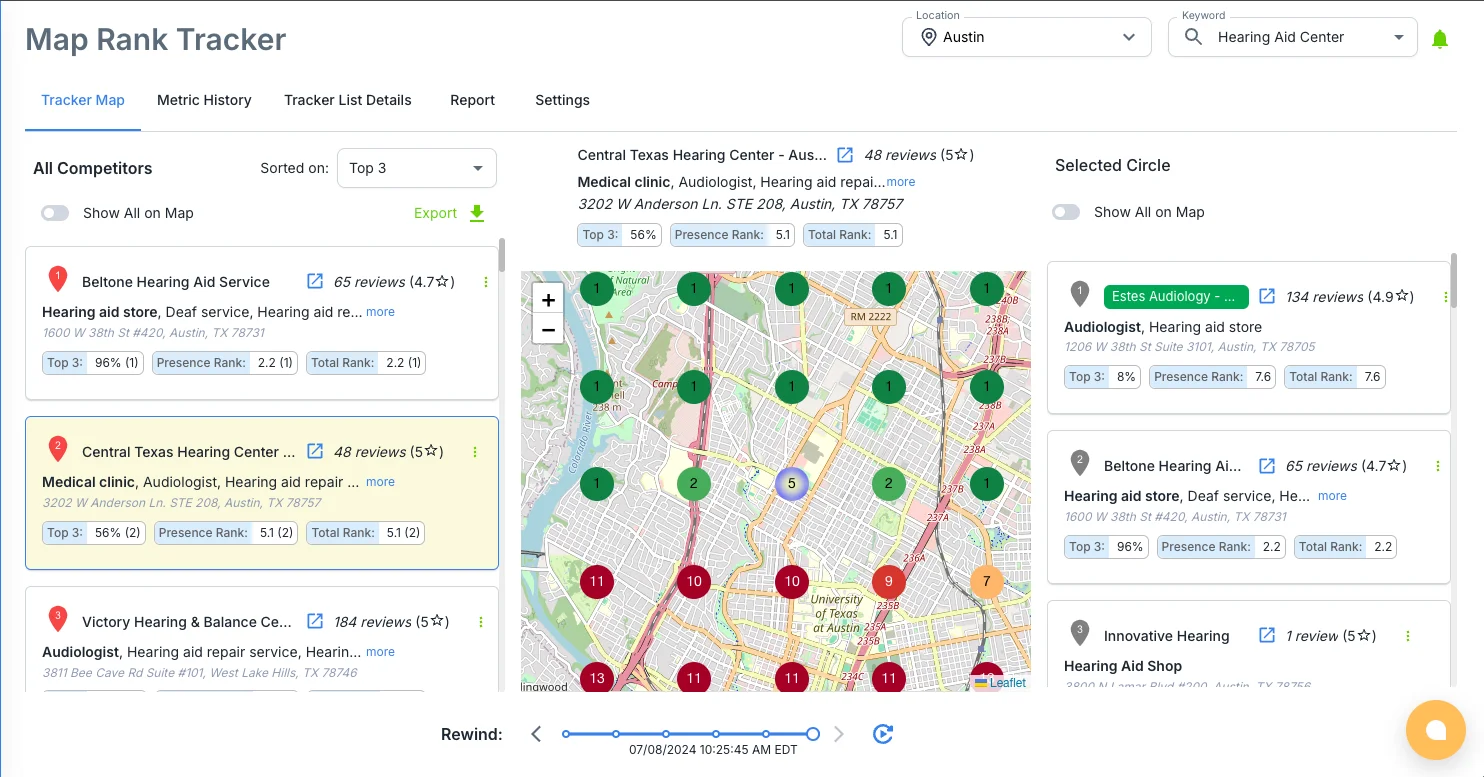
This feature bridges the gap between reputation management and local SEO. The Map Rank Tracker overlays a grid on your geographic area and shows your Google Maps ranking for target keywords at each grid point, plus your competitors’ positions.
It answers a question most business owners can’t: “If someone two miles south of me searches for ‘pizza near me,’ am I showing up on the first page?” And more importantly, it shows whether improving your review profile is actually moving that needle.
RightResponse Pricing
How to Choose the Right Online Reputation Management Tool
After testing 25 platforms, I’ve noticed that the businesses unhappy with their ORM software almost always made the same mistake: they picked a tool based on features rather than fit.
Here’s the framework I’d use instead:
➔ Start with Your Review Volume and Channel Mix
Be honest about where your reviews actually come from. If 90% of your feedback lives on Google and your own website, WiserReview, NiceJob, Podium, and RightResponse AI will handle 95% of what you need.
The only reason to invest in ReviewTrackers or Birdeye is if you genuinely need to monitor specialized review sites. Think Healthgrades for medical, TripAdvisor for hospitality, or Avvo for legal. If you don’t operate in a review-heavy industry, you’re paying for coverage you’ll never use.
➔ Match the Tool to Your Team Size
One person wearing every hat: Choose automation over analytics. WiserReview and NiceJob are designed to work even if nobody’s watching the dashboard daily. Add RightResponse AI if your review volume outpaces your ability to reply.
A marketing team with regional managers: Now the dashboards matter. ReviewTrackers and Birdeye give you the scorecards, benchmarks, and drill-down reporting that make multi-location oversight possible. These tools assume someone is looking at the data regularly and acting on it.
➔ Decide if You Need Messaging and Payments
If your business model depends on real-time customer conversations like scheduling, quoting, and closing, Podium integrates all of that with reputation management. Birdeye offers a similar multi-channel approach.
If you already have a CRM, scheduling tool, and payment processor you’re happy with, don’t add another one. Pair WiserReview with RightResponse AI, or use ReviewTrackers standalone. Keep your stack lean and focused.
➔ Set a Realistic Budget
Under $20/month: WiserReview (Essentials) or RightResponse AI. Both deliver disproportionate value at this price. For a bootstrapped local business, this is where I’d start.
$50 to $150/month: NiceJob Pro, WiserReview Growth tiers, or a single-location ReviewTrackers plan. This range unlocks stronger automation and reporting.
$300 to $600+/month per location: Podium and Birdeye. These only make financial sense when your average customer value is high enough that one additional five-star review can be directly tied to thousands in revenue. If your average transaction is $50, the math doesn’t work. If it’s $5,000, it probably does.
Wrap Up
Here’s the truth nobody in this space wants to admit: the software is the easy part. The hard part is building a culture where your team consistently asks for feedback, responds to every review (good and bad), and uses what customers say to actually fix things.
No tool can replace that. But the right tool removes the friction that prevents it from happening.
My final picks after 40+ hours of testing:
- Best Value for Small Businesses: WiserReview, the most affordable path to automated review collection and display.
- Best for Multi-Location Intelligence: ReviewTrackers, with unmatched analytics and competitor benchmarking for brands with many locations.
- Best for Text-First Lead Conversion: Podium, the right choice when reviews are just one piece of a larger customer communication strategy.
Pick the tool that matches your team, your budget, and your actual workflow. Not the one with the longest feature list.


