
How to Increase Checkout Conversion: 12 Tactics (2026)
To increase checkout conversion, show the full cost before the payment step, let shoppers pay as guests with the method they already use, and put trust signals beside the pay button. Those three answer most reasons people quit.
Checkout is the last place a sale can fail, and the one most stores leave alone. Across 427 Shopify stores benchmarked in October 2026, the median store converts 52% of the shoppers who start checkout.
Below are 12 tactics grouped by the problem they fix, with a live checkout example for each, plus the benchmarks to judge your own rate against.
What Is Checkout Conversion Rate?
Checkout conversion rate is the share of shoppers who start checkout and place an order. It’s the narrowest step in the funnel, so it reacts fastest to fixes.
The formula is simple.
Checkout conversion rate = (Orders placed ÷ Checkouts started) × 100
If 1,000 shoppers start checkout in a month and 520 pay, your rate is 52%. It’s not your site conversion rate, which divides orders by every session, and not cart abandonment, which counts everyone who added an item and left.
Shopify shows it in the Analytics conversion breakdown as reached checkout against sessions converted. In GA4, compare the begin_checkout and purchase events in a funnel report.
What Is a Good Checkout Conversion Rate?
A good checkout conversion rate is above 68%, which puts a store in the top 20% of Shopify stores. The median is 52%, and the bottom 20% sit below 28%.
| Where you stand | Checkout conversion rate | What it usually means |
|---|---|---|
| Bottom 20% | Below 28% | Something breaks or surprises shoppers at the payment step |
| Median | 52% | A standard checkout with the usual drop-offs |
| Top 20% | Above 68% | Costs shown early, guest checkout, express payments |
| Top 10% | Above 76% | All of the above, checked on a phone first |
Those figures come from 427 Shopify stores with at least 1,000 sessions, measured from July to October 2026. Mobile brings 68% of sessions in the same data, so check your mobile rate on its own.
Cart abandonment is a wider measure. The average across 50 studies is 70.22%, and large stores can lift conversion by 35% through checkout design alone. Our cart abandonment stats cover the full picture.
Why Shoppers Quit at Checkout
Shoppers mostly quit over money and effort: extra costs they didn’t expect, slow delivery, a card they don’t want to hand over, and forced account creation.
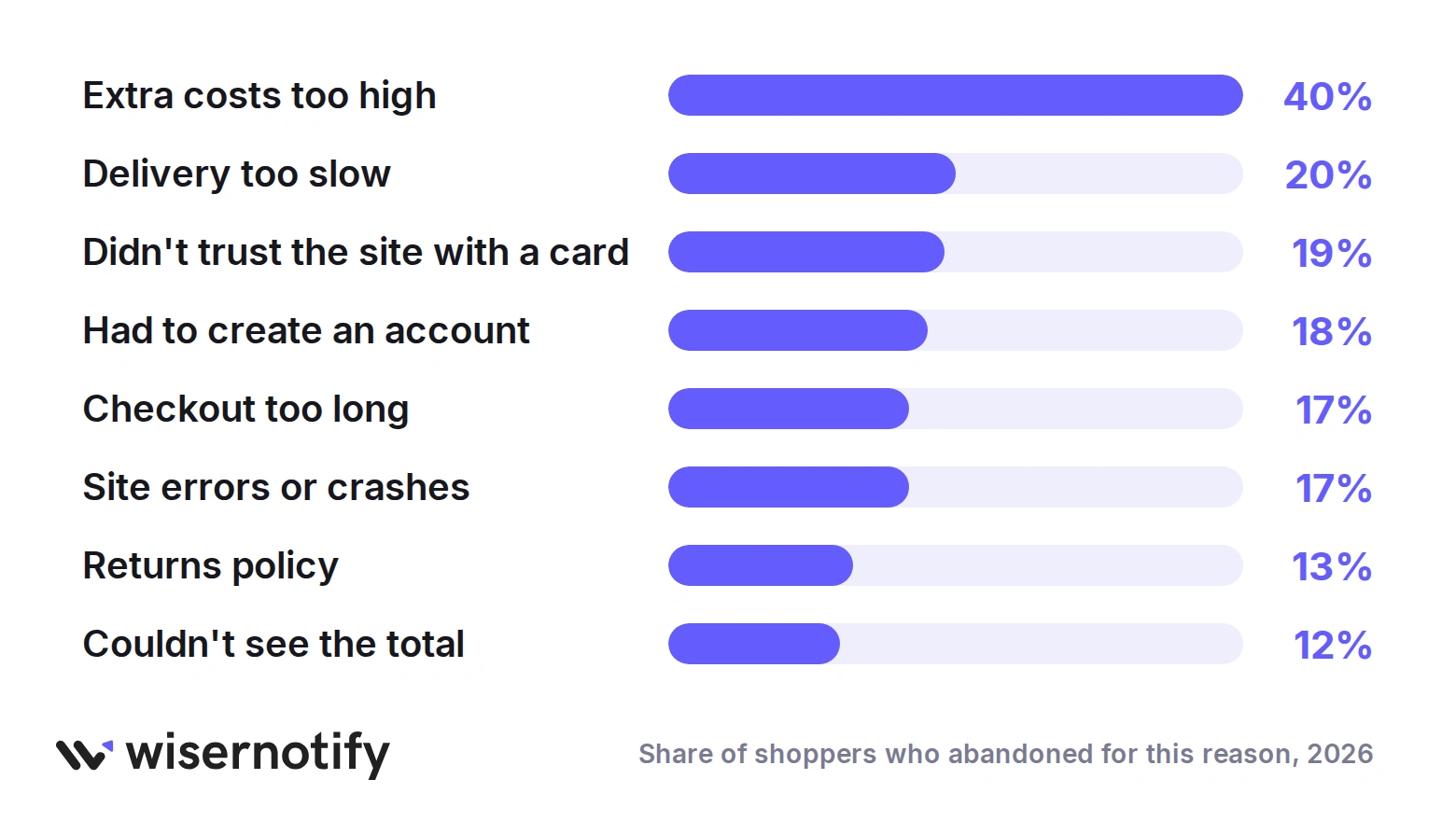
Those reasons map onto the four groups below. Fix the top two first, since costs and delivery lead the list by a wide margin.
The average US checkout still shows 23 form elements by default, when usability testing says 12 to 14 is enough. Each extra field is a small reason to stop.
Show the Real Cost and Easy Ways to Pay
The two biggest losses are a surprise total and a payment method the shopper doesn’t use. Both get fixed before the first form field.
1. Show the Total Before the Form
Unexpected shipping, tax or fees are the top reason for abandonment, so the total needs to appear before anyone types an address.
Add a shipping estimate to the cart, show the free shipping threshold with a progress bar, and keep the order summary visible on every checkout step.
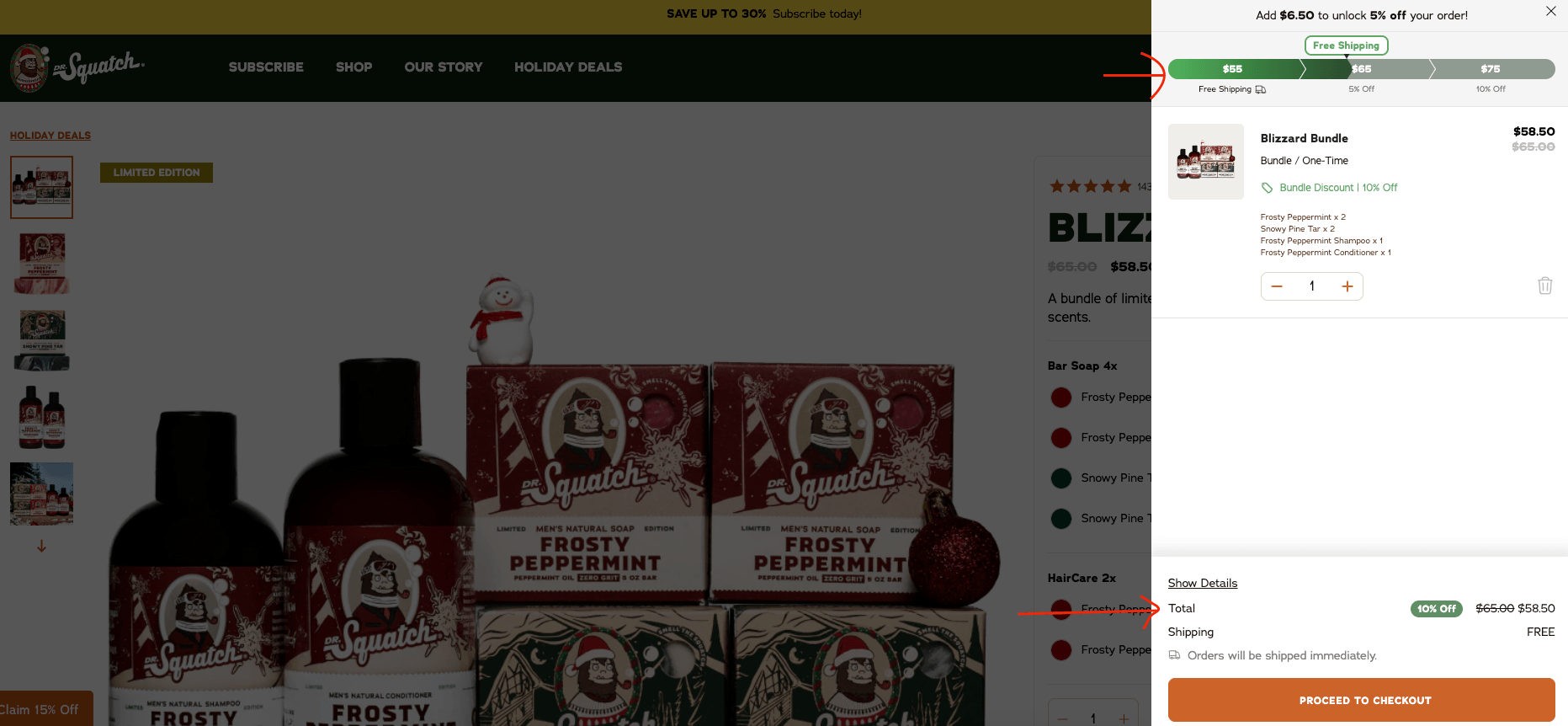
Dr. Squatch’s cart shows a free shipping bar that unlocks at $55, the discounted total, and the shipping line marked free, all before checkout starts. Nobody meets a new number at the end.
2. Pay the Way Shoppers Already Pay
Cards, PayPal, Apple Pay, Google Pay and buy now, pay later each win a different shopper. Express wallets also skip most of the form, which is the main reason they lift completion.
Look at your orders by payment method, then add the one or two your market expects. A single card form costs you every shopper who keeps their card in a wallet.
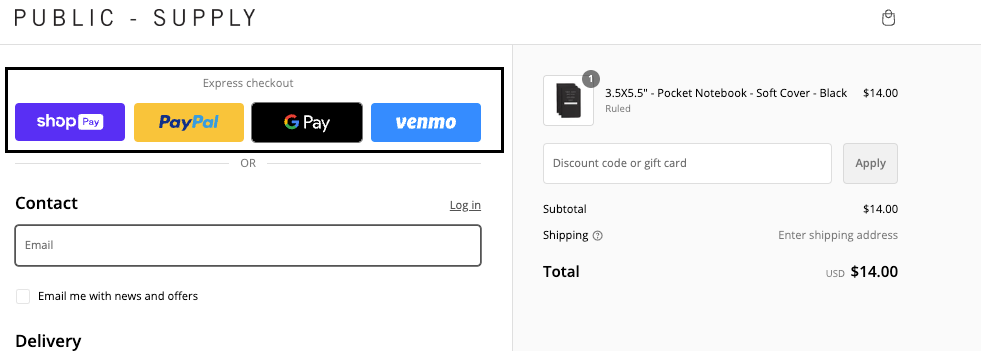
Public Supply puts express checkout buttons above the form, so wallet users finish in two taps.
Nice Laundry shows the pay-in-four option on the product page, so the smaller payment is known before checkout even starts.
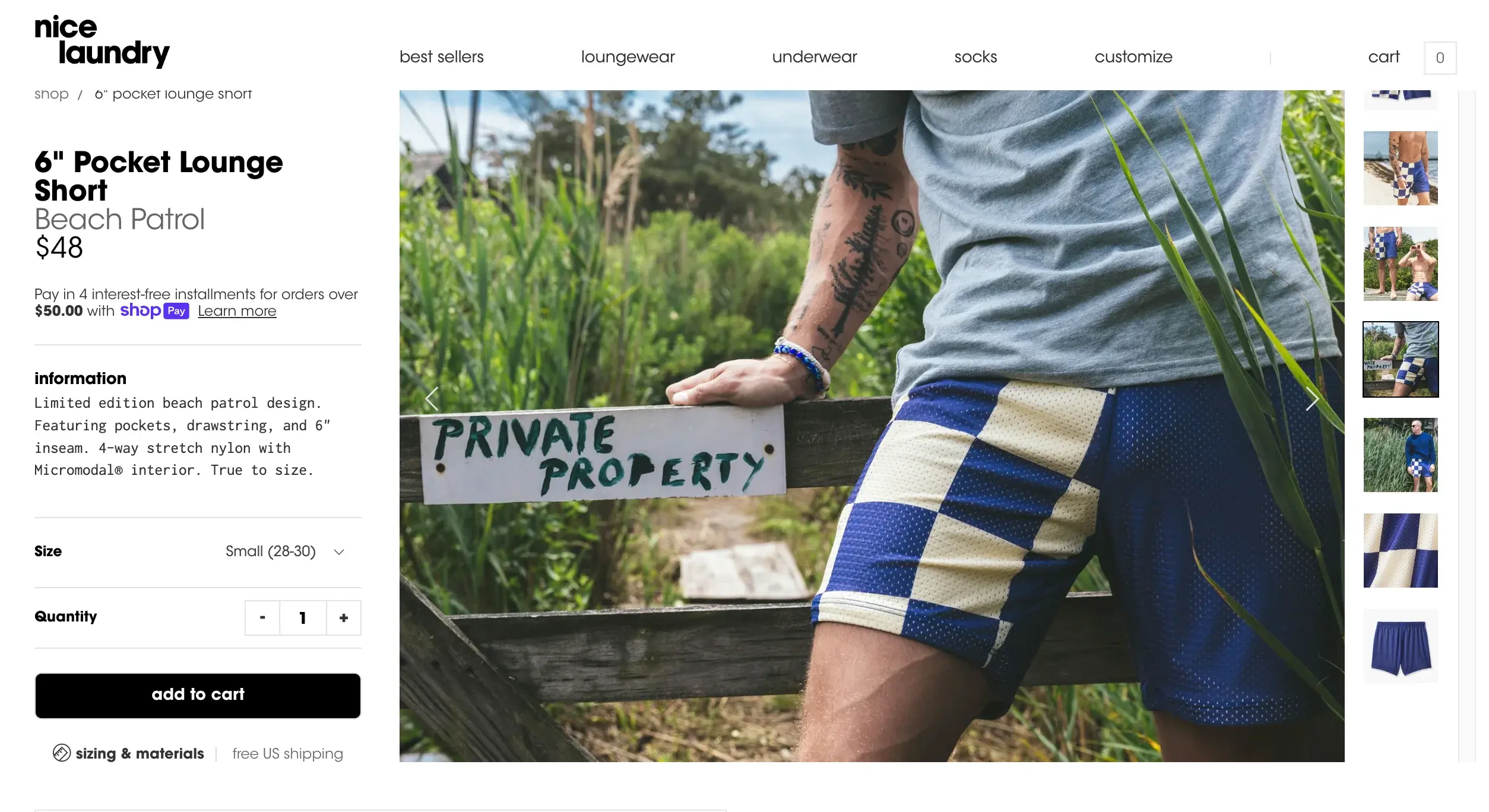
Our express checkout guide covers how to set these up without cluttering the page.
Cut the Friction
Nearly one in five shoppers has abandoned an order because the checkout felt too long. These four tactics shorten it.
3. Let Shoppers Check Out as Guests
Being told to create an account is reason enough for 18% of shoppers to leave. Make guest checkout the most prominent option, and ask about an account on the confirmation page instead.
Most sites still bury the guest option under a returning customer login. Put it first, or make it the default.
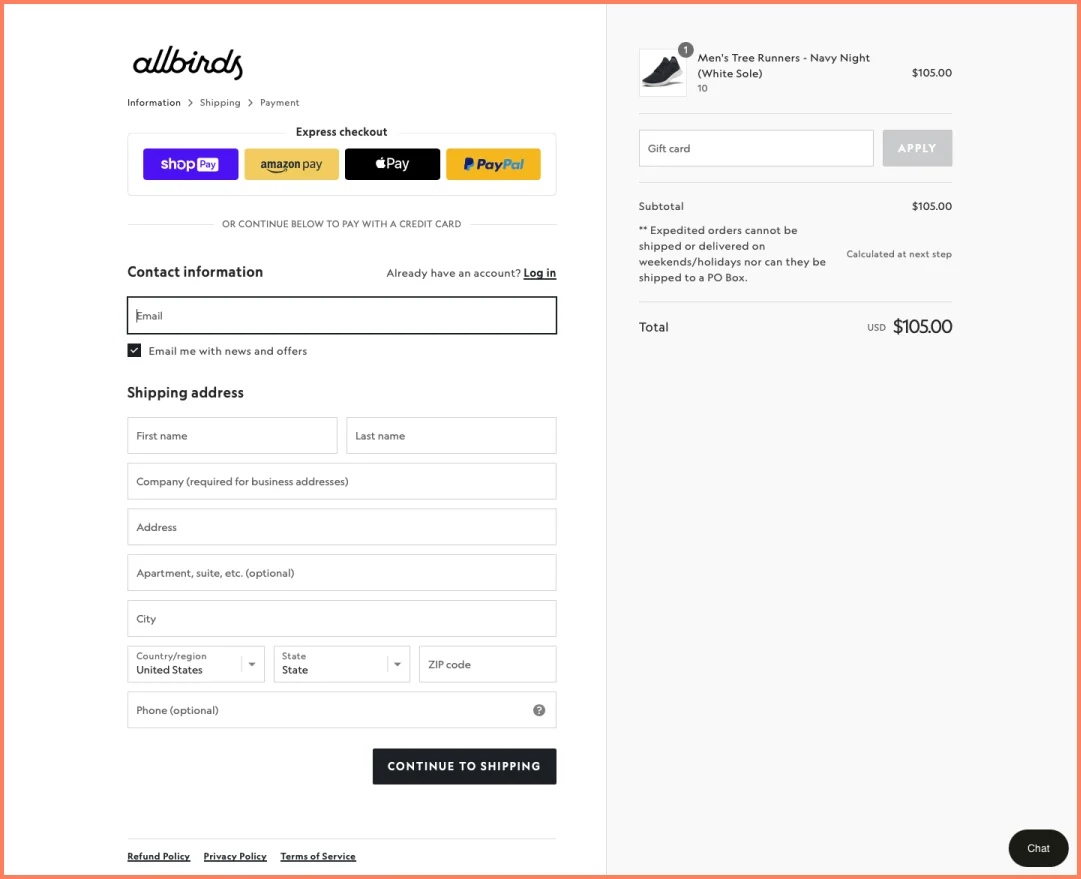
Allbirds opens straight into a guest checkout, with express wallets on top and the login tucked into a small link.
4. Remove Every Field You Don’t Need
Field count matters more than step count. Drop the company name, the second address line and the phone number unless the courier needs it, and say why when you keep a field.
Copy the shipping address to billing by default, and move the coupon box behind a link so it doesn’t send people off to hunt for codes.
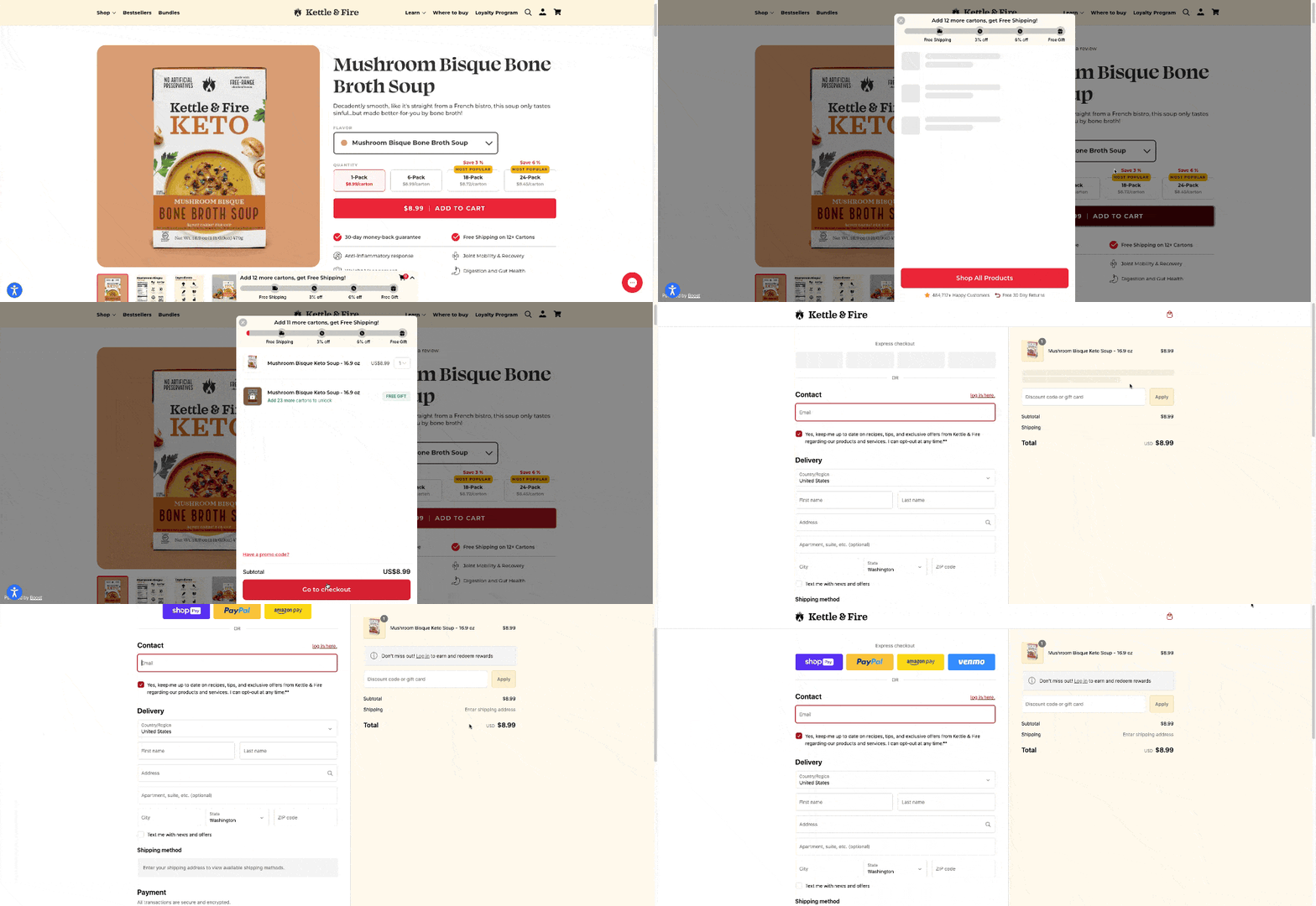
Kettle & Fire gets from cart to confirmation with a short, single-column form and nothing to decide on the way.
5. Autocomplete the Address
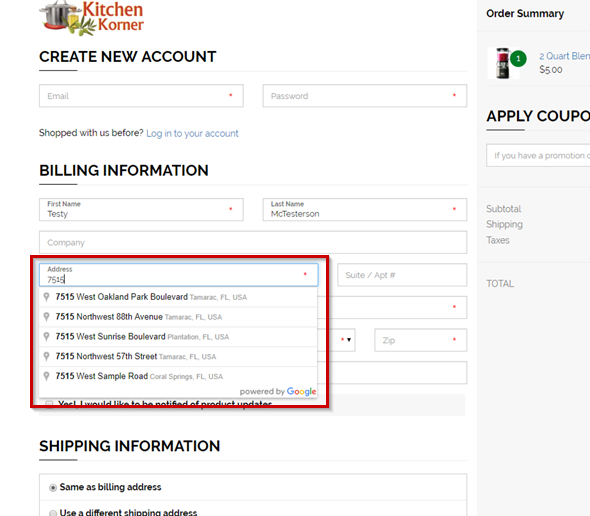
Address lookup fills the street, city, state and ZIP from a few keystrokes. It cuts typing on a phone and stops the failed deliveries that come from typos.
More than half of large sites still don’t offer it, so adding it is an easy edge.
Kitchen Korner suggests the full address after the first few characters.
6. Design the Checkout for Phones First
With two thirds of sessions on phones, a checkout that only works well on desktop loses most of its shoppers. Use large tap targets, the right keyboard for each field, and a sticky pay button.
Test the whole flow on a mid-range phone, not only the latest one. Slow scripts and tiny buttons show up there first. Our mobile checkout optimization tips go field by field.
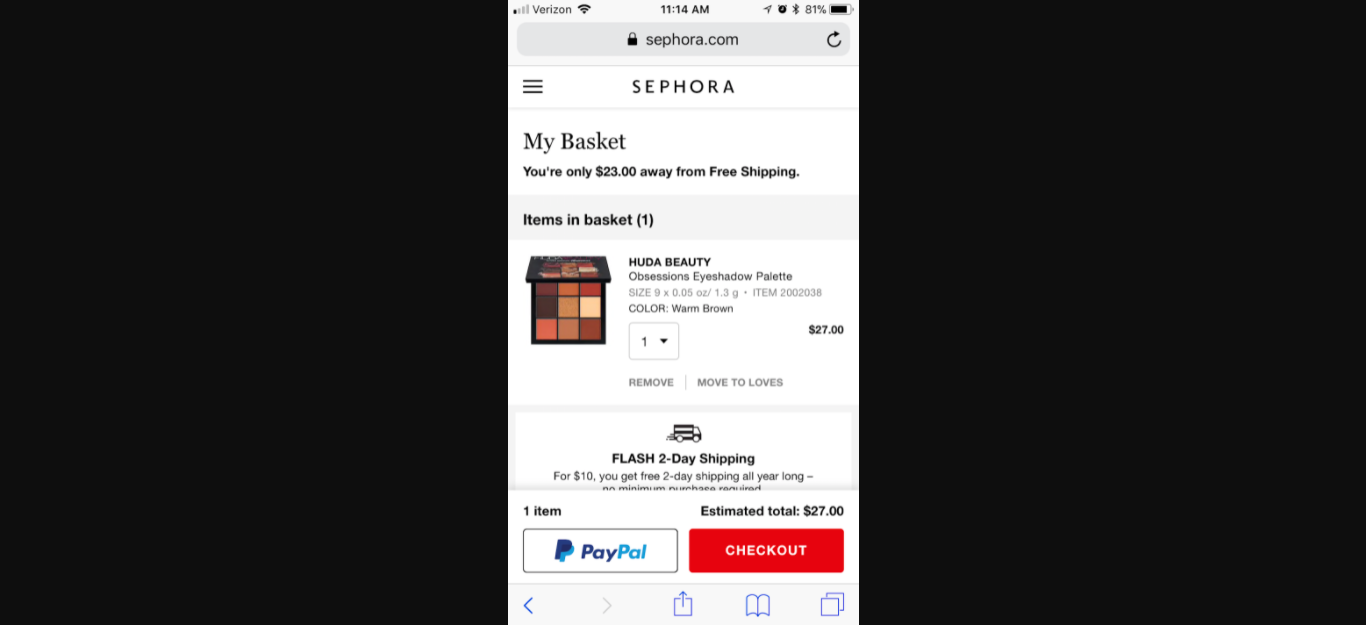
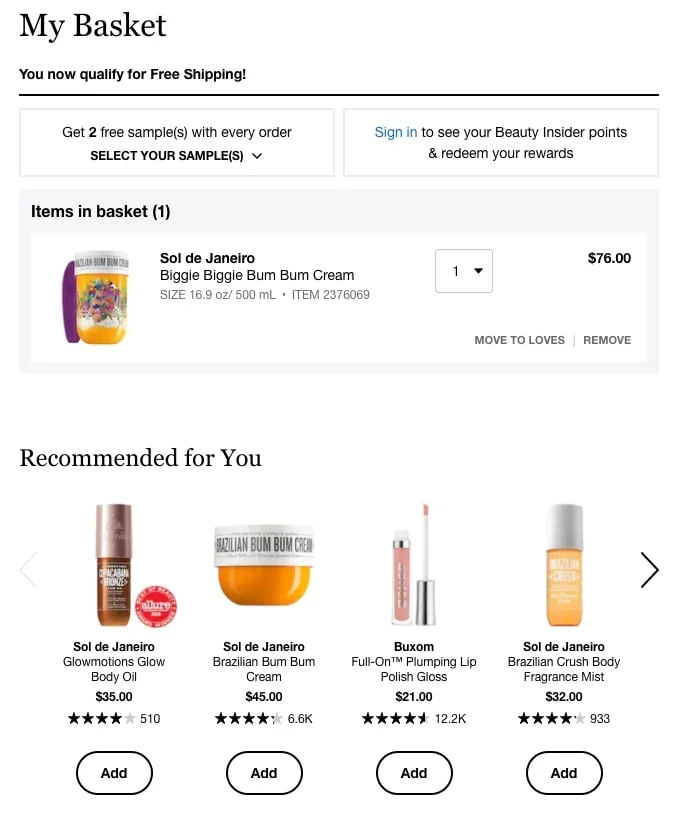
Sephora’s mobile basket keeps the item, the free shipping note and both checkout buttons on one screen, within thumb reach.
Build Trust at the Last Step
About one in five abandoners didn’t trust the site with their card. Trust is built in the seconds before the pay button, by what sits around it.
7. Trust Signals Beside the Pay Button
A padlock in the browser bar isn’t enough. Show the payment provider logos, a plain return policy line and a support contact right beside the button, where the doubt happens.
Keep it to two or three signals. A row of twelve badges looks like a sales page.
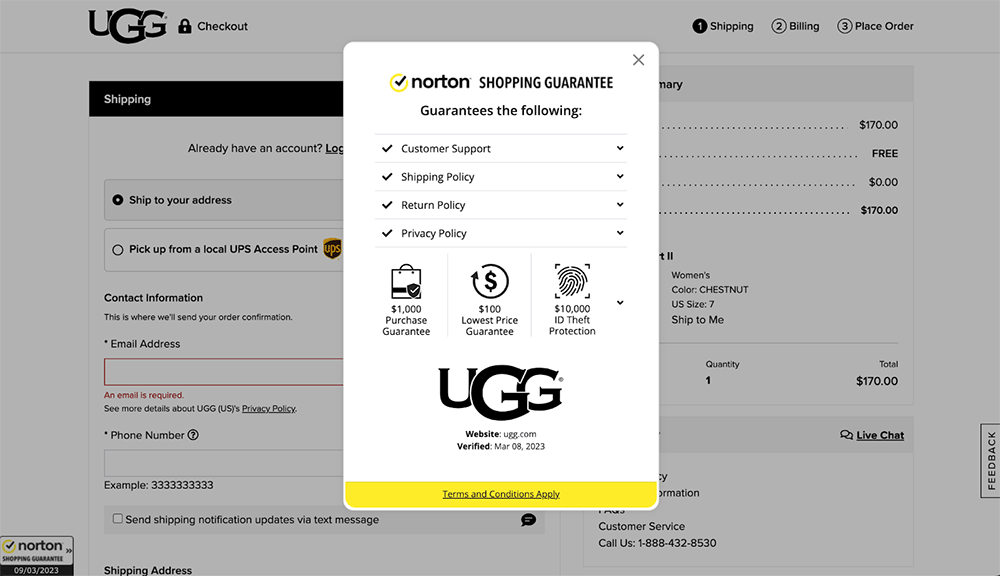
UGG shows a Norton Shopping Guarantee on the checkout page, with its return and privacy policies one click away.
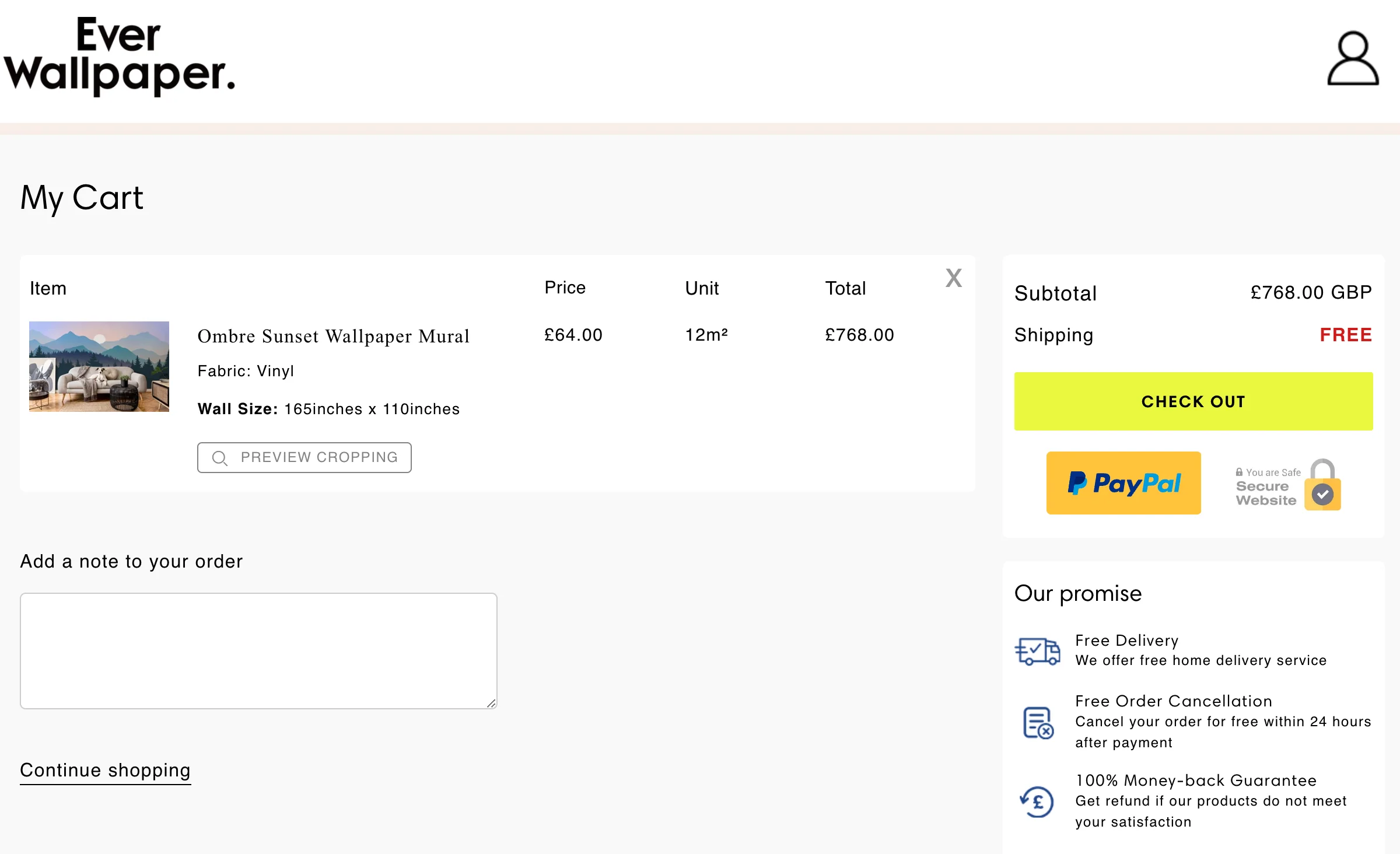
Ever Wallpaper takes a plainer route: a short promise list beside the checkout button covering free delivery, free cancellation and a money-back guarantee.
Our guide to the best trust badges shows which ones shoppers recognize.
8. Show Live Social Proof
A shopper about to pay wants to know other people buy here. WiserNotify shows recent orders, sign-ups and reviews as small notifications pulled from your store’s real activity.

On cart and checkout pages, keep them quiet: one recent purchase or a visitor count, placed away from the form. Rules let you show them only to first-time visitors, who need the reassurance most.
A five-star review notification near the pay button does the job of a trust badge with a human face on it.

Boost Conversion Instantly
Add Social Proof & Urgency to your website
Give Shoppers a Reason to Finish Now
Once cost, effort and trust are handled, what’s left is hesitation and distraction. These four tactics close the gap or bring the shopper back.
9. Run a Countdown on a Real Deadline
A timer works when the deadline holds: a sale that ends tonight, a same-day shipping cutoff, a cart reserved for 15 minutes. Tie it to one of those and shoppers stop putting the decision off.
A timer that resets on every visit gets noticed and costs trust. Our guide to how to create urgency in sales covers the line between a nudge and a trick.
This checkout pairs a coupon with a countdown so the discount has an end time.
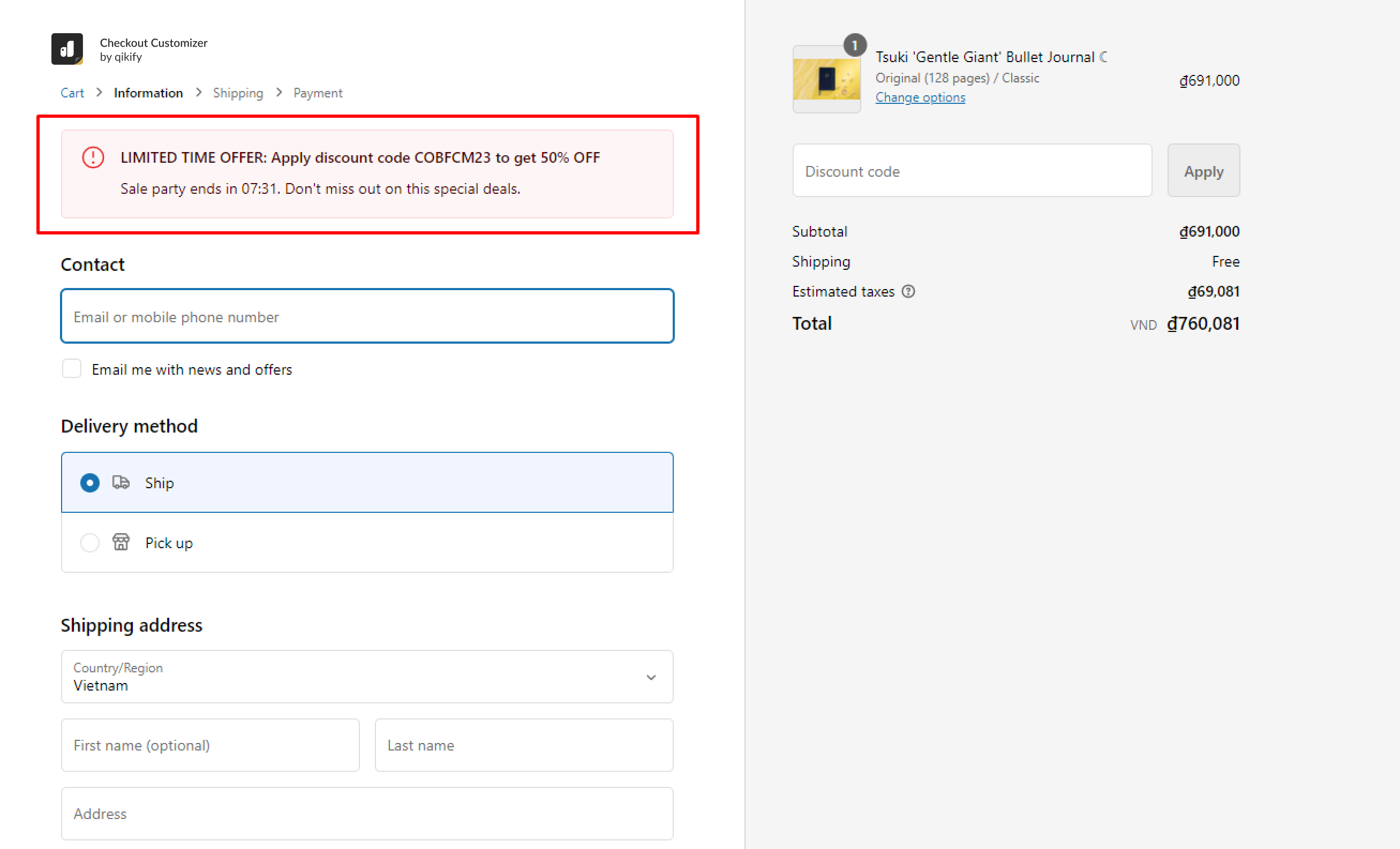
WiserNotify’s countdown timer runs fixed or per-visitor deadlines with display rules and analytics. Here’s what it looks like on a page.
10. Suggest One Add-On, Not a Catalog
A single relevant add-on at checkout raises order value without slowing the sale. A camera bag beside a camera, a refill beside a razor. Three or more suggestions turn the page back into browsing.
Place it in the cart or on the order summary, never between the address and the pay button. Our upsell and cross-sell strategies list the placements that hold conversion steady.
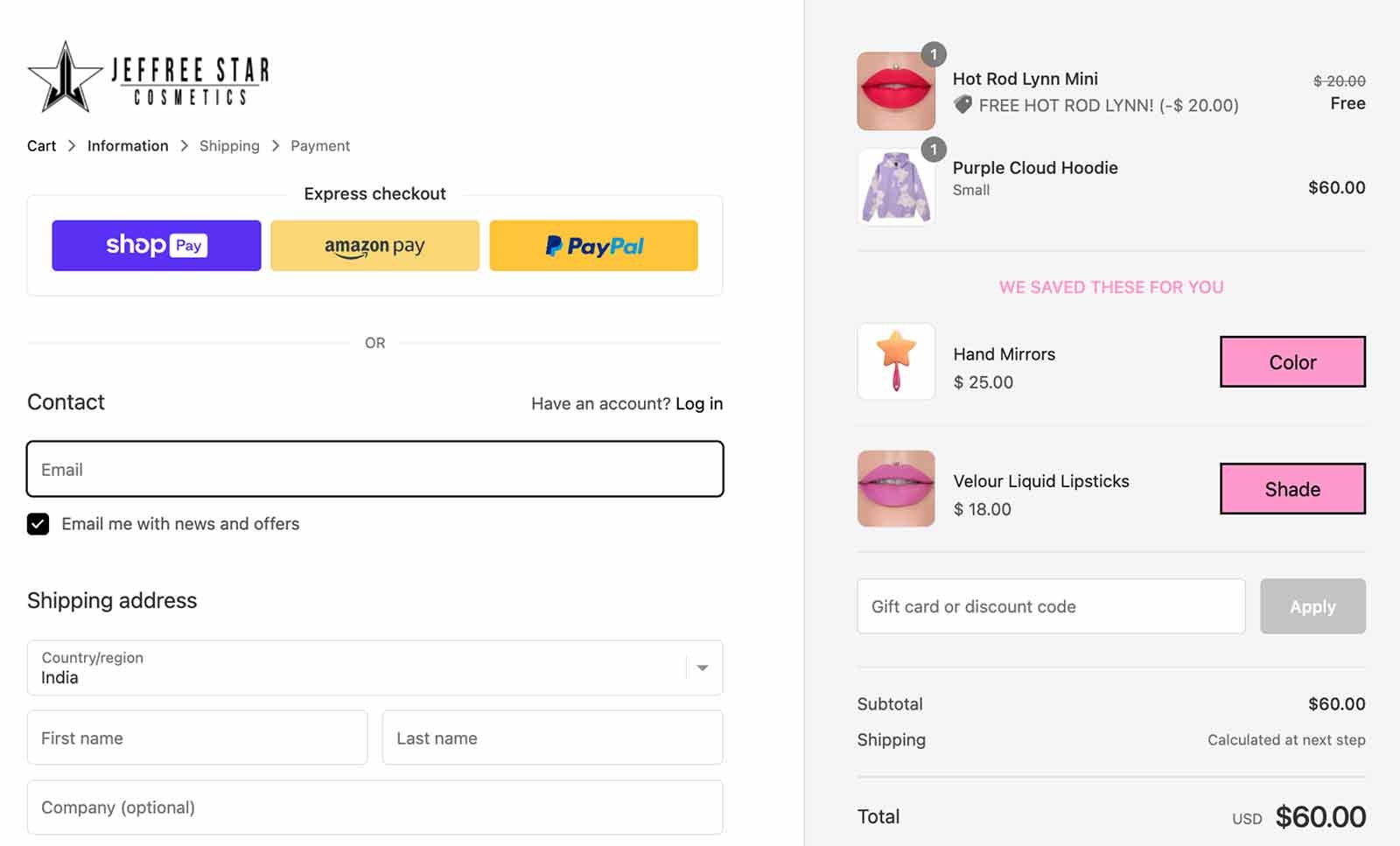
Jeffree Star Cosmetics adds a short “we saved these for you” list to the checkout order summary, two products with a color picker each, nothing more.
11. Add a Free Sample to the Order
For consumables, a free sample picked at checkout lowers the risk of the main purchase and seeds the next one. It works best when the shopper chooses it, since choice feels like a gift rather than packing filler.
Keep the sample picker to a few options and show it on the order summary, not as a popup.
Sephora’s basket offers two free samples with every order, chosen from a short list before checkout.
12. Bring Back the Ones Who Left
Some shoppers leave anyway. An email within an hour that shows the exact items, plus the shipping cost and return policy answered up front, recovers a share of them.
Save the discount for the second message. If the first email already carries a code, you train shoppers to abandon on purpose.
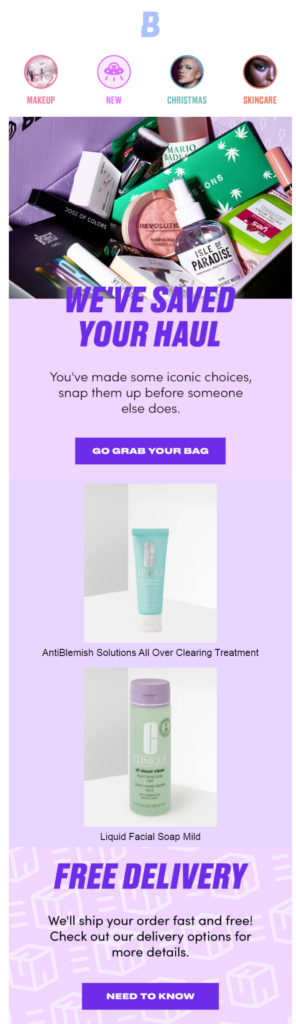
Beauty Bay’s recovery email shows the products, keeps the copy short and repeats the delivery promise.
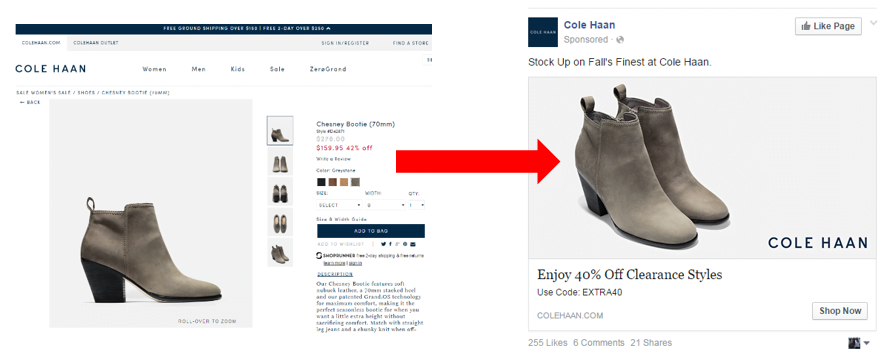
Cole Haan takes the same shopper back through a retargeting ad instead, with a clearance code as the second nudge.
How to Measure the Change
Change one thing at a time and read checkout conversion on its own, not the site rate, so a traffic swing can’t hide the result.
- Baseline first. Note checkout conversion by device for the 30 days before the change.
- One change, two to four weeks. Enough orders to see a real shift, short enough to keep the result clean.
- Watch mobile separately. It converts lower and moves first.
- Check the step report. If shoppers drop at the payment step, the fix is cost or trust, not form length.
For layout ideas once the numbers settle, these checkout page design examples show how stores arrange the same elements.
Turn hesitation into orders
Live sales, sign-ups and reviews on your checkout, taken from your store’s own activity
Wrap Up
Half of the shoppers who start checkout never finish. Most leave for reasons you can fix in a day: a surprise cost, a forced account, a form that drags on, or a pay button with nothing reassuring around it.
Start with the total cost and guest checkout, measure for a month, then work down the list. Each tactic removes one reason to stop, and the rate climbs with every reason you take away.
Frequently Asked Questions
What is a good checkout conversion rate?
Above 68% puts a Shopify store in the top 20%. The median store converts 52% of shoppers who start checkout.
How do you calculate checkout conversion rate?
Divide orders placed by checkouts started and multiply by 100. Shopify shows it in Analytics, and GA4 shows it as begin_checkout against purchase.
Why do shoppers abandon at checkout?
Extra costs such as shipping and fees are the top reason, named by 40% of abandoners, followed by slow delivery, card trust and forced account creation.
Does guest checkout increase conversion rates?
Yes. Being asked to create an account is enough for 18% of shoppers to leave, so making guest checkout the main option removes that reason.
Does social proof help at checkout?
A recent purchase or review notification answers the trust question at the pay button, as long as it stays small and away from the form.
How long does it take to see results?
Two to four weeks per change is usually enough orders to read a shift in checkout conversion, as long as you change one thing at a time.

Krunal Vaghasiya is a marketing tech expert who boosts e-commerce conversion rates with automated social proof and FOMO strategies. He loves to keep posting insightful posts on online marketing software, marketing automations, and improving conversion rates.




 Capterra