
9 Reviewzie Alternatives With Pricing Compared (2026)

Reviewzie starts at $19 a month, which is already low for review software. Most people look at alternatives for its limits, not its price.
If you want to pay less, WiserReview, the Trustpilot free plan, and the Reviews.io free tier are the closest options. If you run many locations or need monitoring, the tools further down fit better.
Prices come from each vendor’s pricing page.
Reviewzie Alternatives at a Glance
| Tool | Starting price | Billed on | Best for | Verdict |
|---|---|---|---|---|
| WiserReview | From $6.75/month billed yearly, with a free plan on the Shopify and Wix app stores only | 100 review requests per month at entry | Stores and service sites that need requests plus on-page widgets | Lower entry price with display widgets |
| Reviews.io | From $29/month, with a free tier | Review invites per month, per domain | Online stores | Seller ratings in Google and a wide widget set |
| Birdeye | Quote only | By number of locations | Multi-location brands | Large suite, price on request |
| Get More Reviews | $129/month | Monthly transactions, 15 or more | Local businesses with steady transactions | Requests with optional AI reply drafts |
| Trustpilot | Free plan, then from $99/month per domain billed annually | Domains and invitations per month | Brands that want a public profile page | Strong name, 12-month contract |
| Reputation | From $80/location/month | Per location | Multi-location brands that want listings too | Priced per location, sold through sales |
| EmbedSocial | From $29/month | Sources and widget views per month | Sites that mainly want to show reviews | Display first, collection second |
| NiceJob | $75/month, no contract | Per business | Local service businesses | Text requests with a referral add-on |
| ReviewTrackers | Quote by number of locations | Per location | Teams that monitor reviews across many sites | Tracking over display |
What Reviewzie Costs and Includes
Reviewzie has three plans, and you can try any of them free without a card.
- Lite, $19 a month: 1 location and 50 email review requests.
- Plus, $39 a month: 3 locations, 500 emails, 500 SMS, video review requests, AI replies, and no Reviewzie branding.
- Premium, $59 a month: 10 locations, 1,000 emails, 1,000 SMS, and API access.
Paying yearly costs $190, $390, or $590. Every plan includes QR codes, shareable links, display widgets, and a dashboard that pulls in reviews from sites like Google and Facebook.
Why Look for a Reviewzie Alternative?

Lite Caps You at 50 Email Requests
The $19 plan sends 50 email review requests and no SMS. A shop with a few hundred customers a month outgrows it quickly.
SMS and AI Replies Start at Plus
Text requests, video review requests, and AI replies arrive on the $39 plan. If you want them, your real starting price is $39, not $19.
Pricing Follows the Number of Locations
Plans are sized at 1, 3, or 10 locations. That suits a small chain, but a single site that wants more volume still has to move up a tier.
The Private Feedback Filter Needs Care
Reviewzie sends unhappy customers to a private form and blocks negative reviews from posting publicly. Google’s review policy disallows selectively soliciting positive reviews, so check how any tool routes customers before you switch that on.
1. WiserReview
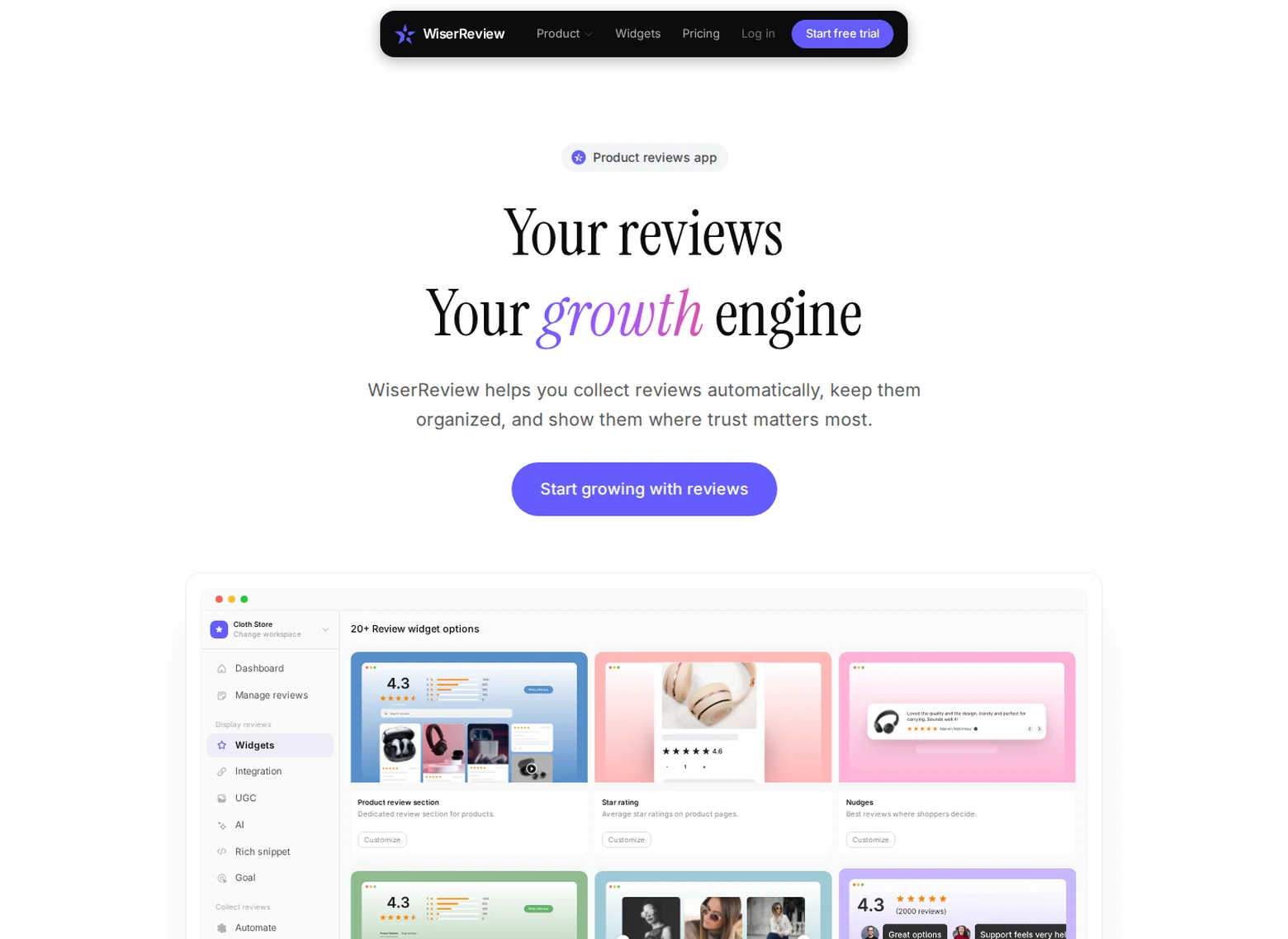
WiserReview handles three jobs: asking for reviews, sorting them, and showing them on your pages.
Requests go out by email, WhatsApp, or a link you share. Pre-built walls, carousels, and popups drop onto a page with an embed code, so nobody has to write code.
- Requests over email, WhatsApp, and a shareable link.
- Photo and video reviews alongside text.
- Wall, carousel, and popup widgets.
- Google star ratings support.
- Tags and filters that decide which reviews appear.
Best for: small stores and service sites that want requests and on-page reviews at a low monthly cost.
Skip it if: you need text messaging or a team inbox, which WiserReview leaves out.

Show Real Reviews That Build Trust
Collect and display photo, video, and text reviews with full design control.
2. Reviews.io

Reviews.io is built around online stores that want both product and company reviews.
Each domain needs its own plan, and billing runs month to month. The free tier covers a small number of review invites.
- Product reviews and company reviews in one place.
- Photo and video uploads from customers.
- More than 15 widgets for your pages.
- Google Seller Ratings and rich snippets from the Start-Up plan.
- Verified review invites by email.
Best for: shops that sell online and want star ratings in Google results.
Skip it if: you run a local service business with no online store.
3. Birdeye

Birdeye targets brands that run many locations and want one system for all of them.
Beyond reviews, it covers listings, social posts, surveys, and a website chatbot. You get a price by filling out a form, and the quote depends on your location count.
- Review requests and a review inbox.
- Listing updates across directories.
- Social posting.
- Surveys and customer insights.
- A chatbot for your website.
Best for: chains that want every location run from one system.
Skip it if: you want a posted price, or you have just one small shop.
4. Get More Reviews

Get More Reviews is a request tool for local businesses with a steady stream of customers.
Plans scale with your monthly transaction count. The higher tiers add AI reply drafts and an auto-responder for new reviews.
- Review requests over SMS and email.
- Reminders that follow up on its own.
- Bulk sending to a customer list.
- Review widgets for your website.
- AI reply drafting on the Growth plan.
Best for: local shops and clinics that serve customers every week.
Skip it if: you log fewer than 15 transactions a month, the floor for the Starter plan.
5. Trustpilot

Trustpilot is a public review platform with a profile page for your business.
You invite customers, reply to reviews, and show a TrustScore on your site. The free plan sends 50 invitations a month, and paid plans are priced per domain with a 12-month commitment.
- Automated review invitations.
- A public profile page you can customize.
- TrustBox widgets for your site.
- QR code review collection.
- Reply tools and review insights on paid plans.
Best for: brands that want a well-known public profile.
Skip it if: you want a month-to-month plan, since paid plans run on 12-month contracts.
6. Reputation

Reputation manages reviews, listings, and customer feedback for businesses with many locations.
Its Rep Core plan covers review collection, requests, and AI replies, plus business listings and local SEO. Higher plans add analytics and surveys.
- Review requests and AI replies.
- Business listings and local SEO.
- Pulse analytics and an AI reputation manager.
- Customer surveys on higher plans.
- Targeted outreach campaigns.
Best for: multi-location brands that want reviews and listings together.
Skip it if: you have one location and want to start without a sales call.
7. EmbedSocial

EmbedSocial shows reviews and social posts on your site as widgets.
You connect sources such as Google and Facebook, then place a slider, grid, or wall on any page. It focuses on display more than review collection.
- Unlimited widgets on every plan.
- Reviews from Google, Facebook, and Trustpilot accounts.
- Auto-sync of new reviews.
- Advanced analytics on paid plans.
- A Shopify integration.
Best for: sites that already have reviews elsewhere and want to show them.
Skip it if: you need a tool that sends review requests.
8. NiceJob

NiceJob serves local service businesses such as cleaners, contractors, and salons.
The Starter plan texts and emails customers for reviews, puts widgets on your site, and shares reviews to social. Pro adds referral campaigns, email broadcasts, and AI replies.
- Review requests by text and email.
- Widgets for your site.
- Reviews shared to social automatically.
- A leaderboard that ranks your team by review count.
- A hosted reviews page called a microsite.
Best for: home and personal service teams that want texting and referrals together.
Skip it if: you need a free tier or a very low starting price.
9. ReviewTrackers

ReviewTrackers tracks and manages reviews from many sites in one place.
It reports by brand or location, and it prices by the number of locations you monitor. It is built more for tracking than for showing reviews on your site.
- Review monitoring and replies.
- Location-based reports.
- Competitor analysis.
- Local listing management.
- Social and review monitoring in one workflow.
Best for: teams that monitor reviews across many locations or sites.
Skip it if: you want review widgets for your own site.
How to Choose a Reviewzie Alternative

Match the tool to the work you need done first.
- Reviews for less: WiserReview.
- Local requests by SMS and email: NiceJob, Get More Reviews, or stay with Reviewzie.
- Online store reviews: Reviews.io.
- Many locations: Birdeye or Reputation.
- A public profile page: Trustpilot.
- Showing reviews you already have: EmbedSocial.
- Tracking reviews across sites: ReviewTrackers.
Next, look at what each price counts. A location, a domain, an invite, and a transaction are different units, so equal prices can lead to very different bills.
Want the full category view? Our review management software guide compares more tools.
How to Move Your Reviews to WiserReview
Reviews posted on Google and Facebook stay there when you switch tools. The steps below pull them into WiserReview and display them on your site.
Step 1: Create Your Account
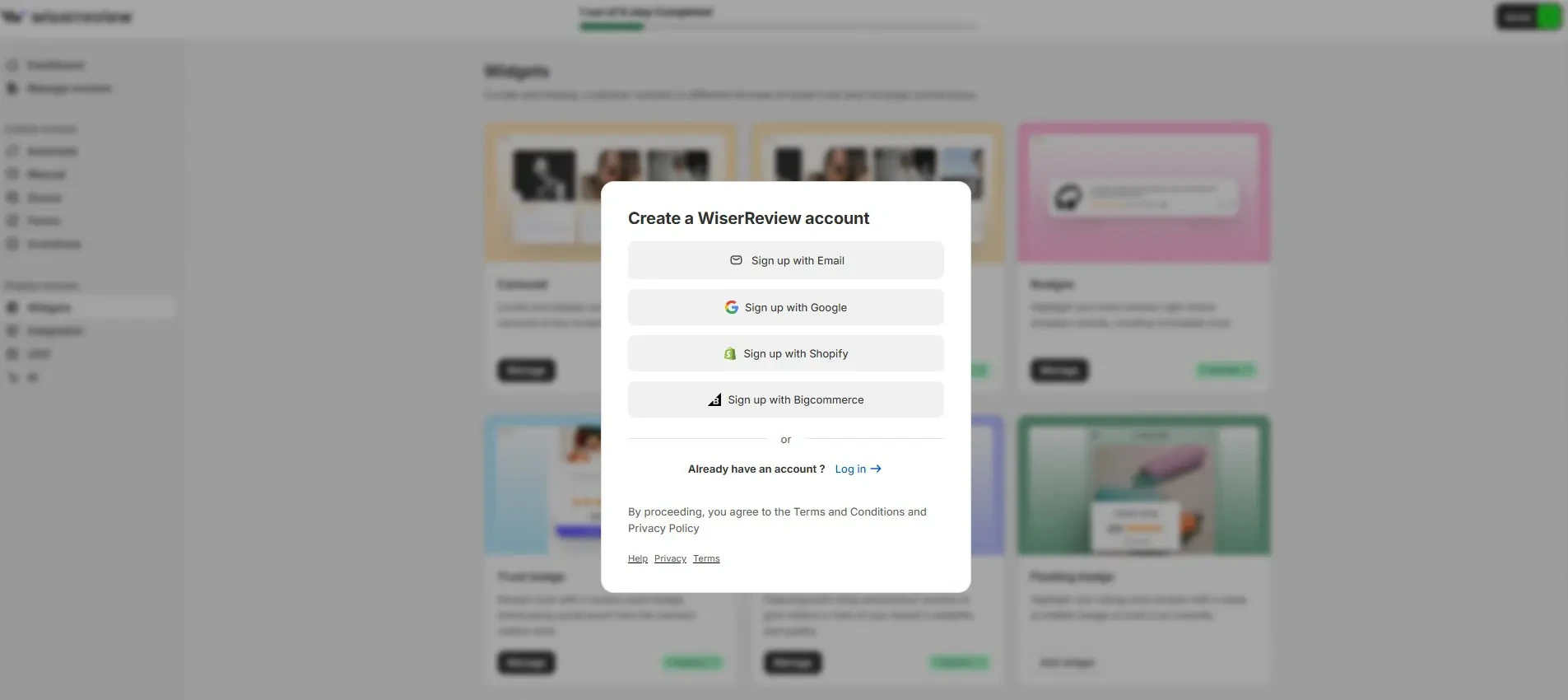
- Sign up for WiserReview.
- Sign in with Email, Google, Shopify, or Bigcommerce.
- Answer the quick setup questions to open your workspace.
Step 2: Import Your Existing Reviews
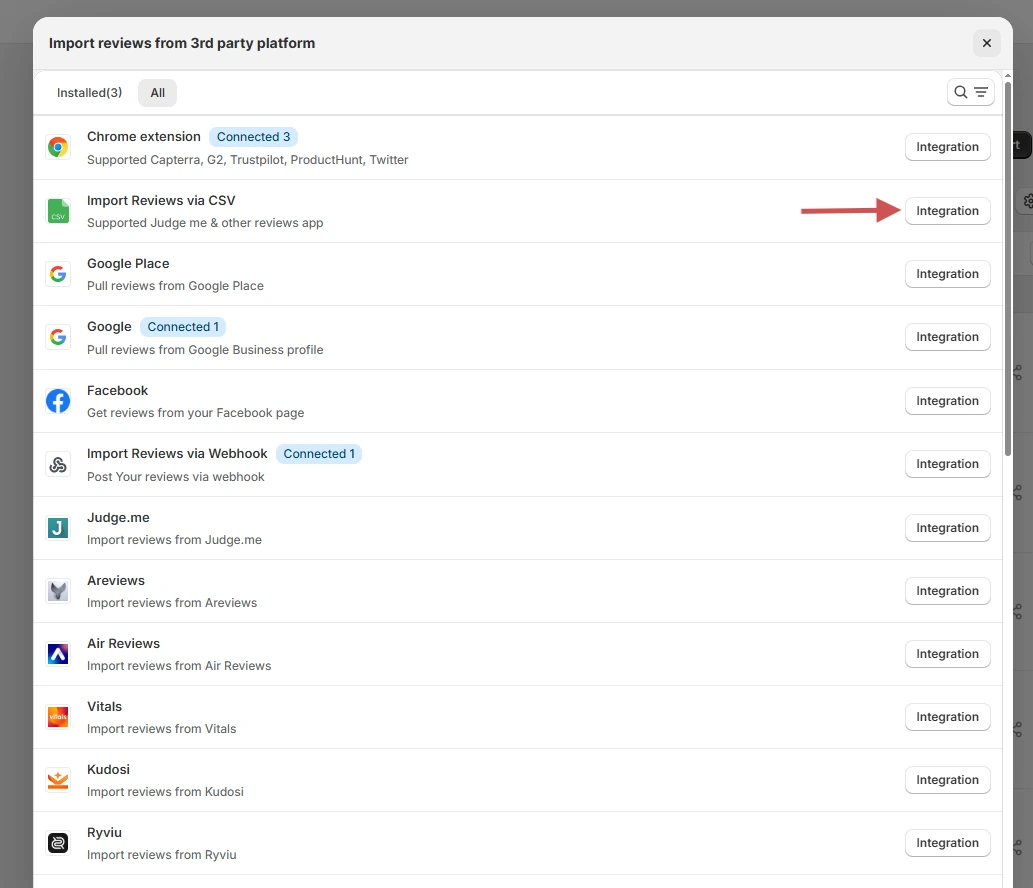
- In Manage reviews, click Import.
- Select Google, Facebook, or Import Reviews via CSV.
- Approve some of the imported reviews so your widget has content.
Step 3: Set Up Review Requests

Recreate the request flow you ran in Reviewzie. This video shows how to set it up.
- Pick email, WhatsApp, or a direct link as the channel.
- Upload customers from a CSV, or connect your store.
- Set the delay between a sale or visit and the request.
Step 4: Choose a Review Widget
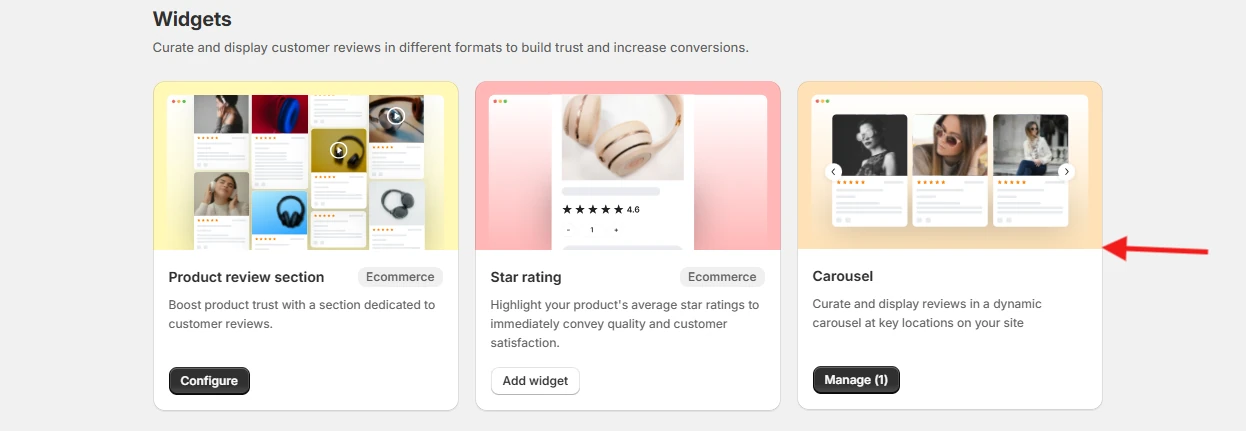
- Go to Widgets in the dashboard.
- Select a style, such as the Carousel.
- Click Add widget, name it, and choose which reviews appear.
Step 5: Embed It on Your Site
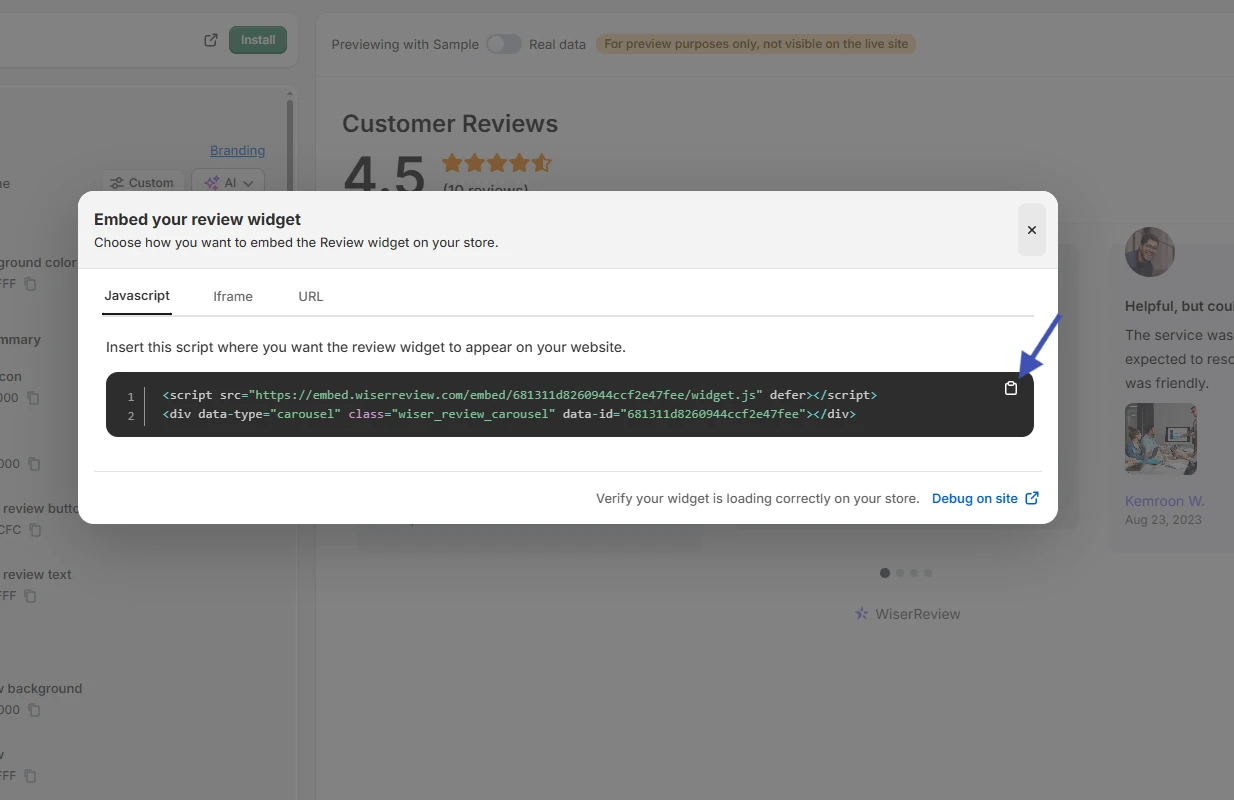
- Click Install in the top right of the widget editor.
- Keep the Javascript tab open and copy the two lines of code.
- Place the code on the page where reviews should show, then load that page in a private window.
Using a specific platform? See how to add reviews to your website.
Wrap Up
Reviewzie is already inexpensive, so the right alternative depends on what you need beyond a low price. WiserReview costs less, and the other tools add profiles, listings, or monitoring.
Choose the tool that fits your job and the way it counts usage, then try its free plan or trial before paying.
Related guides
Frequently Asked Questions
How much does Reviewzie cost?
Reviewzie costs $19 a month for Lite, $39 for Plus, and $59 for Premium, and you can try any plan free.
Does Reviewzie have SMS review requests?
Yes, but SMS starts on the $39 Plus plan, and the $19 Lite plan sends 50 email requests.
What is a cheaper Reviewzie alternative?
WiserReview starts at $6.75 a month billed yearly, which is below Reviewzie’s $19 Lite plan.
Which Reviewzie alternatives have a free plan?
Trustpilot offers a free plan, Reviews.io has a free tier, and WiserReview has a free plan on the Shopify and Wix app stores.
Is it safe to block negative reviews?
Google’s review policy disallows selectively soliciting positive reviews, so check how a tool routes unhappy customers before you use a filter.
Can I move my existing reviews to another tool?
WiserReview imports reviews from Google, Facebook, or a CSV file, so you can bring existing ones along.

Krunal Vaghasiya is a marketing tech expert who boosts e-commerce conversion rates with automated social proof and FOMO strategies. He loves to keep posting insightful posts on online marketing software, marketing automations, and improving conversion rates.




 Capterra