
10 Best Product Video Examples and Ideas to Copy (2026)
A product video has to earn the next few seconds in its first few seconds.
In the first 8 seconds, show the product itself, the problem it solves, and someone using it. If a shopper can’t tell what it is and why it matters by then, most won’t keep watching.
The 10 examples below each get that opening right, and each one fits a spot on a product page or a store.
For every video you get what the brand did and one line on what to copy.
Product Video Examples at a Glance
| Brand | Video type | Format | What it does on a product page |
|---|---|---|---|
| Dyson | Setup guide | Silent, captions only | Shows setup is easy before purchase |
| VEED | Software demo | Screen recording | Proves the tool does the job in a few clicks |
| Sephora | Tutorial | Expert talking to camera | Shows the result and how to get it |
| IKEA | How-to tips | Quick numbered tips | Answers “will this work in my space?” |
| Nike | Product in action | Music-led lifestyle clips | Shows fit and movement photos can’t |
| Fender | Sound demo | Played live on camera | Lets buyers hear the product |
| Sony | Comparison | Side-by-side footage | Helps pick between models |
| Etsy | Behind the scenes | Maker at work | Justifies a handmade price |
| Oreo | Recipe | Step-by-step overhead shots | Gives a new reason to buy |
| Nestlé | Product launch | Vertical short | Introduces a new product fast on mobile |
What a Product Video Must Show First
Before the examples, here is the checklist every one of them passes in its opening seconds:
- The product, clearly. No slow logo intro. The item is on screen right away.
- The problem or use. A messy wardrobe, a slow video export, a dull makeup routine.
- A person using it. Hands, a face or a body in motion make it real.
- Captions. Many shoppers watch on mute, so the story has to work without sound.
Demo and How-To Videos
These answer the buyer’s biggest doubt: will I be able to use this?
1. Dyson’s Silent Setup Guide
Dyson’s “Getting started” video for its Purifier Cool uses no voice-over at all. Captions and clear close-ups walk through setup step by step.
Because it works on mute, it plays well on a product page, in a support email, or on a phone in a quiet room.
Copy this: film your setup or first use with captions only, so it works anywhere with the sound off.
2. VEED’s Software Demo
VEED shows exactly how to convert a video to MP4 in its online tool, from upload to download, as a screen recording.
Viewers see how few clicks it takes, which is the whole sales pitch for a simple tool.
Copy this: for software, record the fastest path to one result a buyer searches for, and title the video with that task.
3. Sephora’s Makeup Tutorial
Sephora’s back-to-school tutorial is led by one of its beauty experts, who creates an easy look with the products being sold.
An expert face adds credibility, and viewers see the finished result along with each step to reach it.
Copy this: let a real person use the product from start to finish, and show the end result in the first few seconds.
4. IKEA’s Wardrobe Tips
IKEA’s six quick tips for organizing a wardrobe teach something useful while showing its storage products in a real room.
Viewers get ideas for their own space and see the products that make them work.
Copy this: teach a short, practical tip where your product is the tool that makes it possible.
Build trust & FOMO
Highlight real-time activities like reviews, sales & sign-ups.


Product-in-Action Videos
Some products only make sense when you see or hear them moving.
5. Nike’s Activewear in Motion
Nike shows its leggings on different people running, stretching and training, set to an upbeat soundtrack.
Shoppers see how the fabric moves and fits on real bodies, which a flat product photo can’t show.
Copy this: for clothing, film the product on several body types doing the activity it was made for.
6. Fender’s Sound Demo
Fender introduces its Squier Paranormal series by playing the guitars on camera, so musicians hear each model’s tone.
For a product bought on sound, hearing it does more than any spec list.
Copy this: if your product is judged by a sense photos can’t capture, like sound, build the video around that sense.
Comparison and Story Videos
These help buyers choose between options, or understand why a product costs what it does.
7. Sony’s Camera Comparison
Sony compares the subject tracking and focus of its newer camera against earlier models, with side-by-side footage.
Buyers deciding between models see the difference instead of reading about it.
Copy this: when you sell several versions, show the same shot on each one so the upgrade is visible.
8. Etsy’s Behind-the-Scenes Maker Video
Etsy follows a seller making handcrafted wooden checkers, from raw wood to finished board.
Seeing the hours of work behind a handmade product explains its price and builds trust in the seller.
Copy this: for handmade or premium goods, show how the product is made so the price feels earned.
Short-Form and Recipe Videos
Quick formats that work on social and give shoppers a new reason to buy.
9. Oreo’s Recipe Video
Oreo turns its cookies into a cream pie in a simple overhead recipe video with clear steps.
It sells more cookies by giving buyers a new way to use them.
Copy this: show a use for your product that customers may not have thought of.
10. Nestlé’s YouTube Short Launch
Nestlé introduces its Garden Gourmet Vuna in a vertical short, getting straight to what the product is.
Short vertical video fits mobile feeds and is easy to share, which suits a new product launch.
Copy this: cut a vertical version of every product video for Shorts, Reels and TikTok.
Add Customer Video Reviews to Product Pages
Brand videos show what the product can do. Customer video reviews show that it did it for someone like the buyer.
Short clips from real customers answer questions your own video can’t, like how a jacket fits a tall person or how a serum looks after a month.
With WiserReview (our review app), you can ask for video reviews in the same request as text and photo reviews.
Then show them on the product page in a carousel, a review wall or a popup that plays a clip while the shopper browses.
Keep customer clips short and put the best one right under the product photos, where shoppers look before they decide. You can read more about testimonial software for collecting them.

Show Real Reviews That Build Trust
Collect and display photo, video, and text reviews with full design control.
Where to Put Product Videos
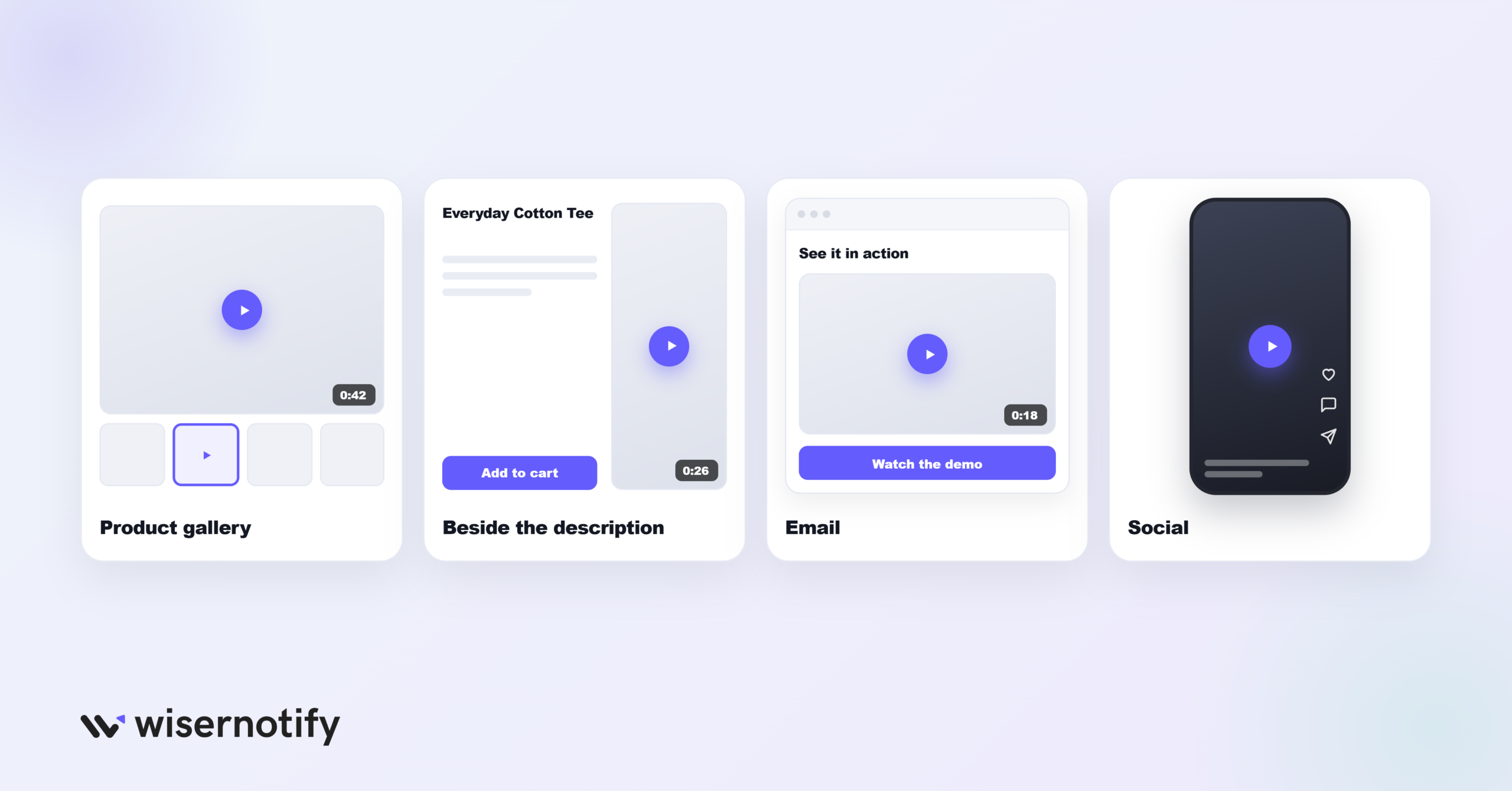
- Product page: In the image gallery, as the second or third slide, so it is found without scrolling.
- Next to the description: A short demo beside your product description answers questions the copy can’t.
- Emails: A thumbnail with a play button linking to the video tends to get clicked.
- Social: A vertical cut of the same video for Shorts, Reels and TikTok.
Pair videos with other trust signals on the product page, such as reviews and product badges.
Wrap Up
The best product videos don’t try to be ads. They show the product, the problem and a person using it, fast.
Start with one demo for your best-selling product, add captions, and put it on the product page. Then add customer video reviews underneath.
Frequently Asked Questions
What makes a good product video?
It shows the product, the problem it solves and someone using it in the first few seconds, with captions so it works on mute.
How long should a product video be?
Keep product page videos short, well under two minutes, and put the key moment first. Tutorials and demos can run longer.
What types of product videos work best?
Demos, how-to tips, product-in-action clips, comparisons and customer video reviews all work, depending on what your buyer doubts most.
Where should I put a product video?
In the product page image gallery, near the description, in emails as a play-button thumbnail, and as a vertical cut on social.
Should I use customer video reviews?
Yes. Short clips from real buyers show fit, results and quality in a way your own videos can’t.

Krunal Vaghasiya is a marketing tech expert who boosts e-commerce conversion rates with automated social proof and FOMO strategies. He loves to keep posting insightful posts on online marketing software, marketing automations, and improving conversion rates.




 Capterra