
How to Add a Video Popup to LearnWorlds (2026)

You add a video popup to LearnWorlds in three steps. Paste the WiserNotify pixel into LearnWorlds’ Site custom code, build a Video popup widget with your YouTube link, then choose the pages it shows on.
The popup opens over the page with your video and one button, such as Enroll now. It fits course previews, instructor intros and launch videos, and you decide when it appears and when it stops.
Key Takeaways
- Paste the pixel once, in the site-wide head slot of LearnWorlds custom code.
- Build the popup from the Video popup template and paste a YouTube link.
- Give it one button, such as Enroll now or Watch the free lesson.
- Limit it to course pages and set dates for when it runs.
How to Add a Video Popup to LearnWorlds
The pixel goes into LearnWorlds once. After that, everything happens in WiserNotify. Keep your YouTube link and the course page URL handy. Using another builder as well? The guide to add a video popup to your website covers it.
This walkthrough covers the widget build from the template list to Publish.
Step 1: Add the Pixel to LearnWorlds

- In WiserNotify, open Install Pixel and click Copy Code. If you are new, the 7-day free trial covers this setup.
- In LearnWorlds, open Website, then Design, then Edit Website.
- Click Site custom code.
- Paste the code into the head slot for all pages of your site template, then save.
LearnWorlds has a separate head slot for logged-in users and built-in pages such as the course player. Course previews and instructor intros run on public pages, so use the all-pages slot.
Step 2: Check the Pixel Is Live

- Open your school in a new tab once.
- Back on the pixel page, click Verify pixel installation.
- Move on when it reports the pixel as detected.
Step 3: Open Widgets in WiserNotify
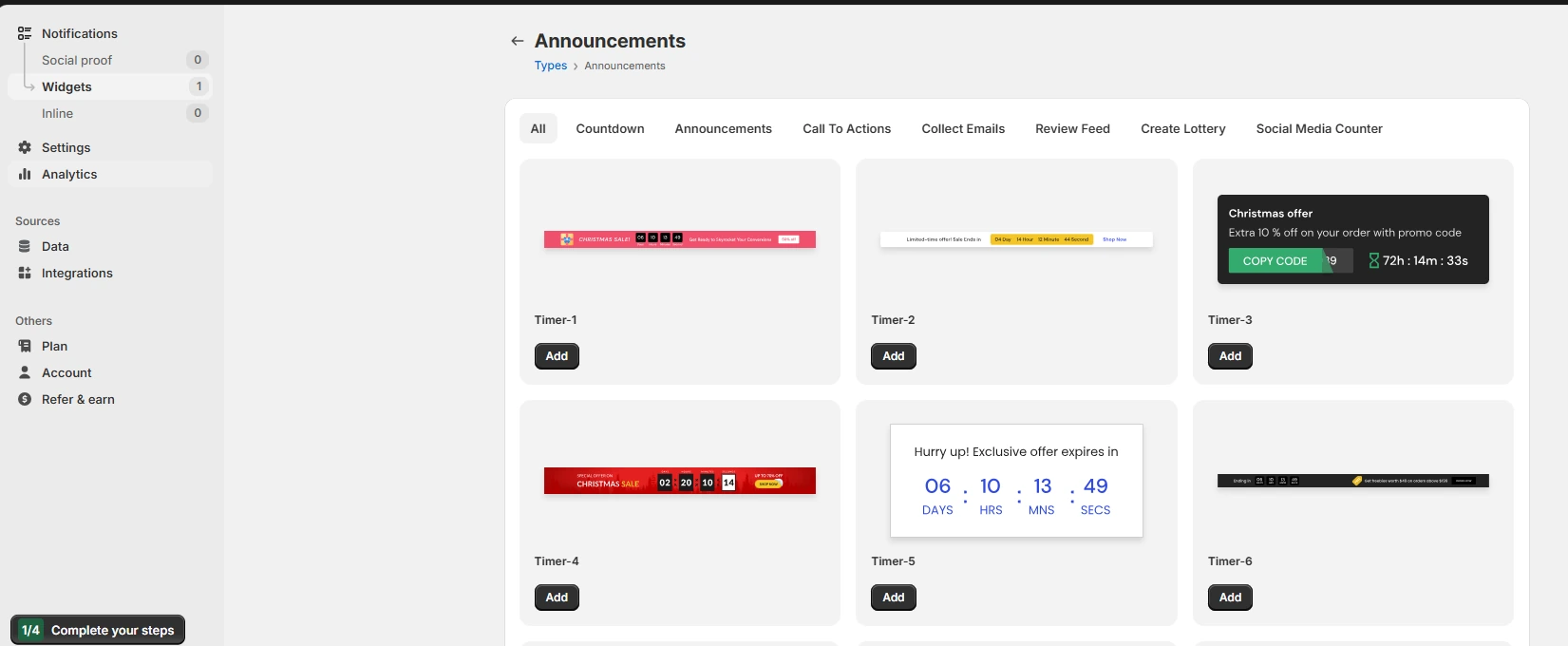
- Go to Notifications, then Widgets.
- Click Add notification, then open the Call To Actions tab.
Step 4: Pick the Video Popup Template
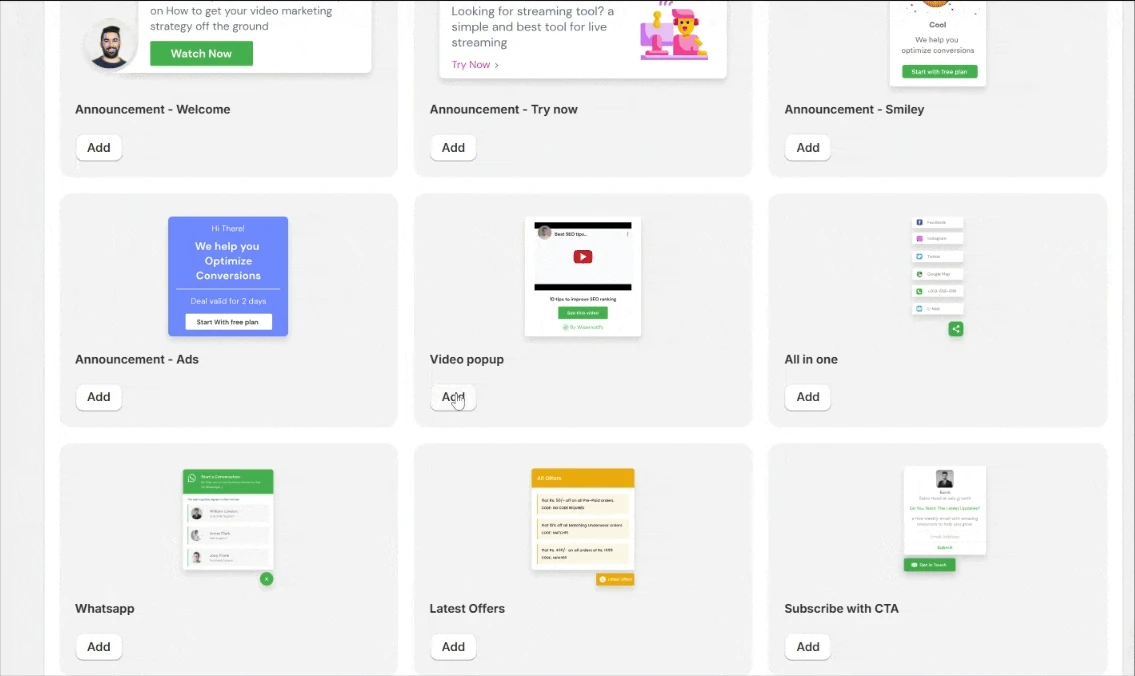
- Click Add on the Video popup card.
- Type a name and your school’s URL, then click Create & customize.
Step 5: Add the Video and Button

- In Text editor, write a short headline, such as “See inside the course,” and paste the YouTube URL.
- Tick Autoplay and Mute if the video should start on its own. Hide related videos keeps YouTube suggestions off the end screen.
- Under Click actions, name the button, such as Enroll now, and link it to the course page. Add UTM tags if you track campaigns.
- Turn on closing the popup when visitors click outside it.
- Set placement and colors in Position & animation and Style.
- In Timing control, pick start and expiry dates and a trigger: a delay, a scroll depth, or exit intent.
Step 6: Set Pages and Go Live

- Click Save, then Next.
- Leave All pages on, or add a URL condition for one course page.
- Advanced targeting narrows it by visitor type, UTM source or referrer.
- Click Publish, then load your school in a private window. The popup shows once its trigger fires.
Every design and display option is listed in the video popup widget guide.
Build trust & FOMO
Highlight real-time activities like reviews, sales & sign-ups.

LearnWorlds Popups or a WiserNotify Popup?
LearnWorlds has its own Popup Builder on the Pro Trainer plan and above, with video templates and triggers such as exit intent. It covers popups you design inside LearnWorlds.
A WiserNotify video popup fits when one of these sounds like you.
- You already run WiserNotify enrollment or sales notifications and want every widget in one dashboard.
- The same popup should run on your school and on a separate marketing site.
- It should show only on chosen days of the week between two dates.
- You want to target by country, UTM source, referrer, or new and returning visitors.

Video Popup Ideas for Course Sites
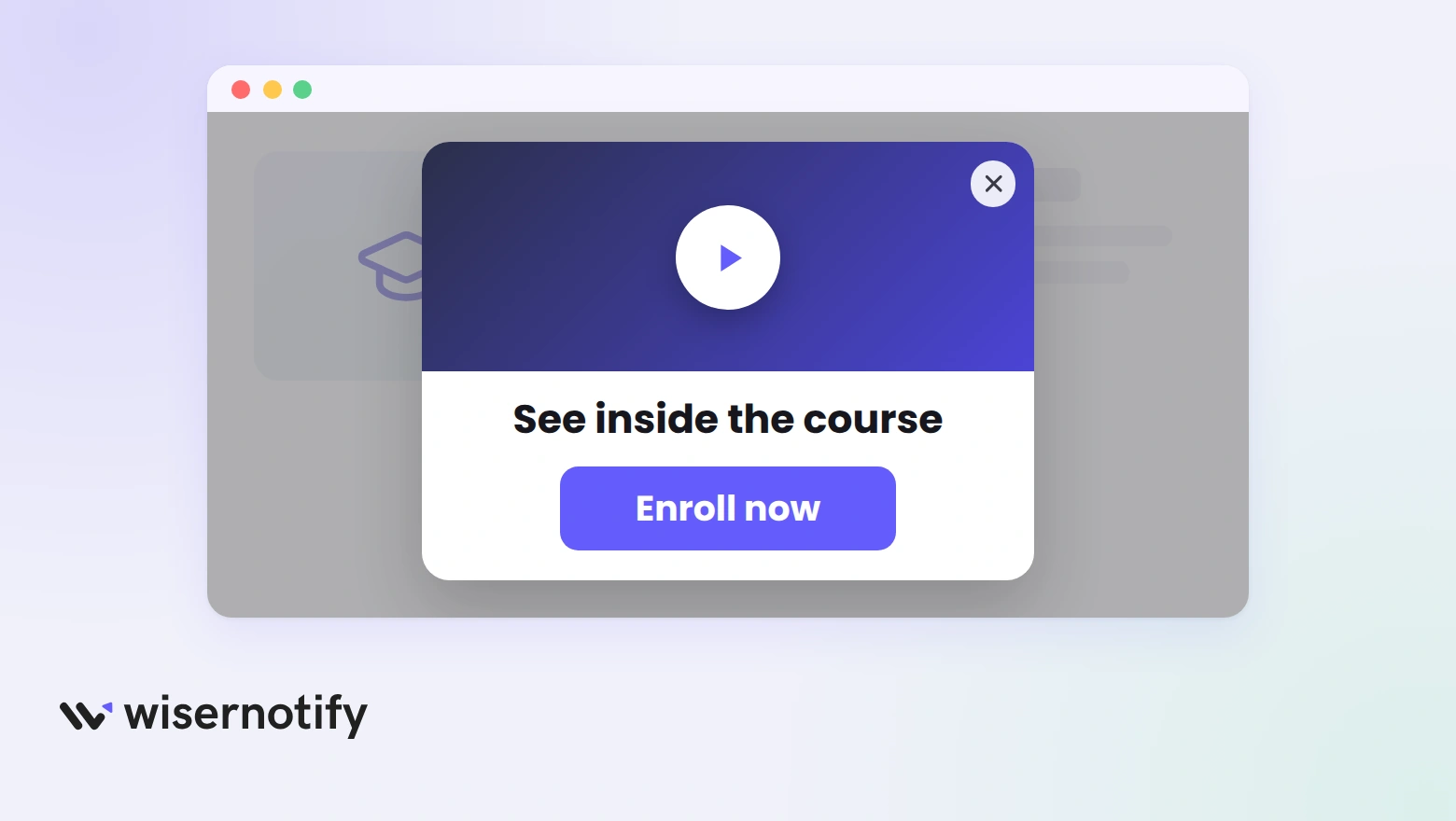
One popup per page, each with one job. These are the formats that suit a LearnWorlds school.
- Course preview: a short look inside the lessons on the course page, with an Enroll now button.
- Instructor intro: who teaches the course and why, on the homepage or about page.
- Free lesson teaser: on blog posts, with a button to a free lesson or lead magnet.
- Launch or cohort video: on the sales page while enrollment is open, with the expiry date set to the close date.
- Webinar replay: for returning visitors in the days after a live session.
A launch video lands harder with a deadline in view. Pair it with a countdown timer on LearnWorlds, built from the same Widgets page.

If the video promotes a discount, show the code with offers on LearnWorlds as well.
Video Popup Not Showing on LearnWorlds?
When the popup stays hidden, look at the code slot first, then page rules and dates.
- Logged-in slot only: code pasted in the logged-in head slot won’t load for visitors who aren’t signed in. Move it to the all-pages slot.
- Pixel not detected: save the custom code, reload your school, and verify again.
- Page rule: a typo in the URL condition hides the popup. Test with All pages first.
- Dates: check the end date hasn’t passed and today is one of the days you ticked.
- Already seen: Skip seen in Data control hides it from people who closed it before. Test in a private window.
- Video won’t autoplay: browsers block autoplay with sound. Tick Mute alongside Autoplay.
If it’s still missing, the widget list has a troubleshoot check, and live chat support can review your setup.
Video Popup Mistakes on Course Sites
- A full lesson in a popup: long videos lose people. Keep it short and save the rest for the course.
- Every page, every time: students in the course player don’t need a sales video. Limit it to public pages and keep Skip seen on.
- No way out: show the close icon and let a click outside dismiss it.
- Sound on arrival: start muted and let people choose to listen.
- A button to the homepage: send people to the course page or checkout they came for.
Recent sign-ups make the video more convincing. Show them with a sales notification popup on LearnWorlds.

Boost Conversion Instantly
Add Social Proof & Urgency to your website
Wrap Up
A short video answers what a course page can’t: what it’s like to learn from you.
Paste the pixel once, build one popup for your best-selling course, and keep it on that page.
Related Post
Frequently Asked Questions
How do I add a video popup to LearnWorlds?
Paste the WiserNotify pixel into LearnWorlds’ Site custom code, then build a Video popup widget and publish it on the pages you choose.
Can the video play automatically?
Yes. Tick Autoplay in the widget’s Text editor, and tick Mute too, since browsers block autoplay with sound.
What kind of video can I use?
Paste a YouTube video URL into the widget’s Text editor. Hide related videos keeps YouTube suggestions off the end screen.
Can I show the popup on one course page only?
Yes. In the Display tab, add a URL condition that matches that course page instead of All pages.
When does the popup appear?
You choose in Timing control: after a short delay, after a scroll, or when a visitor is about to leave.
Does LearnWorlds have its own popups?
Yes, LearnWorlds includes a Popup Builder on the Pro Trainer plan and above. WiserNotify runs the video popup from its own dashboard with its own scheduling and targeting.

Krunal Vaghasiya is a marketing tech expert who boosts e-commerce conversion rates with automated social proof and FOMO strategies. He loves to keep posting insightful posts on online marketing software, marketing automations, and improving conversion rates.




 Capterra