
How to Add Reviews to LearnWorlds (2026)

LearnWorlds doesn’t come with a review widget. To show learner reviews on a course page, you paste a review tool’s embed code into an Embed section, click Update and save the page.
The harder part is getting reviews in the first place. Most learners won’t write one unless you ask right after they finish, and on most LearnWorlds plans that ask can go out automatically when someone completes a course.
This guide covers both halves with screenshots. First the widget in nine steps, then the request that goes out after each course, plus where reviews belong on a school and what to check when they don’t load.
Does LearnWorlds Have a Reviews Feature?
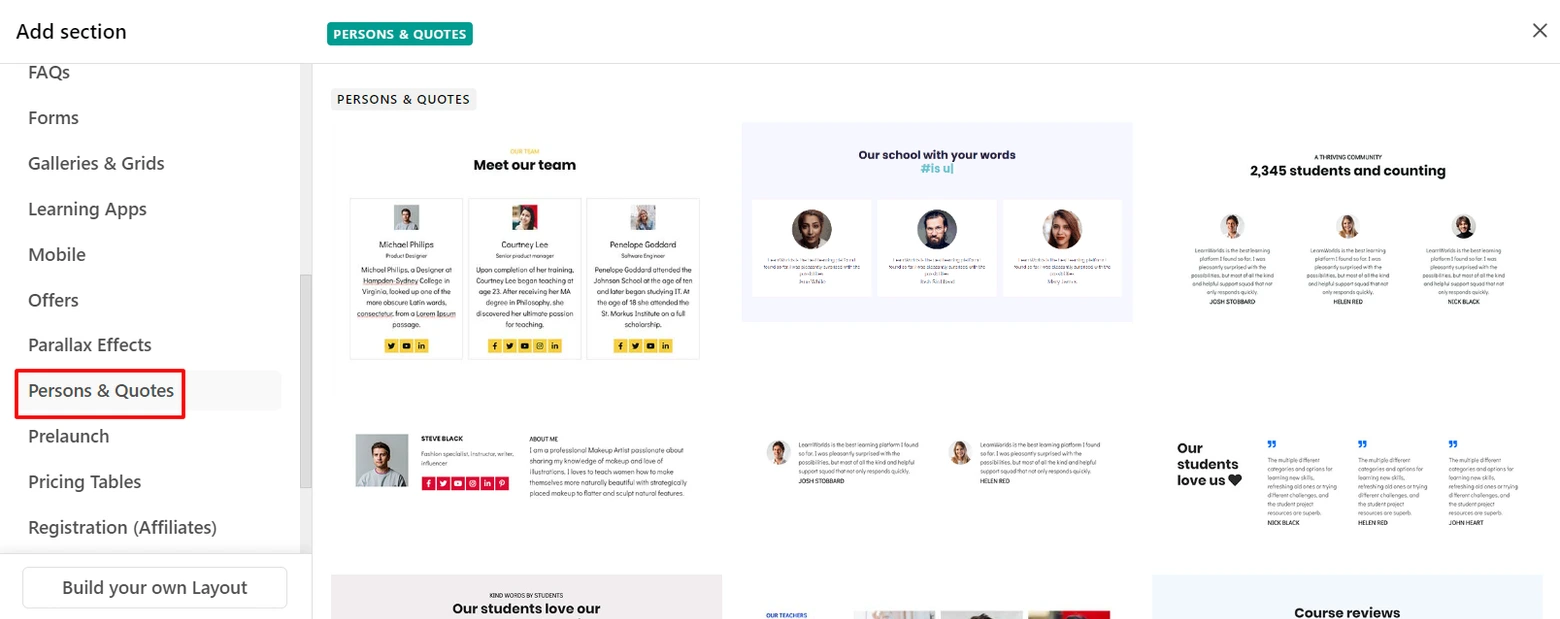
LearnWorlds has no built-in widget that collects star ratings from learners. Reviews reach a LearnWorlds school through an embed code from a review tool.
What LearnWorlds does give you is a feedback form inside a course (there’s a Course Evaluation template) and a Persons & Quotes section. You copy answers into that section by hand, one quote at a time.
That’s fine for three quotes on a homepage. With a dozen courses it turns into a chore, and nothing changes on the page when a new learner writes something kind.
The steps below use WiserReview to collect the reviews and build the widget.

Reviews for every course
Collect learner reviews, tag them by course and show them with one embed code.
How to Add a Review Widget to LearnWorlds
To add a review widget to LearnWorlds, build the widget in WiserReview, copy its embed code and paste it into an Embed section on the page.
Steps 1 to 6 happen in WiserReview. Steps 7 to 9 happen in the LearnWorlds site builder.
Step 1: Sign Up and Log In to WiserReview
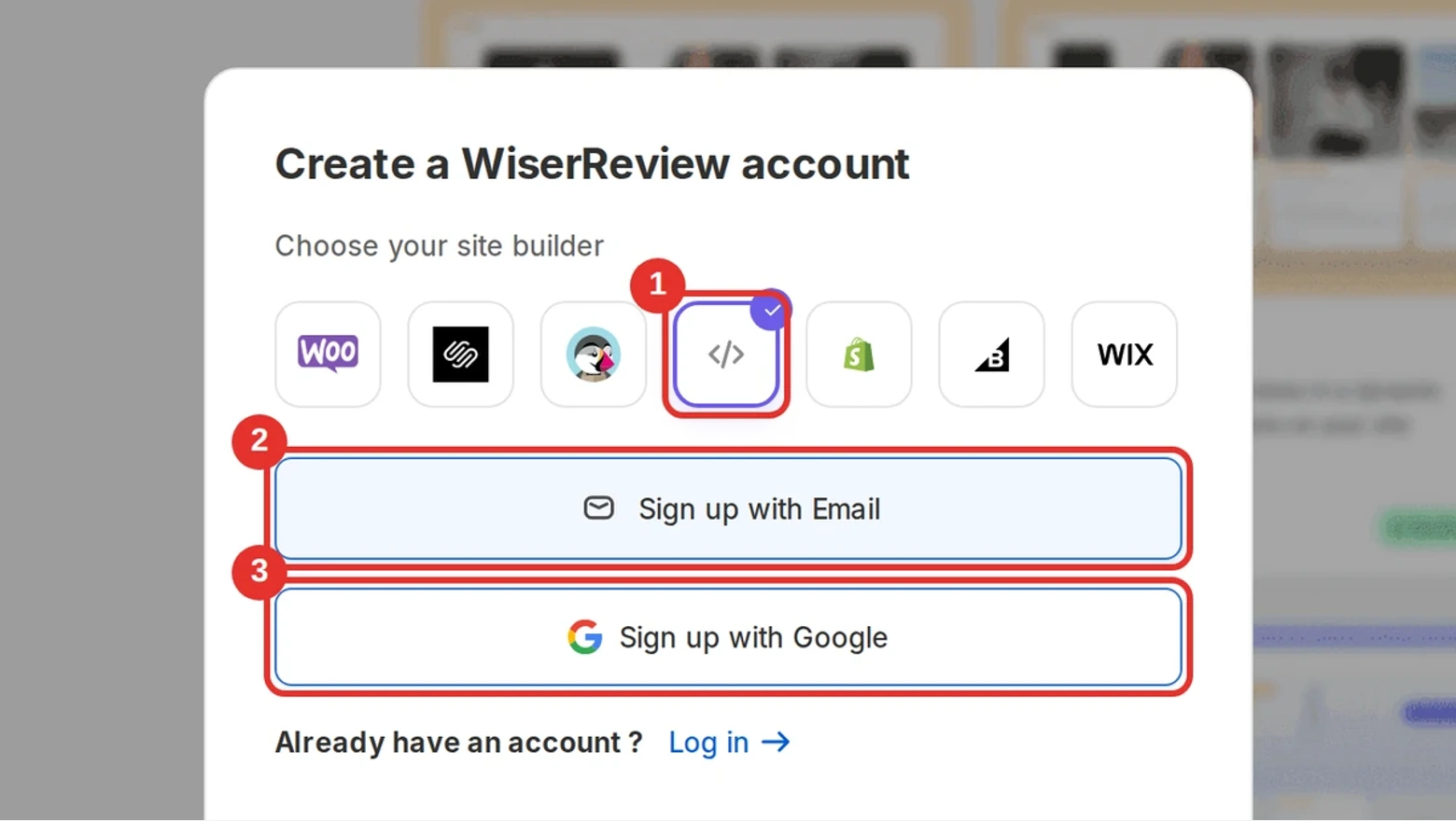
- Click Sign up for WiserReview to open the account window.
- Under Choose your site builder, click the custom code icon (</>). LearnWorlds isn’t on the list, and custom code covers any site where you can paste a script.
- Click Sign up with Email or Sign up with Google. All plans open with a 7-day free trial.
- Already have an account? Click Log in and sign in with the same email or Google account.
Step 2: Add Your First Reviews
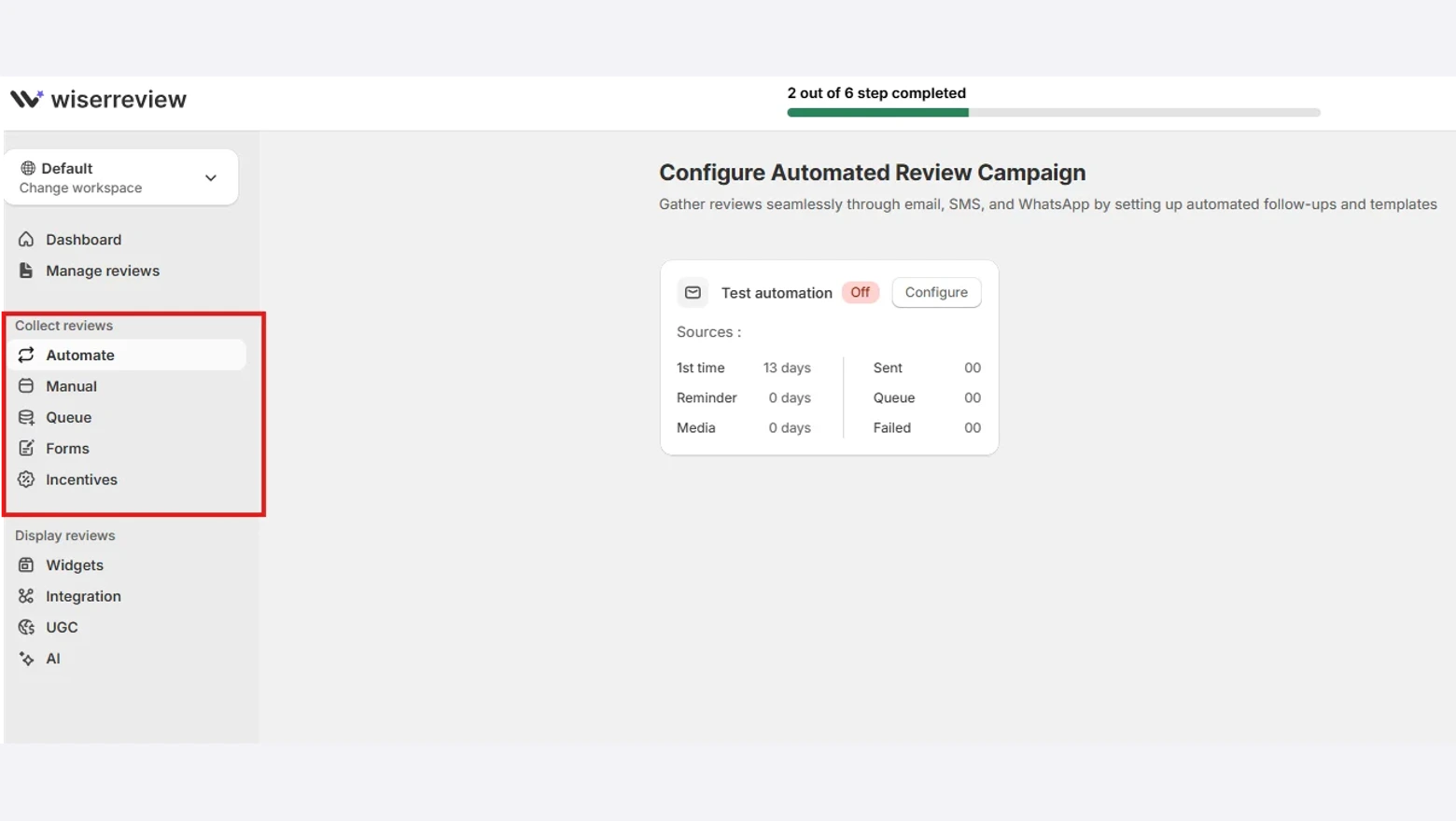
- Already have reviews somewhere else? Open Manage reviews, click Import and pick the source, such as a CSV file or Google.
- Starting from zero? Under Collect reviews, open Forms and set up the form learners fill in.
- Then open Manual to send a review request email to your past learners.
Step 3: Tag Each Review by Course
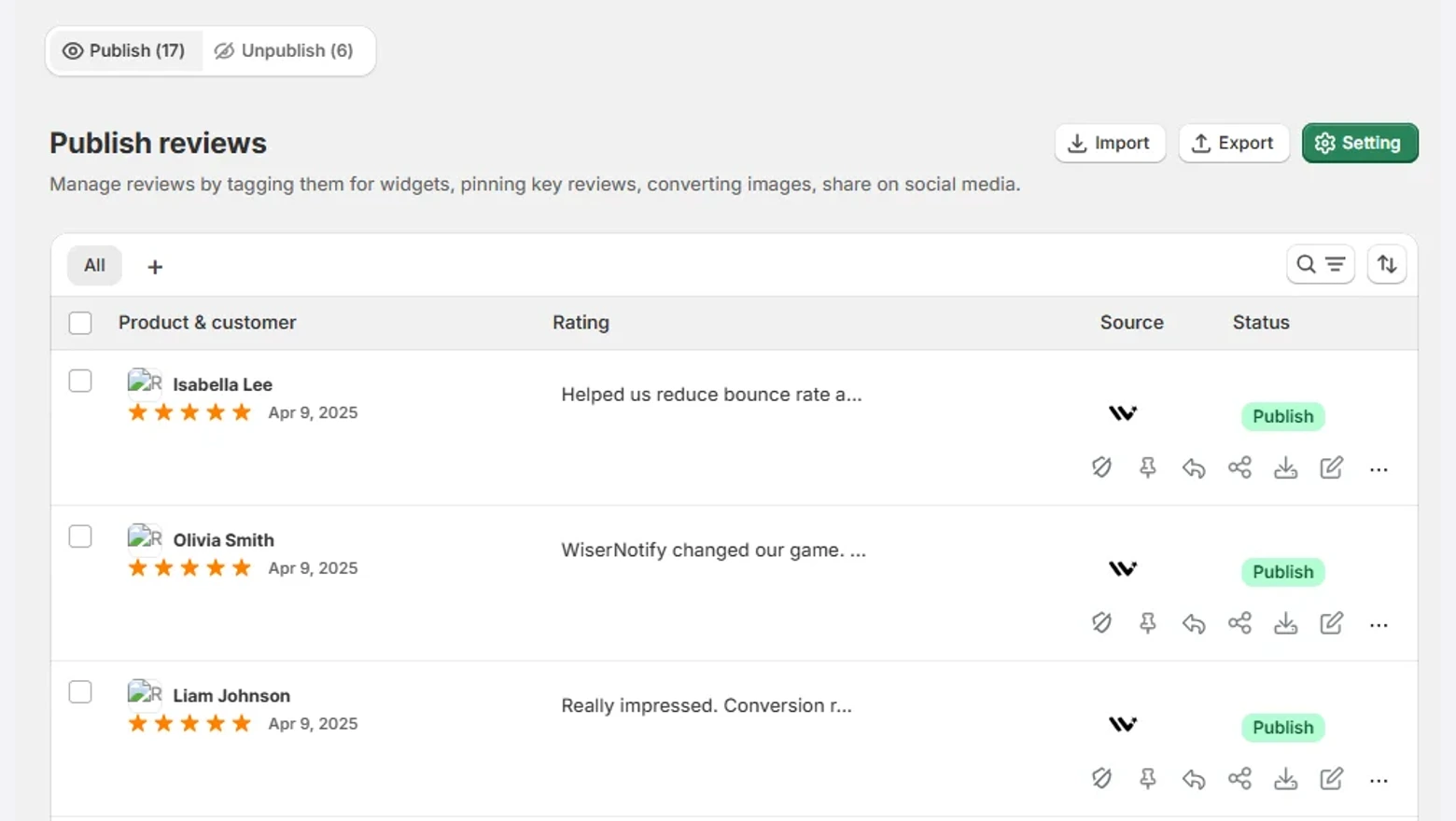
- Open Manage reviews and publish the reviews you want visitors to see.
- Tag each review with the course it talks about, such as excel-basics.
Tags let you build one widget per course, so each course page shows feedback from its own learners only.
Step 4: Add a Wall of Love Widget
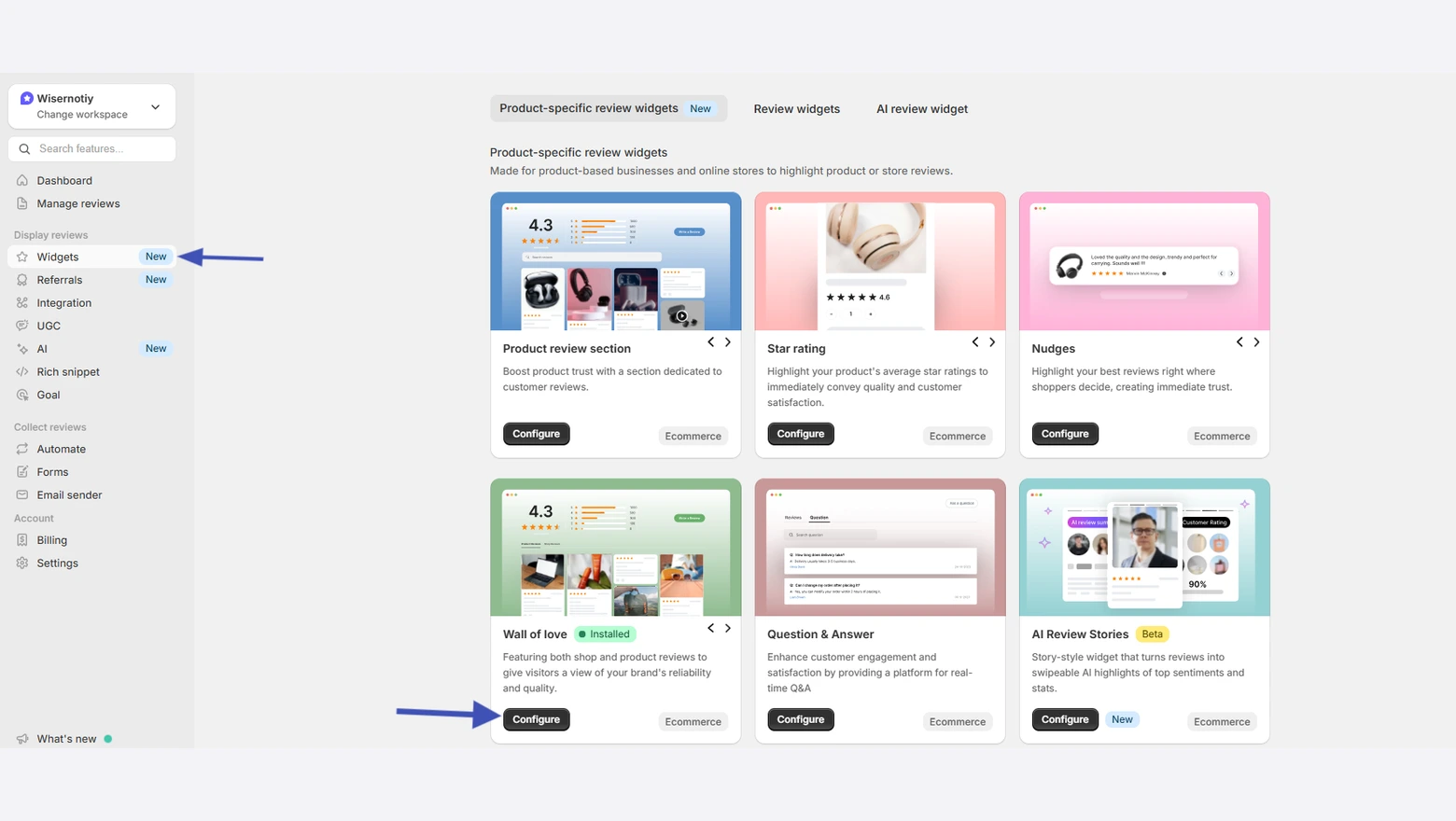
- Click Widgets under Display reviews.
- Find Wall of love and click Configure to open the widget editor.
- Prefer a sliding row or a small badge? Pick that layout from the same Widgets page instead.
Step 5: Filter It to One Course
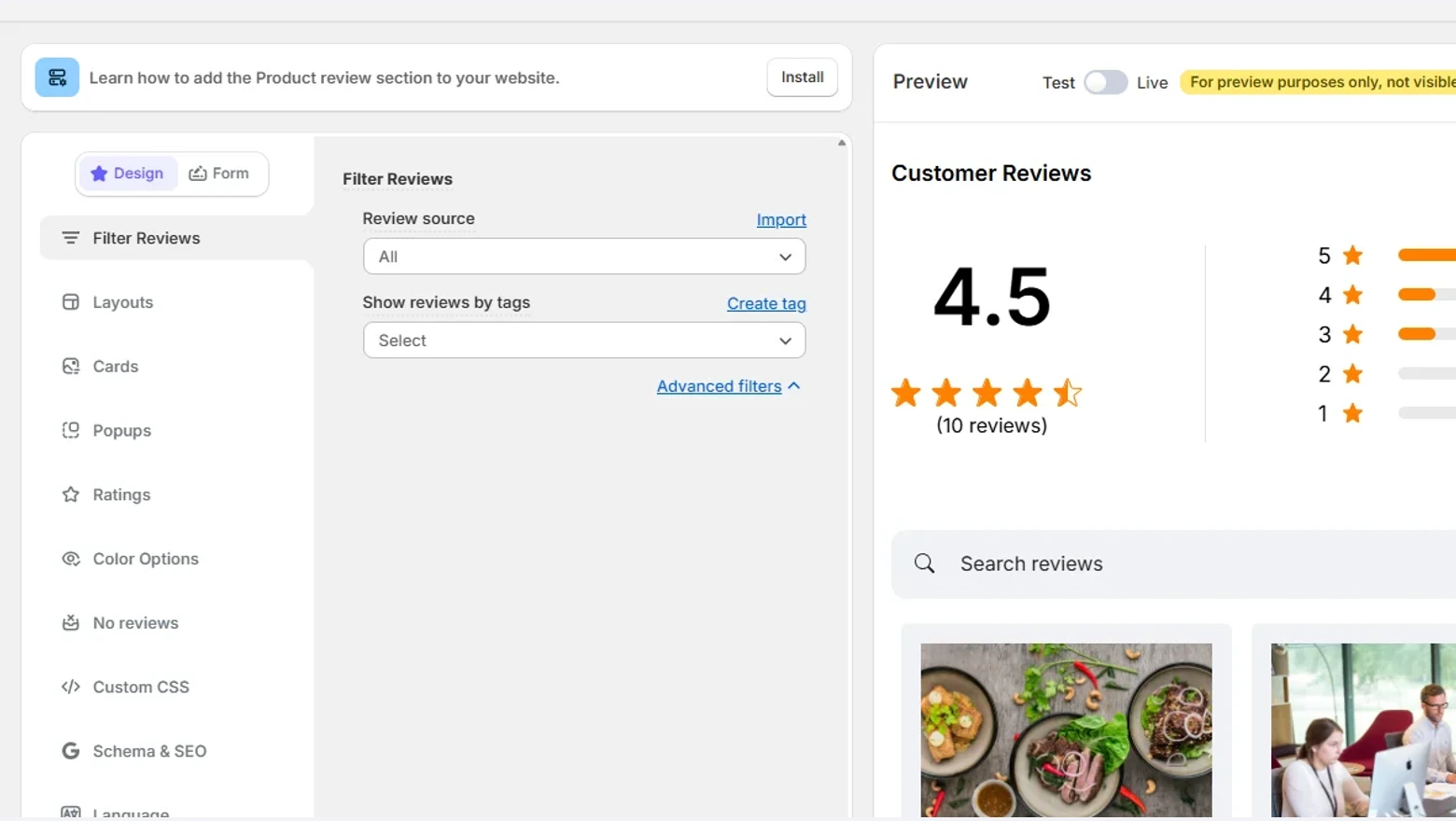
- In the widget editor, open Filter Reviews.
- Under Show reviews by tags, pick the course tag from Step 3.
- Match the colors and fonts to your school’s theme, then save.
Step 6: Copy the Widget Code
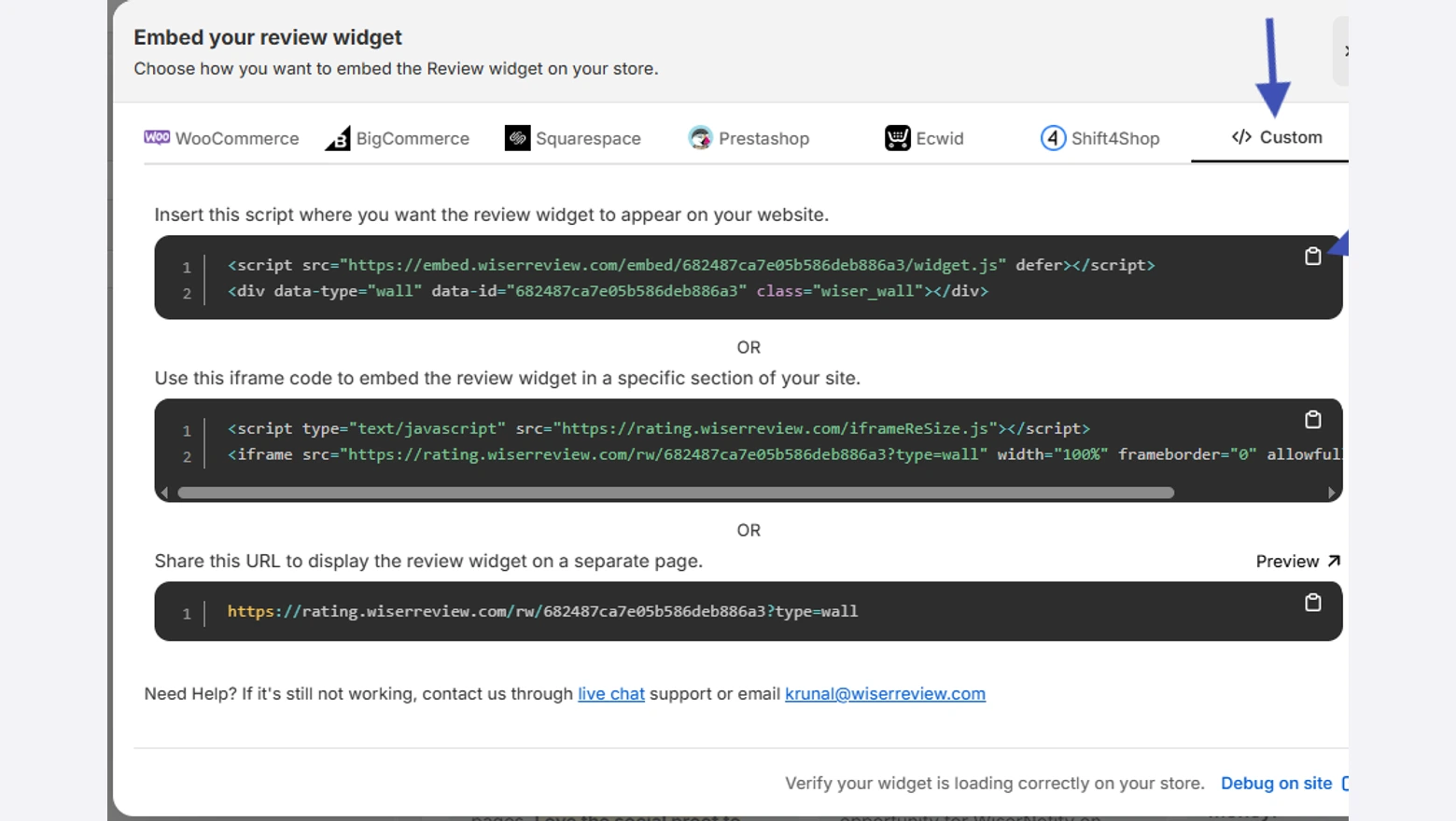
- Click Install at the top right of the widget editor.
- Open the Custom tab.
- Click the copy icon next to the script. That one script is all a LearnWorlds page needs.
Step 7: Log In to LearnWorlds
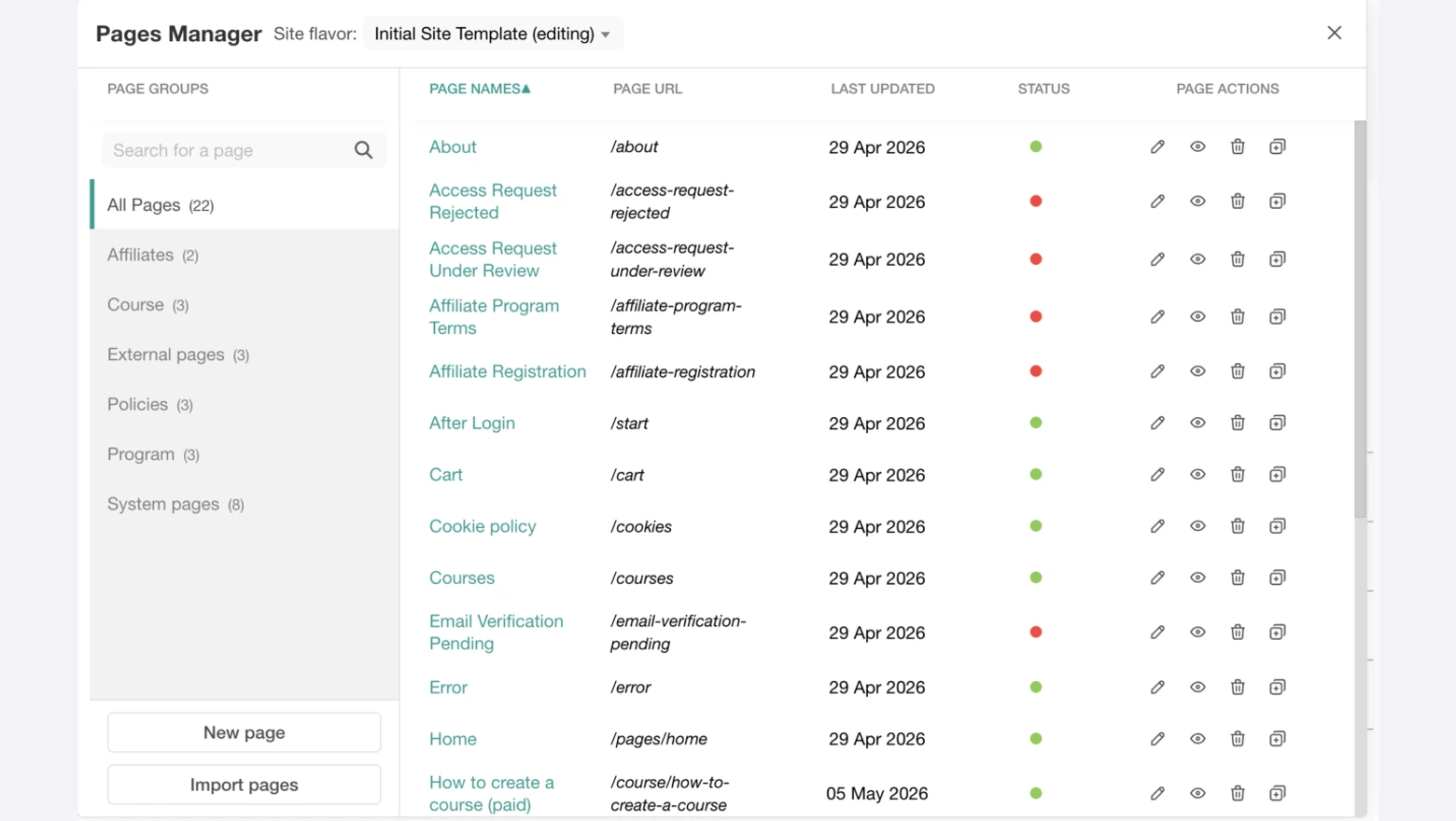
- Log in to your LearnWorlds school as an admin.
- Go to Website, then Design, then Edit Website.
- Click Manage pages at the bottom left to open the Pages Manager.
- Pick the page that needs reviews, such as a course landing page or your homepage.
Step 8: Add an Embed Section
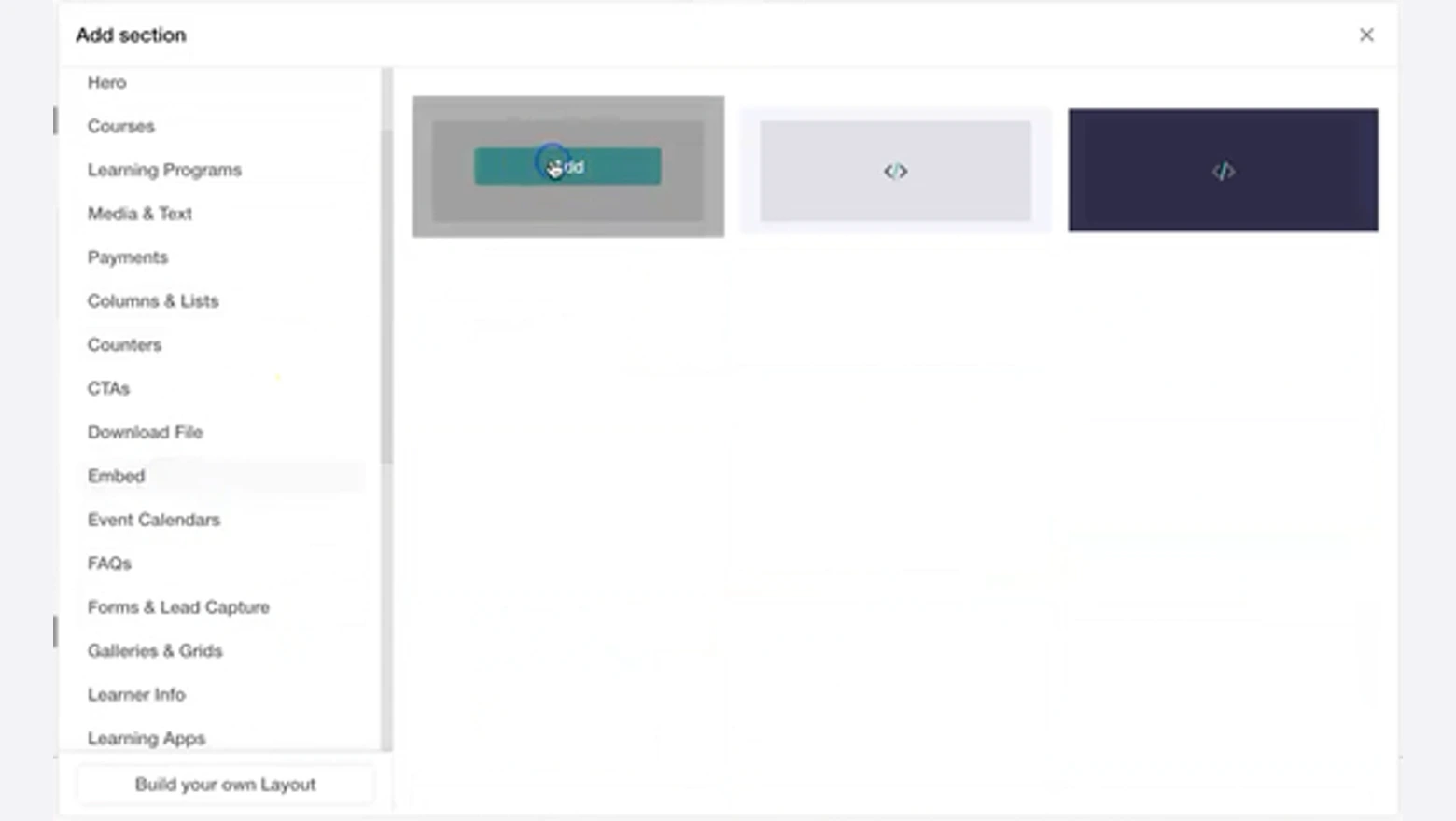
- Hover over the page where the reviews should sit and click the + icon.
- Choose Embed from the list of section types.
- Click Add on one of the Embed layouts.
Step 9: Paste, Update and Save
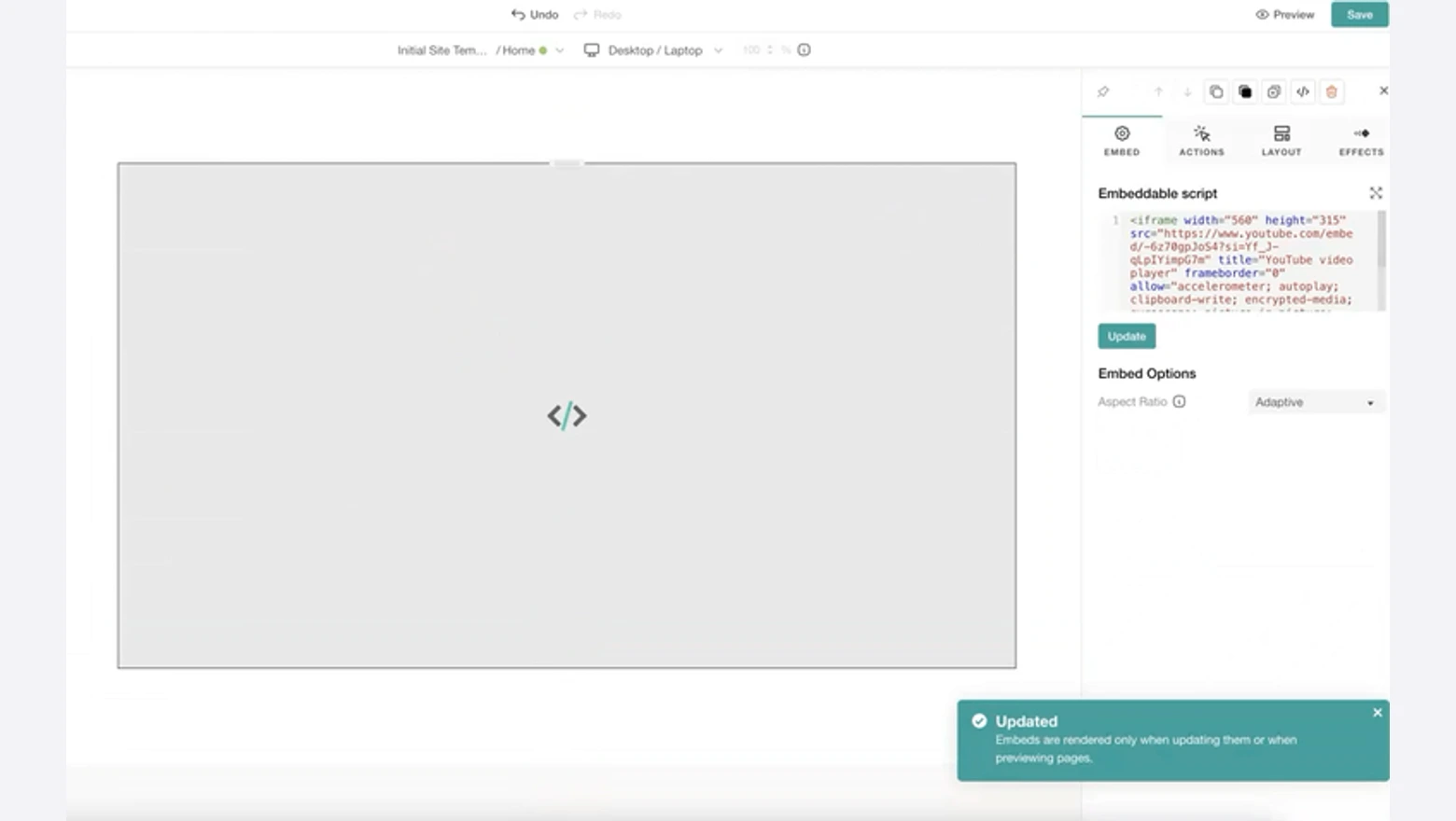
- Click the new section to open its side panel.
- Paste the WiserReview code into the Embeddable script box and click Update.
- Click Save at the top right, then open Preview to check desktop and mobile.
Show a Badge on Every Page
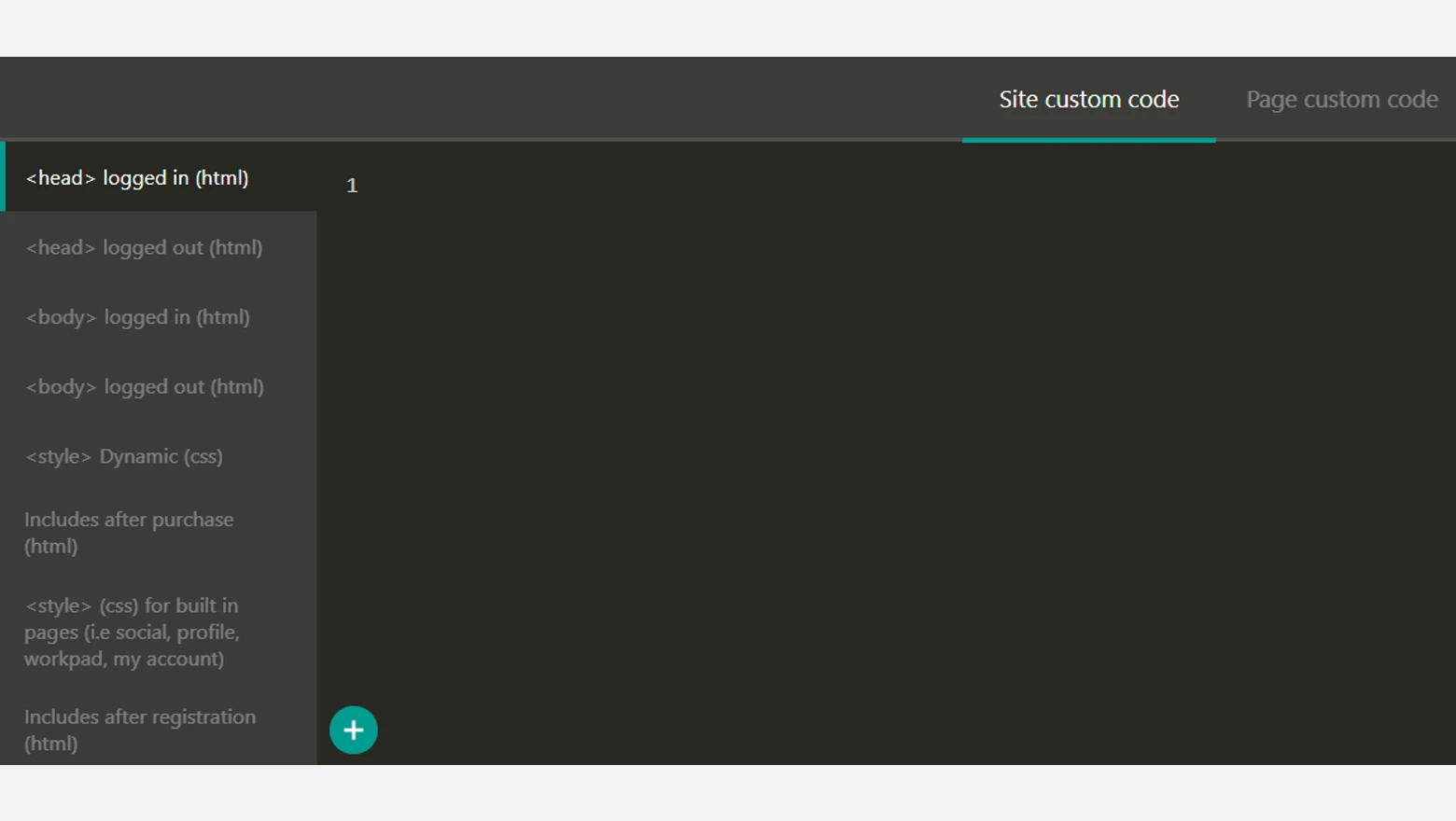
A floating badge or review popup follows visitors around the whole school, so it doesn’t belong in one page section. It goes in Site custom code.
- In Edit Website, open Site, then Site custom code.
- Paste the widget code into the <body> logged out box. That’s the box first-time visitors load.
- Paste it into the <body> logged in box too if enrolled students should see it.
- Save, then check the school in a private window.
One code per course page
Filter by course tag, style the widget once and paste the code into LearnWorlds.
Where Should Reviews Go on a LearnWorlds School?

Reviews on a LearnWorlds school work hardest on course landing pages, close to the price and the enroll button, where visitors decide whether to pay.
Each spot suits a different layout from the WiserReview Widgets page.
| Page | Widget | Where on the page |
|---|---|---|
| Course landing page | Wall of love filtered to that course | After the curriculum, before the second enroll button |
| School homepage | Carousel of your best reviews | Under the course cards |
| Pricing or bundle page | Trust badge with the star average | Beside the plan buttons |
| Webinar or free lesson page | Small carousel | Next to the sign-up form |
| Instructor or About page | Full Wall of love | After your bio |
| Every public page | Floating badge | Site custom code, logged out box |
Leave lesson pages alone. Those learners already paid, and a badge floating over a video only gets in their way.
Reviews also pair well with live enrollment proof. A sales notification popup on LearnWorlds can run on the same course pages.
For a few hand-picked quotes with photos, see how to add testimonials on your website.
How to Show Google Reviews on LearnWorlds
Google reviews go on LearnWorlds the same way course reviews do. Connect your Google Business Profile in WiserReview, set the widget source to Google and embed the code.
Step 1: Connect Google in WiserReview
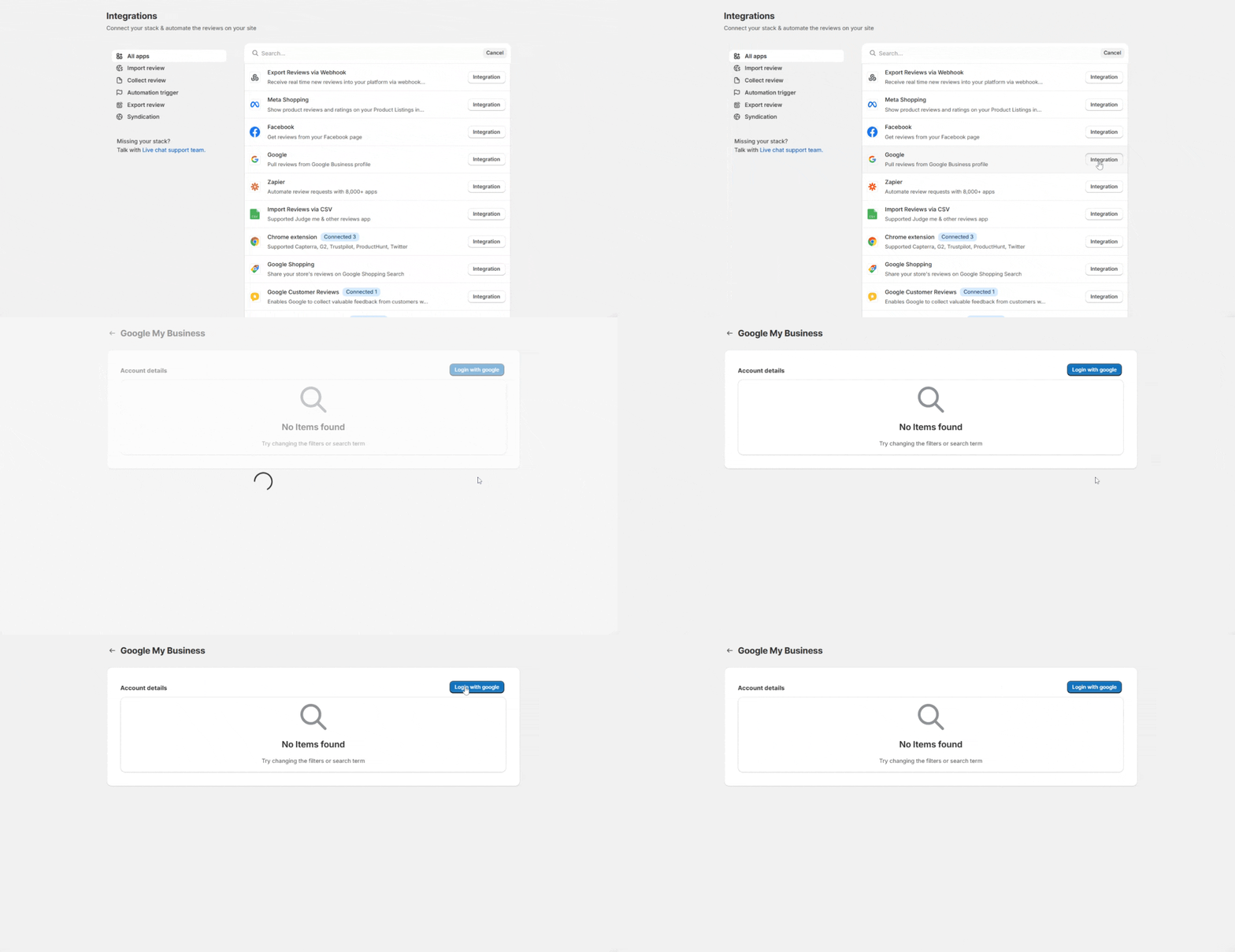
- In WiserReview, click Integrations in the left menu. You can also start from Manage reviews, then Import.
- Find Google, the one that pulls reviews from a Google Business profile, and click Integration.
- Click Login with google and sign in with the account that manages your Business Profile.
- Allow WiserReview to read your Google reviews.
Step 2: Keep the Sync On and Embed
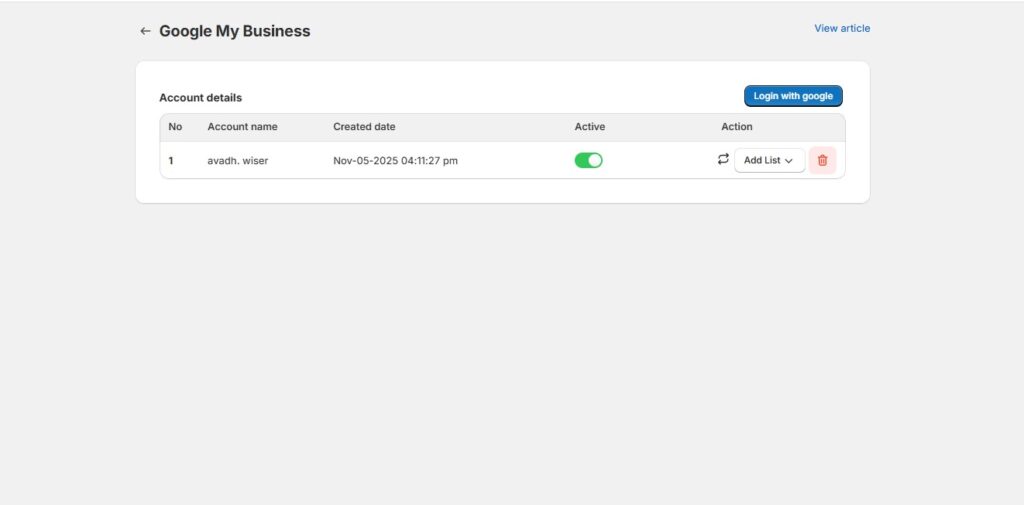
- Check that your profile shows under Account details with the Active toggle on. New Google reviews keep syncing while it’s on.
- In your widget’s Filter Reviews panel, set Review source to Google.
- Copy the code and add it to LearnWorlds, exactly as in Steps 6 to 9.
No Business Profile but listed on Google Maps? Choose Google Place instead and search for your business by name. There are more setups for Google reviews on a website in our full guide.
How to Ask Learners for a Review After a Course
Review requests for LearnWorlds courses go out when WiserReview learns that a learner finished a course. That signal comes by webhook, Zapier or a CSV upload, depending on your LearnWorlds plan.
Timing matters more than wording here. Someone who just got a certificate is glad to say so. Three months later, the course is a blur.
| LearnWorlds plan | What sends the review request |
|---|---|
| Starter | No webhooks or Zapier, so you upload a CSV of learners to a one-time campaign |
| Pro Trainer | Zapier, with the LearnWorlds Course Completed trigger |
| Learning Center, High Volume & Corporate | A LearnWorlds automation that sends a webhook, no Zapier needed |
The steps below follow the webhook route, and this WiserReview walkthrough shows the same screens. For what to ask and when, these ideas on collecting reviews for online coaching carry over well to courses.
Step 1: Create a Service Automation
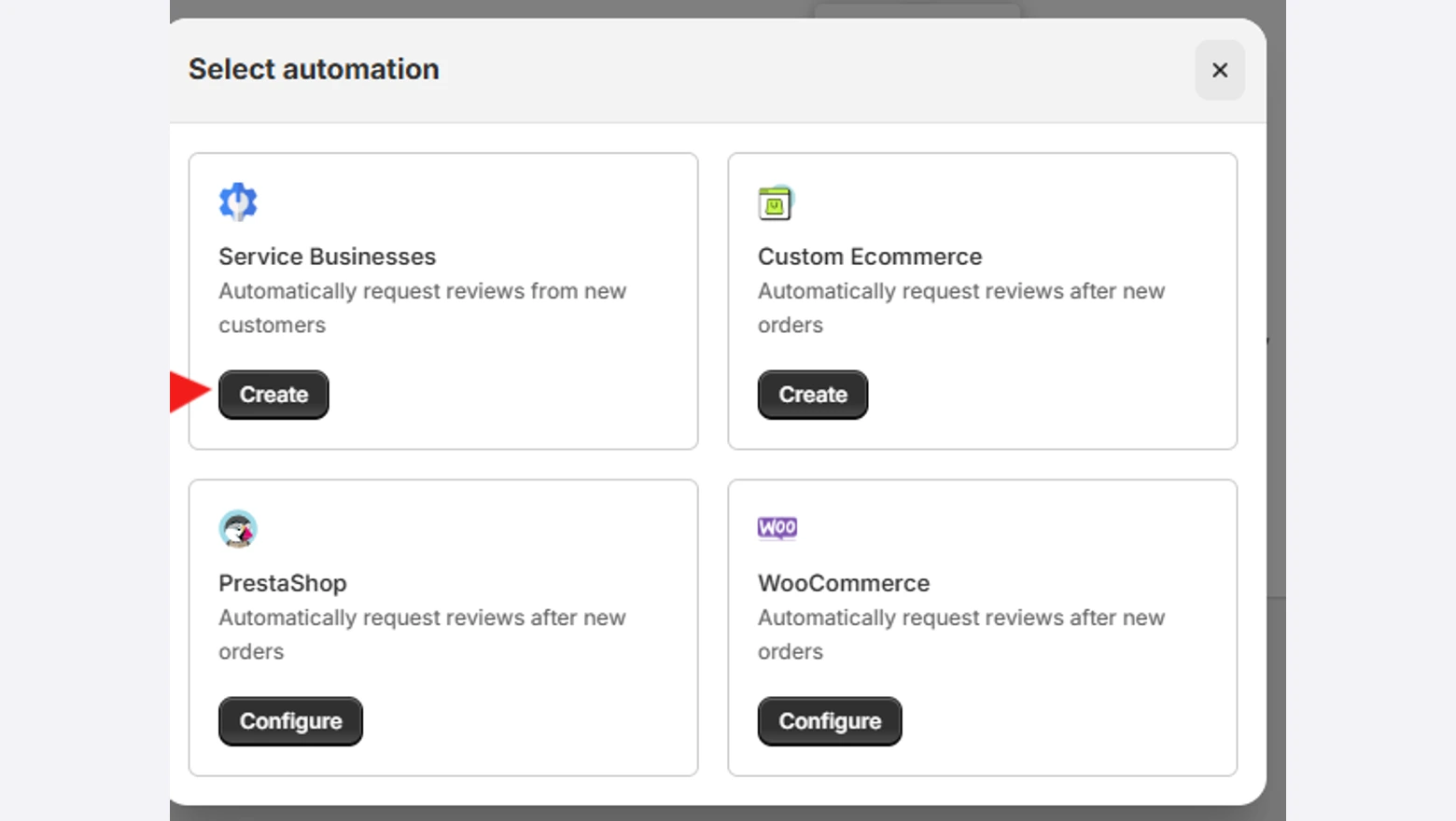
- In WiserReview, open Automate and click Add automation.
- Pick Service Businesses and click Create. A course has no shipping date to wait for, so it fits here better than the store options.
- Name the automation after the course, choose the review form the email button opens, and click Save.
Step 2: Add a Webhook Source
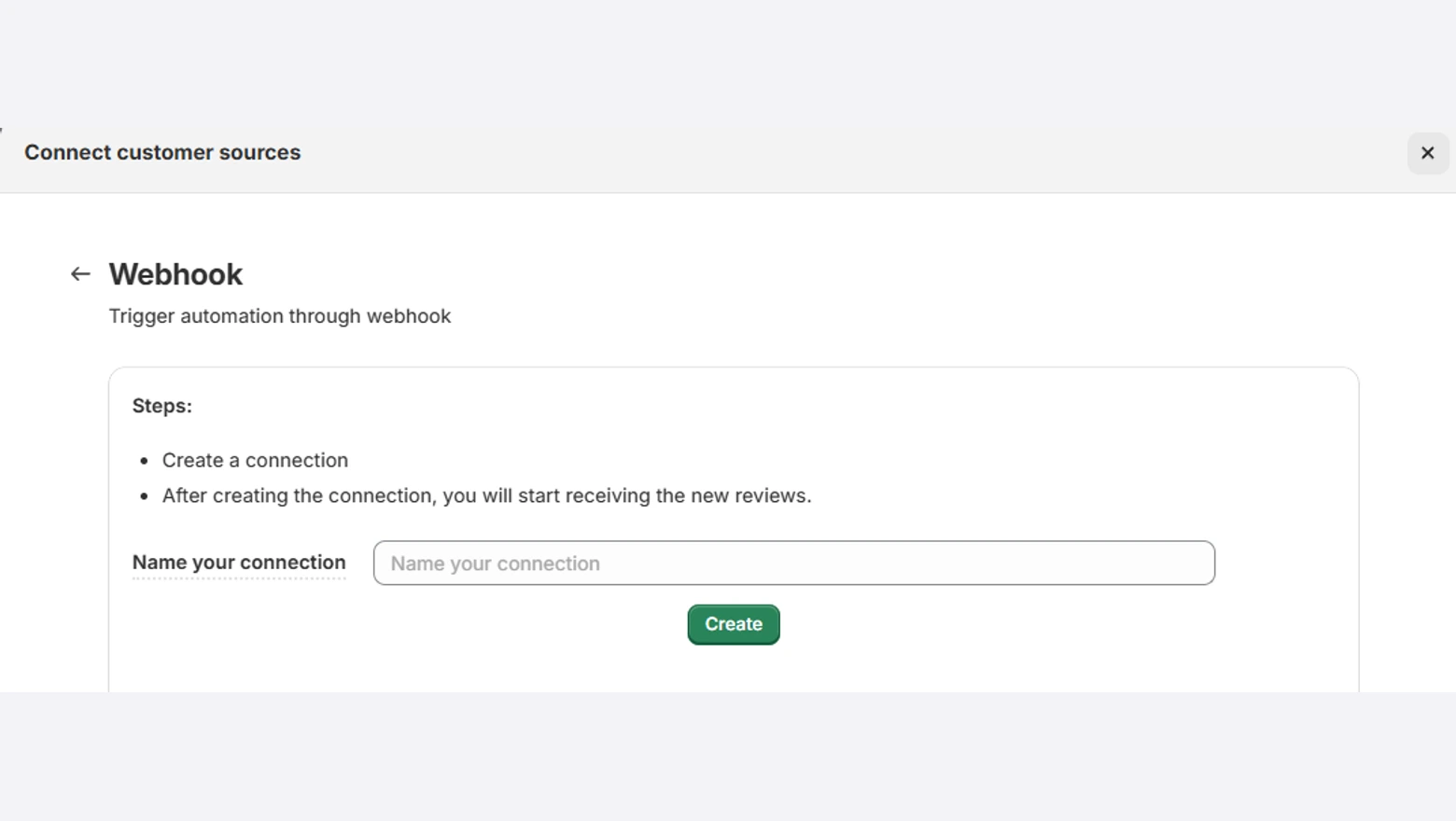
- Under Set review triggers, click Add Source to Trigger Reviews.
- Click Integration next to Webhook.
- Name the connection, for example LearnWorlds course completed, and click Create.
Step 3: Copy the URL and Start Listening
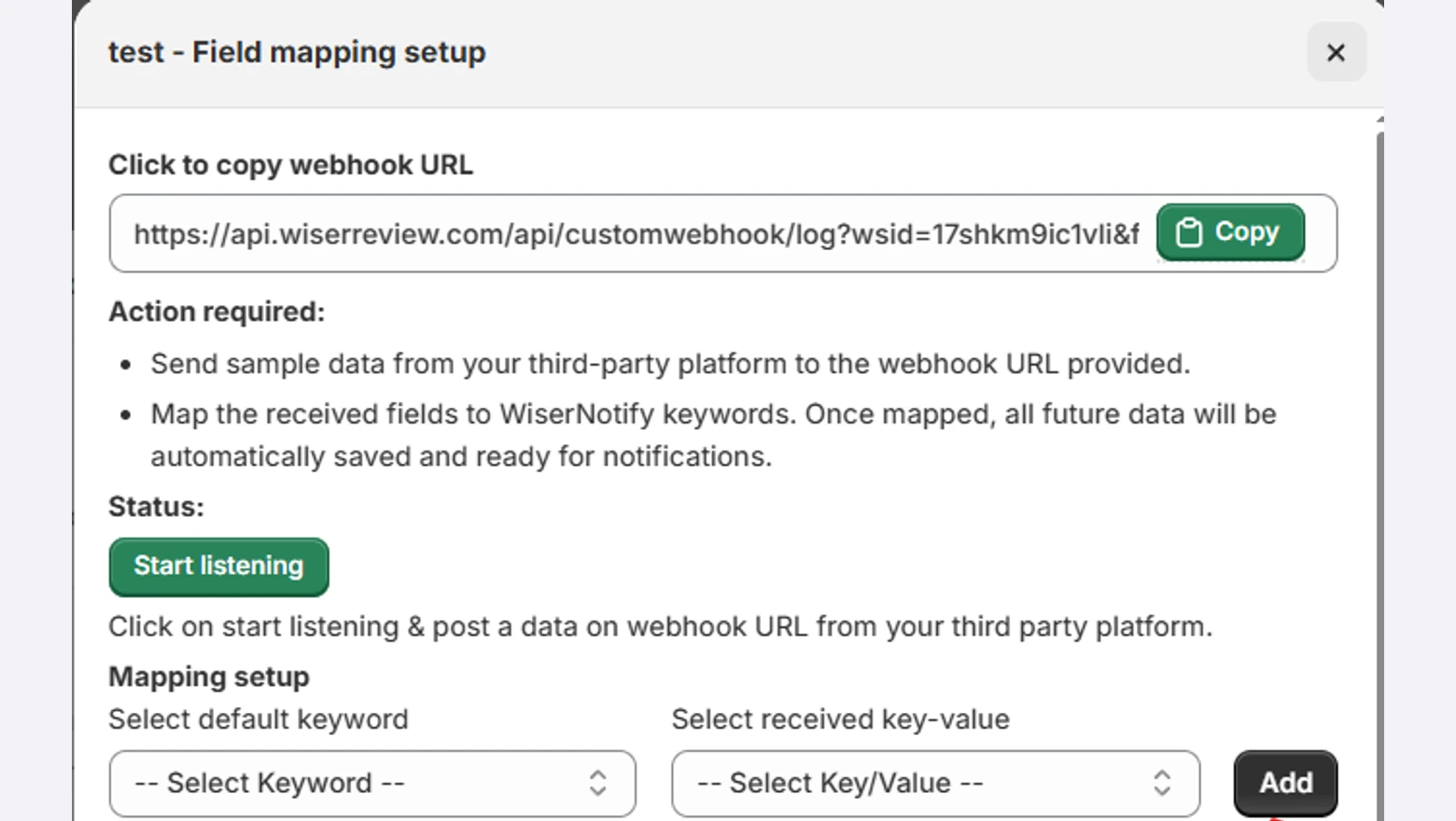
- Click Configure on the new connection.
- Click Copy next to the webhook URL.
- Click Start listening and keep this window open.
Step 4: Send a Webhook From LearnWorlds
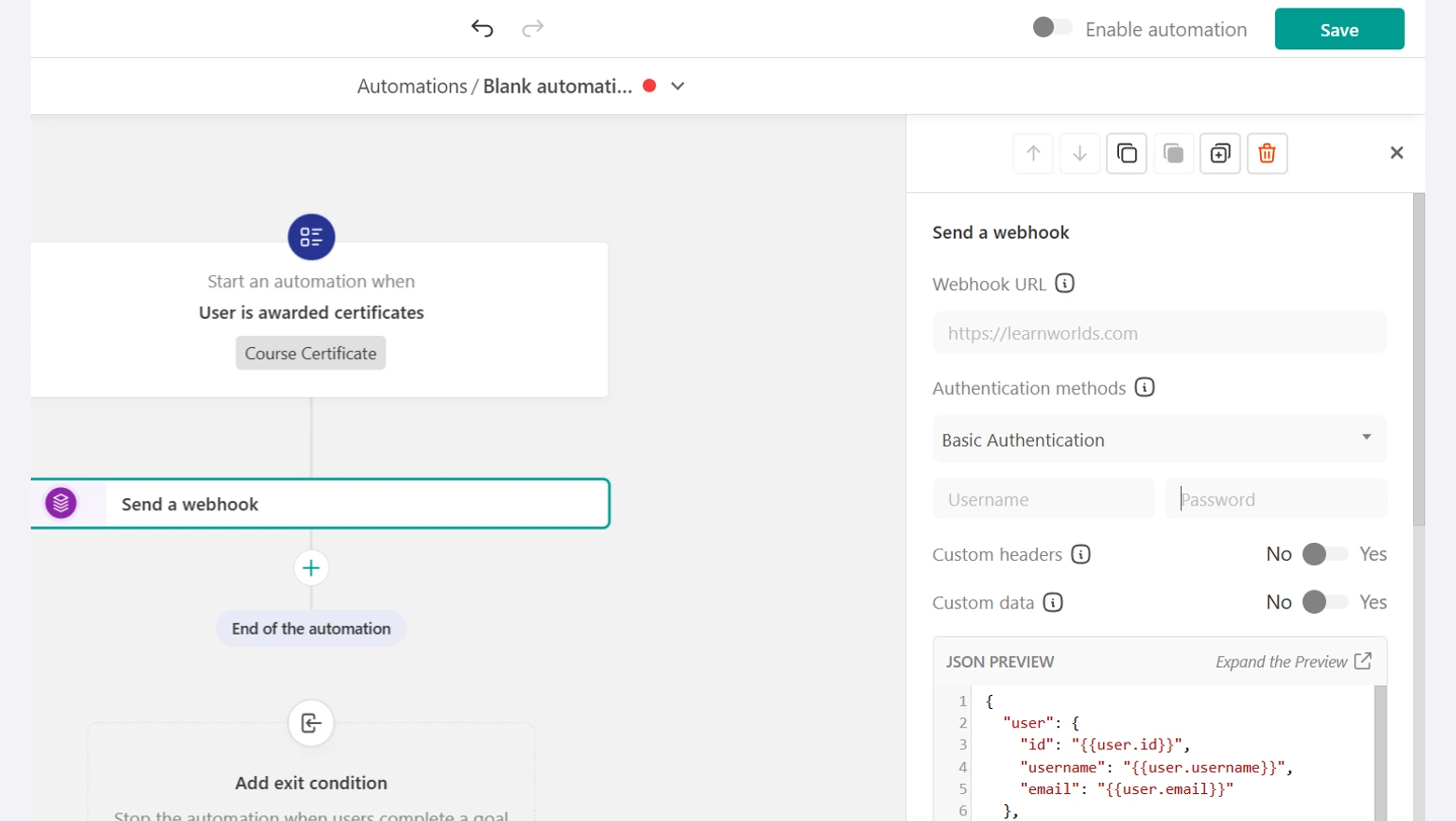
- In LearnWorlds, go to Users, then Automations, and create an automation.
- Drop in the trigger for completing a course and choose the course.
- Click + under the trigger, add Send a webhook and paste the WiserReview URL into Webhook URL.
- Save, enable the automation and finish the course once with a test learner.
The screenshot uses the certificate trigger. That works as well if your course awards a certificate at the end.
Step 5: Map Fields and Pick the Source
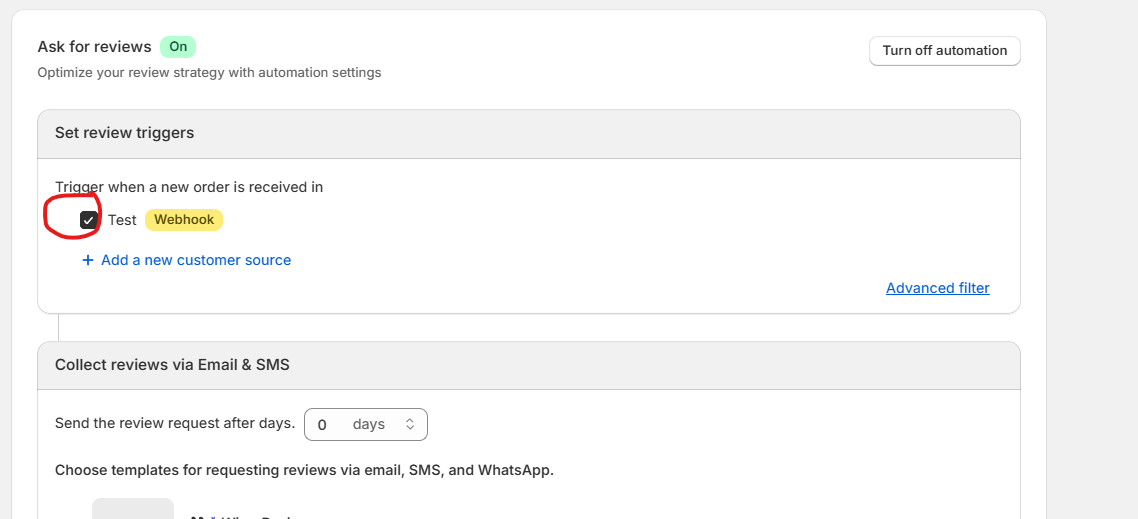
- Back in WiserReview, wait for the Received data successfully message.
- Map Email to user.email and First Name to user.username, clicking Add after each pair.
- Close the window and tick the new source under Set review triggers.
Step 6: Set the Delay and Email
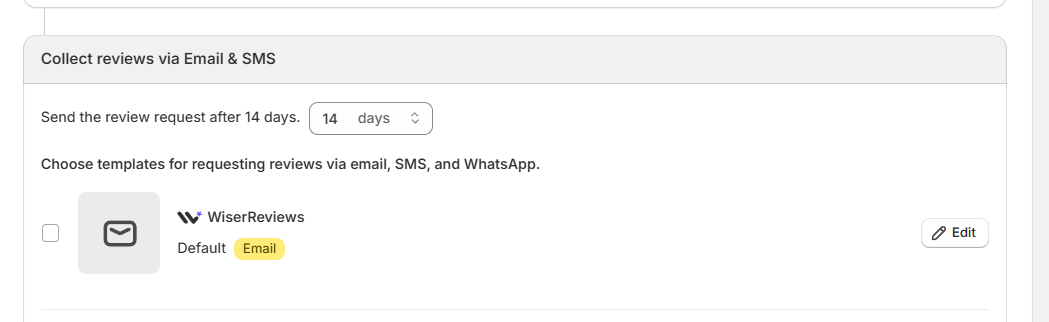
- Under Collect reviews via Email & SMS, set the delay. I’d send it a day or two after completion, and 0 sends it right away.
- Tick an email template and click Edit.
- Write the subject and the ask, then send yourself a test email.
Put the course name in the subject line so the email doesn’t read like a newsletter. These review request email templates have wording you can adapt.
Step 7: Add Reminders and Turn It On
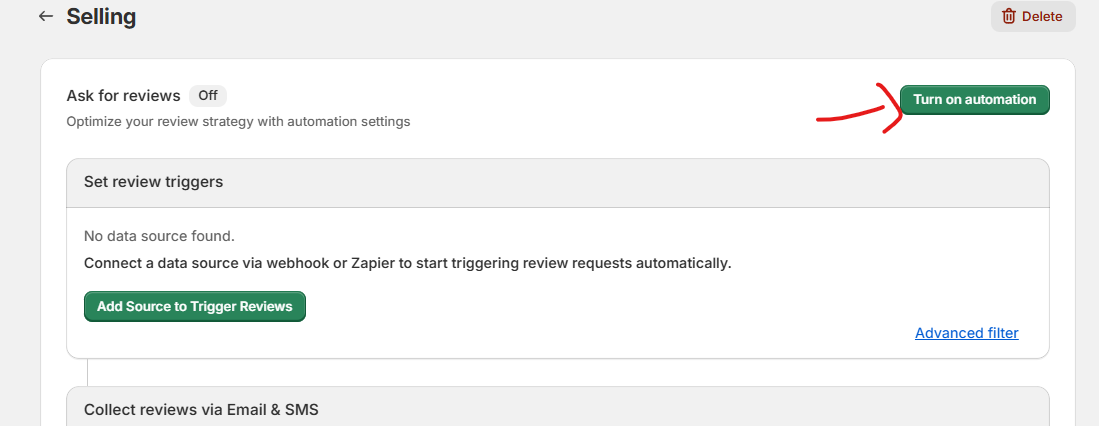
- Switch on Reminder to send a second nudge a few days later.
- Switch on Media follow up if you want video reviews from happy learners.
- Click Turn on automation at the top right.
No Webhooks on Your Plan?
On Pro Trainer, Zapier takes the place of the webhook.
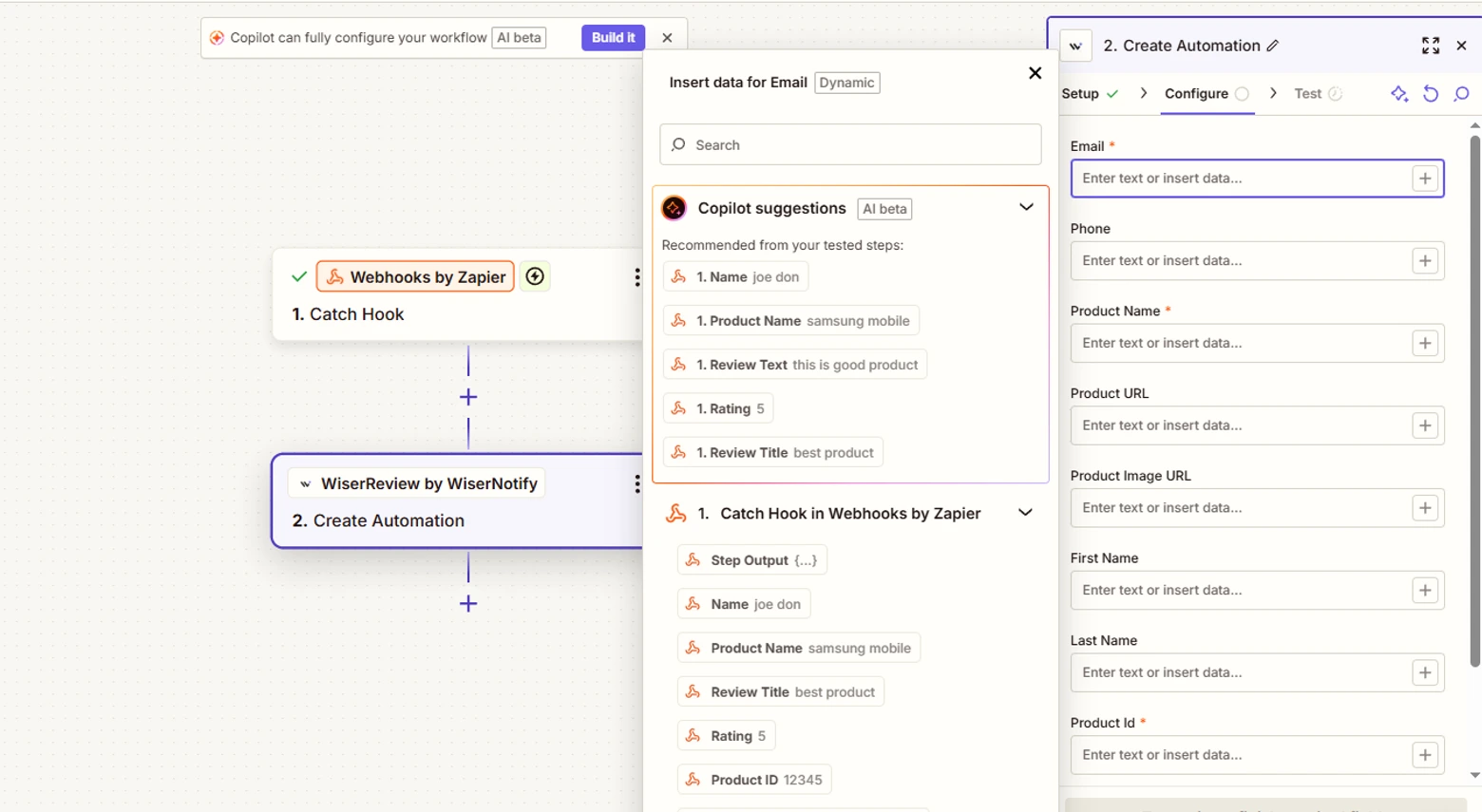
- In WiserReview, open Integrations, click Integration on Zapier, name the connection and copy the API key.
- In Zapier, start a Zap with the LearnWorlds Course Completed trigger.
- Add the WiserReview by WiserNotify action Create Automation and connect it with the key.
- Map Email, Product Name (the course title) and Product ID (the course ID), and pick your Zapier connection under Integration.
- In your WiserReview automation, pick Zapier as the source instead of Webhook.
The screenshot starts from a webhook trigger. In your Zap, the LearnWorlds trigger sits in that first slot.
On Starter, run a one-time campaign. Export the learners who finished the course as a CSV with each learner’s name, email and the course name, then follow these steps.
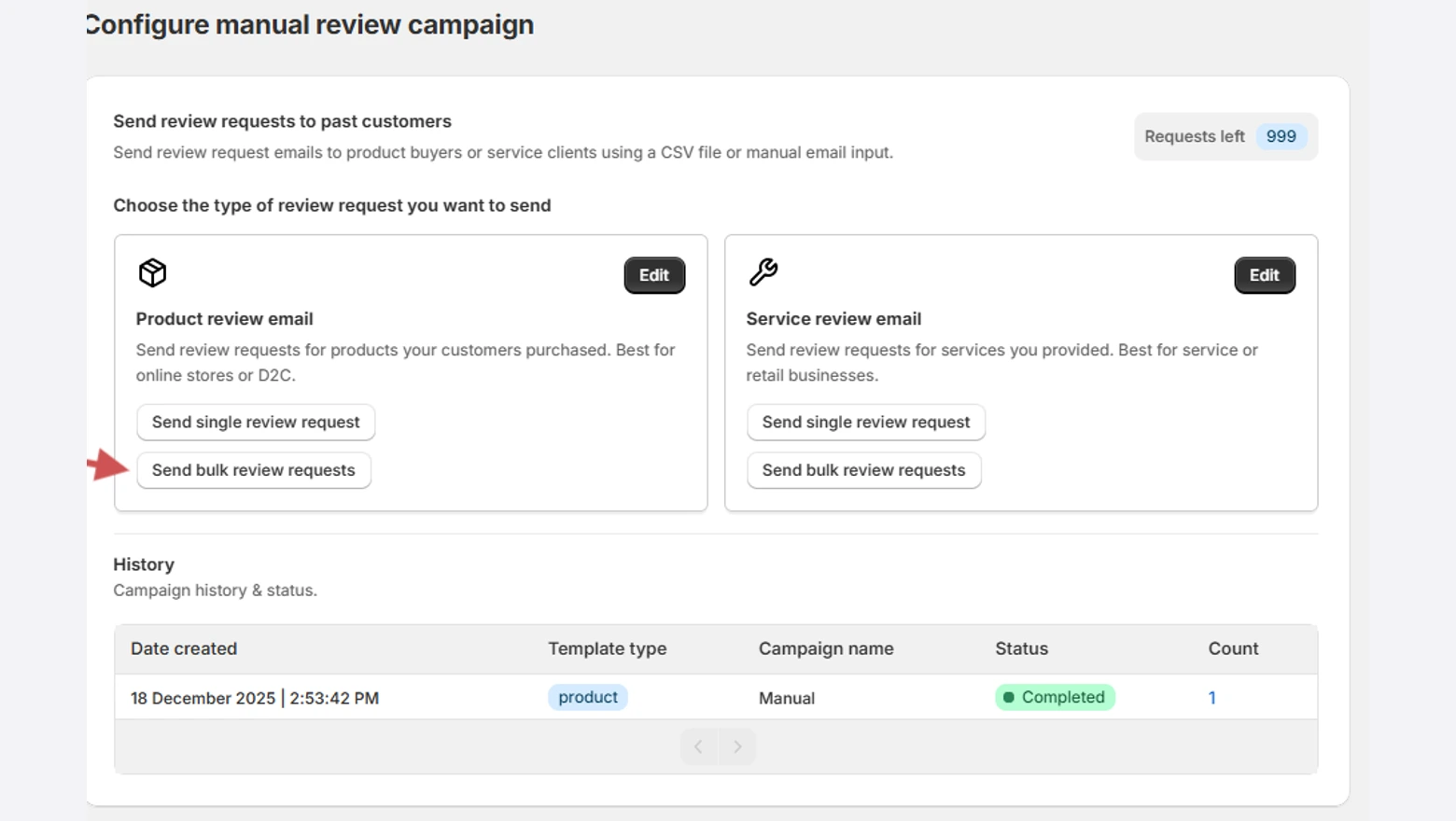
- In WiserReview, go to Automate, then Manual.
- Under Product review email, click Send bulk review requests. Treating the course as the product ties each review to that course.
- Check the email, click Next, name the campaign and upload the CSV.
- Map the columns, leave Exclude already reviewed items on and click Launch campaign.
Run it once a month for each new group of learners who finish.
Ask when the course ends
Send review requests on course completion, with reminders and video follow-ups.
Reviews Not Showing on LearnWorlds?
Missing reviews on LearnWorlds usually come down to checking inside the editor, a section that was never saved, or code sitting in a logged-in box.
- Checking in the editor: the builder shows a grey placeholder. Open Preview or the live page.
- Update without Save: Update applies the code to the section, and Save publishes the page. You need both.
- Logged-in box only: code in a logged-in slot never loads for visitors who aren’t signed in. You’re signed in as the admin, so it looks fine to you. Add it to the logged-out box.
- Inside the course player: LearnWorlds doesn’t inject the head slot there. Use the <body> logged in box for anything that has to load inside a course.
- Empty filter: the course tag has no published reviews yet. Publish a few, or widen the filter.
- Script won’t load: paste the iframe version from the same Custom tab instead.
- Old version on screen: open the page in a private window each time you change something.
- Still blank: in the WiserReview Install window, click Debug on site to see whether the widget loads.

Wrap Up
LearnWorlds can’t collect or show reviews on its own. An Embed section handles the showing, and a completion trigger handles the asking.
Start with your best-selling course. Put a filtered wall on its landing page, switch on the completion request, and copy the setup to the next course once the first reviews arrive.
Related Post
Frequently Asked Questions
Does LearnWorlds have built-in reviews?
No. LearnWorlds has a Persons & Quotes section where you type each quote by hand, so collected reviews come in through an embed code in an Embed section.
Where do I paste the widget code in LearnWorlds?
Open the page in Edit Website, add a section from the Embed category and paste the code into the Embeddable script box. Then click Update and Save.
How do I ask learners for a review after a course?
On Learning Center and higher plans, a LearnWorlds automation sends a webhook to WiserReview when a learner completes a course. On Pro Trainer use the Zapier Course Completed trigger, and on Starter upload a CSV under Automate, then Manual.
Can I show different reviews on different courses?
Yes. Tag reviews by course, filter each widget by its tag and embed one widget on each course page.
Is WiserReview free for LearnWorlds?
Every plan starts with a 7-day free trial, so you can test it on one course page first.
Why don't the reviews show in the LearnWorlds editor?
LearnWorlds renders embeds only after you click Update or open Preview. Check the page in Preview or on the live site.

Krunal Vaghasiya is a marketing tech expert who boosts e-commerce conversion rates with automated social proof and FOMO strategies. He loves to keep posting insightful posts on online marketing software, marketing automations, and improving conversion rates.




 Capterra