
Instantly Add Facebook Reviews to GoDaddy (No Coding)
 Krunal Vaghasiya|Jan 15, 2025
If you’re using GoDaddy Website Builder to create your website, you’re already leveraging a powerful platform for easy site creation and management.
However, attracting visitors is only half the battle—trust is the key to converting them into customers. Embedding Facebook reviews into your GoDaddy site is a simple and effective way to provide social proof, build credibility, and encourage action.
This guide will walk you through why Facebook reviews are essential, how to integrate them seamlessly into GoDaddy, and best practices for optimizing their placement.
Why Add Facebook Reviews to GoDaddy?
Adding Facebook reviews to your GoDaddy website offers several advantages:
Build Credibility: 84% of consumers trust online reviews as much as personal recommendations. Facebook reviews provide authentic, verifiable testimonials to boost your reputation.
Increase Conversions: Placing reviews near CTAs like “Shop Now” or “Sign Up” can reduce hesitation and encourage visitors to take action.
Enhance Engagement:Reviews keep visitors on your site longer, increasing the chances of them exploring your offerings.
Improve SEO: User-generated content such as reviews often includes relevant keywords, helping improve your website’s search rankings.
Showcase Authenticity: Facebook reviews are public and trusted, making them a reliable source of social proof.
Build trust & FOMO
Highlight real-time activities like reviews, sales & sign-ups.


How to Add Facebook Reviews to GoDaddy
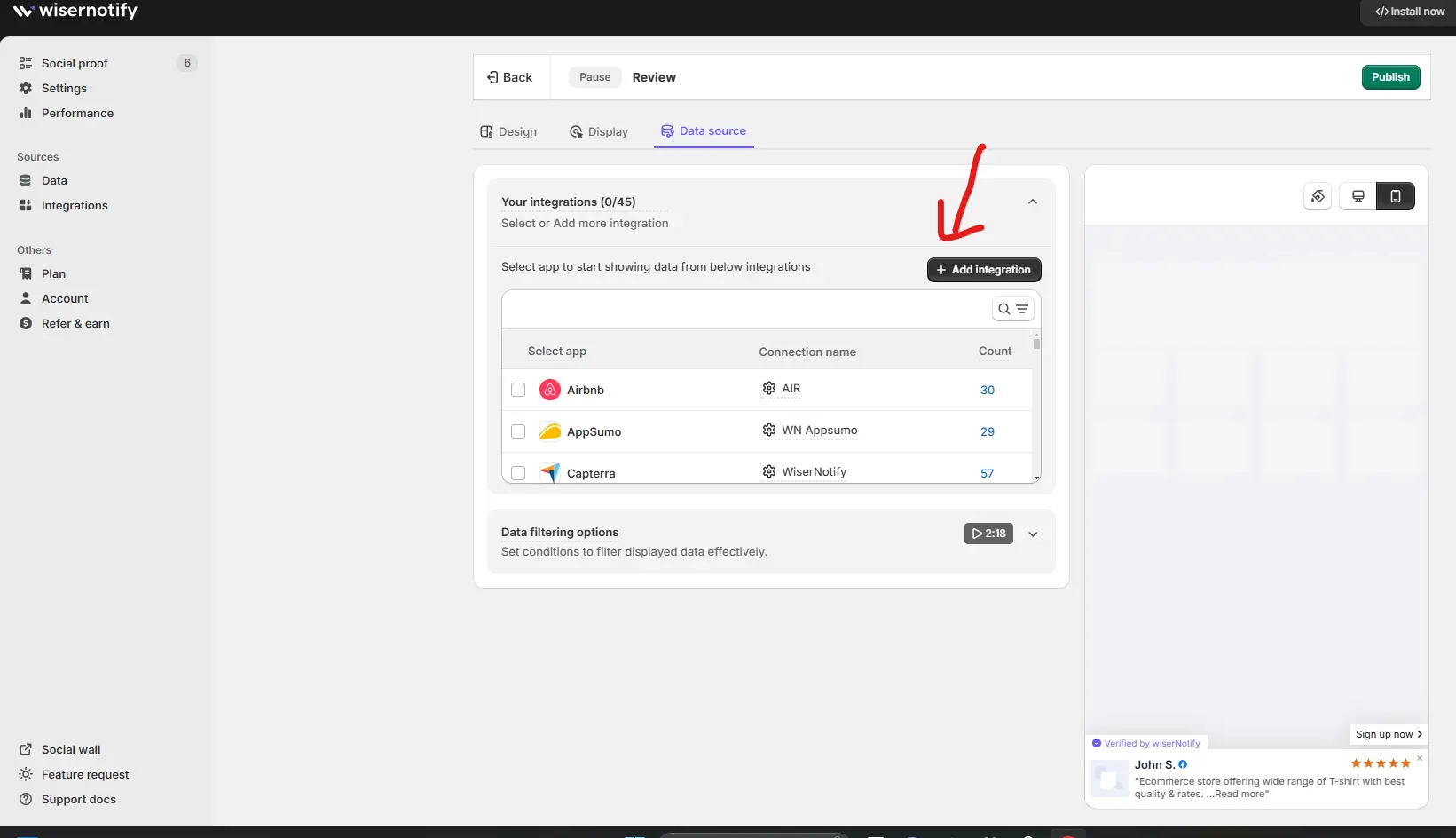
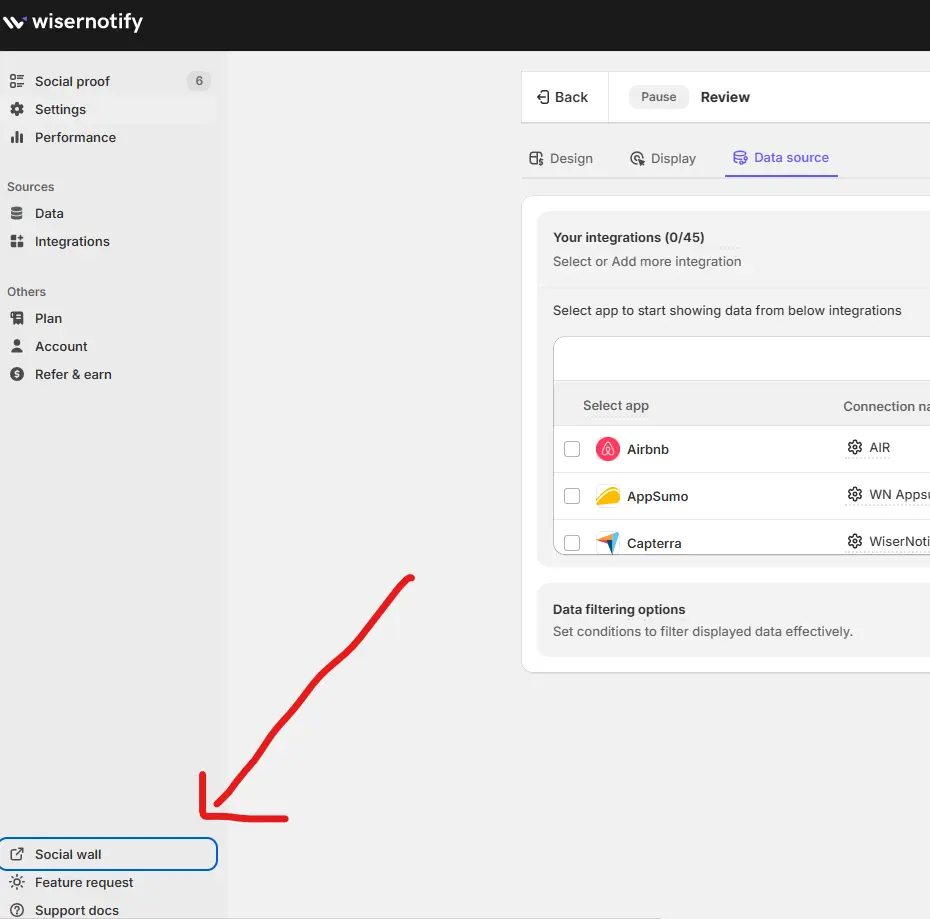
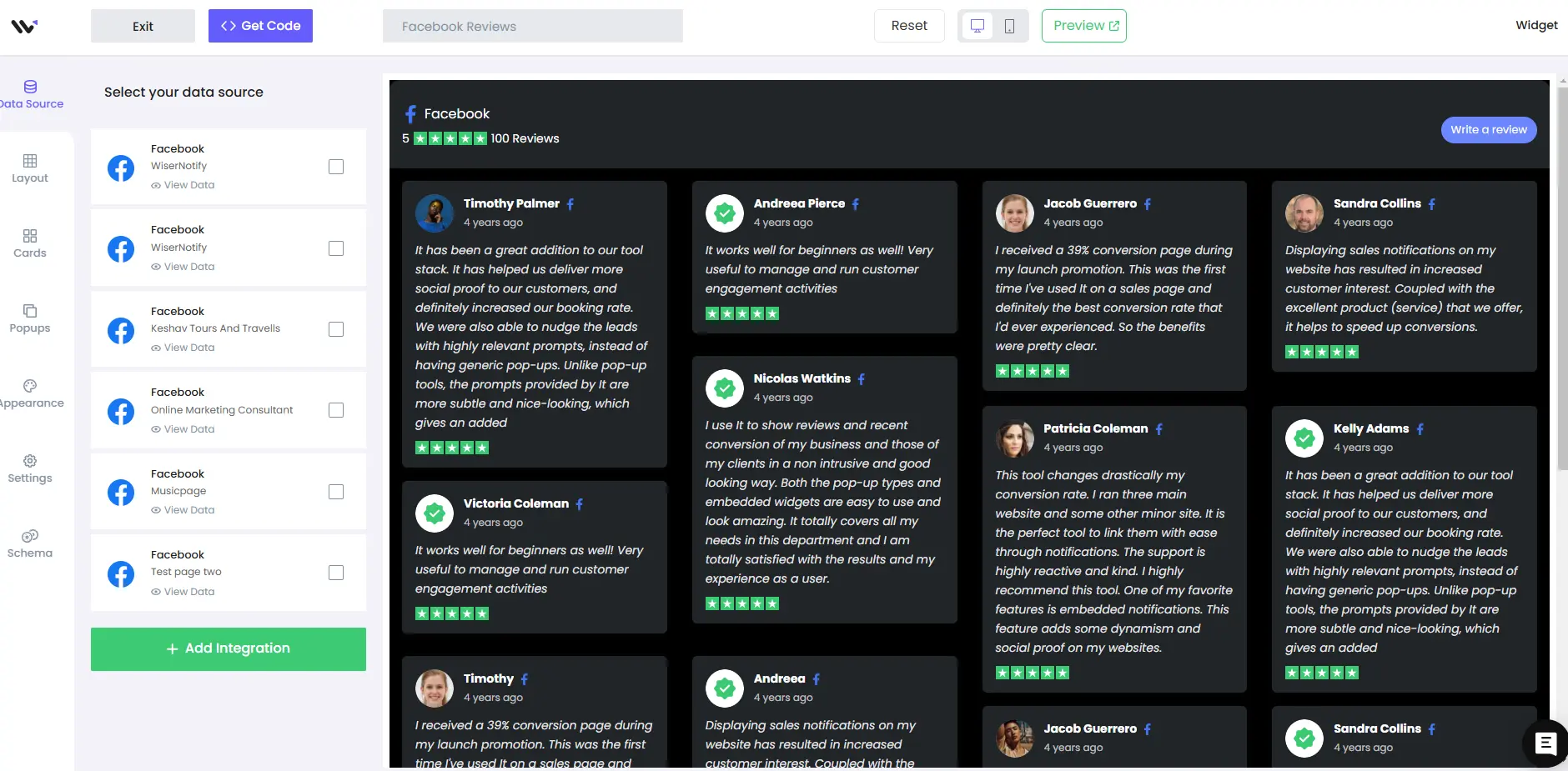
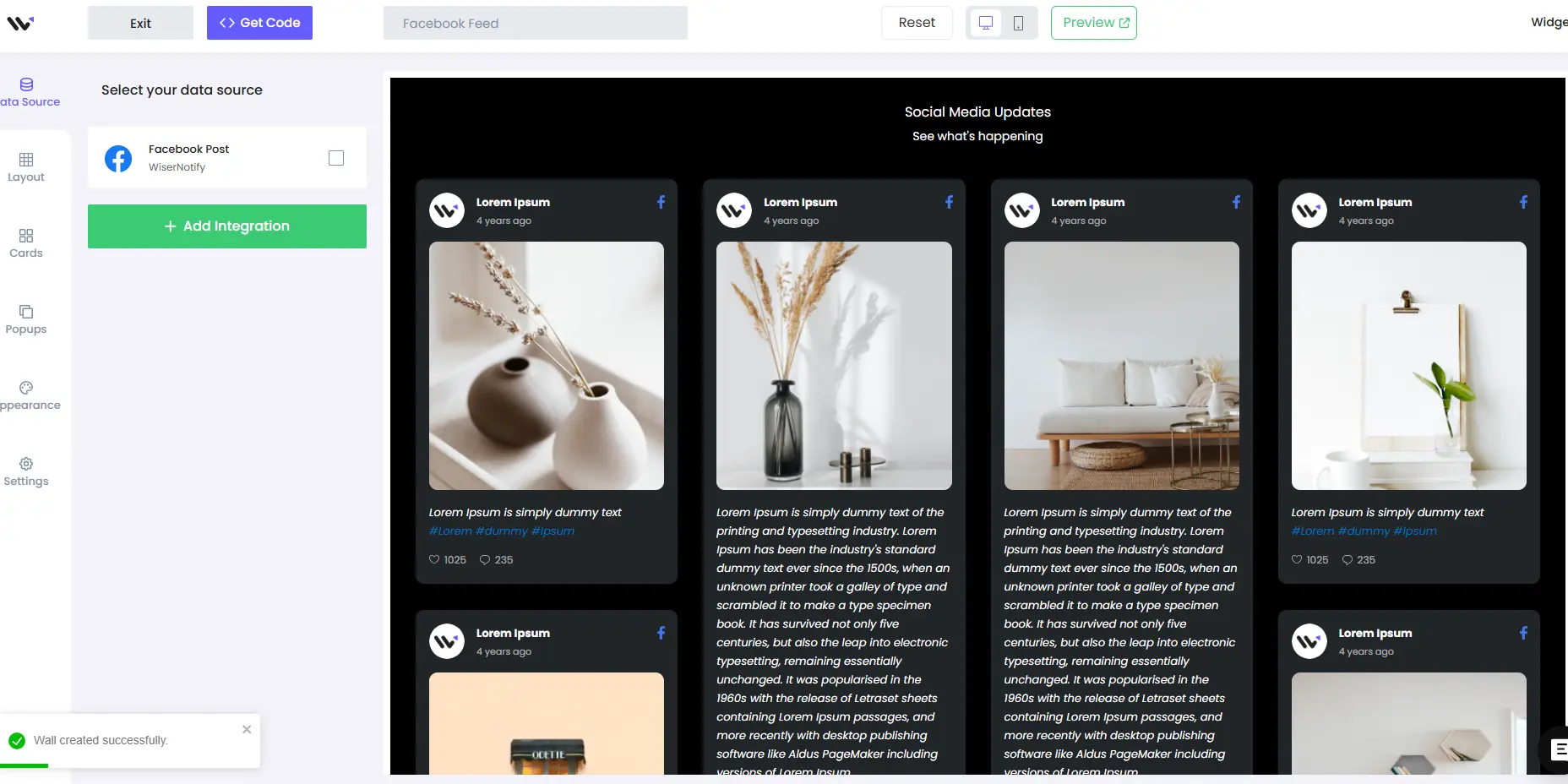
Let’s dive into the essentials of adding Facebook reviews to your website or platform.With WiserNotify, this process is straightforward and user-friendly. Here’s a step-by-step guide to help you seamlessly display Facebook reviews on your platform. Step 1: Log Into Your WiserNotify Dashboard Ensure you’ve installed the social proof pixels. You’ll find an “Add Notification” button on the dashboard. Clicking this will allow you to select “Customer Review.” From there, you can add notifications by entering your website name. Step 2: Customize Your Notifications Navigate to the customization dashboard and select “Data Source” to add Facebook reviews. WiserNotify efficiently pulls data directly from Facebook, ensuring your reviews are up-to-date and authentic. Step 3: Watch the Customization Tutorial For detailed customization to align with your brand style, watch our full tutorial video here: Expanding Your Options: Facebook Social Wall In addition to individual reviews, WiserNotify offers a “Social Wall” feature, which you can access from the dashboard. This feature provides two options: a Social Wall and a Review Wall, allowing you to tailor the content to meet your specific needs. Visual Guide Here’s what your Facebook Review Wall and Feed Wall could look like once set up. Facebook review wall: Facebook social feed wall: Remember, the integration of Facebook reviews is just the beginning. WiserNotify offers a range of social proof and FOMO notifications to build your website’s trust and credibility. Explore these options to find the perfect match for your online presence.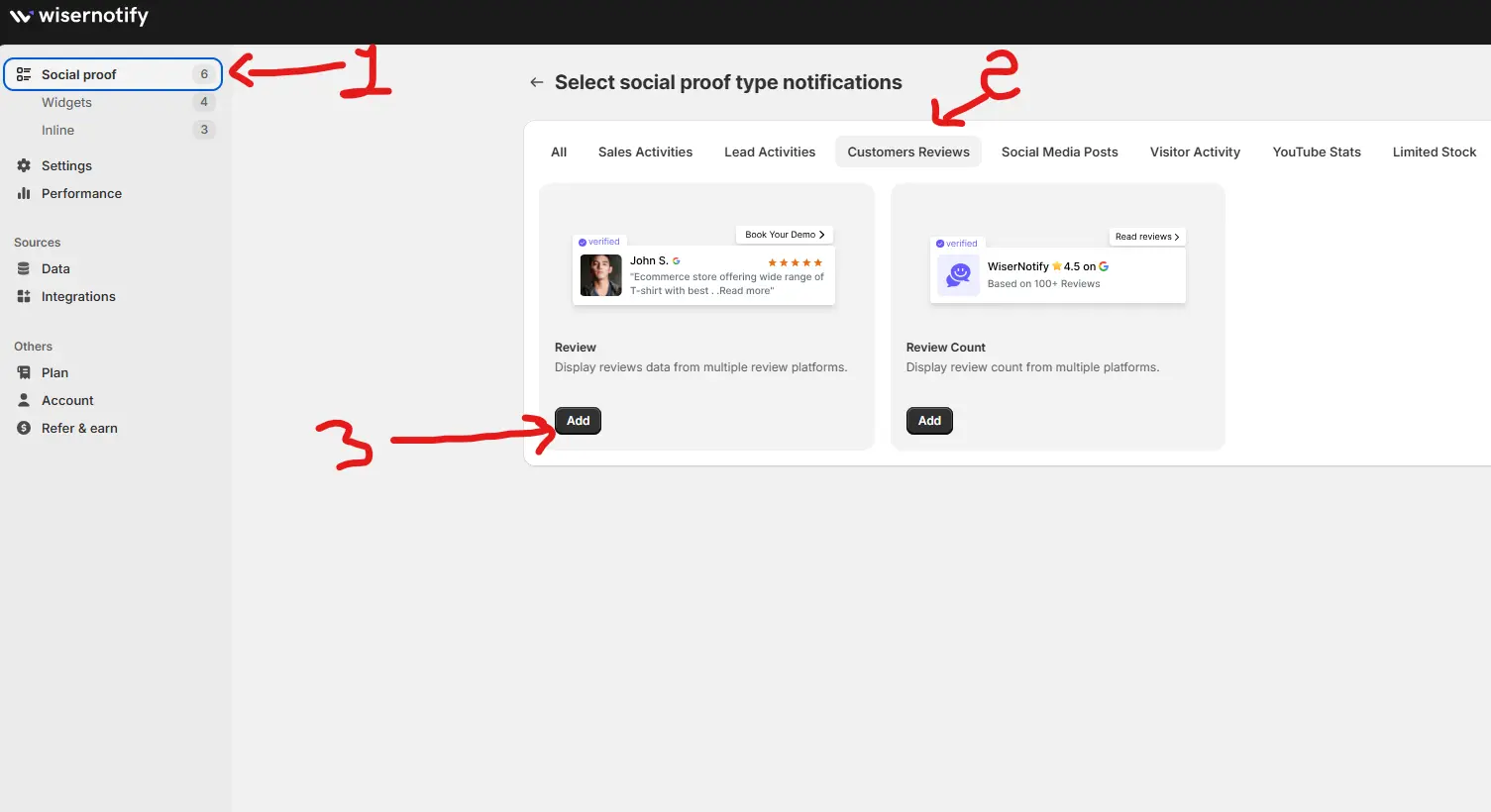
How to Embed Facebook Reviews on GoDaddy
Follow these steps to seamlessly integrate Facebook reviews into your GoDaddy website:
1. Generate a Facebook Reviews Widget
- Use Wisernotify to create a dynamic Facebook reviews widget.
- Customize the widget to align with your site’s design, including colors, fonts, and layout.
2. Copy the Embed Code
- After finalizing your widget, Wisernotify will provide you with an embed code.
3. Log into Your GoDaddy Account
- Access your GoDaddy dashboard and open the website you want to edit.
4. Open the Website Builder
- Navigate to the page where you want to display the Facebook reviews.
5. Add a Custom HTML Section
In the GoDaddy Website Builder:
- Click on the + Add Section button.
- Select HTML Code or Embed from the options provided.
6. Paste the Embed Code
- Paste the Wisernotify embed code into the HTML/Embed section.
7. Adjust Placement and Size
- Position the widget where it will have the most impact, such as near CTAs, above the fold, or in the footer.
8. Preview Your Page
- Use the preview mode to check how the reviews display on your website.
9. Save and Publish Your Site
- Save your changes and publish your website to make the reviews live.
10. Test for Responsiveness
- Verify that the reviews look great on desktop, tablet, and mobile devices.
Best Practices for Showcasing Facebook Reviews on GoDaddy
Strategic Placement
Add reviews in high-visibility areas, such as:
- Homepage: To create a strong first impression.
- Product or Service Pages: To reassure visitors about specific offerings.
- Checkout Pages: To reduce hesitation during the purchase process.
- Footer: For consistent visibility across your site.
Highlight Key Testimonials
- Choose reviews that address common concerns or emphasize your unique selling points, such as excellent customer service or fast delivery.
Match Your Branding
- Customize the widget to align with your GoDaddy site’s colors, fonts, and overall design.
Use Dynamic Displays
- Consider using sliders or carousels to showcase multiple reviews without overwhelming the page.
Keep Reviews Fresh
- Dynamically update the widget to feature your latest customer feedback.
Common Mistakes to Avoid When Adding Facebook Reviews to GoDaddy
Cluttering Pages with Too Many Reviews
- Highlight 3–5 impactful testimonials rather than overloading visitors with excessive reviews.
Ignoring Mobile Optimization
- Many GoDaddy users browse on mobile devices. Ensure your reviews widget is fully responsive.
Using Generic Reviews
- Highlight specific and detailed reviews that provide meaningful insights into your products or services.
Neglecting Placement
- Place reviews strategically to complement, not disrupt, the user journey.
Skipping Testing
- Test the widget across multiple browsers and devices to ensure proper functionality.
Wrap-Up
Embedding Facebook reviews into your GoDaddy website is a simple yet powerful way to build trust, engage visitors, and boost conversions.
With tools like Wisernotify, you can seamlessly integrate visually appealing, customizable review widgets that align with your site’s design and goals.
Ready to elevate your GoDaddy site with the power of social proof? Start embedding Facebook reviews today and watch your credibility and sales grow!
Related Posts:
Krunal Vaghasiya is a marketing tech expert who boosts e-commerce conversion rates with automated social proof and FOMO strategies. He loves to keep posting insightful posts on online marketing software, marketing automations, and improving conversion rates.




 Capterra