
Anonymous Google Reviews: What Business Owners Can See and Do
Someone left you a review under a name that tells you nothing, and you want it gone. Google will not tell you who wrote it. Being anonymous is not by itself a reason for removal.
What you can do is check the review against Google’s content policy, report it if it breaks one, reply in public, and outweigh it with verified reviews.
Google has not allowed a review to post as “A Google User” since May 2018. Every review now carries a display name.
The catch is that Google never checks whether that name is real. So the reviews that look anonymous to you are accounts using initials, a nickname, or something made up.
Key takeaways
- You cannot learn a reviewer’s identity. Google shows their display name, photo, Local Guide level, and public review history, and nothing else.
- A pseudonym breaks no rule. Google allows alternative names as long as the reviewer is not impersonating someone.
- Reviews come down for what they say or how they were posted, never for who posted them.
- One account reviewing the same business from several logins does break the policy, and that is reportable.
- Readers care less about names than owners assume. Whether a reviewer is named ranks seventh among the things that make a review believable.
Can Anyone Review You Anonymously?
Not fully. A Google account is required, and every account has a name attached to the review.
What they can do is set that name to anything. Initials, a first name and last initial, a nickname, or a generic handle all pass, because Google runs no identity check on the name field.
That is why your profile shows reviews from “J.K.” or “Local Shopper.” Those are real accounts using a display name that hides the person behind it.
For you, the practical difference is small. A review from “J.K.” and a review from “James Keller” follow the same rules and come down for the same reasons.
Also check: How to Collect and Manage Google Reviews in 2026
What You Can See About a Reviewer
Owners ask this constantly, usually after a one star lands with no detail. Here is the honest boundary.
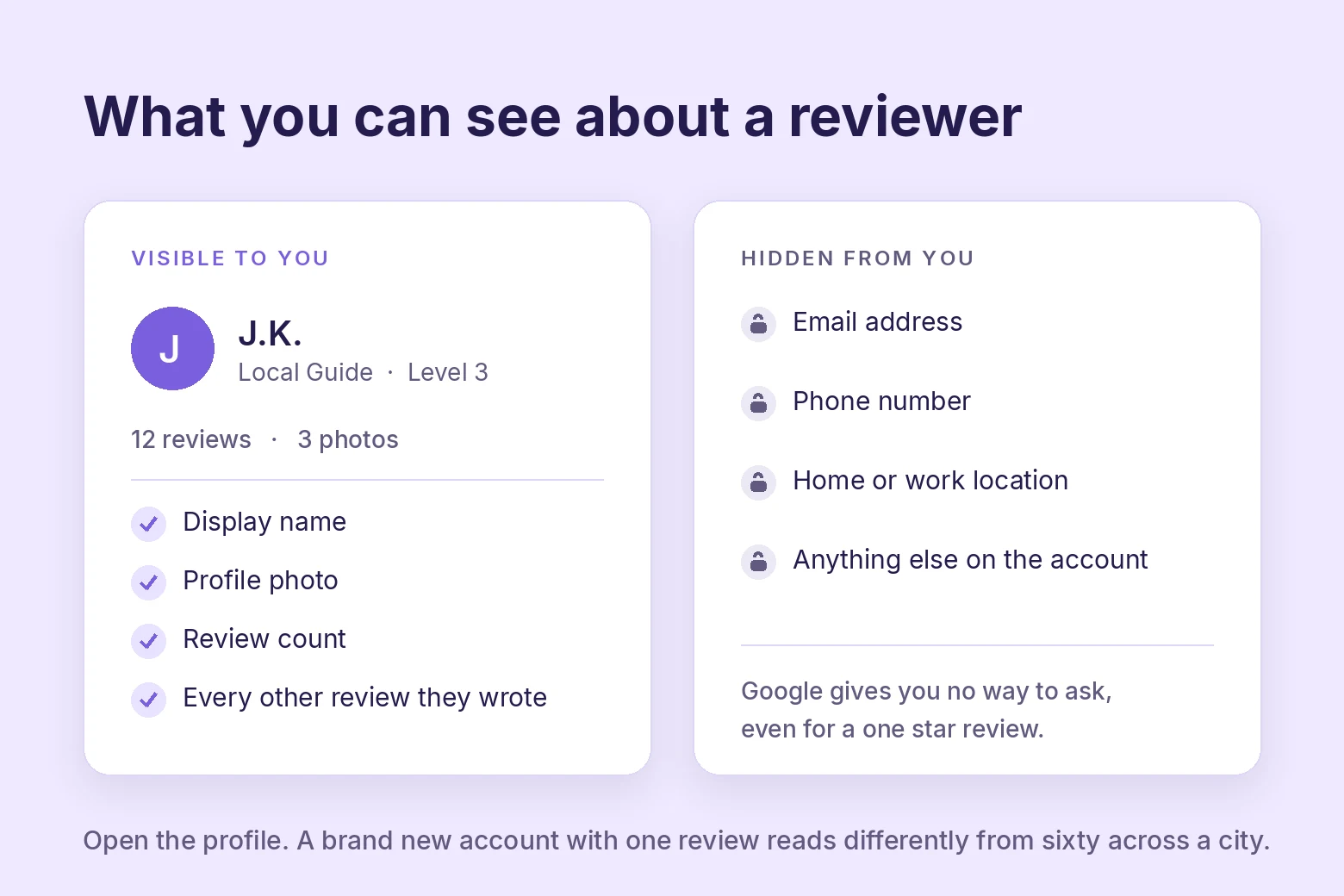
What is visible to you:
- The display name on the account.
- Their profile photo, if they set one.
- Their Local Guide level, if they have one.
- How many reviews they have written.
- Every other public review on that profile, which you can open and read.
What is not: their email address, phone number, location, or any account detail.
Google does not pass that to businesses and gives you no path to request it. There is no support form, no paid tier, and no workaround that reveals a reviewer.
The one thing worth doing is opening the profile. A brand new account whose only review is your one star reads differently from an account with sixty reviews across a whole city.
That pattern is also what Google’s own spam systems weigh.
When Google Removes a Review
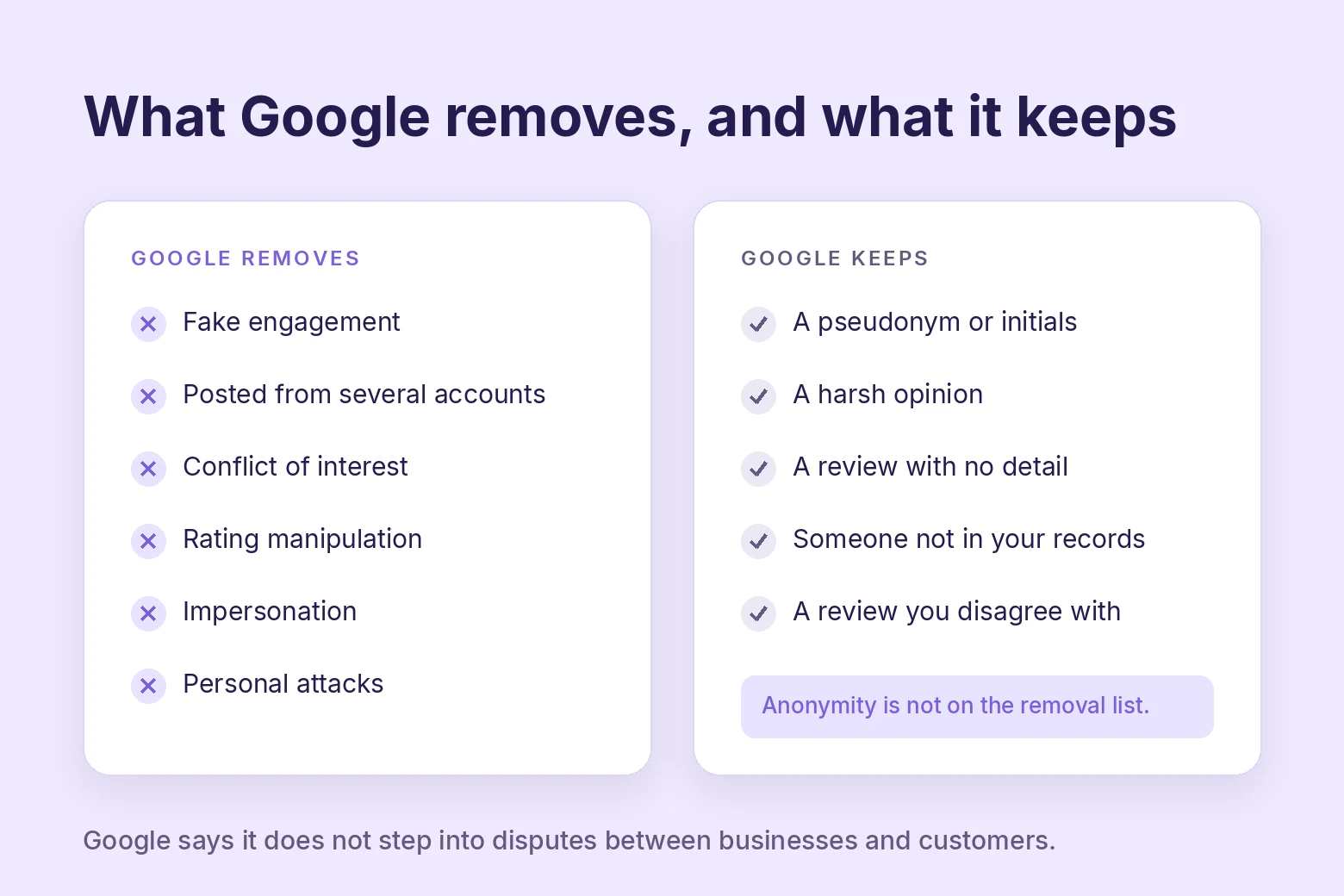
Google removes reviews that break its prohibited and restricted content policy. Anonymity is not on that list. These are.
| Grounds | What it covers |
|---|---|
| Fake engagement | Not based on a real experience, paid for, or posted from multiple accounts by or at the request of one person |
| Conflict of interest | Current or former employees, contractors, competitors, family members |
| Rating manipulation | Incentivized reviews, or unusual volumes and patterns aimed at moving your rating |
| Impersonation | Posing as a person, group, or organization to mislead readers |
| Off topic and harmful content | Personal attacks, harassment, hate speech, sexually explicit content, misinformation |
Read the fake engagement row twice. Multiple accounts posting for one person is named in Google’s policy, so the throwaway-account tactic people use to hit a business repeatedly is reportable on its face.
Note what is missing. A harsh review, a review from someone you cannot place in your records, and a review with no detail are all allowed.
Google states plainly that it does not step into disputes between businesses and customers, and tells owners not to report a review only because they disagree with it.
How to Report a Review to Google
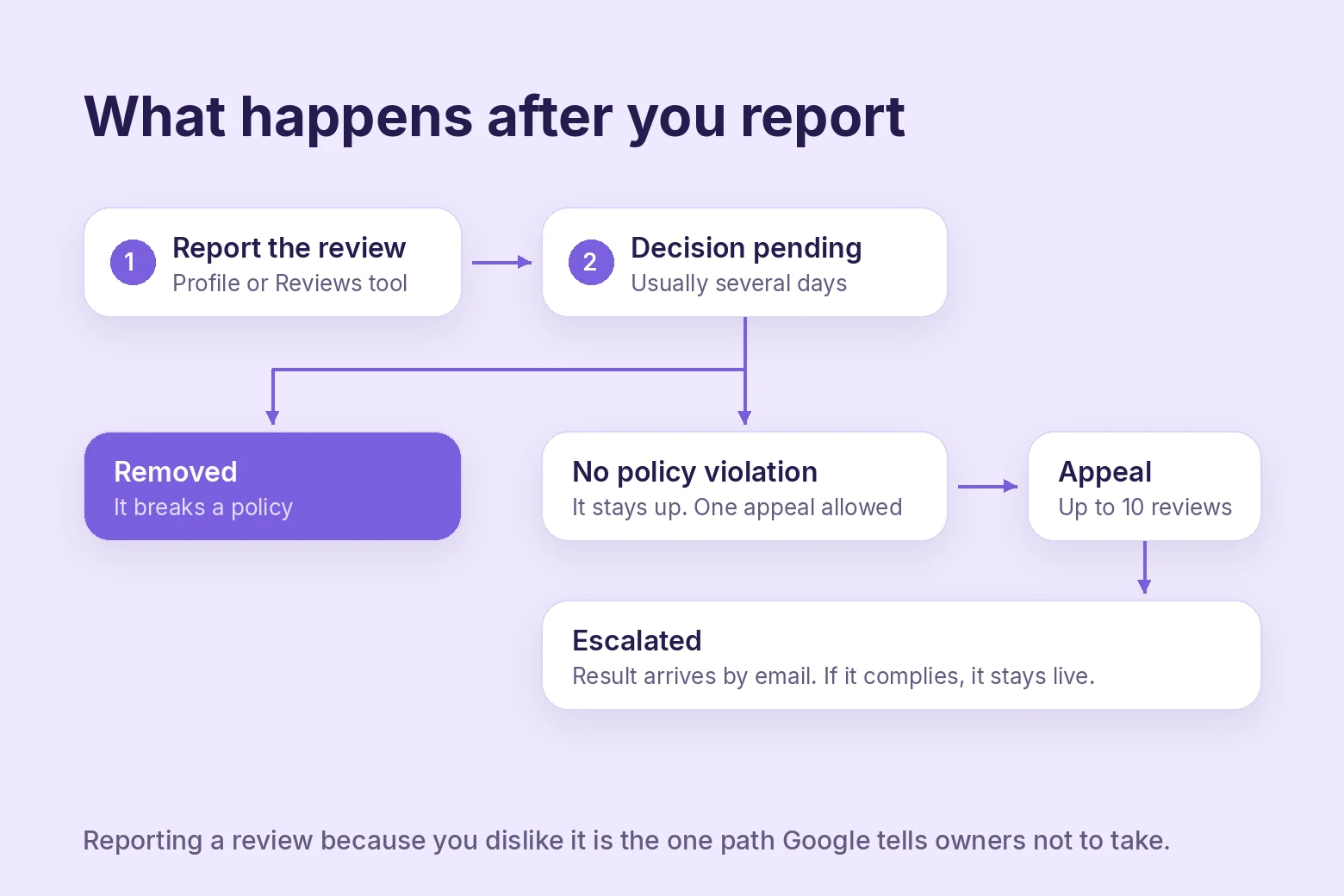
Two routes exist. Use the second one for anything you expect to fight over.
From your Business Profile
Open your Business Profile, select Read reviews, then Report next to the review. Pick the reason that matches the policy row above, then Send report.
From the Reviews Management Tool
Confirm the email tied to your profile, pick your business, then choose Report a new review for removal. Flag the review, select the reason, and submit.
This route is worth the extra clicks because it shows the status of every report you have filed.
What the statuses mean
Evaluation usually takes several days. You will see one of three results.
- Decision pending. Flagged, not yet looked at.
- Report reviewed, no policy violation. It stays up. You get one appeal.
- Escalated. The appeal is moving and the result comes by email.
The appeal covers up to ten reviews at once, so hold a batch rather than burning it on the first rejection.
If a single account is hitting you repeatedly, report the profile instead of the review. In the Google Maps app, open Business, then Reviews, tap the reviewer’s name, and use Report at the top of their profile.
One more thing worth knowing. Google’s automated spam detection sometimes pulls down legitimate reviews by mistake.
So if a real customer’s review vanishes, that is a support conversation rather than a lost review.
Also check: 8 Best Google Review Management Software
How to Reply to a Pseudonymous 1-Star
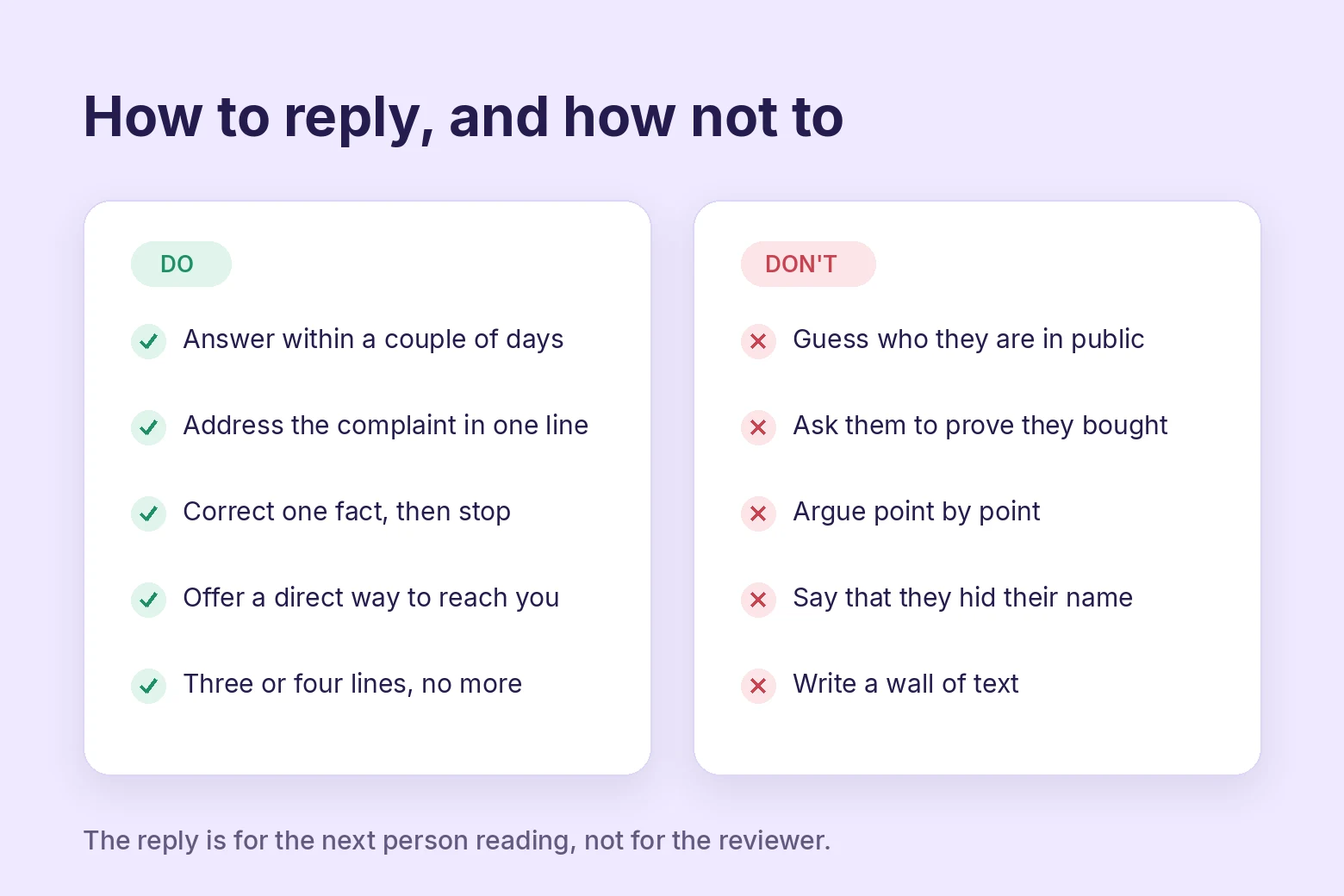
Most anonymous one stars will not come down, so the reply is the real work. It is also the part strangers read.
Your reply is not aimed at the reviewer. It is aimed at the next person deciding whether to call you.
That reader is judging your temperament.
Write it like this.
- Answer within a couple of days. Speed reads as attention.
- Thank them without sarcasm, then address the specific complaint in one sentence.
- Give one concrete fact that corrects the record if something is wrong, and no more.
- Offer a way to reach you directly, by phone or email, and stop there.
- Keep it to three or four lines.
Do not do this.
- Guess at who they are in public. Naming a suspected customer is the single worst move available.
- Ask them to prove they were a customer. It reads as stonewalling to everyone else.
- Argue point by point. Length signals that the complaint landed.
- Mention that they hid their name. It makes you look like the problem.
A calm reply to an unfair review does more for you than removal would, because the removal is invisible and the reply is not. Whether the owner responded at all is one of the top five things readers weigh.
Cut Anonymous Reviews With Verified Ones
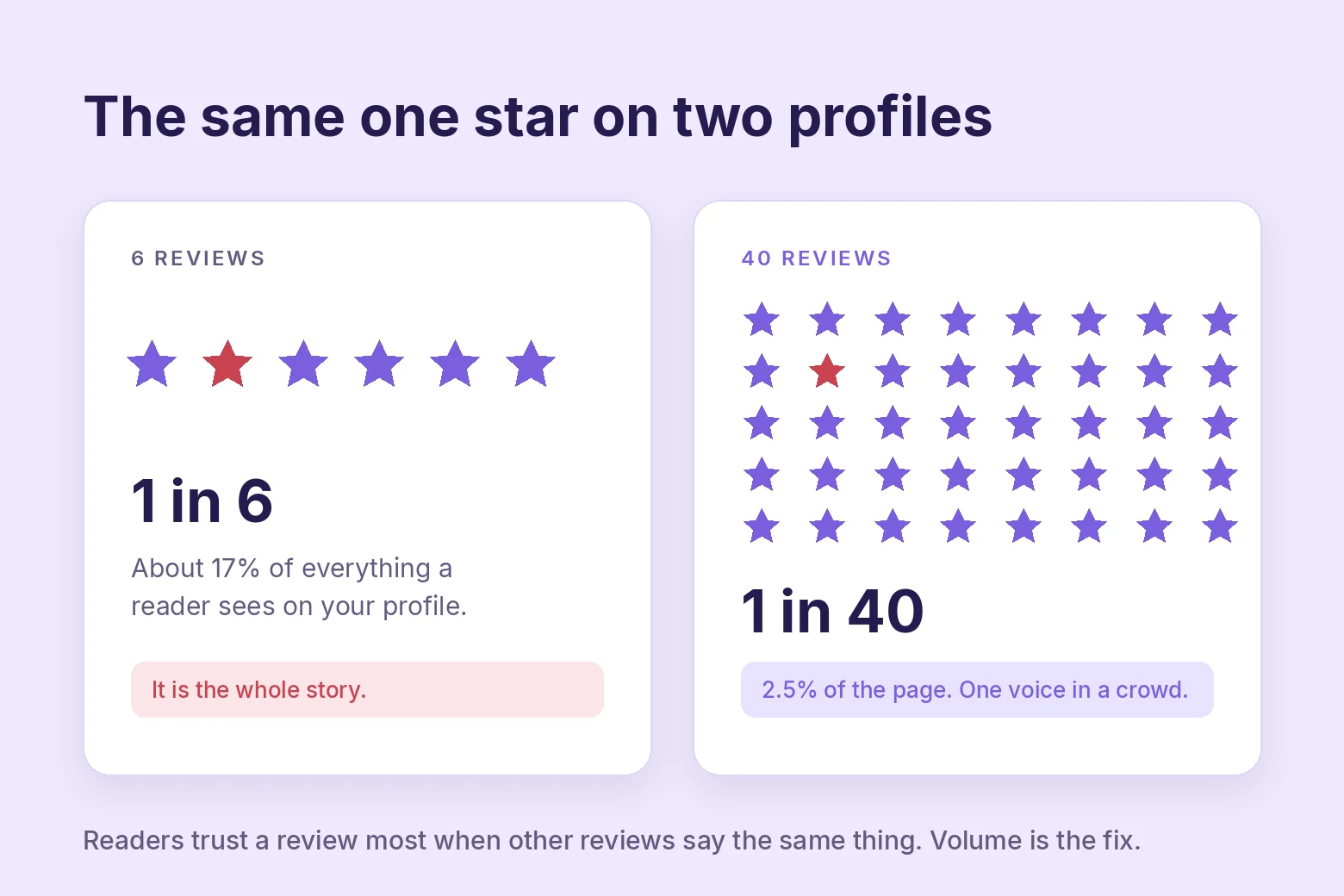
Reporting handles one review. Volume handles the problem.
The strongest thing a reader looks for is whether a review is backed up by other reviews saying similar things. That is the top-ranked trust factor, ahead of star rating and ahead of whether the reviewer used a real name.
A lone anonymous one star sitting under forty consistent reviews barely registers. The same review sitting under six is the whole story.
This is where a collection tool earns its place. WiserReview sends review requests to people who have bought from you.
Every review it brings in is tied to a real order rather than to whoever wandered past your listing.
That gives you two things Google alone will not. Recency, because requests go out on a schedule instead of whenever someone feels strongly.
It also gives you reviews on your own site that you keep, alongside the Google profile you do not control.
Readers also discount old reviews fast. Most only care about the last three months, which means a steady trickle beats a burst every time.
Verified reviews are worth understanding before you pick a tool, and our guide to getting more 5-star Google reviews covers the asking side.
Build urgency
Add floating offers with countdown timer & coupon code.

Wrap Up
You will not find out who left an anonymous review, and Google will not remove it for being anonymous. Those two facts are fixed, and most of the frustration comes from fighting them.
What you control is the rest. Check the review against the policy, report it properly if it breaks one, and reply in a way that makes you look like someone worth buying from.
Then get enough real reviews coming in that a single anonymous complaint is one voice in a crowd instead of the first thing anyone sees.
Frequently Asked Questions
Can a business find out who left an anonymous Google review?
No. Google shows only the display name, profile photo, Local Guide level, and public review history. Your email, phone, and location stay private from the business.
Will Google remove a review just because it is anonymous?
No. Google allows alternative names as long as the reviewer is not impersonating anyone. Reviews are removed for what they say or how they were posted, not for the name attached.
Someone is reviewing my business from several accounts. Is that reportable?
Yes. Posting from multiple accounts by or at the request of one person counts as fake engagement under Google’s policy, so report it with that reason.
How long does a review report take?
Usually several days. You can track it in the Reviews Management Tool, and if the report is rejected you get one appeal covering up to ten reviews.
How should I respond to an anonymous 1-star review?
Reply in public within a couple of days, address the complaint in one sentence, and offer a direct way to reach you. Never guess at who the reviewer is.
What is the best way to offset anonymous negative reviews?
Collect steadily from real buyers so no single review carries the page. Readers weigh whether a review is backed by others saying similar things above almost everything else.

Krunal Vaghasiya is a marketing tech expert who boosts e-commerce conversion rates with automated social proof and FOMO strategies. He loves to keep posting insightful posts on online marketing software, marketing automations, and improving conversion rates.




 Capterra