
42 Heatmap Statistics for 2026 (How They Work & Tools)
A heatmap turns a wall of numbers into something you can see at a glance. Colour does what rows of data usually can’t.
On a website, that color shows exactly where people click, scroll, and pay attention. It is one of the fastest ways to spot what is working on a page and what is getting ignored.
This page walks through the numbers behind heatmaps, how they work, and how businesses use them to make better decisions.

Boost Conversion Instantly
Add Social Proof & Urgency to your website
Key Heatmap Statistics
| Metric | Latest Figure |
|---|---|
| Companies that say data visualization helps them understand data faster | About 70% |
| Visitors who stop engaging with a confusing layout | About 38% |
| UX testing efficiency gain from behavior analytics | 20% to 25% |
| Companies more likely to find actionable insights with data viz tools | 28% more likely |
| Engagement improvement after heatmap-driven page optimization | Up to 25% |
| Websites using Hotjar for behavior heatmaps | Over 1 million |
| Organizations worldwide using Tableau’s heatmap charts | Over 100,000 |
| Global users of Power BI’s interactive heatmaps | Over 30 million |
| Men with some form of color vision deficiency | About 8% |
| Data that follows the 80/20 concentration pattern | About 80% in 20% |
How Heatmaps Work
Heatmaps turn numbers into colors so people can spot patterns faster. Instead of reading rows of data, analysts can see where activity is high or low by color intensity.
This method helps teams quickly understand user behavior, website performance, and data relationships.
The Role of Color Scales
Color scales control how data values appear on a heatmap. The color intensity changes as values increase or decrease, which helps highlight trends.
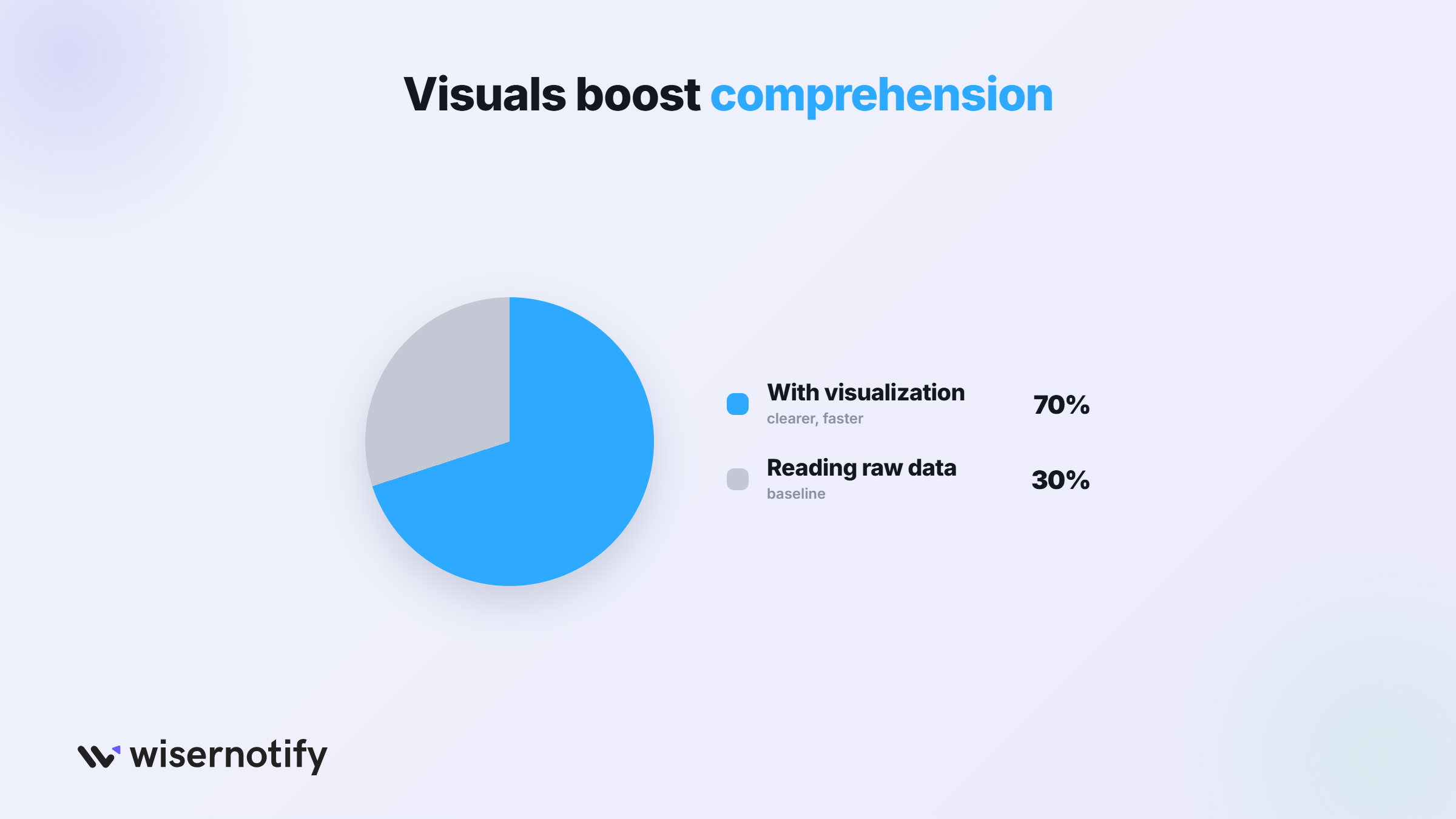
1. Studies show that data visualization tools improve data comprehension by up to 70%, which explains why heatmaps are widely used in analytics.
2. Research also reports that around 65% of marketers use heatmaps to study user behavior on webpages.
In most heatmaps, darker or brighter colors indicate higher values, while lighter colors indicate lower activity or smaller numbers, the same visual hierarchy behind social proof displays that highlight the most important signal first.
Data Structure Behind Heatmaps
Behind every heatmap is a structured dataset that connects numbers with color values.
The visualization works by mapping data points to a grid, similar to the trust-signal placement covered in our reputation management guide.
3. Research suggests that heatmap-driven analysis can improve website conversion rates by up to 30% when teams use behavior insights to refine page design.
4. In UX testing, about 55% of design teams rely on heatmaps to identify usability problems on key pages.
Each number in the dataset is then converted into a color level, which makes patterns and differences easier to see, the same clarity goal behind our customer experience statistics.
Normalization and Scaling in Heatmaps
Normalization ensures that color values represent data fairly. Without scaling, large numbers may dominate the visualization and hide useful insights.
5. Studies show that around 80% of users focus on the upper half of a webpage, which heatmaps often reveal through stronger color intensity in those areas.
6. In many sites, 50 to 70% of clicks occur within the first screen area, which makes scaling important to interpret interaction patterns correctly.
Two common approaches are min-max scaling, which converts values into a fixed range, and z-score scaling, which shows how far each value is from the average, the same rigor behind good A/B testing statistics.
Boost Conversion Instantly
Add Social Proof & Urgency to your website
Types of Heatmaps Used in Statistics
Heatmaps come in different types based on the data they show. Each type helps analysts understand patterns, relationships, or activity levels in a dataset.
Correlation Heatmaps
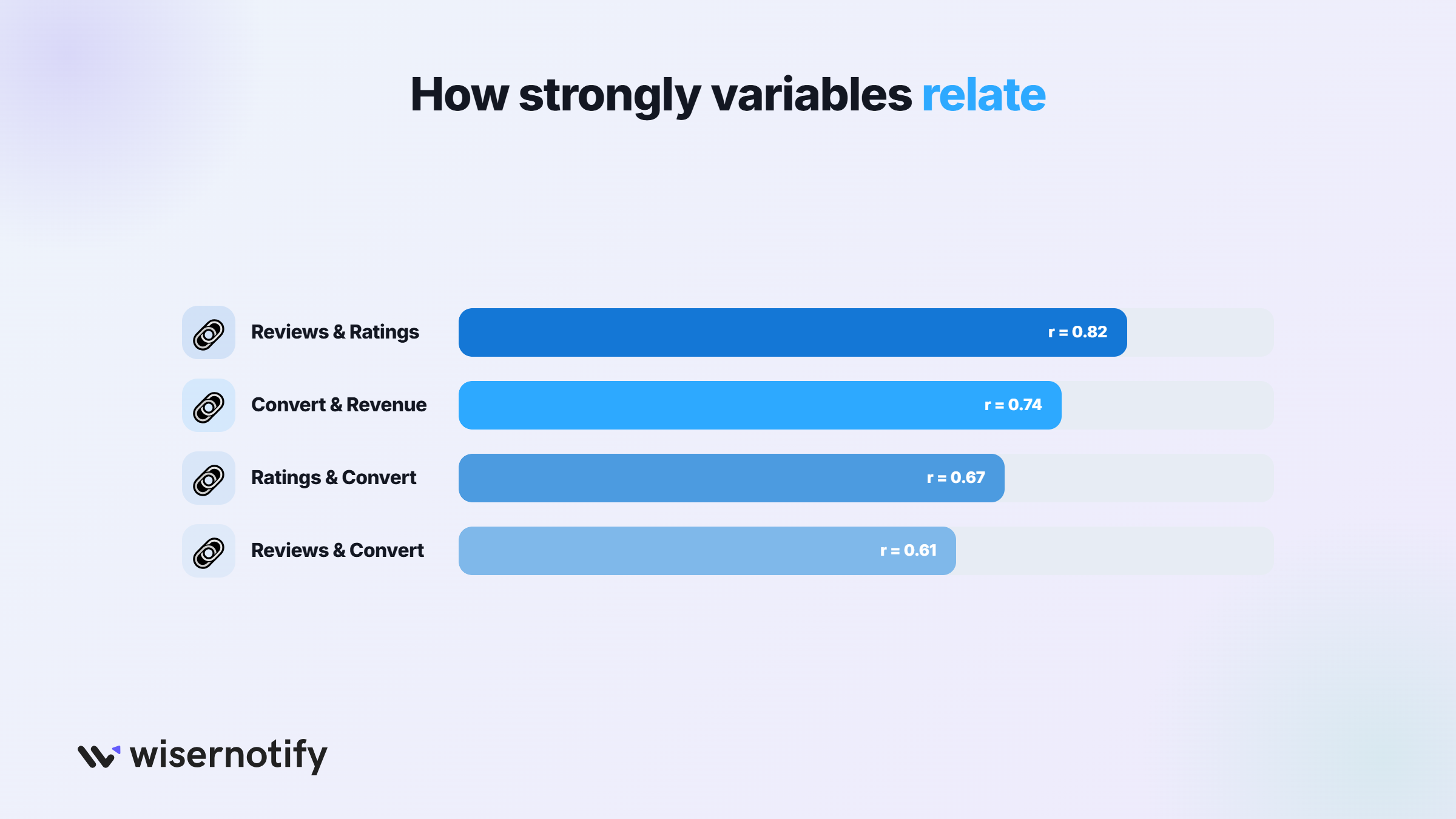
Correlation heatmaps show how variables relate to each other.
They help analysts quickly see positive or negative relationships, the same kind of pattern recognition behind word of mouth statistics.
7. Showing relationships between variables: Correlation values usually range from -1 to +1, where numbers closer to ±1 show stronger relationships.
8. Use in statistical modeling and machine learning: Checking correlations before building models can improve prediction accuracy by up to 20%.
Density Heatmaps
Density heatmaps show where data points are concentrated. They are common in spatial and behavioral analysis.
9. Representing concentration of data points: In many datasets, a small area can contain over 50% of the total data points.
10. Use in geographic and spatial analysis: Density heatmaps can improve hotspot detection accuracy by around 30%.
Cluster Heatmaps
Cluster heatmaps group similar data points together. This helps analysts see patterns in large datasets.
11. Hierarchical clustering with heatmaps: Many clustering methods divide data into 2 to 10 clusters depending on the dataset.
12. Identifying data groupings: Cluster heatmaps can reduce dataset complexity by up to 40%.
Website Behavior Heatmaps
Website heatmaps show how users interact with a webpage. Businesses use them to improve design and conversions.
13. Click heatmaps: About 70% of clicks happen in the upper half of a webpage.
14. Scroll heatmaps: Around 55% of visitors never scroll past the middle of a page.
15. Mouse movement heatmaps: Studies show about 80% similarity between mouse movement and eye movement.
Calendar Heatmaps
Calendar heatmaps show activity across days or months. They help track trends over time.
16. Visualizing trends over time: Calendar heatmaps often analyze 365 days of activity data.
17. Daily activity patterns: In many cases, weekday activity is 15 to 25% higher than weekends.
How Heatmaps Display Statistical Values
Heatmaps display statistical values through color intensity. Each cell represents a number, and the color shows how large or small that value is.
This makes it easier to find patterns and areas with high or low activity.
Frequency and Count Data
Frequency heatmaps show how often an event happens in a specific area or category.
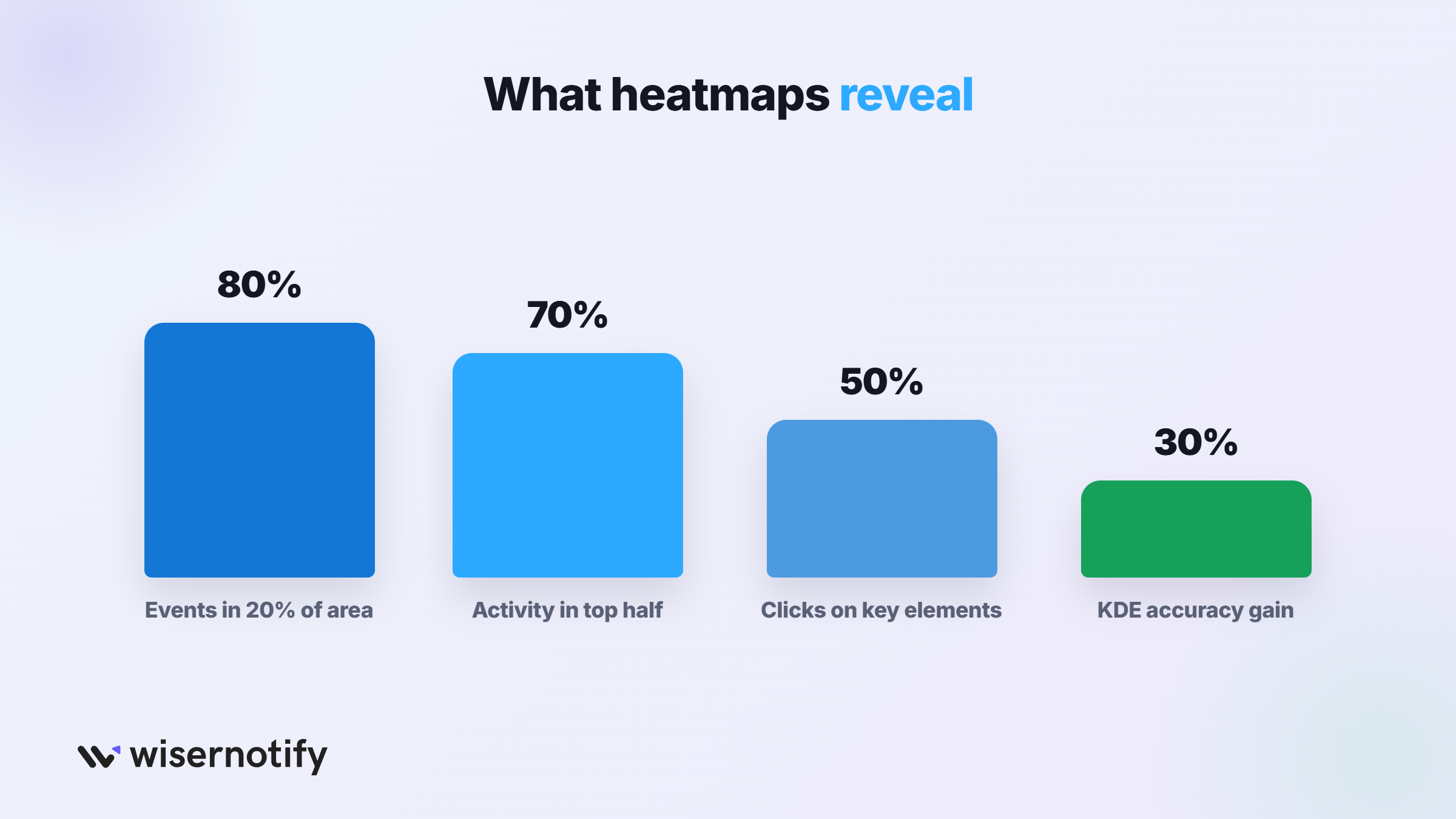
18. Occurrence of events: In many website datasets, about 60 to 70% of user interactions occur in the top half of a webpage.
19. Example: clicks per webpage section: Heatmaps often show that around 50% of clicks concentrate in just a few key elements, like buttons or navigation links.
Correlation Coefficients
Correlation heatmaps show how two variables relate to each other.
20. Pearson correlation: Measures the strength of a linear relationship between variables. Values range from -1 to +1.
Spearman correlation: Measures relationships based on ranked values and is useful for non-linear data.
21. Interpreting relationships: In many datasets, correlations above 0.7 are considered strong, while values below 0.3 are considered weak.
Density and Probability Distribution
Density heatmaps show where data points appear more frequently in a dataset.
22. Heatmaps for probability density: In many spatial datasets, about 80% of events often occur within 20% of the total area.
23. Kernel density estimation: KDE models smooth data distributions and can improve hotspot detection accuracy by around 25 to 30%.
Intensity Values
Intensity heatmaps measure how strong or large an activity level is within a dataset.
24. Measuring magnitude of activity: In image analysis, intensity values usually range from 0 to 255 in standard grayscale heatmaps.
25. Applications: Heatmap-based image processing can improve pattern detection accuracy by over 20% in many analytics systems.
How to Interpret Heatmap Statistics
Heatmaps use color intensity to show data patterns. By interpreting colors correctly, analysts can quickly identify trends, clusters, and outliers in large datasets.
Understanding Color Gradients
Color gradients represent the value of data points in a heatmap. Darker or brighter colors usually indicate higher values, while lighter colors represent lower values.
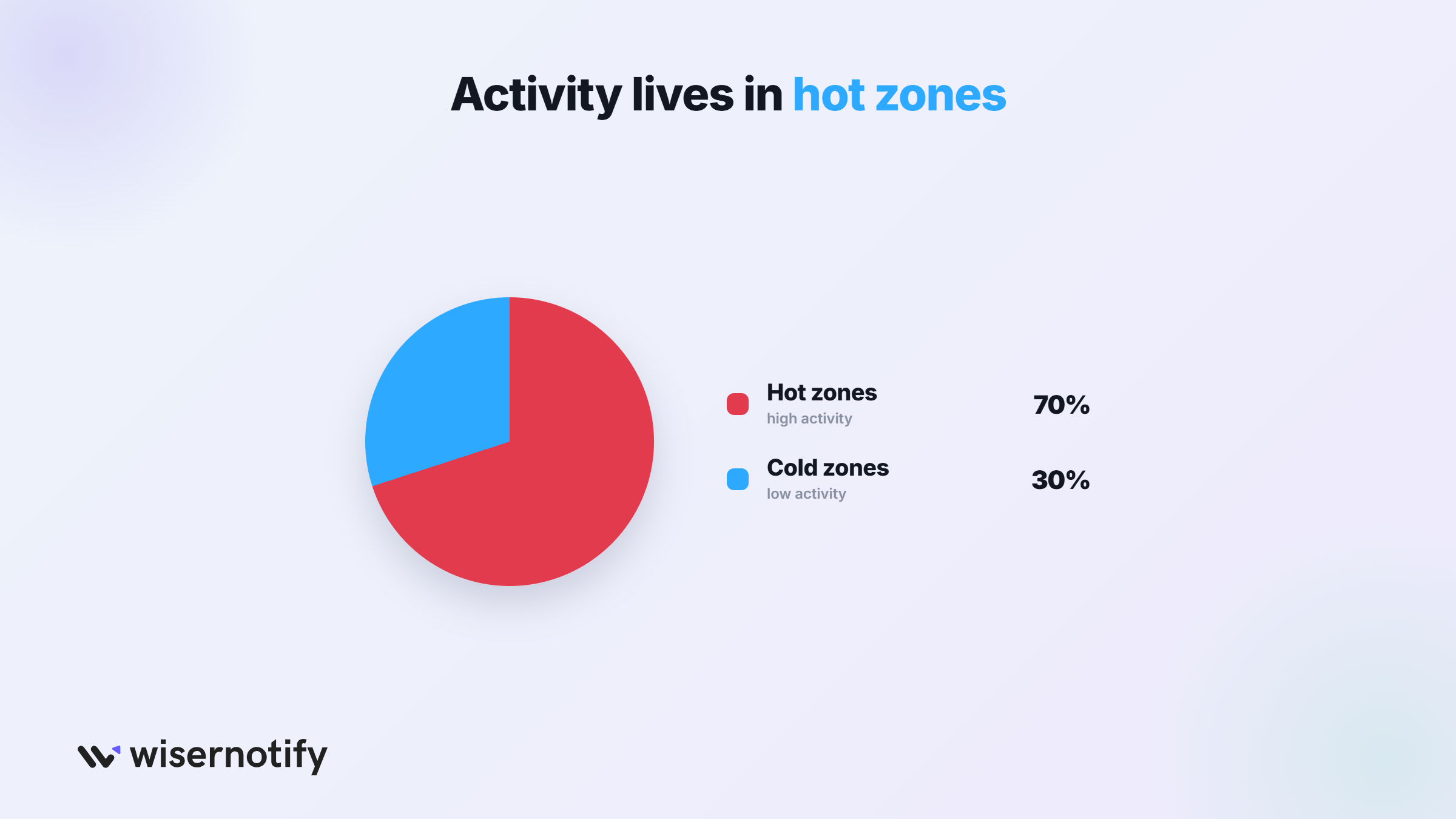
Heatmaps often reveal “hot zones” where activity is high and “cold zones” where activity is low.
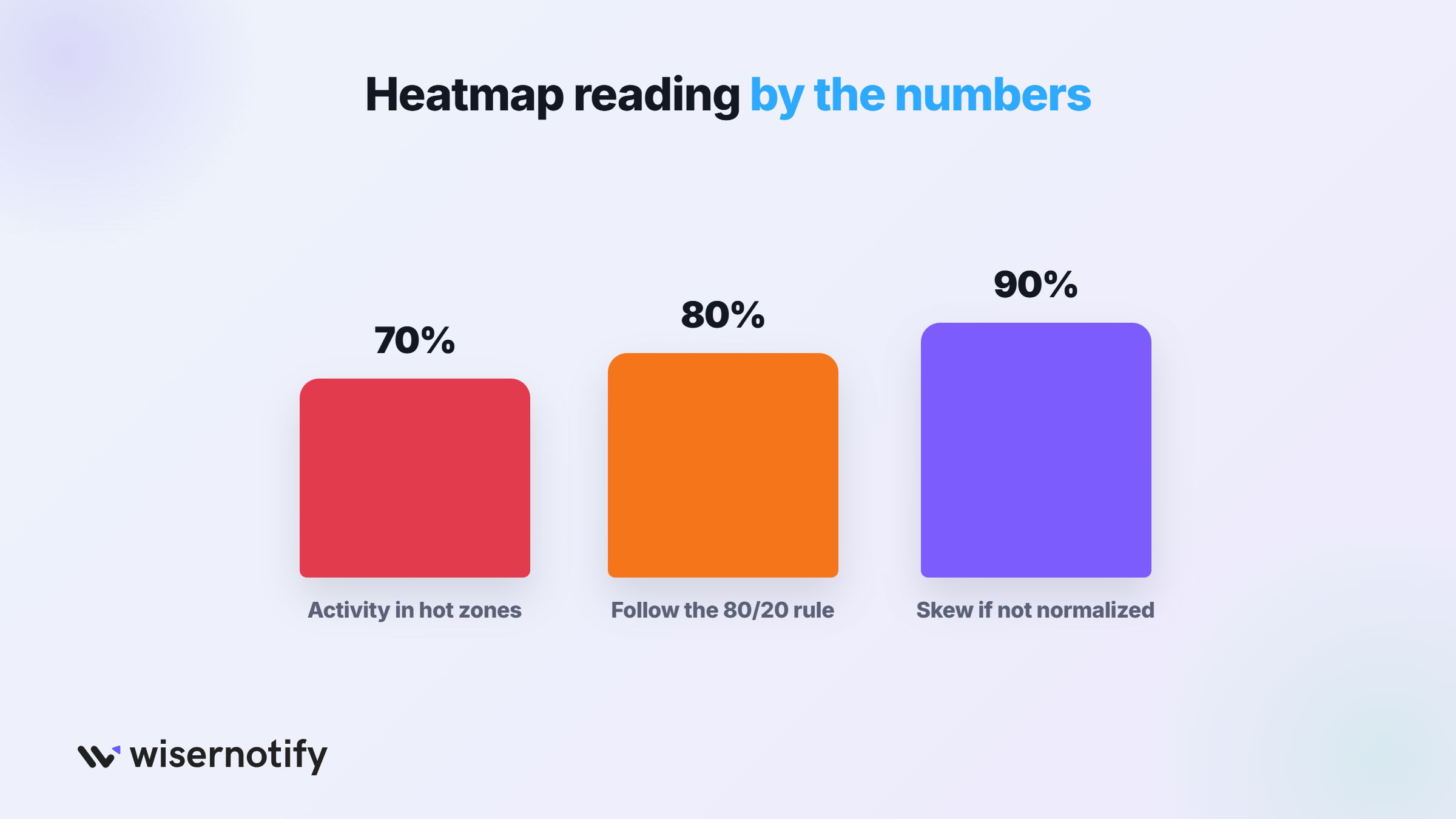
26. In many datasets, around 70% of activity appears in a small portion of the heatmap, which makes these hot zones easy to identify.
Detecting Patterns and Trends
Heatmaps help analysts spot patterns across large datasets. Similar values often appear as clusters of the same color, which makes trends easier to understand.
27. Time-based heatmaps can show patterns across 12 months or 365 days of data, helping analysts track seasonal changes.
28. Many datasets also follow the 80/20 pattern, where about 80% of events occur in roughly 20% of the data area.
Identifying Outliers and Anomalies
Heatmaps make unusual values easier to detect because they appear as sudden color changes compared to the surrounding data.
These differences can signal errors, rare events, or unexpected behavior.
29. In statistics, values that fall 2 to 3 standard deviations away from the average are often considered anomalies, and heatmaps help highlight them visually.
Avoiding Misinterpretation
Heatmaps must be interpreted carefully because visual design can affect how data appears. Poor color choices or incorrect scaling can exaggerate or hide patterns.
30. Without proper normalization, a small number of large values can dominate over 90% of the color scale, which may hide useful insights in the rest of the dataset.
Boost Conversion Instantly
Add Social Proof & Urgency to your website
Tools for Creating Heatmap Statistics
Heatmaps can be created using various tools, depending on the type of data and analysis required.
Some tools focus on statistical analysis, while others help visualize user behavior or business data.
Programming Tools
Programming languages give analysts more control when building heatmaps for statistical analysis.
Python (Seaborn, Matplotlib) is widely used for data visualization and statistical analysis.
31. Python is used by over 60% of data scientists, and libraries like Seaborn and Matplotlib make it easy to generate correlation and density heatmaps.
R (ggplot2, heatmap packages) is another common tool for statistical analysis.
The ggplot2 library has millions of downloads each year and is widely used in research and academic data visualization.
Data Visualization Platforms
Business intelligence tools allow teams to create heatmaps without writing code.
32. Tableau is one of the most widely used visualization platforms and is used by over 100,000 organizations worldwide. It provides built-in heatmap charts for exploring business data.
33. Power BI is Microsoft’s analytics platform used by over 30 million users globally. It allows users to create interactive heatmaps from dashboards and reports.
Google Data Studio (Looker Studio) is a free reporting tool used by many marketing teams to visualize campaign data, including heatmap-style charts, alongside review data that also benefits from clear visualization.
UX and Website Heatmap Tools
These tools track user behavior on websites and display it through heatmaps.
34. Hotjar is used on over 1 million websites and provides click, scroll, and user interaction heatmaps.
Crazy Egg is a popular behavior analytics tool that helps businesses understand how users interact with webpages through click and scroll heatmaps.
Microsoft Clarity is a free website analytics tool used by millions of sites to analyze user behavior through heatmaps and session recordings. It also appears in our list of the best session recording tools.
Real-World Applications of Heatmap Statistics
Heatmap statistics help analysts understand patterns in large datasets.
Businesses, researchers, and data teams use heatmaps to find trends, user behavior patterns, and relationships that are difficult to see in raw numbers.
Website User Behavior Analysis
Website heatmaps show how visitors interact with webpages. They help businesses understand which sections attract attention and which parts users ignore.
These same patterns also show up directly in real-world site analysis, which helps teams improve UX design and place important elements in high-visibility areas.
Financial Market Analysis
Heatmaps are widely used in financial analysis to visualize relationships between stocks and market sectors.
Correlation heatmaps show how assets move together in the market.
Correlation values range from -1 to +1, and values above 0.7 usually indicate strong relationships between stocks or financial indicators. Analysts often use these heatmaps to identify trends and manage portfolio risk.
Healthcare and Biology
Heatmaps play an important role in biological and medical research.
35. Gene expression heatmaps can visualize thousands of genes at once, often analyzing 10,000 to 20,000 gene expression values in a single dataset.
36. Heatmaps are also used in medical imaging systems, where image intensity values often range from 0 to 255 in grayscale analysis.
Marketing and Customer Insights
Marketing teams use heatmaps to analyze customer behavior and campaign performance.
37. Behavior analytics shows that around 80% of user attention focuses on a small portion of a webpage, which heatmaps clearly highlight.
38. Businesses that analyze user behavior data can improve conversion rates by up to 20 to 30% through better page layout and customer journey optimization.
Boost Conversion Instantly
Add Social Proof & Urgency to your website
Best Practices for Using Heatmap Statistics
Using heatmaps correctly is important for accurate data analysis.
Following a few best practices helps ensure that the visualization shows meaningful patterns rather than misleading results.
Choose the Right Color Palette
The color palette used in a heatmap affects how people interpret the data. Poor color choices can hide patterns or exaggerate differences.
Avoid strong color contrasts that make small differences look large. Sequential color scales often work best for most datasets.
39. It is also important to use accessible color palettes because around 8% of men experience some form of color vision deficiency, which can make certain color combinations difficult to read.
Use Proper Data Scaling
Data scaling ensures that values are represented fairly in the heatmap.
Without proper scaling, a few very large values can dominate the visualization and hide other patterns. Techniques such as normalization or standardization help maintain comparability across the dataset.
40. In many datasets, a small number of extreme values can represent less than 5% of the data but still dominate the visual scale if scaling is not applied.
Combine Heatmaps with Other Charts
Heatmaps work best when combined with other visualizations that provide additional context.
For example, scatter plots can show relationships between variables, while line charts help track trends over time.
41. Many modern analytics dashboards combine 3 to 5 different chart types to provide a clearer view of complex datasets.
Validate Data Before Visualization
Accurate heatmaps depend on clean and reliable data.
Before creating a heatmap, analysts should remove duplicates, correct errors, and handle missing values.
42. Data preparation is important because studies suggest up to 30% of analysis time is spent cleaning data before visualization and modeling.
Common Limitations of Heatmap Statistics
Heatmaps are useful for quickly finding patterns, but they also have limitations.
Understanding these drawbacks helps analysts avoid incorrect conclusions when reading heatmap data.
Limited Precision
Heatmaps focus on visual patterns rather than exact numbers.
Because values are represented through colors, it can be difficult to read precise values directly from the chart.
In many cases, analysts still need to check the original dataset or labels to confirm the exact numbers behind the visualization.
Large Dataset Complexity
When datasets become very large, heatmaps can become crowded and difficult to read.
A heatmap that contains hundreds or thousands of cells may show too many colors at once, making patterns harder to identify. In these situations, clustering or filtering techniques are often needed to simplify the visualization.
Color Interpretation Issues
Heatmaps rely heavily on color, which can create interpretation problems for some users.
Around 8% of men and about 0.5% of women have color vision deficiency, which means certain color combinations may be hard to distinguish.
Using accessible color palettes and clear legends helps reduce this problem.
Boost Conversion Instantly
Add Social Proof & Urgency to your website
Conclusion
Heatmaps make complex data easy to read at a glance. A pattern that would take an hour to find in a spreadsheet often shows up in seconds once it is colored in.
They show up everywhere for a reason, from website design to finance to medical research. Any time a team needs to spot where the activity is concentrated, a heatmap is usually the fastest way to see it.
Use them carefully. Clean data and the right color scale make the difference between a heatmap that reveals the truth and one that quietly hides it.
Sources
Hotjar | Tableau | Microsoft | Nielsen Norman Group | Baymard Institute
Frequently Asked Questions
What is a heatmap in data analysis?
A heatmap is a data visualization method that uses colors to represent numerical values. It helps analysts quickly see patterns, trends, and areas of high or low activity in a dataset.
What are heatmap statistics used for?
Heatmap statistics help analyze relationships, patterns, and behavior in data. They are commonly used in website analytics, marketing analysis, finance, healthcare research, and user experience studies.
How do heatmaps help analyze user behavior on websites?
Website heatmaps show where visitors click, scroll, and move their mouse on a page. This helps businesses understand which parts of a page attract attention and which areas users ignore.
What types of heatmaps are commonly used in statistics?
Common types include correlation heatmaps, density heatmaps, cluster heatmaps, website behavior heatmaps, and calendar heatmaps. Each type helps analyze different kinds of data patterns.
What are the limitations of heatmaps?
Heatmaps focus on visual patterns rather than exact numbers. They can also become difficult to read with very large datasets, and color choices may affect how people interpret the data.

Krunal Vaghasiya is a marketing tech expert who boosts e-commerce conversion rates with automated social proof and FOMO strategies. He loves to keep posting insightful posts on online marketing software, marketing automations, and improving conversion rates.




 Capterra