



As a Flatsome user, you know how important it is to create a visually stunning and high-performing online store. However, great design alone doesn’t guarantee conversions—trust is the key.
Adding Facebook reviews to your Flatsome store can help build credibility and provide the social proof customers need to feel confident about purchasing from your store.
This guide will walk you through why Facebook reviews are essential for Flatsome users, how to integrate them seamlessly, and the best practices for maximizing their impact.
Why Add Facebook Reviews to Flatsome?
Embedding Facebook reviews into your Flatsome site offers several benefits:
Boost Customer Confidence: 84% of shoppers trust online reviews as much as personal recommendations. Facebook reviews reassure visitors of your credibility.
Increase Conversions: Strategically placing testimonials near CTAs like “Add to Cart” or “Buy Now” reduces hesitation and drives sales.
Enhance SEO: Reviews contribute user-generated content with relevant keywords, improving your store’s search rankings.
Build Authenticity: Facebook reviews are public and verifiable, making them a reliable source of social proof.
Engage Visitors Longer: Displaying reviews keeps users on your site longer, increasing the likelihood of conversions.
Build trust & FOMO
Highlight real-time activities like reviews, sales & sign-ups.


How to Add Facebook Reviews to Flatsome
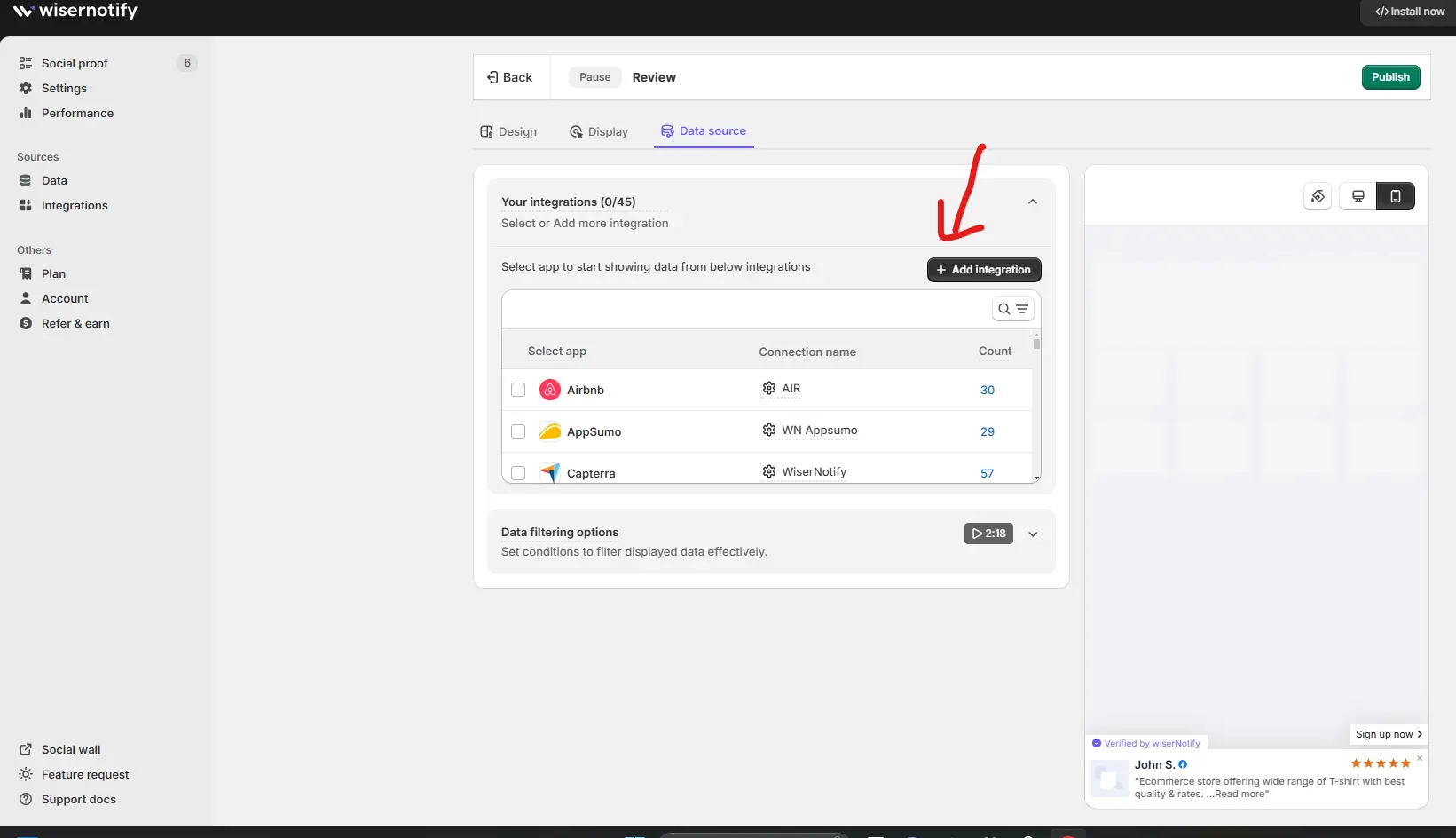
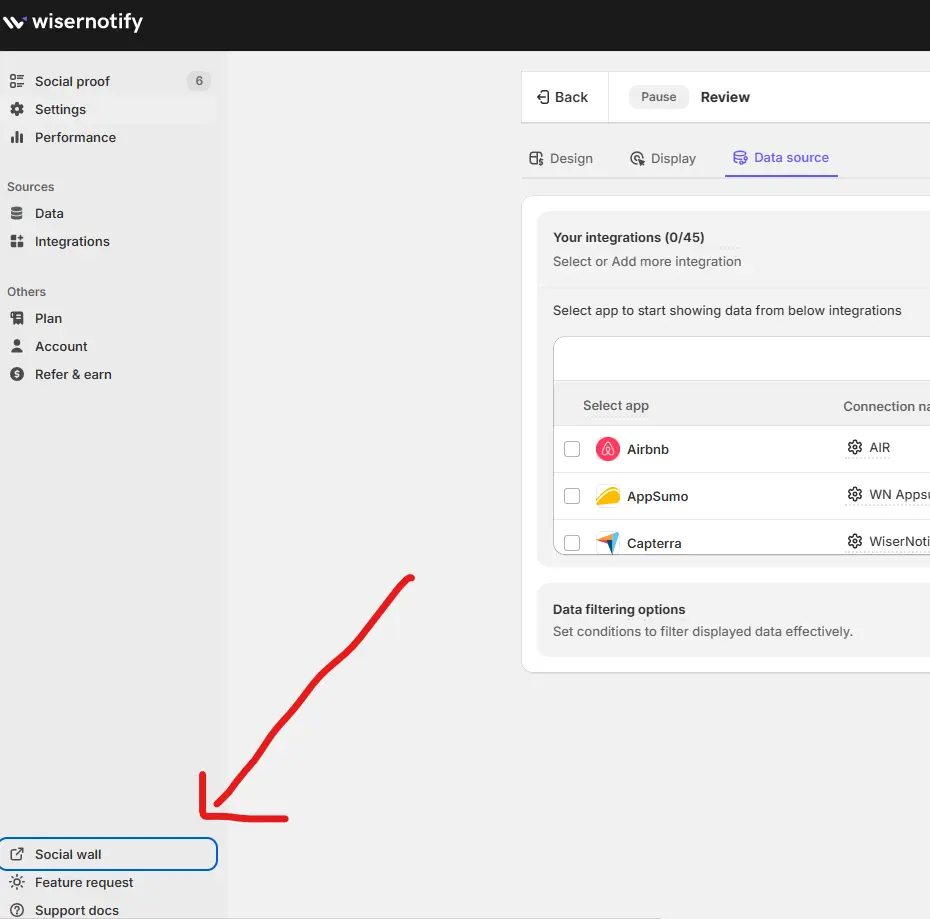
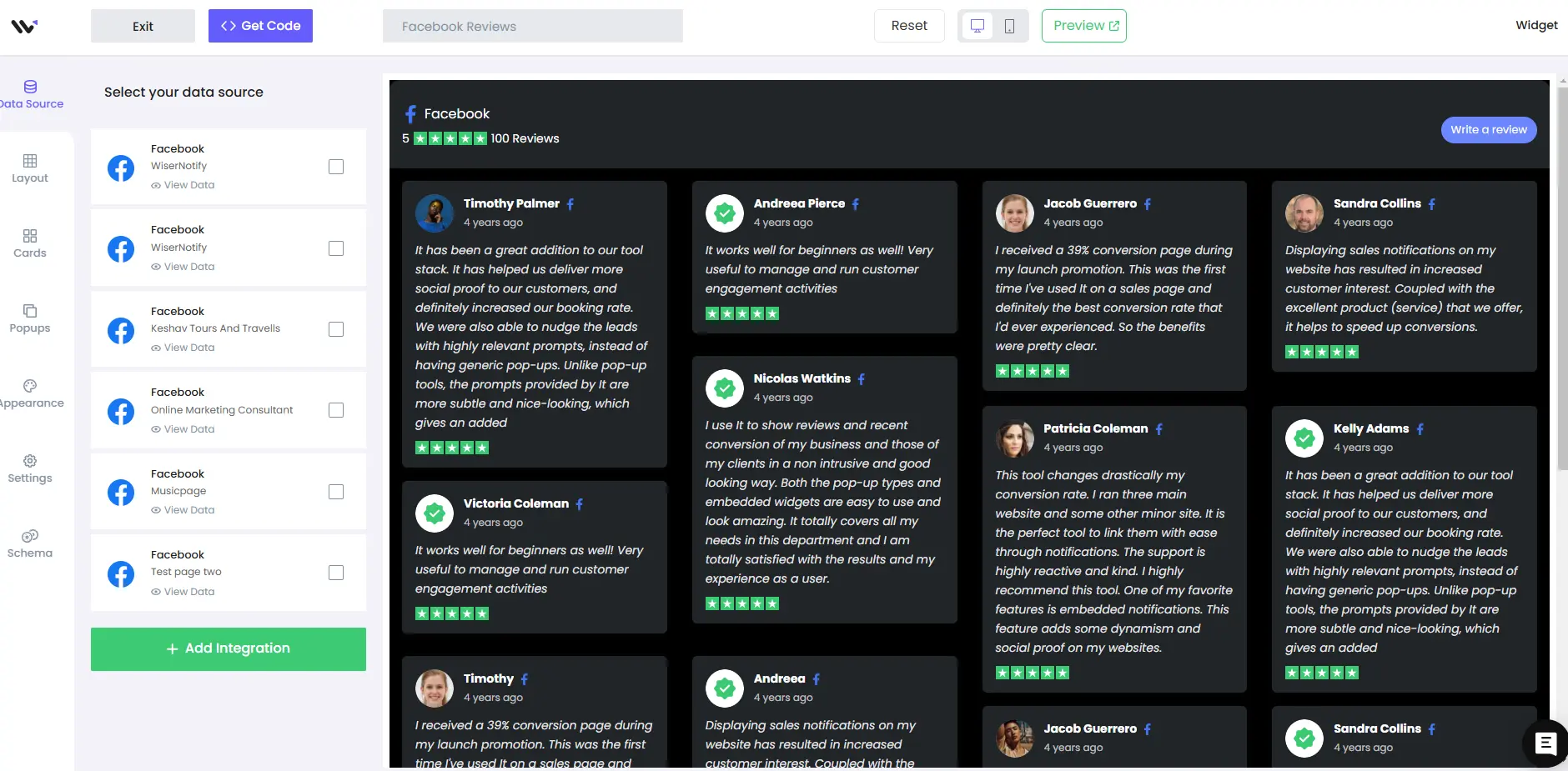
Let’s dive into the essentials of adding Facebook reviews to your website or platform.With WiserNotify, this process is straightforward and user-friendly. Here’s a step-by-step guide to help you seamlessly display Facebook reviews on your platform. Step 1: Log Into Your WiserNotify Dashboard Ensure you’ve installed the social proof pixels. You’ll find an “Add Notification” button on the dashboard. Clicking this will allow you to select “Customer Review.” From there, you can add notifications by entering your website name. Step 2: Customize Your Notifications Navigate to the customization dashboard and select “Data Source” to add Facebook reviews. WiserNotify efficiently pulls data directly from Facebook, ensuring your reviews are up-to-date and authentic. Step 3: Watch the Customization Tutorial For detailed customization to align with your brand style, watch our full tutorial video here: Expanding Your Options: Facebook Social Wall In addition to individual reviews, WiserNotify offers a “Social Wall” feature, which you can access from the dashboard. This feature provides two options: a Social Wall and a Review Wall, allowing you to tailor the content to meet your specific needs. Visual Guide Here’s what your Facebook Review Wall and Feed Wall could look like once set up. Facebook review wall: Facebook social feed wall: Remember, the integration of Facebook reviews is just the beginning. WiserNotify offers a range of social proof and FOMO notifications to build your website’s trust and credibility. Explore these options to find the perfect match for your online presence.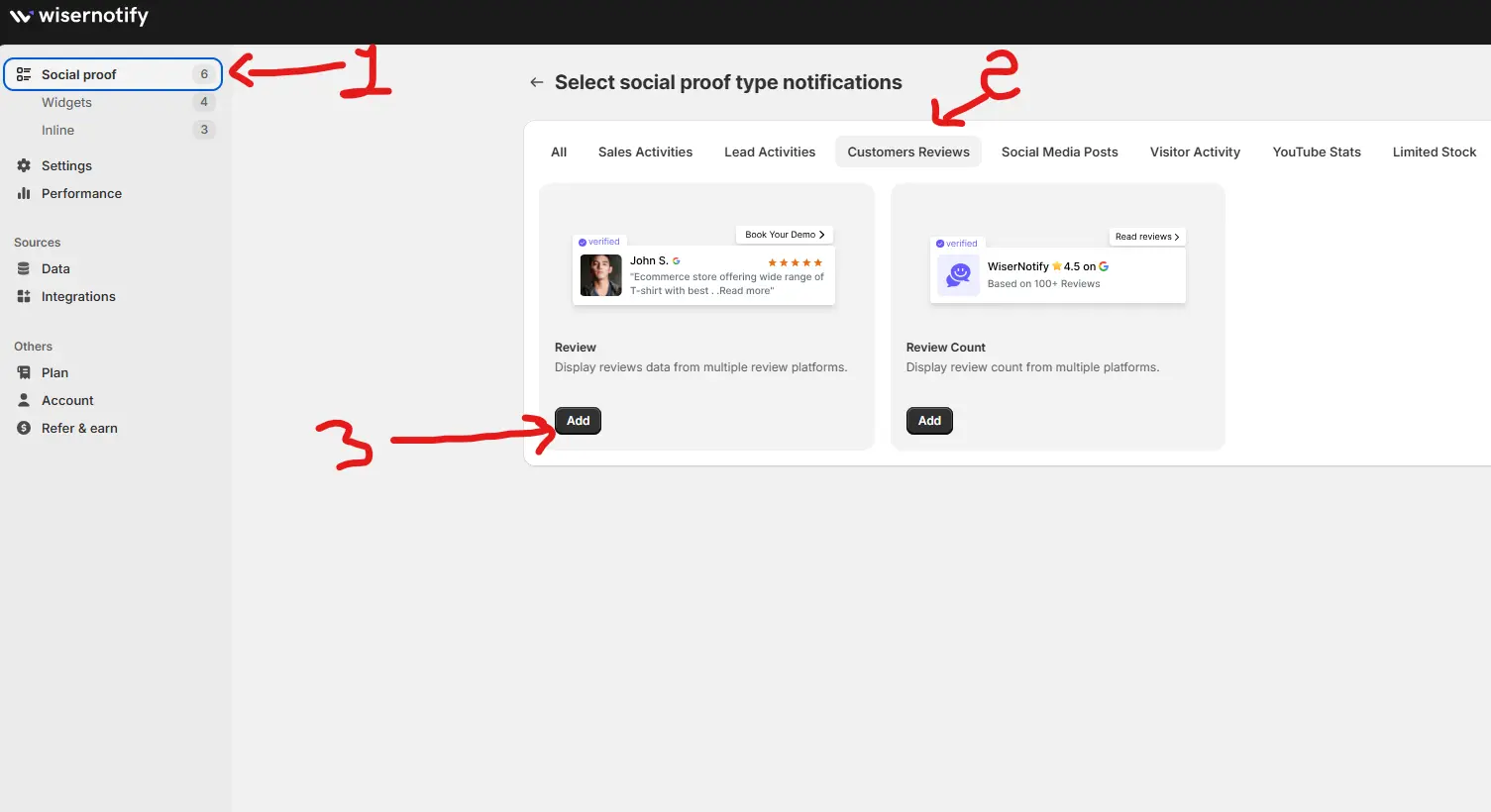
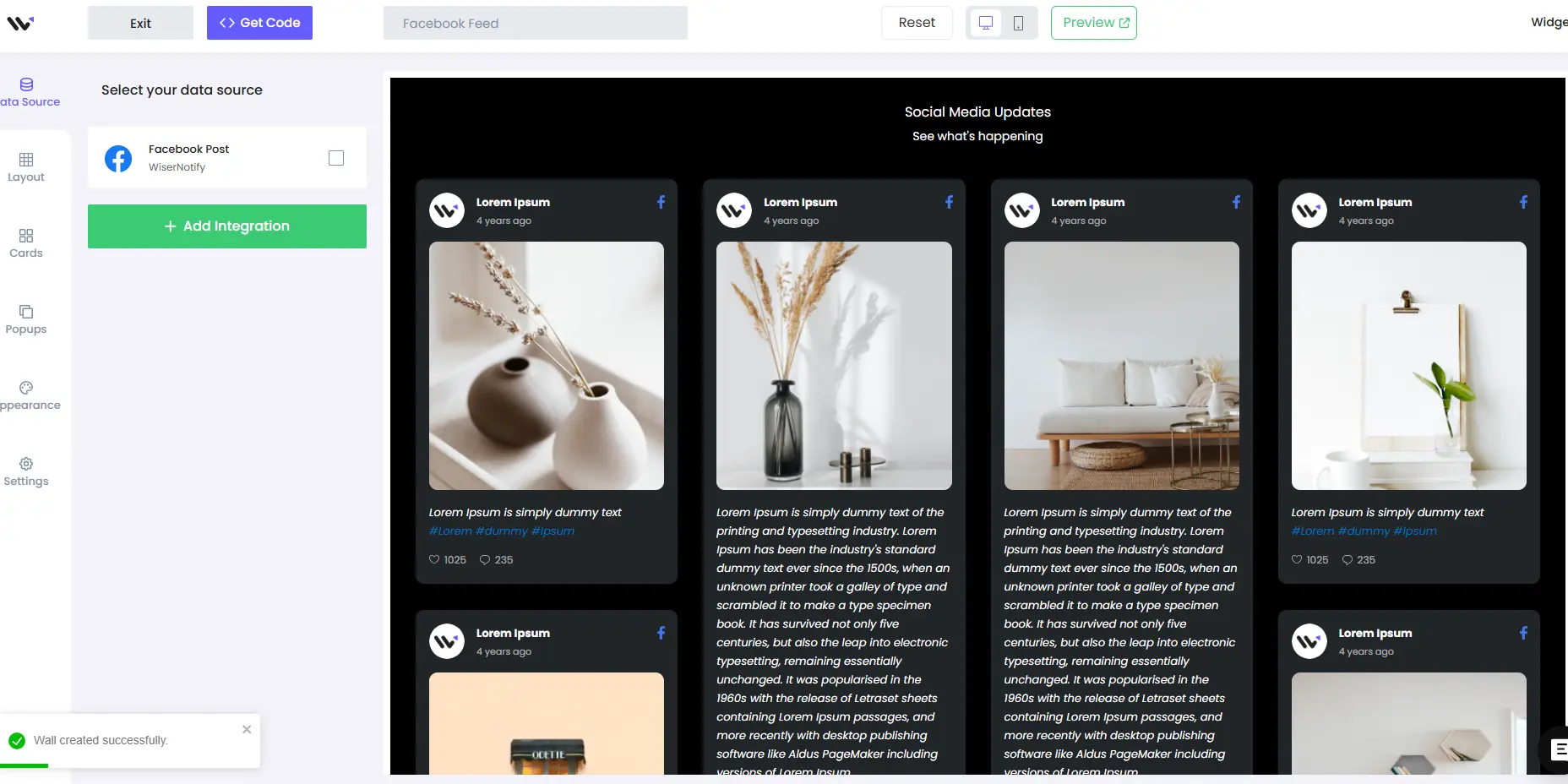
How to Embed Facebook Reviews on Flatsome
Follow these steps to seamlessly embed Facebook reviews into your Flatsome-powered WooCommerce store:
1. Generate a Facebook Reviews Widget
- Use Wisernotify to create a Facebook reviews widget.
- Customize the widget’s design to align with your Flatsome store’s branding.
2. Copy the Embed Code
- Once your widget is ready, Wisernotify will provide you with an embed code.
3. Log into Your WordPress Dashboard
- Access your WordPress admin panel.
4. Edit the Desired Page with UX Builder
- Navigate to the page or product where you want to display the reviews.
- Click Edit with UX Builder to open the Flatsome page editor.
5. Add a Code Element
- In UX Builder, drag and drop a Code Element into the section where you’d like the reviews to appear (e.g., homepage, product page, footer).
6. Paste the Embed Code
- Paste the Wisernotify embed code into the Code Element field.
7. Preview Your Changes
- Use Flatsome’s preview functionality to ensure the reviews display correctly and align with your page design.
8. Publish the Page
- Save and publish the page to make the reviews live.
9. Test for Mobile Responsiveness
- Verify the widget is fully responsive and looks great on all devices.
Best Practices for Showcasing Facebook Reviews on Flatsome
Strategic Placement
Add reviews to key sections such as:
- Homepage: To create a great first impression.
- Product Pages: To reassure visitors about specific products.
- Checkout Pages: To reduce cart abandonment.
- Footer: For site-wide visibility.
Highlight Key Testimonials
- Feature reviews that address common buyer hesitations or emphasize product benefits like quality, fast shipping, or excellent customer service.
Match Your Store’s Branding
- Customize the widget to align with Flatsome’s modern design and color scheme.
Use Dynamic Formats
- Opt for sliders or carousels to display multiple reviews without overcrowding the page.
Regular Updates
- Ensure the widget dynamically updates to showcase the latest reviews, maintaining credibility and relevance.
Common Mistakes to Avoid When Adding Facebook Reviews to Flatsome
Overcrowding Pages with Reviews
- Avoid displaying too many testimonials at once. Highlight 3-5 impactful reviews instead.
Ignoring Mobile Optimization
- Many Flatsome visitors use mobile devices. Ensure the reviews look great on smaller screens.
Using Generic Feedback
- Choose detailed reviews that highlight specific product features or service experiences.
Neglecting Page Speed
- Use lightweight embed codes to avoid slowing down your Flatsome store.
Failing to Test
- Always test the reviews on multiple devices and browsers to ensure seamless functionality.
Wrap-Up
Embedding Facebook reviews into your Flatsome store is a powerful way to build trust, increase engagement, and boost conversions.
By leveraging tools like Wisernotify, you can easily integrate dynamic, visually appealing review widgets that align perfectly with your store’s design.
Ready to elevate your Flatsome site with the power of social proof? Start embedding Facebook reviews today and watch your sales grow!


